A remote access tool lets someone see and control a computer from somewhere else, over the internet.
This guide is for anyone who gets IT help from a distance, or pays an IT supplier to look after their computers. You do not need to be technical to be affected: if a helper has ever taken over your screen, you have used one of these tools.
In short
- Remote access tools let an IT helper fix your computer without visiting. They are normal and useful.
- The same tools can give a criminal full control, so attackers like to use them too.
- Only allow a session that you started, with a helper you contacted yourself.
- Businesses should pick one approved tool, protect its sign-in and block the rest.
What you will learn
- Explain what a remote access tool does.
- Spot a remote session request you should refuse.
- Check which remote tools your business allows.
- Ask your IT supplier how it protects its own access.
- Screen takeover tool (remote access tool)
- software that lets someone see and use your computer from another place.
- IT supplier's control panel (RMM)
- a tool IT firms use to watch and fix many computers at once.
- Help session (remote session)
- one visit, over the internet, where a helper uses your screen.
What is a remote access tool?
Think of a toy car with a remote control. Whoever holds the remote steers the car from across the room. A remote access tool gives someone a remote control for your computer.
The helper sees your screen on their own computer. They can move your mouse, type and open programs, as if they were sitting in your chair.
There are two common kinds. Some tools are for one-off help: you start a session and the helper joins. Others stay installed and are used by IT firms, called remote monitoring and management tools, or RMM. These let an IT team watch, update and fix many computers from one place.[1]
Where the comparison stops working: you can see who holds a toy's remote. With a computer, the helper is out of sight, and an installed tool can sometimes connect when you are not watching.
Why does it matter?
A remote tool hands over a lot of control. That makes it useful for help, and attractive to criminals.
If you get help at home
What could happen: a caller who says they are from "tech support" asks you to install a tool and then takes control.
Check this: only allow a session if you contacted the helper first.
If you run a small business
What could happen: a criminal who breaks into your IT supplier's remote tool can reach every computer it looks after.
Check this: ask your supplier which tool it uses and how its sign-in is protected.
If you are new to IT work
What could happen: a staff member installs an unapproved remote tool, and nobody notices it is there.
Check this: keep a list of the remote tools your team has approved.
What does it look like?
Example only. All values are made up.
Email from: IT Help Desk <[email protected]>    (1)
Subject: URGENT - your account will be closed   (2)
  Download our support tool to fix it now:
  support-tool-FAKE.example.invalid               (3)
  Then read us code 0000-EXAMPLE                  (4)
  Or call us on 0000 000 000                      (5)
- An email you did not expect, from a "help desk" address you do not know.
- Urgency is used to rush you.
- A link to download a remote tool. In a real message, this line would contain a web address made to look official.
- Reading out a code lets the stranger join your screen.
- A phone number in the message, not one you looked up yourself.
Why this is risky: criminals have sent help desk emails like this. Victims who followed them downloaded remote tools and let strangers onto their computers.[1]
The safer way: do not use the link or number. Contact your IT team using details you already have, and let them start the session.
How does it work?
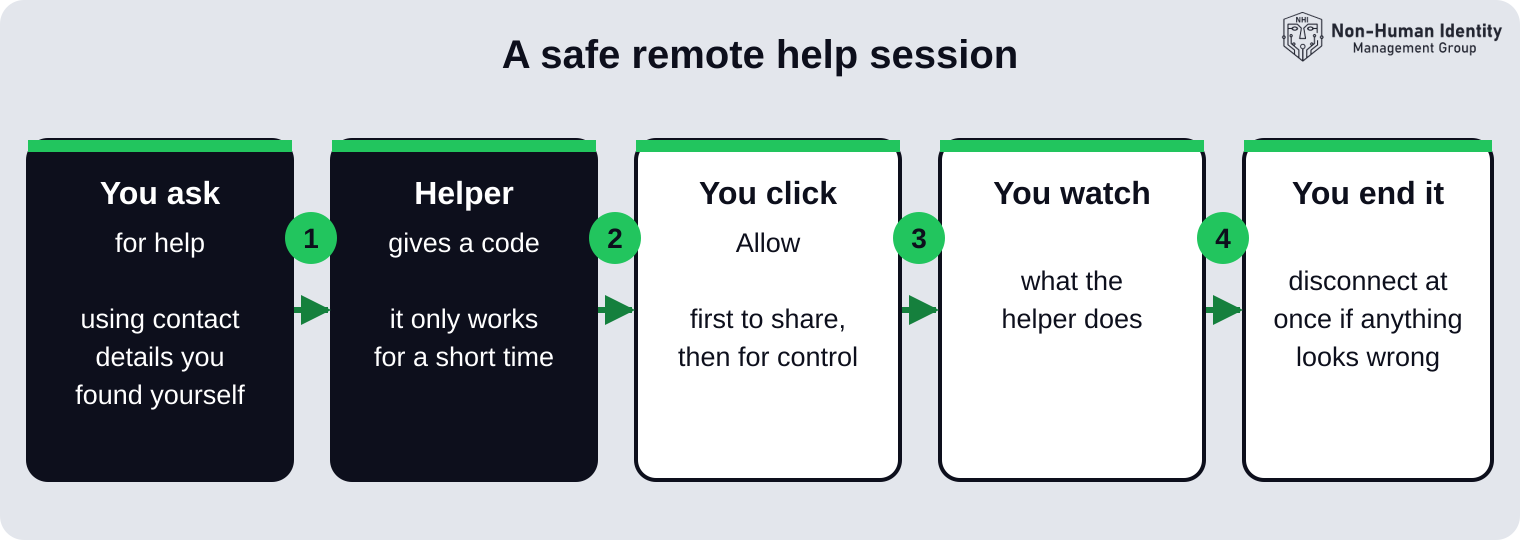
A safe help session usually goes like this.
- You ask for help. You contact your IT team or a company's support line, using details you found yourself.
- The helper gives you a code. Many tools use a short code that only works for a limited time.[2]
- You allow the connection. In the help tool built into Windows, for example, you must click Allow to share your screen, and again before the helper can take control.[2]
- You watch. Stay at the computer and watch what the helper does.
- You end the session. Close the tool when the job is done. If anything looks wrong, disconnect straight away.[2]
Criminals like these tools because they are normal software. US government agencies warn that using them usually does not set off antivirus alerts. Some versions run without being installed, so they can work even where installing software is blocked.[1]
Microsoft says it does not make unexpected calls or send unexpected emails asking to get into your device.[2] Real security warnings do not ask you to call a phone number either.[3]
A worked example
This story is made up to show how it can happen.
Jess Whitfield is the practice manager at Riverside Veterinary Group. The practice has twelve computers. An outside IT firm looks after them using a remote tool.
One Monday, a receptionist shows Jess an email. It says it is from the "IT Help Desk". It asks her to download a support tool and read out a code, or her account will be closed.
Jess does not recognise the sender. The practice only ever gets help from its IT firm, and staff contact the firm, not the other way round. She tells the receptionist not to click anything.
Jess calls the IT firm on the number in their contract. They confirm they sent no email. They block the sender and warn the other staff.
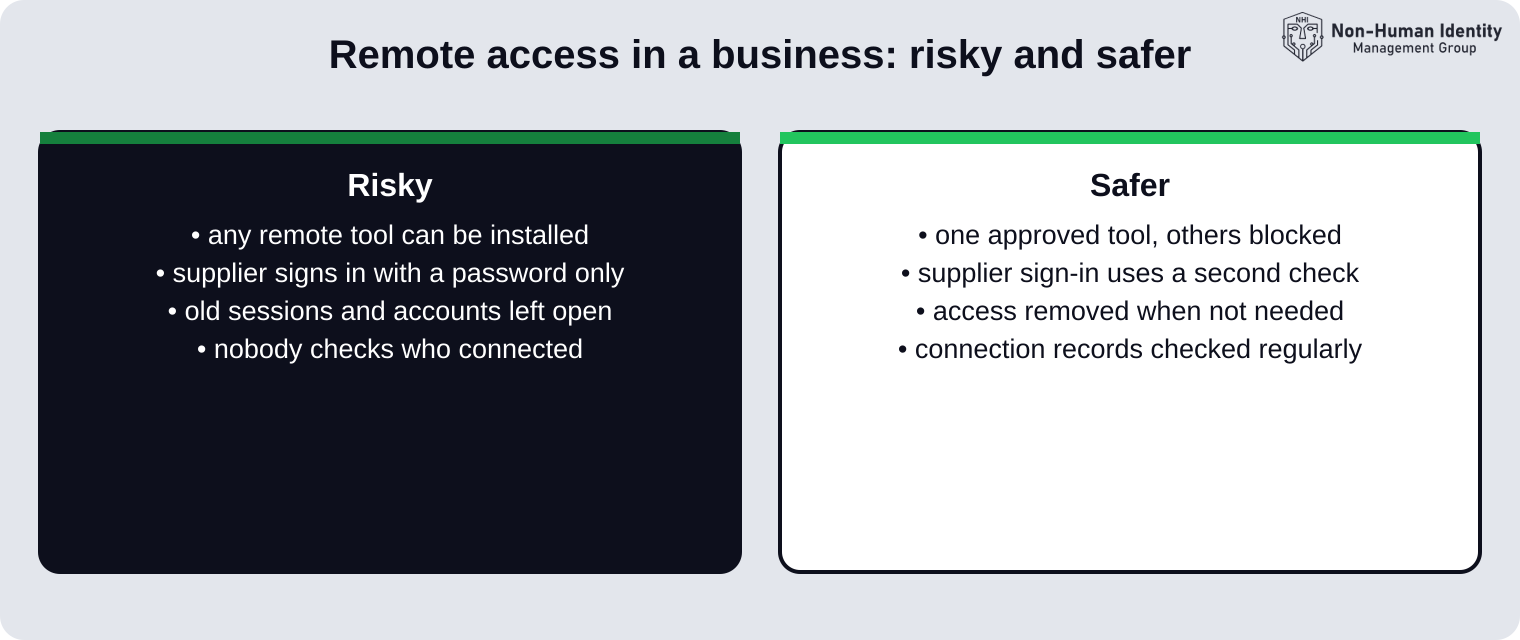
The call makes Jess think about the practice's own setup. She asks the IT firm three questions. Which remote tool do you use? Is your sign-in protected by a second check? Can other remote tools be blocked on our computers?
The firm says it uses one tool, and that its staff sign in with a code from an app as well as a password. It agrees to block other remote tools and to send Jess a monthly list of sessions.
What made the difference: Jess treated an unexpected request for screen access as a warning, and checked using a number she already had.
Myths and mistakes
| What people think | What is true |
|---|---|
| Remote access tools are a kind of virus. | They are normal tools that IT teams use every day. The risk is who controls them.[1] |
| My antivirus will warn me if a stranger connects. | Often it will not, because the tool itself is not harmful software.[1] |
| If the caller knows my name, they must be real. | Criminals often know personal details. Hang up and call back on a number you looked up yourself. |
| Once I let a helper in, I cannot stop them. | You can close the tool or disconnect at any time. Do it straight away if something looks wrong.[2] |
| Our IT supplier's tool is their problem, not ours. | Their tool reaches your computers. Ask how they protect it, and who can use it. |
What can I do this week?
- Write down how to contact your real IT helper, so you never need a number from an email.
- Check your computer's list of apps for remote tools you do not use, and remove them.
- Ask your IT supplier which remote tool it uses and how its sign-in is protected.
- Tell your team: only allow a session you asked for.
Checklist
- I only allow remote sessions that I started.
- I know the real contact details for my IT help.
- I stay at the computer and watch during a session.
- I end each session when the job is done.
- There are no unused remote tools on my computer.
- My business has one approved remote tool, and others are blocked where possible.
- My IT supplier's sign-in uses a second check, not just a password.
Common questions
Is it safe to let someone control my computer remotely?
It can be, if you started the contact. Allow a session only with a helper you reached using details you found yourself, such as your IT team. Watch what they do, and end the session when the job is done.[2]
What is an RMM tool?
RMM stands for remote monitoring and management. It is software that IT teams and IT suppliers use to watch, update and fix many computers from one place. It is useful, but whoever controls it can reach every computer it manages.[1]
Why do attackers use remote access tools?
Because they are normal software. US agencies warn that they usually do not trigger antivirus alerts, and some run without being installed. That lets a criminal control a computer without writing harmful software of their own.[1]
What should I do if I let a stranger onto my computer?
Disconnect at once, or switch off the internet. Then use another device to change your important passwords, starting with email and banking. Call your bank if you shared money details. Ask a trusted IT helper to check the computer for tools left behind.
Where next?
Ready for the detail? Read the practitioner guide: RMM Tool Security Guide. It goes further into choosing and locking down approved tools, blocking the ones you have not approved, and spotting remote access that should not be there.
Also useful:
- Remote Access Scams for Beginners
- Remote Desktop (RDP) Security Guide
- Social Engineering for Beginners
- Multi-Factor Authentication for Beginners
Related NHI Mgmt Group resources: Exposed RDP Compromise · MFA for Windows Logon and RDP Guide · Phishing for Beginners
Key terms
- Remote access
- Using a computer or system from another place, over a network such as the internet.
- Remote monitoring and management
- Software IT teams use to watch, update and fix many computers from one place.
- Screen sharing
- Letting someone else see what is on your screen, sometimes with control of the mouse and keyboard.
- Remote Desktop Protocol
- A Microsoft method for using a Windows computer from another device over a network.
- Tech support scam
- A scam where someone pretends to fix a computer problem to get money or control of your device.
- Multi-factor authentication
- Asking for two or more kinds of proof, such as a password and a code, before letting someone in.
Sources and further reading
- Protecting Against Malicious Use of Remote Monitoring and Management Software (AA23-025A). Cybersecurity and Infrastructure Security Agency (CISA), National Security Agency (NSA) and MS-ISAC, 25 January 2023. https://www.cisa.gov/news-events/cybersecurity-advisories/aa23-025a, accessed 28 Nov 2026.
- Use Quick Assist to help users. Microsoft Learn. https://learn.microsoft.com/en-us/windows/client-management/client-tools/quick-assist, accessed 28 Nov 2026.
- How To Spot, Avoid, and Report Tech Support Scams. US Federal Trade Commission (FTC), Consumer Advice. https://consumer.ftc.gov/articles/how-spot-avoid-and-report-tech-support-scams, accessed 28 Nov 2026.