Moving a website means copying it to a new host or a new web address, then switching visitors over.
This guide is for small business owners, charity volunteers and students who are moving a site, or paying someone to. You do not need to be technical to be affected: a rushed move can lose data, break email or leave old copies open to strangers.
In short
- Take a full backup first, and check that you can restore it.
- Plan the switch: the address book of the internet (DNS) can take time to update everywhere.
- Point old web addresses to the new ones, and keep those signposts for at least a year.
- After the move, close the old account, delete old copies and remove old address records.
What you will learn
- Explain the main steps of a website move in plain words.
- Spot the security gaps a move can leave behind.
- Check that the old site, logins and records are closed down.
- Ask your web supplier the right questions before the switch.
- Web landlord (host)
- the company whose computers store your website and show it to visitors.
- Internet address book (DNS)
- the system that turns your web address into the location of your host.
- Signpost to a new page (redirect)
- a rule that sends visitors from an old web address to a new one.
What is moving a website safely?
Think of moving house. You pack carefully, tell the post office your new address and hand back the old keys. If you forget, post goes missing or a stranger could walk into your old home.
A website move works the same way. You might change your host (the company that stores the site). You might change your web address, called a domain. Sometimes you change both.
The internet finds your site using DNS, which works like an address book. During a move, you update the address book so visitors reach the new home. Moving safely means nothing is lost, nothing is left open, and nobody can step into the gap.
Where the comparison stops working: an empty house is clearly empty. An old website copy can keep running quietly, with old logins and customer data, long after you think it has gone.
Why does it matter?
A move is a busy time, and gaps are easy to miss. The common results are lost data, broken email, missing search traffic and forgotten copies that still hold personal details.
If you own a small business
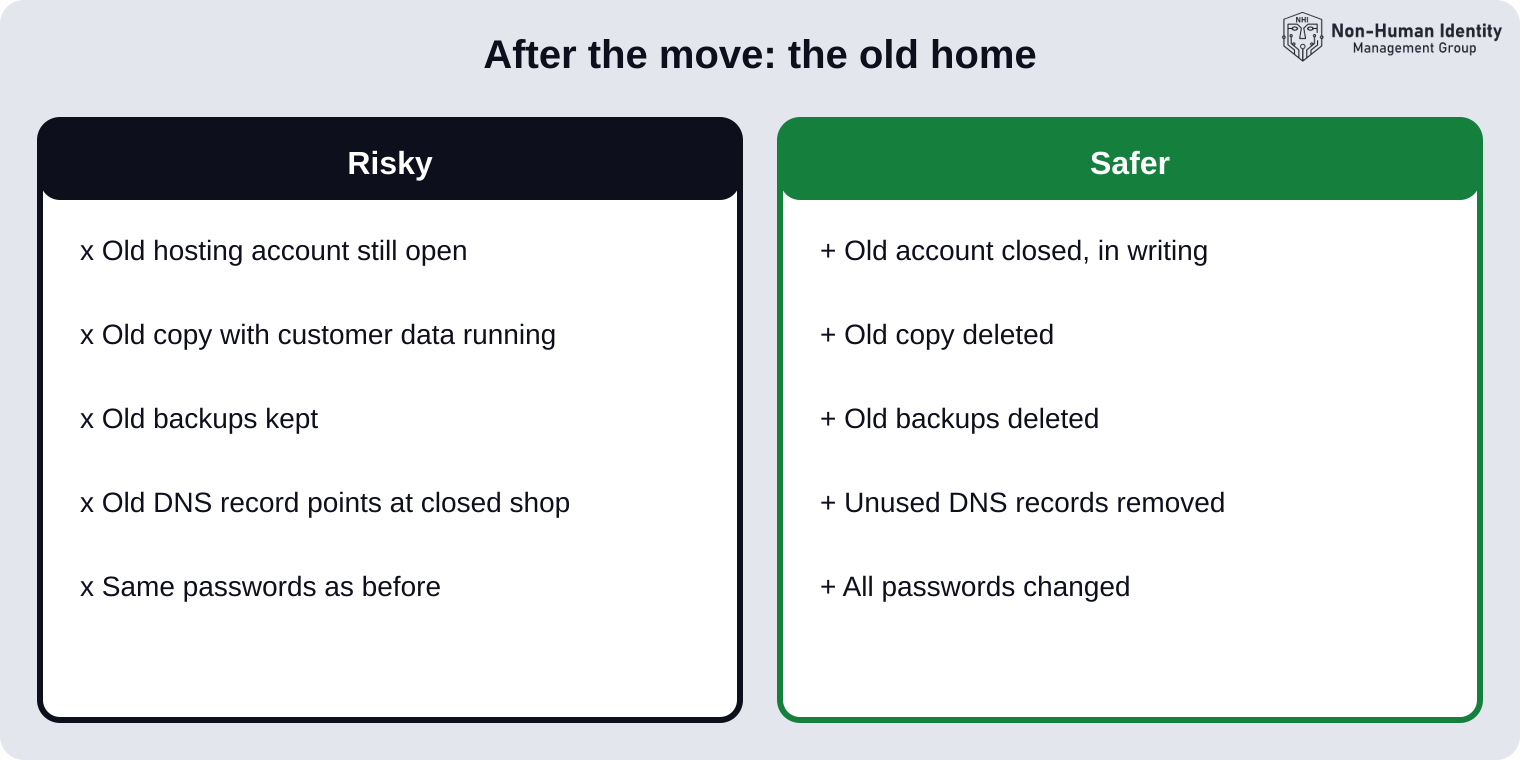
What could happen: the old host still holds a copy of your customer list after you stop paying attention to it.
Check this: ask for written proof that the old copy and its backups are deleted.
If you look after the website
What could happen: an old address record still points at a service you closed, and a stranger claims it.
Check this: list every DNS record before the move, and remove the ones you no longer need afterwards.
If you are a student or new web builder
What could happen: you copy the site with its passwords and keys, then leave them in a shared folder.
Check this: move secrets through a safe channel and change them once the move is done.
What does it look like?
Here is a made-up move plan for a small design studio. Each marked line is a common gap.
Example only. All values are made up.
Move plan: Fern Studio, fern-studio.example to new host
[x] Copy site files and database to new host
[ ] Full backup stored away from both hosts           (1)
[x] Switch DNS on Friday 17:00                        (2)
[ ] Copy email (MX) records to the new DNS            (3)
[ ] Redirect old page addresses to new ones           (4)
[ ] Change admin passwords and database password      (5)
[ ] Delete old hosting account and its backups        (6)
[ ] Remove DNS record "shop" (old shop closed)        (7)
- No safe backup. If the copy fails, there is nothing to go back to.
- A Friday evening switch leaves no one around if something breaks.
- Email records not copied. Email to the business can stop arriving.
- No redirects. Old links and search results lead to error pages.
- Passwords seen by the old host and helpers still work until they are changed.
- The old account still holds a full copy of the site and its data.
- An old record pointing at a closed service can be claimed by someone else.
Why this is risky: each unticked line is a gap. Some lose data or email. Others leave a door open at the old address.
The safer way: back up first and test the restore. Switch early in the week. Copy every record and add redirects. Then close down the old home properly.
How does it work?
Most website moves follow the same five stages.
- Back up. Copy all the data you need, including the site, its database and email, and store it away from both hosts. Check that you can restore it.[1]
- Copy and test. Set up the site on the new host and test it before visitors arrive. Get a security certificate for the new home, so the padlock shows. The certificate company checks that you control the domain first.[2]
- Switch. Update DNS to point at the new host. Each DNS record has a TTL (time to live), which tells other systems how long to keep their old copy. Changes can take time to reach everyone.[3]
- Signpost. If page addresses or the domain change, set up permanent redirects from each old address to its new one. Google suggests keeping them for at least a year.[4]
- Close down. Change passwords, delete the old copy and its backups, close the old account and remove DNS records you no longer need.
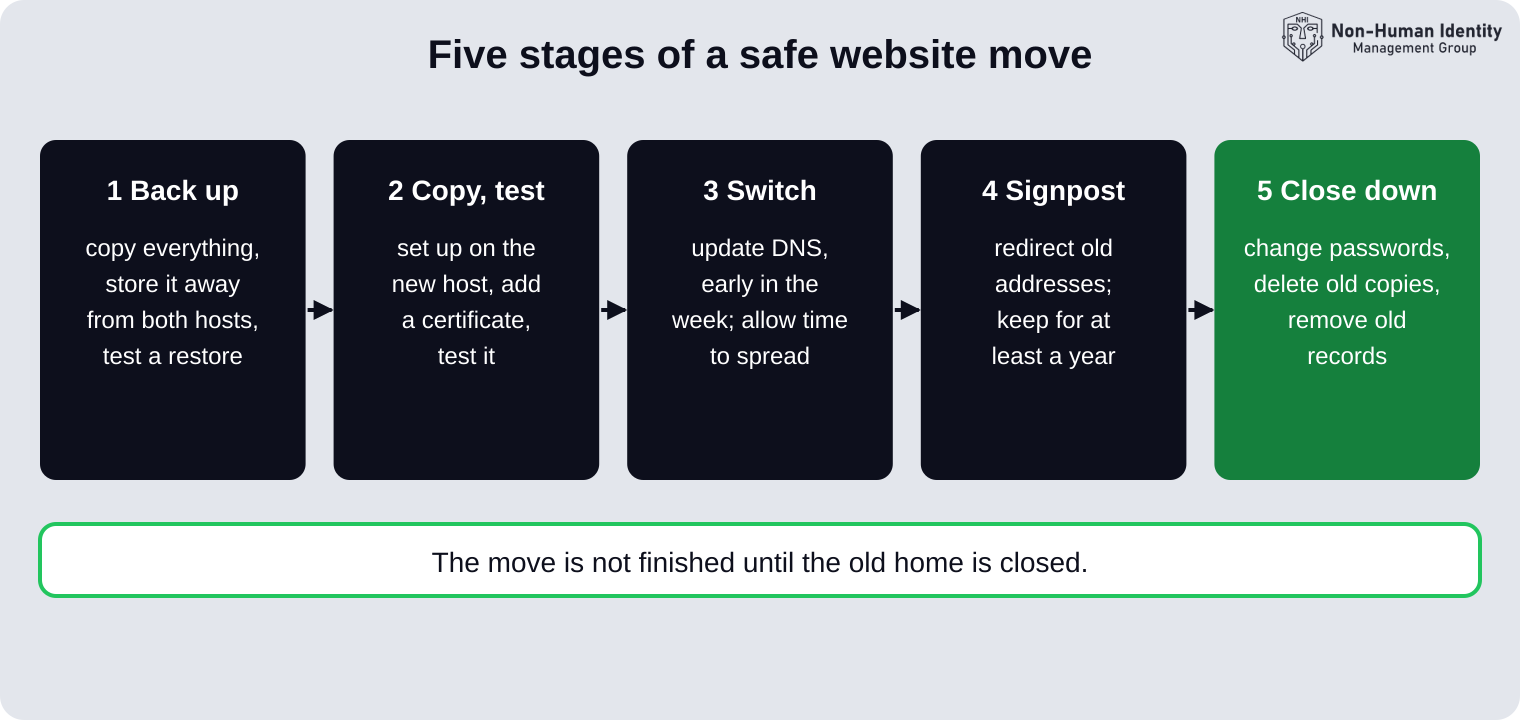
The last stage matters most for security. A forgotten DNS record that points at a deleted service is called dangling DNS. Someone else may be able to claim that service's name and show their own content on your address. Microsoft's advice is to remove the DNS record as part of shutting down the service.[5]
Old copies also matter. Under UK data protection rules, you should not keep personal data longer than you need it. Deleting data should also cover backups, so it is put beyond use.[6]
A worked example
Zola Lindahl runs Fern Studio, a fictional design studio with a small website and an online shop. She is moving to a cheaper host. Her freelance web builder, Lina Kowal, will do the work.
Zola thinks about her last house move. She remembers the post that went to the old flat for months. She asks Lina for a written plan before anything starts.
Lina starts with a full backup of the site, the shop database and the mailboxes. She stores it on a separate drive and tests a restore. Then she builds the site on the new host and checks every page.
Two days before the switch, Lina lowers the TTL on the main DNS records, so the change spreads faster. She copies all the records, including the email ones. She switches on a Tuesday morning, so both of them are around if something goes wrong.
The page addresses have changed, so Lina adds redirects from the old ones. Zola notes in her diary to keep them for at least a year.
Next, Lina changes the admin and database passwords. The old host's staff and an earlier helper had seen them.
Last, she checks the DNS list. A "shop" record still points at an old shop service Zola closed in the spring. Lina removes it. Zola asks the old host to delete her account and backups, and keeps their written reply.
Myths and mistakes
| What people think | What is true |
|---|---|
| The move is done once the new site works. | It is done once the old copy, old account and old records are closed down too. |
| DNS changes show up for everyone straight away. | Other systems keep old copies for a while, set by the TTL. Plan for a delay.[3] |
| Redirects can be removed after a few weeks. | Google suggests keeping them for at least a year, and longer if you can.[4] |
| An old DNS record does no harm. | A record pointing at a closed service can let someone else show content on your address.[5] |
| The old host will delete everything anyway. | Do not assume it. Ask for deletion of the account and backups, and keep the reply. |
What can I do this week?
- Write down who controls your domain, your DNS and your hosting account.
- Take a full backup and test that you can restore it.
- Export a list of all your DNS records, including email records.
- Pick a switch time early in the week when help is available.
- Plan which passwords you will change once the move is finished.
Checklist
- A full backup is stored away from both hosts, and a restore has been tested.
- The new site is tested and has a valid security certificate before the switch.
- Every DNS record, including email records, has been copied.
- The switch happens at a time when someone can fix problems.
- Old page addresses redirect to the new ones, and will stay for at least a year.
- Admin, database and other passwords are changed after the move.
- The old hosting account, old copy and old backups are deleted, with written proof.
- Unused DNS records are removed.
- The domain stays registered and set to renew, even if you stop using it.
Common questions
How long does it take for DNS changes to work?
Anything from minutes to a day or more, set by the TTL on each record. Other systems keep their old copy until that time runs out. Lowering the TTL a day or two before the move can help the change spread faster.
Will moving my website hurt my search ranking?
It can cause a dip for a while. Google says your visibility may change during a move. Using permanent redirects from each old page to its new page, and keeping them for at least a year, helps search engines follow the change.
Should I keep my old domain after moving to a new one?
Yes, we suggest keeping it registered. Old links, emails and search results still point to it, and your redirects live there. If it lapses, someone else could register it and use your old address.
Do I need to change passwords after a move?
Yes, it is a good idea. During a move, passwords are often shared with helpers and the old host. Changing admin, database and hosting passwords afterwards means anyone who saw the old ones loses access.
What happens to my data on the old host?
It may stay there unless you ask for it to be deleted. Ask the old host to close your account and delete the site and its backups. Keep their written reply, as personal data should not be kept longer than needed.
Where next?
Ready for the detail? Read the practitioner guide: Small Business Domain and Website Ownership Guide. It goes further into who should own the domain, DNS and hosting accounts, and how to keep control when suppliers change.
Also useful:
- Domain Names and Registrars for Beginners
- Web Hosting Security for Beginners
- Subdomain Takeover and Dangling DNS Guide
- TLS and HTTPS for Beginners
- The 3-2-1 Backup Rule for Beginners
Related NHI Mgmt Group resources: DNS Security for Beginners · Data Retention and Secure Deletion for Beginners · Small Business Website Security Guide
Key terms
- Domain name
- The web address people type to reach your site.
- DNS
- The internet's address book, which turns a domain name into the location of a server.
- TTL
- A setting that says how long other systems keep a copy of a DNS record before checking again.
- 301 redirect
- A permanent signpost that sends visitors and search engines from an old address to a new one.
- TLS certificate
- A digital document that lets a browser check a site's identity and show the padlock.
- Dangling DNS
- A DNS record that still points at a service that has been shut down.
- Subdomain takeover
- When someone else gains control of part of your web address through a dangling record.
Sources and further reading
- Backing up your data (small organisations guide to cyber security). National Cyber Security Centre (NCSC). https://www.ncsc.gov.uk/collection/small-organisations-guide-to-cyber-security/backing-up-your-data, accessed 28 Nov 2026.
- How it works. Let's Encrypt. https://letsencrypt.org/how-it-works/, accessed 28 Nov 2026.
- Time to Live (TTL). Cloudflare DNS docs, Cloudflare. https://developers.cloudflare.com/dns/manage-dns-records/reference/ttl/, accessed 28 Nov 2026.
- Site moves with URL changes. Google Search Central, Google. https://developers.google.com/search/docs/crawling-indexing/site-move-with-url-changes, accessed 28 Nov 2026.
- Prevent dangling DNS entries and avoid subdomain takeover. Microsoft Learn, Microsoft. https://learn.microsoft.com/en-us/azure/security/fundamentals/subdomain-takeover, accessed 28 Nov 2026.
- Principle (e): Storage limitation. Information Commissioner's Office (ICO). https://ico.org.uk/for-organisations/uk-gdpr-guidance-and-resources/data-protection-principles/a-guide-to-the-data-protection-principles/storage-limitation/, accessed 28 Nov 2026.