A vector database stores pieces of your text as number lists, so AI tools can find similar meanings fast.
This guide is for students, new developers and anyone whose team is adding an AI chat or search tool to its own files. You do not need to build one to be affected: if an AI tool answers questions from your documents, a vector database probably holds a copy of them.
In short
- A vector database finds text by meaning, not by exact words.
- It usually keeps the original text next to the numbers, so it is a second copy of your data.
- It needs the same locks as the files it came from: who can search, who can change, and where it can be reached.
- Keep each customer's or team's data apart, and remove data from the store when you remove it from the source.
What you will learn
- Explain what a vector database does in one sentence.
- Spot a stored record that could leak private text.
- Check who can search the store and whether it is open to the internet.
- Ask how data is kept apart and deleted.
- Meaning as numbers (embedding)
- a list of numbers an AI model makes from a piece of text, so similar meanings get similar numbers.
- Piece of a document (chunk)
- a short section of a file, such as a paragraph, stored on its own.
- Closest match search (similarity search)
- finding the stored pieces whose numbers sit nearest to the question's numbers.
What is a vector database?
Think of a supermarket. Ask for "something for a cold" and a helper walks you to the aisle with tissues, lozenges and honey. You did not need the product names, because similar things sit together.
A vector database works like that aisle. An AI model turns each piece of text into an embedding, a list of numbers that captures its meaning. The database stores these lists so that similar meanings sit close together.[1]
When you ask a question, it is turned into numbers too. The database then returns the stored pieces that sit nearest. This is called a similarity search.[1]
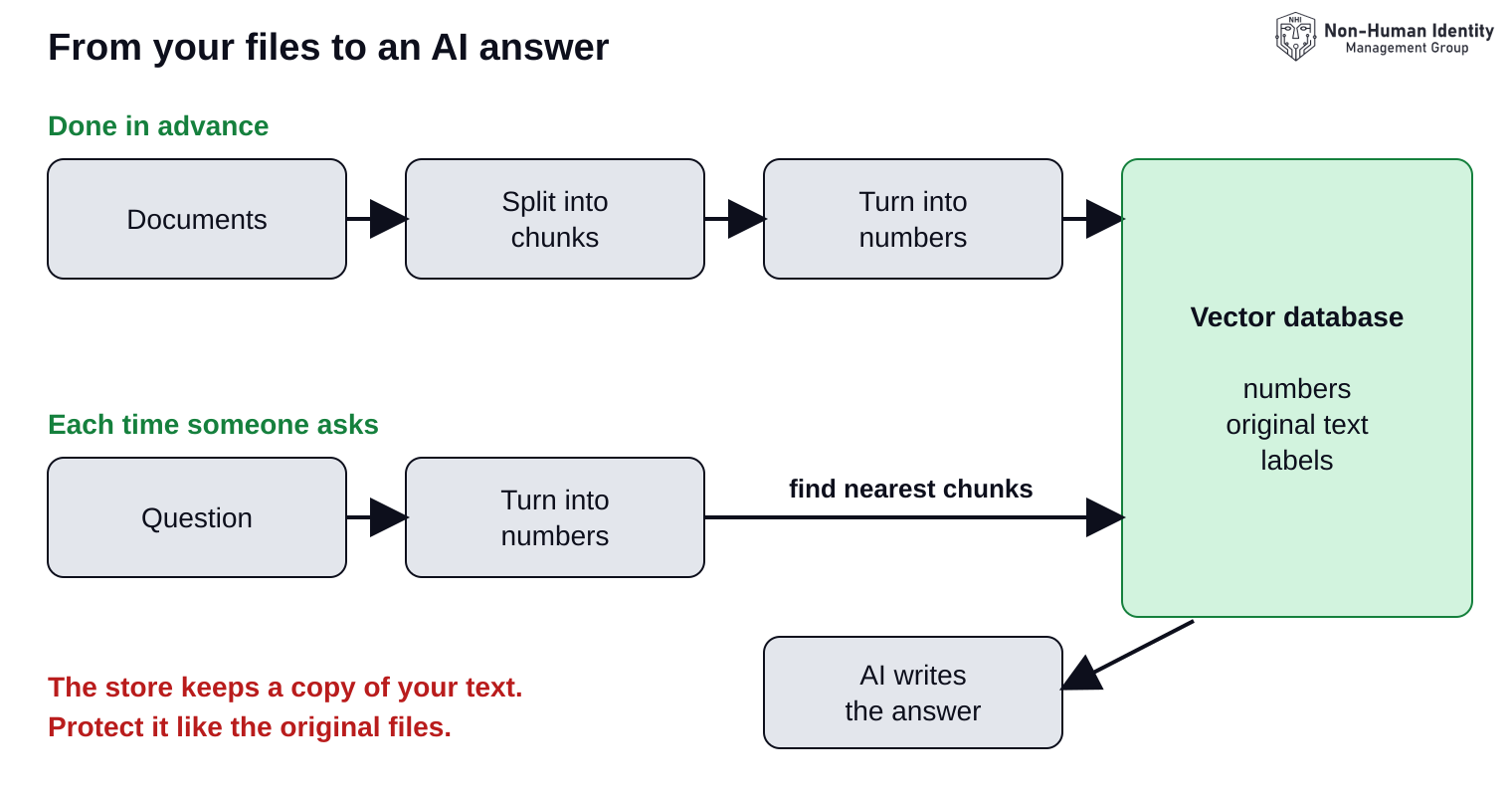
Most "chat with your documents" tools use this as their memory. The tool finds the closest pieces, then hands them to the AI to write an answer.
Where the comparison stops working: a supermarket shows every shopper the same shelves. A well-built vector database should show each person only the pieces they are allowed to see. That part does not happen by itself.
Why does it matter?
A vector database is a copy of your documents in another form. A well-known security group lists weak locks on these stores as one way AI tools leak data.[2]
If you are learning to build AI apps
What could happen: you start a test store on a rented server, and it answers anyone online.
Check this: turn on sign-in with a key before you load real data.
If your team is buying an AI search tool
What could happen: the tool searches every file, so a new starter's question pulls up private board papers.
Check this: ask the supplier if results follow each person's file rights.
If you run a service with many customers
What could happen: one customer's question brings back a passage from another customer's files.
Check this: keep each customer in a separate space inside the database.
What does it look like?
Here is one made-up record, as a vector database might store it.
Example only. All values are made up.
id:      chunk-0000-EXAMPLE
vector:  [0.12, -0.08, 0.33, ... 1,536 numbers]      (1)
text:    "FAKE: Staff review notes for Example Person,
          see attached warning letter..."             (2)
source:  hr/reviews/FAKE-review-0000.docx
access:  (none)                                       (3)
- The list of numbers. It looks meaningless, but research shows text can sometimes be partly rebuilt from it.
- In a real file, this line would contain the original private text, stored in plain words next to the numbers.
- No label says who may see this record, so any search could return it.
Why this is risky: the store holds the private text itself, not just numbers. With no access label, a question from anyone may bring it back. OWASP also warns that the numbers alone can sometimes be turned back into much of the original text.[2]
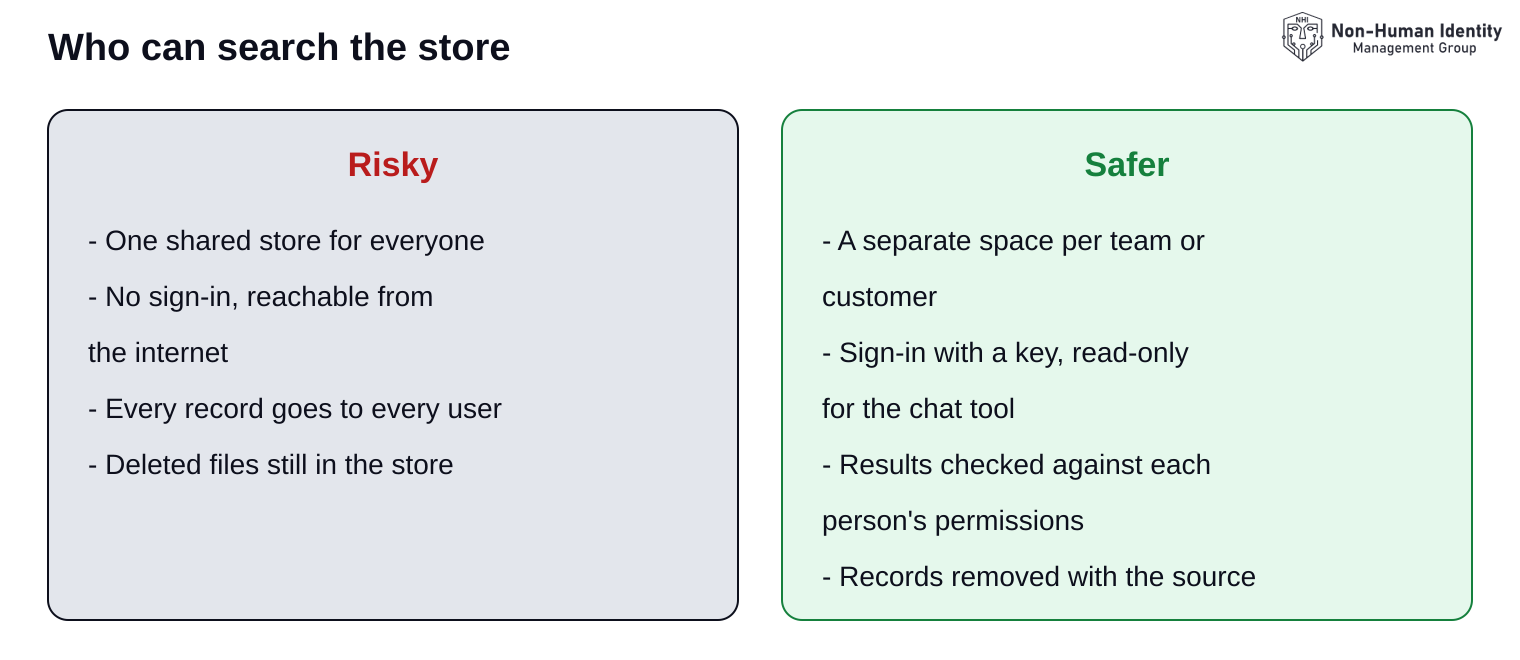
The safer way: only load files the tool really needs. Give every record a label for who may see it, and check that label on every search. Keep separate teams or customers in separate spaces.[2][4]
How does it work?
Here is the usual path that a file takes before it can help answer a question.
- Split. Documents are cut into short pieces, called chunks, so each one covers a single idea.
- Turn into numbers. An AI model reads each chunk and makes an embedding for it.
- Store. The numbers, the chunk text and labels such as the source file go into the vector database.
- Search. A question is turned into numbers, and the database returns the nearest chunks.[1]
- Answer. The AI tool reads those chunks and writes a reply in its own words.
Where can this go wrong? Some databases you run yourself accept requests from anyone who can reach them, until you turn sign-in on. One maker's guide says its self-hosted version works this way by default, and that connections are not encrypted unless you set that up.[3]
A worked example
Jonah Corrigan looks after IT at Marigold Printers, a fictional print shop with forty staff. A freelance developer, Xena Ulrich, is building a help chatbot that answers staff questions from the shared drive.
In testing, Jonah asks, "What is the holiday policy?" The answer is right, but it also quotes a line from a manager's private staff review. Jonah thinks of the supermarket helper who walks everyone down every aisle.
Xena checks the store. She loaded the whole shared drive, including the HR folder. No record has a label for who may see it.
They make three changes. First, Xena removes the HR folder from the store and loads only the staff handbook and IT guides. Second, each record now carries a label for the team that may see it. The chatbot checks the asker's team before it returns a chunk.
Third, Xena checks how the database is reached. It was running on a cloud server with an open port and no key. She turns on sign-in, gives the chatbot a read-only key and limits access to the chatbot's own server.
Jonah adds one rule for the future. When a file is deleted from the drive, it must be deleted from the store as well.
A week later, a new starter asks about review dates. The bot points to the handbook page and nothing more.
Myths and mistakes
| What people think | What is true |
|---|---|
| It only stores numbers, so it is not sensitive. | Most stores keep the original text too. And the numbers can sometimes be turned back into text.[2] |
| The AI tool follows our file permissions automatically. | Only if it was built to. Ask how each search is checked against the asker's rights. |
| A test database does not need a password. | Some self-hosted ones answer anyone who can reach them until sign-in is turned on.[3] |
| Deleting the file deletes it from the AI tool. | The copy in the store stays until someone removes it there too. |
| Anything in the store is trustworthy. | Planted or wrong text in the store can steer the AI's answers. Check what goes in.[2] |
What can I do this week?
- List the AI tools that answer questions from your files.
- Ask each supplier where the vector database runs and who can search it.
- Check that any database you run needs a key and is not open to the internet.
- Pick one private folder and confirm it is not in the store.
Checklist
- Only the files the tool needs are loaded into the store.
- Sign-in is on, and the chat tool uses a read-only key.
- The database cannot be reached from the open internet.
- Each record has a label for who may see it, checked on every search.
- Different customers or teams are kept in separate spaces.
- Deleted source files are removed from the store as well.
- Searches are logged so odd use can be spotted.
Common questions
Is a vector database the same as a normal database?
Not quite. A normal database finds rows by exact values, such as an order number. A vector database finds the stored items whose meaning is closest to a question. Many normal databases can now add this as an extra feature, so the line between them is blurring.
Can someone read my documents from the vector database?
Yes, often. Most stores keep the original text beside the numbers, so anyone who can query the store may read it. Even the numbers alone can sometimes be turned back into much of the text, according to OWASP.[2] Treat the store as sensitive as the files.
How do I delete data from a vector database?
Delete the records that came from that file, using their source label or ID. If each customer has their own space, removing that space can remove all their data in one step.[4] Make deletion part of the same process that deletes the original file.
Do I need a vector database to use AI with my files?
Not always. Small jobs can work by pasting a document into the chat. Tools that search many files usually use one behind the scenes. If you buy such a tool, ask where that store lives and who controls it.
Where next?
Ready for the detail? Read the practitioner guide: Vector Database Security Guide. It goes further into admin roles, service keys, logging and the most common setup mistakes.
Also useful:
- Embeddings for Beginners
- Retrieval-Augmented Generation for Beginners
- RAG Security Guide
- Data Classification for Beginners
Related NHI Mgmt Group resources: Vector and Embedding Weaknesses · Vector database buyer's guide · AI Memory for Beginners
Key terms
- Vector database
- A store built to hold embeddings and find similar ones quickly.
- Embedding
- A list of numbers that stands for the meaning of a piece of text.
- Chunking
- Cutting documents into short pieces before they are turned into embeddings.
- Similarity search
- Finding the stored items whose embeddings sit closest to a question's embedding.
- Multi-tenancy
- One system serving many customers while keeping each one's data apart.
- Retrieval-augmented generation
- An AI tool that looks up stored pieces of text before it answers.
Sources and further reading
- Understanding Vector Databases. Microsoft Learn, Data Engineering Playbook. https://learn.microsoft.com/en-us/data-engineering/playbook/solutions/vector-database/, accessed 28 Nov 2026.
- LLM08:2025 Vector and Embedding Weaknesses. OWASP GenAI Security Project, 2025. https://genai.owasp.org/llmrisk/llm082025-vector-and-embedding-weaknesses/, accessed 28 Nov 2026.
- Security. Qdrant documentation. https://qdrant.tech/documentation/security/, accessed 28 Nov 2026.
- Implement multitenancy. Pinecone documentation. https://docs.pinecone.io/guides/index-data/implement-multitenancy, accessed 28 Nov 2026.