Split tunnelling is a VPN setting that sends only some of your traffic through the VPN.
This guide is for anyone who has seen a "split tunnelling" switch in a VPN app, or works from home on a work VPN. You do not need to manage a network to be affected: the setting decides which of your data your employer's protections can see.
In short
- A full tunnel sends all your traffic through the VPN. A split tunnel sends only chosen traffic through it.
- Only traffic that goes through the VPN is protected by it. The rest uses your normal internet connection.
- Split tunnelling can make calls and cloud apps faster, but the office checks less of what you do.
- On a work device, leave the choice to your IT team. On your own VPN app, keep the list of exceptions short.
What you will learn
- Explain the difference between a full tunnel and a split tunnel.
- Spot the split tunnelling setting in a VPN app.
- Weigh the speed gain against what the VPN no longer covers.
- Ask your IT team how your work VPN is set up.
- Private link (VPN)
- a scrambled connection between your device and a VPN server, often run by your employer.
- Everything goes in (full tunnel)
- a VPN set-up where all of a device's traffic goes through the VPN.
- Some traffic goes in (split tunnel)
- a VPN set-up where only chosen traffic goes through the VPN.
What is VPN split tunnelling?
Think of a company post room. Work letters go in a locked courier van to head office. Personal post goes by the normal postal service. Split tunnelling sorts your internet traffic in the same way.
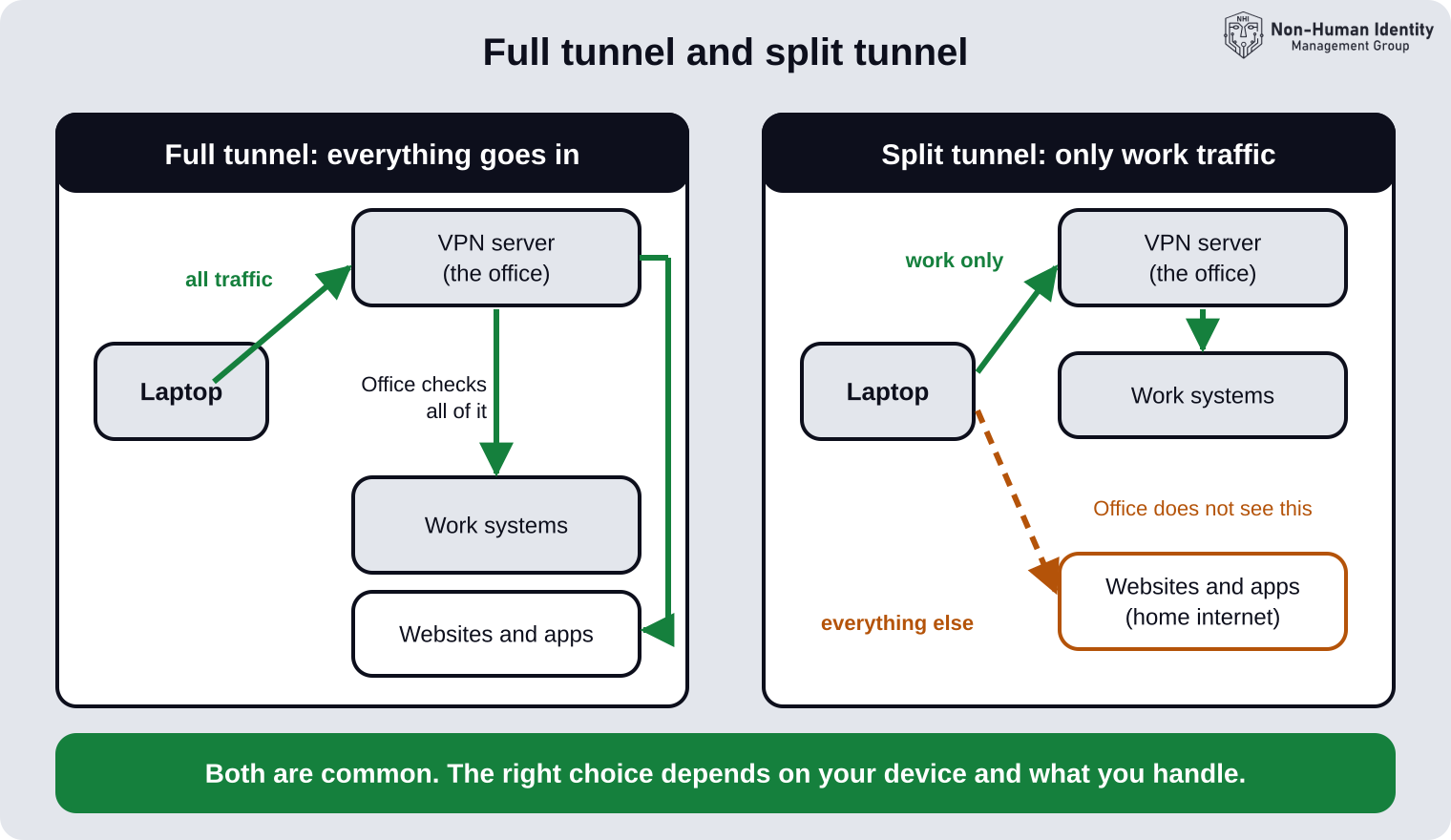
A VPN (virtual private network) is a scrambled connection from your device to a VPN server. With a full tunnel, all of your traffic goes to that server first. With a split tunnel, only some of it does. The rest goes straight out over your home or café internet.[1]
The VPN owner sets a list. Some lists name what must go through the VPN, such as work systems. Others name what may skip it, such as a busy video call service.[2]
Where the comparison stops working: a post room sorts each letter by hand. A VPN sorts traffic by fixed rules, so a mistake in the list affects every connection that matches it.
Why does it matter?
Only traffic that goes through the VPN is protected by it.[1] Anything outside the tunnel relies on the network you are using and on the app's own protection.
If you work from home
What could happen: work files you open from a website outside the tunnel skip the checks your employer runs.
Check this: ask IT whether your work VPN uses a full or split tunnel.
Next: VPNs for Beginners
If you use a VPN app on your own phone
What could happen: an app you excluded from the VPN sends its traffic over café Wi-Fi without the VPN.
Check this: open the app's split tunnelling list and remove anything you did not add on purpose.
If you look after IT for a small firm
What could happen: a wide exception list quietly lets most traffic skip your filters.
Check this: write down every exception, why it exists and who agreed it.
Next: How VPNs Work
What does it look like?
Many VPN apps show split tunnelling as one switch and a list. Here is a made-up settings screen.
Example only. All values are made up.
EXAMPLE VPN app > Settings > Split tunnelling
Split tunnelling .................. ON          (1)
Mode: Send these apps OUTSIDE the VPN           (2)
  - VideoCall EXAMPLE                           (3)
  - Photo backup FAKE
  - Web browser                                 (4)
Kill switch ....................... OFF         (5)
- The switch that turns split tunnelling on.
- This list names apps that skip the VPN. Some apps work the other way round and name apps that use it.
- A video call app, excluded to make calls smoother.
- In a real file, this line would name the browser. Excluding it means most web traffic skips the VPN.
- A kill switch blocks traffic if the VPN drops. Here it is off.
Why this is risky: the browser sits on the "outside" list, so the VPN covers very little. With the kill switch off, traffic can also leave unprotected when the VPN drops.
The safer way: keep the outside list short, add each item on purpose, and remove the browser. On a work device, use the settings your IT team gives you and do not change them.
How does it work?
- The VPN connects. Your device sets up a scrambled link to the VPN server.
- The rules load. The VPN gives your device a list of routes, which are directions for where each kind of traffic should go.[2]
- Each connection is sorted. When an app connects somewhere, the device checks the list.
- Matching traffic goes in. Traffic on the "use the VPN" list travels through the tunnel to the VPN server.
- The rest goes direct. Everything else leaves through your normal connection, outside the VPN's protection.
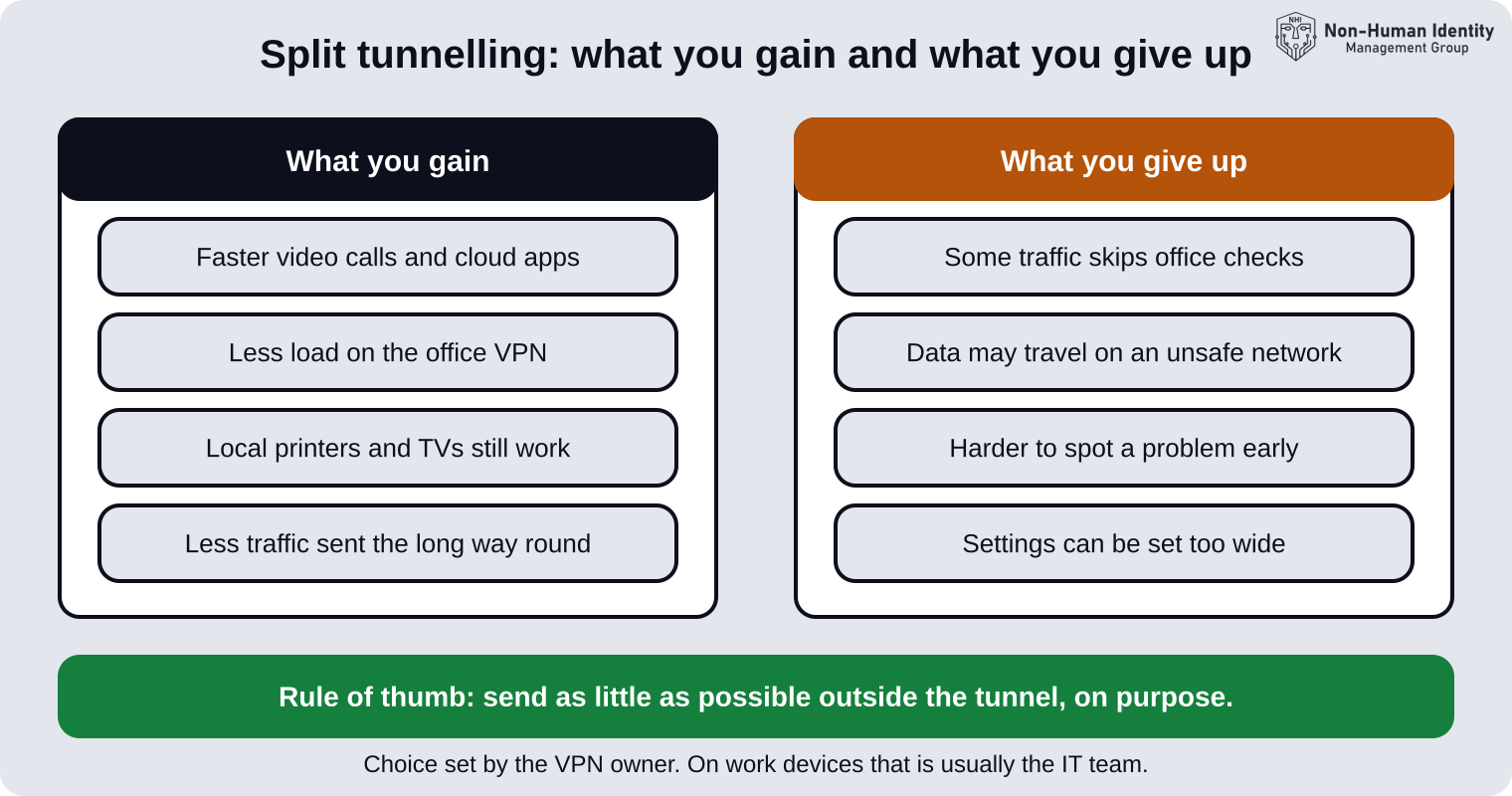
Why would anyone choose a split tunnel? Speed and load. Microsoft, for example, suggests sending some of its busiest Microsoft 365 traffic outside a work VPN. It says this traffic makes up about 70 to 80 percent of the traffic to the service. Moving it frees VPN capacity for work that still needs the VPN.[3]
The UK's National Cyber Security Centre takes a stricter line for work devices. It warns that split tunnelling raises the risk of sensitive data reaching an unprotected network. It suggests a VPN that covers the whole device.[1]
A worked example
Juno Vance runs a small, fictional accountancy firm with six staff. Umar Hollis looks after its computers two days a week.
Staff work from home and use a work VPN to reach the firm's file server. Lately, video calls keep freezing. Juno asks Umar to fix it.
Umar finds the work VPN uses a full tunnel. Every call goes from each home to the office first, then back out to the call service. The office internet line is full.
A quick fix would be to switch on split tunnelling and send everything except the file server outside the VPN. Umar thinks about the post room. If all post skips the locked van, the van protects almost nothing.
So he makes a narrow change. Only the video call service skips the VPN. Client files, email and everything else still go through it. He writes the exception down, with the reason and the date, and Juno signs it off.
He also checks the call service. Its traffic is already scrambled by the service itself, so sending it direct still keeps the content private on the way.
A week later, calls are smooth. Umar checks the VPN records and sees the office line is far less busy. He puts a reminder in the diary to review the exception list in six months.
Juno is pleased that the fix was small and written down. If a new member of staff asks why calls work differently, the answer is in one place.
Myths and mistakes
| What people think | What is true |
|---|---|
| If the VPN app says "connected", all my traffic is protected. | With split tunnelling on, only the traffic on the VPN list is protected by the VPN. |
| Split tunnelling is always unsafe. | A short, deliberate list can be reasonable. A long or careless list is the risk. |
| Excluding my browser just makes pages load faster. | It means most of your web traffic no longer goes through the VPN at all. |
| I can change my work VPN settings if it is slow. | Work settings are chosen by IT for a reason. Report the problem instead. |
| A full tunnel has no downsides. | It can slow busy services and may block all traffic if the VPN cannot connect.[1] |
What can I do this week?
- Open your VPN app and check whether split tunnelling is on.
- Read the exception list and remove anything you did not add on purpose.
- Turn on the kill switch if your app has one and you rely on the VPN.
- Ask your IT team whether your work VPN uses a full or split tunnel, and why.
Checklist
- I know whether my VPN uses a full tunnel or a split tunnel.
- Every item on the split tunnelling list was added on purpose.
- My web browser is not on the "outside the VPN" list unless IT chose that.
- Work devices use the settings IT provides, and staff do not change them.
- Each work exception has a written reason, an owner and a review date.
- The kill switch is on where the VPN is relied on for privacy.
- Exception lists are reviewed at least once a year.
Common questions
Should I turn split tunnelling on or off?
Off is the cautious default, because then the VPN covers everything. Turn it on only for a clear reason, such as a local printer or a slow video call, and exclude just that app. On a work device, follow your IT team's settings rather than changing them yourself.
Does split tunnelling make a VPN less secure?
It makes the VPN cover less. Traffic outside the tunnel depends on your local network and on the app's own protection. Many apps scramble their traffic anyway, which helps, but your employer's checks no longer see it. A short, deliberate list keeps that gap small.
What is inverse split tunnelling?
It is the opposite list. Instead of naming what goes through the VPN, you name what skips it, and everything else goes in. Many VPN apps offer both modes. Check which one your app uses before you add items, because the same list means different things in each mode.
Why does my work VPN stop me using my home printer?
Most likely because it uses a full tunnel. All traffic goes to the office, so your device cannot reach things on your home network. That is often a deliberate choice for security. Ask IT before trying a workaround, as they may have an approved option.
Is split tunnelling the same as a kill switch?
No. Split tunnelling decides which traffic uses the VPN. A kill switch decides what happens if the VPN drops, usually by blocking traffic until it reconnects. They work well together: a short exception list plus a kill switch keeps most traffic inside the VPN.
Where next?
Ready for the detail? Read the practitioner guide: How VPNs Work. It goes further into tunnelling and encryption, remote access versus site-to-site VPNs, and where zero trust access takes over from a VPN.
Also useful:
- VPNs for Beginners
- Per-App and Always-On VPN on Mobile
- Mesh VPNs for Beginners
- Zero Trust for Beginners
Related NHI Mgmt Group resources: Secure Remote Access Beyond VPN Guide · Choosing a VPN Safely Guide · Wi Fi Security for Beginners
Key terms
- VPN
- A scrambled connection that carries your traffic between your device and a private network or VPN server.
- Split tunnelling
- A VPN set-up where only chosen traffic goes through the VPN and the rest uses your normal connection.
- Full tunnel
- A VPN set-up where all of a device's traffic goes through the VPN.
- Route
- A rule that tells a device which way to send traffic for a given destination.
- Always-on VPN
- A VPN that connects by itself whenever the device uses the network, so users do not have to switch it on.
- Kill switch (VPN)
- A VPN app setting that blocks traffic if the VPN connection drops.
Sources and further reading
- Virtual Private Networks (VPNs), Device Security Guidance. National Cyber Security Centre (UK), published 29 June 2021, reviewed 13 May 2025. https://www.ncsc.gov.uk/collection/device-security-guidance/infrastructure/virtual-private-networks, accessed 28 Nov 2026.
- VPN routing decisions. Microsoft Learn, Microsoft. https://learn.microsoft.com/en-us/windows/security/operating-system-security/network-security/vpn/vpn-routing, accessed 28 Nov 2026.
- VPN split tunneling for Microsoft 365. Microsoft Learn, Microsoft. https://learn.microsoft.com/en-us/microsoft-365/enterprise/microsoft-365-vpn-split-tunnel, accessed 28 Nov 2026.