A mesh VPN is a private network where your devices connect straight to each other through scrambled links.
This guide is for home lab fans, small business owners and new IT staff who have heard of tools like these and want to know how they work. If your team reaches a server or office computer from home, a mesh VPN may already be the way in.
In short
- A mesh VPN links laptops, phones and servers into one private network, wherever they are.
- Devices talk to each other directly, so there is no single office gateway to guard.
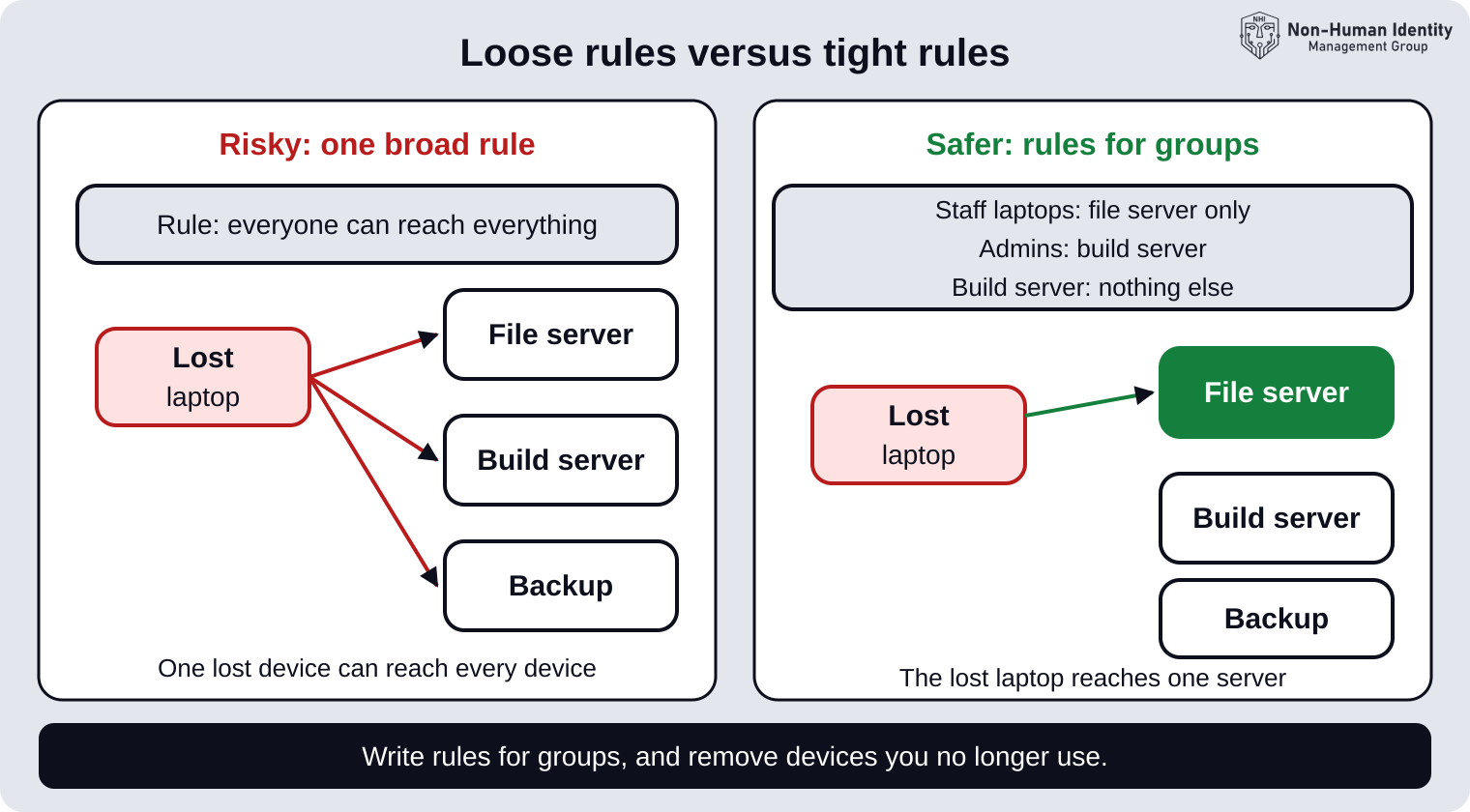
- The access rules decide which device can reach which. Loose rules mean one lost laptop can reach everything.
- Keys that let servers join on their own are powerful secrets. Keep them short-lived and stored safely.
What you will learn
- Explain how a mesh VPN differs from an ordinary VPN.
- Spot the settings that decide who can reach what.
- Check which devices and join keys are on your network.
- Ask the right questions before you rely on one at work.
- Private device network (mesh VPN)
- a set of devices that connect straight to each other over scrambled links.
- Address book service (coordination server)
- the service that tells each device how to find the others and which rules apply.
- Access rules (policy)
- the list that says which person or device may reach which other device.
What is a mesh VPN?
Think of a private club with a front desk. The desk checks your membership card and hands you a list of other members' room numbers. After that, you knock on doors yourself.
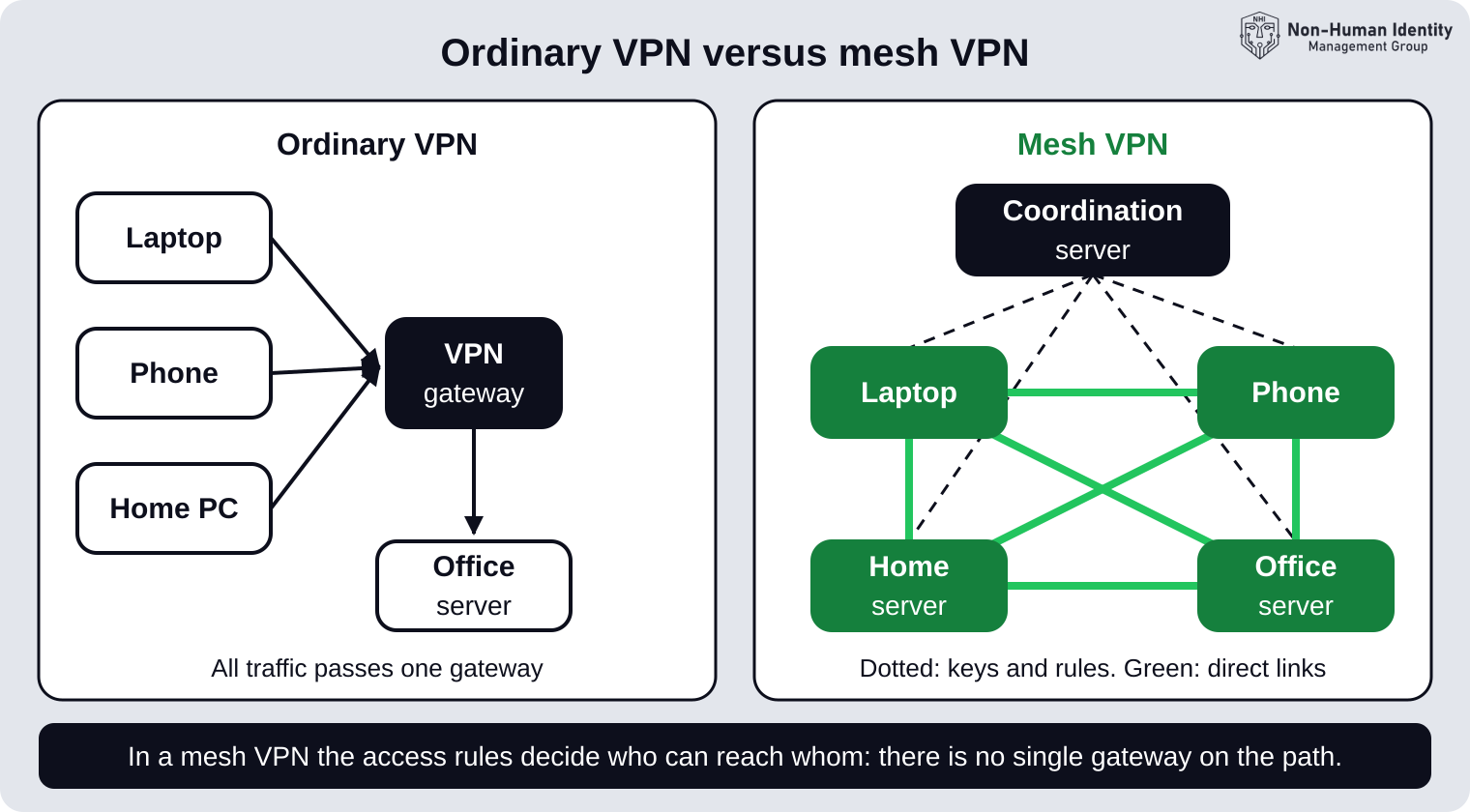
A mesh VPN works the same way for devices. Each laptop, phone or server signs in to a central service once. That service shares the other devices' public details and the rules. Then the devices build scrambled links straight to each other.
An ordinary work VPN is different. All traffic goes through one central gateway, a bit like every visitor passing one guard. A mesh VPN has no single guard on the path, so the access rules do that job. Popular products include Headscale, Tailscale and ZeroTier (listed alphabetically).
Where the comparison stops working: a club desk can see who visits whom. A mesh VPN's central service sets up the links. In the products we checked, the traffic itself goes device to device or through a relay.[2]
Why does it matter?
Mesh VPNs are quick to set up, which is why they spread fast. That speed can leave a network where every device can reach every other one.
If you run a home lab
What could happen: an old tablet you forgot about can still reach your home server and its files.
Check this: open the device list and remove anything you no longer use.
If you own a small business
What could happen: a leaver's laptop stays on the network and can reach the shared files.
Check this: make removing mesh VPN devices part of every leaver's last day.
Next: Zero Trust for Beginners
If you are new to IT work
What could happen: a reusable join key pasted into a script lets anyone who finds it add devices.
Check this: keep join keys in a password vault, not in files or chat.
What does it look like?
Most people meet a mesh VPN as a device list in a web console. Here is a made-up one, with notes on what to look for.
Example only. All values are made up.
EXAMPLE mesh network: example-team.example.com
Device            Owner          Last seen     Key expires
office-laptop-01  sam            2 hours ago   in 120 days
old-tablet        sam            8 months ago  disabled     (1)
build-server      tag:server     1 minute ago  disabled     (2)
nas-at-home       ex-staff-0000  3 days ago    in 15 days   (3)
Access rule: everyone can reach everything                  (4)
Join key: FAKE-reusable-key-0000 (expires in 90 days)       (5)
- A device nobody has used for months, with key expiry switched off.
- A server with its own machine label, not tied to one person. Expiry is often off for servers on purpose.
- A device still owned by someone who has left.
- One broad rule. Any device on the network can reach any other.
- A made-up join key. In a real file, this line would contain a key that can add many devices.
Why this is risky: the forgotten tablet and the leaver's device can reach the server, because the only rule allows everything.
The safer way: remove unused devices, give servers their own labels, write rules for each group, and use one-off join keys.
How does it work?
Products differ in detail, but the main steps are much the same.
- Sign in. You install the app and sign in, often with a work or personal account. A server can join with a join key instead, called an auth key.[4]
- Get approved. Some products hold a new device back until an admin approves it.[5]
- Swap public details. The central service, called a coordination server, shares each device's public key and the access rules. It does not carry your traffic.[2]
- Connect directly. Devices build scrambled links to each other. One product uses WireGuard, a modern VPN method.[1][6] If a direct link is blocked, traffic goes through a relay.
- Check the rules. Each device only accepts traffic the access rules allow.
- Sign in again. Device keys can expire, so people sign in again from time to time. One product sets this to 180 days by default.[3]
Some mesh VPNs can also publish a service on your network to the open internet. One product turns this off by default, but once switched on, any member can use it unless the rules say otherwise.[7] Decide who may use features like this.
A worked example
Quarry Lettings is a fictional letting agency with six staff. Two years ago, Soren Mbeki, the office manager, set up a mesh VPN. Staff use it to reach the office file server from home.
Soren's colleague Talia Achterberg starts a new IT course and asks to see the console. Together they open the device list. There are 19 devices for six people.
Four belong to former staff. Two are old phones. One is a laptop that was sold last year. Soren checks with the owner of the agency, then removes all seven.
Next, Talia looks at the rules. There is one rule, and it lets every device reach every other one. That means a staff phone could reach the backup server. They write three new rules. Staff reach the file server. Soren alone reaches the backup server. The backup server reaches nothing.
Last, Talia finds a reusable join key saved in a notes file on the shared drive. It was made to add the backup server and never deleted. Soren revokes it and moves future keys into the agency's password vault. New keys are one-off and short-lived.
None of this makes the agency safe from every attack. A phishing email could still trick someone. But one lost phone can now reach far less, and the device list matches the people who work there.
Myths and mistakes
| What people think | What is true |
|---|---|
| Everything on the mesh is trusted, so it is safe. | Any device on the network can be lost or infected. The access rules decide how far it can reach. |
| The company running the service sees all my traffic. | In the products we checked, traffic goes device to device or through a relay, not through the coordination server.[2] |
| Join keys are just setup codes. | A reusable join key can add many devices. One vendor warns these keys can be very dangerous if stolen.[4] |
| Turning off key expiry saves hassle with no downside. | Expiry makes people sign in again. Keep it off only for trusted servers that need it.[3] |
| A mesh VPN replaces every other control. | You still need updates, strong sign-in and backups on each device. |
What can I do this week?
- Open the device list and remove devices you do not recognise or no longer use.
- Turn on a second sign-in check for the account that runs the network.
- Replace any "everyone can reach everything" rule with rules for groups.
- Find every join key, revoke the ones nobody needs, and store the rest in a vault.
Checklist
- Every device on the network belongs to a current person or a named server.
- Leavers' devices are removed on their last day.
- Access rules give each group only what it needs.
- Servers have their own machine labels, not a person's account.
- Join keys are one-off where possible, short-lived and kept in a vault.
- Key expiry is on for people's devices.
- Features that publish services to the internet are limited to named people.
- Admin accounts for the network use a second sign-in check.
Common questions
Is a mesh VPN the same as a VPN app for privacy?
No. A privacy VPN app sends your browsing through a provider's server. A mesh VPN links your own devices so they can reach each other. Some mesh VPNs can also send internet traffic through one of your devices, but that is an extra feature.
Do I need to open ports on my router?
Usually not. Mesh VPNs are built to connect devices through home routers and firewalls without manual changes. One vendor says connections work across firewalls and address-sharing routers without port forwarding.[6] If a direct link fails, a relay carries the traffic.
Can I run the central service myself?
Yes, with some products. Headscale, for example, is an open source, self-hosted version of one vendor's coordination server. Its makers describe it as suited to personal use or small groups.[8] You then look after its updates and uptime yourself.
What happens if someone steals a laptop on the network?
The laptop can reach whatever the rules allow until you remove it. Remove it from the device list straight away. Tight rules and key expiry limit the damage. Then change any passwords that were saved on the laptop.
Why does a join key count as a non-human identity?
Because software uses it, not a person. A non-human identity (NHI) is a digital identity, or the credential behind it, that lets a machine or process connect without a person. A server joining with a key fits that description.[9]
Where next?
Ready for the detail? Read the practitioner guide: Mesh VPN Security Guide. It goes further into writing and testing access rules, machine labels and join keys, and logging and monitoring a mesh network.
Also useful:
- VPNs for Beginners
- Zero Trust Network Access (ZTNA) for Beginners
- Non-Human Identities for Beginners
Related NHI Mgmt Group resources: WireGuard Security Guide · How VPNs Work · SSH Keys for Beginners
Key terms
- Mesh VPN
- A private network where devices connect directly to each other over scrambled links, not through one central gateway.
- Coordination server
- The central service that shares device details and rules so devices can find each other.
- WireGuard
- A modern VPN method for building scrambled links between devices.
- Access control list
- A list of rules saying who or what may reach a device or service.
- Auth key
- A secret value that lets a device or program prove it may join or connect, so it needs care like any credential.
- Exit node
- A device on the network that passes other devices' internet traffic out through its own connection.
- NAT traversal
- Ways of letting devices connect to each other through home routers and firewalls.
Sources and further reading
- WireGuard: fast, modern, secure VPN tunnel. WireGuard project. https://www.wireguard.com/, accessed 28 Nov 2026.
- Control and data planes. Tailscale documentation. https://tailscale.com/kb/1508/control-data-planes, accessed 28 Nov 2026.
- Key expiry. Tailscale documentation. https://tailscale.com/kb/1028/key-expiry, accessed 28 Nov 2026.
- Auth keys. Tailscale documentation. https://tailscale.com/kb/1085/auth-keys, accessed 28 Nov 2026.
- Quickstart: create a network and join devices. ZeroTier documentation. https://docs.zerotier.com/start/, accessed 28 Nov 2026.
- What is Tailscale? Tailscale documentation. https://tailscale.com/kb/1151/what-is-tailscale, accessed 28 Nov 2026.
- Tailscale Funnel. Tailscale documentation. https://tailscale.com/kb/1223/funnel, accessed 28 Nov 2026.
- Headscale README. Headscale project, GitHub. https://github.com/juanfont/headscale, accessed 28 Nov 2026.
- Non-Human Identities for Beginners. NHI Mgmt Group. https://nhimg.org/what-are-non-human-identities-beginners-guide, accessed 28 Nov 2026.