Water utility cyber security means protecting the computers that clean, pump and test our water from attack.
This guide is for small utility staff, councillors, board members and curious members of the public. You do not need a technical background. Many water systems are run by small teams with no security staff, so the basics matter a great deal.
In short
- Water works use computers to run pumps, add treatment chemicals and watch tank levels.
- Most attacks on small water systems use simple gaps, such as factory passwords or controls left open to the internet.
- US inspectors found that over 70% of the drinking water systems they checked broke basic security planning rules.[3]
- A short list of actions, such as changing default passwords and keeping backups, closes many of the common gaps.
What you will learn
- Explain why water systems are a target, and what an attack can do.
- Spot the common weak points at a small water works.
- Check the eight basic actions US agencies recommend.
- Ask the right questions as a councillor, board member or new member of staff.
- Plant computer (controller or PLC)
- a small, tough computer that switches pumps and valves on and off.
- Control screen (HMI)
- the screen operators use to watch the plant and change settings.
- Factory password (default password)
- the password a device ships with, often printed in its manual.
What is water utility cyber security?
Think of the fence and the locked gate around a reservoir. They keep people away from the water. Today, most water works also have a second, invisible gate: the computer links that let staff and suppliers reach the controls.
Water utility cyber security is about locking that second gate. It covers plant computers and control screens. It also covers the office network and the links staff and suppliers use from afar.
It applies to drinking water and to wastewater. Wastewater is used water that is cleaned before it goes back into rivers or the sea. To learn how plant controls work in general, see the beginner guide on control systems linked at the end.
Where the comparison stops working: a broken fence is easy to see. A computer gate left open can go unnoticed for months, and anyone in the world may be able to find it.
Why does it matter?
A hacked office computer loses data. A hacked water works could stop pumps or change how water is treated. Most plants have safety checks and staff who can run things by hand, but those take planning.
If you are a councillor or board member
What could happen: an attack forces the plant into hand control, and the public asks why basic steps were never taken.
Check this: ask for a yearly report on the basic actions in this guide.
If you are new to working at a water utility
What could happen: a control screen that still uses its factory password is changed by a stranger.
Check this: ask whether every device has had its default password changed.
If you supply or support water systems
What could happen: your always-on support link becomes the attacker's way in.
Check this: agree that your link is switched on only for booked work, with your own named login.
If you are a member of the public
What could happen: you hear about an attack on a local water system and are not sure whether the water is safe.
Check this: follow your water supplier's official notices, not social media posts.
What does it look like?
Here is a made-up self-check from a small water works, with the gaps marked.
Example only. All values are made up.
EXAMPLE Valley Water, quick cyber self-check (made up)
[ ] Controllers reachable from the internet?   YES       (1)
[ ] Default passwords changed?                 NOT SURE  (2)
[ ] One login shared by all operators?         YES       (3)
[ ] Former staff logins removed?               NO        (4)
[x] Can we run the plant by hand?              YES       (5)
[ ] Backups of controller programs tested?     NEVER     (6)
- A controller anyone online could find. In a real file, this line would list each device.
- Nobody knows if the factory passwords were changed.
- A shared login means the records cannot show who changed what.
- People who left may still be able to sign in.
- A good sign: staff can keep water flowing if the computers fail.
- Without a tested copy, a wiped controller may take days to rebuild.
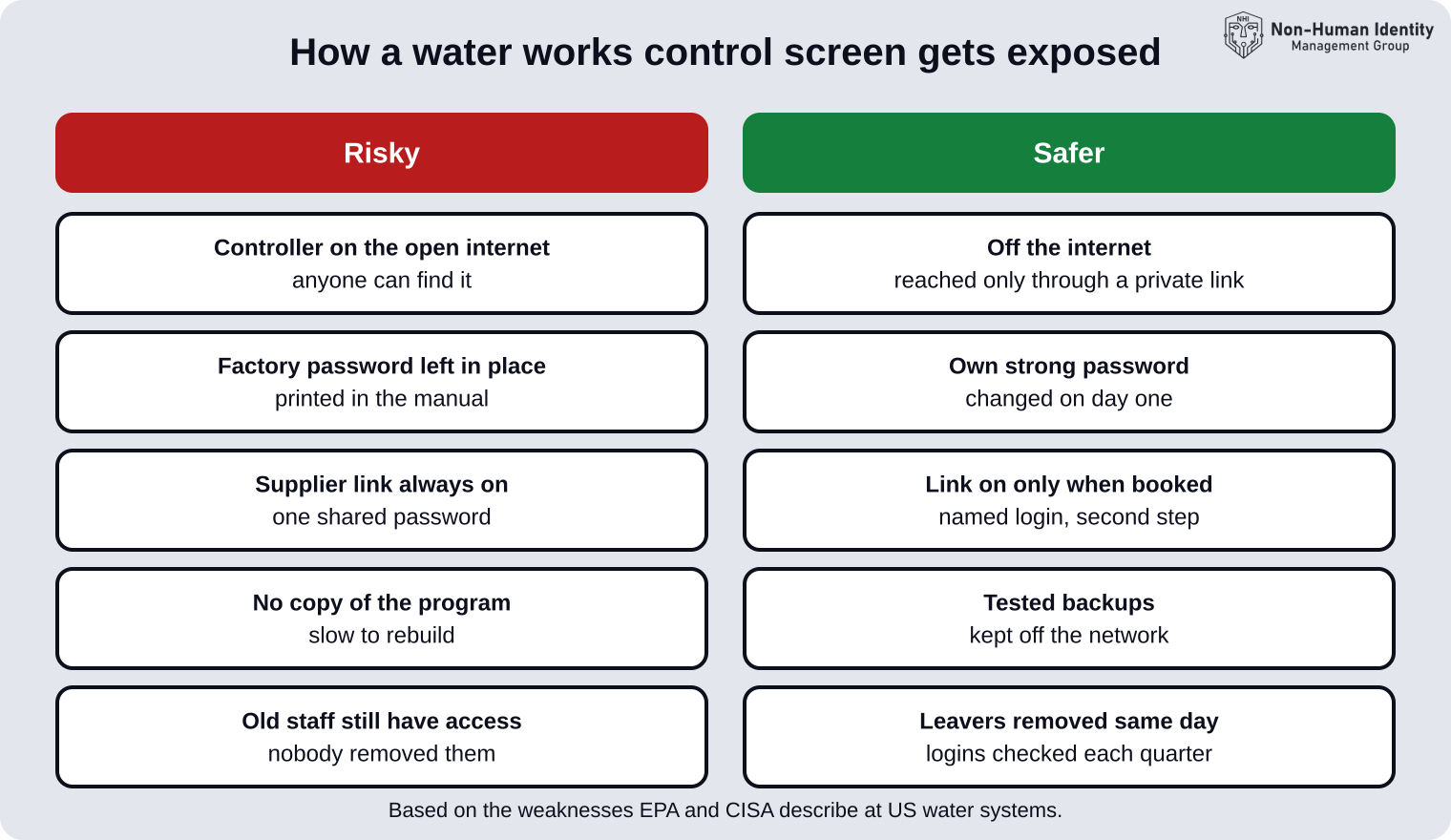
Why this is risky: these are the same gaps US inspectors keep finding at real water systems.[3] Each one is a simple way in.
The safer way: take controllers off the open internet and change every default password. Give each person their own login, and remove leavers the same day. Test your backups.
How does it work?
Here is how a typical attack on a small water system unfolds, and where each step can be blocked.
- The attacker searches the internet. Some controllers and control screens are connected straight to the internet, so they can be found.[1]
- They try the factory password. Many devices still use the password they shipped with, or have none.[1]
- They change the controller. Once in, they can replace its program or change its settings, so it no longer runs as intended.[1]
- Staff notice and take over. Operators switch to hand control, while the controller is rebuilt from a backup or reset by the supplier.
- The utility fixes the gap. It removes the device from the internet, sets its own strong password and checks other devices for the same problem.
A real case: attacks on water controllers in 2023
From November 2023, a group linked to Iran's Revolutionary Guard targeted one brand of controller used at water works and other sites. US agencies say the group compromised at least 75 devices, including at least 34 in the US water and wastewater sector.[1] The devices were on the internet and used default passwords or none. The attackers replaced their programs and put a message on the control screens.[1]
The eight basic actions
Three US agencies, CISA, the EPA and the FBI, published a short list of top actions for water systems.[2] In plain words:
- Keep plant systems off the open internet.
- Check your security regularly.
- Change default passwords straight away.
- Keep a list of all your plant and office computers.
- Write and practise a plan for an attack and for recovery.
- Back up plant and office systems.
- Fix known weaknesses, for example by installing updates.
- Train staff to spot and report problems.
What the rules say
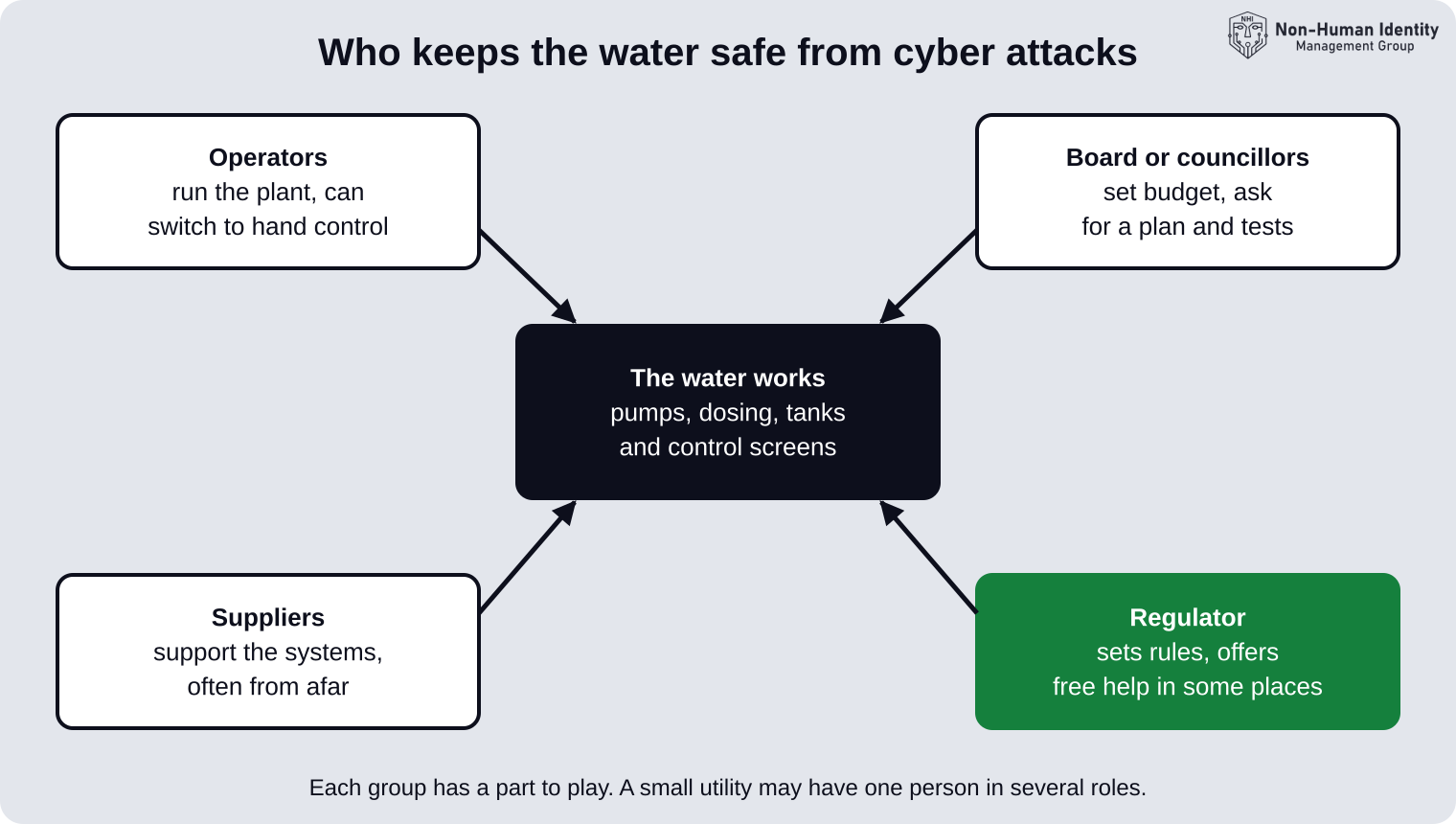
In the US, community water systems serving more than 3,300 people must assess their risks, including cyber risks, and keep an emergency plan. They must review both every five years.[3] The EPA offers free technical help and a free assessment for utilities.[4]
In England and Wales, water companies supplying more than 200,000 people fall under a cyber security law for essential services. The Drinking Water Inspectorate regulates them. They must report serious incidents within 72 hours.[5]
Status: correct as at 28 November 2026, based on EPA and Drinking Water Inspectorate pages. Rules change; check the official text. This guide is not legal advice.
A worked example
Leila Marlow has just been elected to the board of a small made-up water district, EXAMPLE Valley Water. It serves about 4,000 people from one treatment works and two pumping stations. There are five staff and no IT team.
At her first meeting, Leila asks a simple question: "Are we safe from hackers?" Nobody is sure. The plant manager says a supplier set up the control system years ago and still looks after it from afar.
Leila suggests using the eight basic actions as a checklist. The manager agrees to work through them with the supplier over a month.
The first finding is a surprise. One pumping station controller can be reached from the internet, and it still has its factory password. The supplier moves it behind a private link and sets a strong password the same day.
Next, the team finds that a former operator who left last year can still sign in. His login is removed. Each remaining operator gets a personal login instead of the shared one.
The supplier's link was always on. Now it is switched on only for booked work, with a second sign-in step. The manager also finds there is no tested copy of the controller programs, so the supplier makes one and keeps it off the network.
Finally, the staff practise running the plant by hand for an afternoon. They find two gaps in the written steps and fix them.
Leila asks for a short update at every second board meeting. She also signs the district up for the EPA's free technical help.[4]
Myths and mistakes
| What people think | What is true |
|---|---|
| We are too small to be a target. | Attackers search for any exposed device. In 2023 many of the hit devices were at small sites. |
| Our plant is not connected to the internet. | Supplier links, remote screens and office connections often create paths nobody listed. |
| Cyber security is a job for the IT department. | Many small utilities have no IT team. Operators, leaders and suppliers all play a part. |
| The supplier looks after security for us. | The utility stays responsible. Agree in writing what the supplier does and how they connect. |
| A hack means the water is unsafe. | Not always. Plants usually have safety checks and hand control. Follow the utility's official notices. |
What can I do this week?
- Ask about the internet. Find out whether any controller or control screen can be reached from the internet.
- Check the passwords. Confirm that every device has had its factory password changed.
- Clean up logins. Remove anyone who has left, and stop sharing one login between staff.
- List outside links. Write down every supplier or remote connection, and who uses it.
- Get free help. In the US, look at the EPA's water cyber security page. In the UK, check the regulator's guidance.
Checklist
- No controller or control screen is open to the internet.
- Every device has its own strong password, not the factory one.
- Each person has a named login, and leavers are removed the same day.
- Supplier links are on only when needed and use a second sign-in step.
- We keep a list of all plant and office computers.
- Backups of controller programs exist, are kept off the network and have been tested.
- Staff have practised running the plant by hand.
- We have a written plan for a cyber attack, and we know who to call.
- Our board or council gets a regular update on these points.
Common questions
Can hackers poison the water supply?
It is possible but unlikely. An attacker could try to change treatment settings. Most plants have safety limits, water tests and staff who watch the process, which makes harm much harder. The real risk is disruption, which is why the basic actions matter.
Why would anyone attack a small water works?
Often because it is easy to find and easy to get into. Attackers search the internet for exposed devices with weak passwords. Some want attention, some want money, and some are linked to governments that want to show they can cause disruption.
What is a default password?
It is the password a device has when it leaves the factory. It is often the same on every device of that model and may be printed in the manual. Anyone who knows it can sign in, so it should be changed before the device goes into use.
Who regulates water cyber security?
The answer varies by country. In the US, the EPA sets rules for drinking water systems. In England and Wales, the Drinking Water Inspectorate regulates larger water companies under a cyber security law for essential services.[5]
What should a councillor ask first?
Start with three questions. Can anything at the plant be reached from the internet? Have all factory passwords been changed? Could staff run the plant by hand if the computers failed? The answers show quickly where the biggest gaps are.
Where next?
Ready for the detail? Read the practitioner guide: Water and Wastewater Cybersecurity Guide. It goes further into removing controller exposure, managing vendor access, engineering safety around chemical dosing and the US rules for utilities.
Also useful:
- Industrial Control Systems and SCADA for Beginners
- Small Water Utility Cyber Security Checklist
- Operational Technology Security for Beginners
- EPA Water Sector Cybersecurity Requirements Guide
Related NHI Mgmt Group resources: Water Sector Cyber Statistics · OT Remote Access Guide · Critical Infrastructure for Beginners
Key terms
- PLC
- A small, tough computer that runs pumps, valves and other plant equipment.
- HMI
- The screen operators use to watch and control the plant.
- Default password
- The password a device ships with, which should be changed before use.
- Operational technology
- Computers and devices that watch or control physical processes, such as pumping water.
- Wastewater
- Used water from homes and businesses that is cleaned before it is released.
- Hand control
- Running the plant by hand when its computers cannot be trusted.
Sources and further reading
- IRGC-Affiliated Cyber Actors Exploit PLCs in Multiple Sectors, Including U.S. Water and Wastewater Systems Facilities (AA23-335A). CISA, FBI, NSA, EPA and partners, 1 December 2023, updated 18 December 2024. https://www.cisa.gov/news-events/cybersecurity-advisories/aa23-335a, accessed 28 Nov 2026.
- Top Cyber Actions for Securing Water Systems. CISA, EPA and FBI. https://www.cisa.gov/resources-tools/resources/top-cyber-actions-securing-water-systems, accessed 28 Nov 2026.
- Enforcement Alert: Drinking Water Systems to Address Cybersecurity Vulnerabilities. US Environmental Protection Agency, May 2024. https://www.epa.gov/enforcement/enforcement-alert-drinking-water-systems-address-cybersecurity-vulnerabilities, accessed 28 Nov 2026.
- Cybersecurity for the Water Sector. US Environmental Protection Agency. https://www.epa.gov/cyberwater, accessed 28 Nov 2026.
- The Network and Information Systems (NIS) Regulations 2018. Drinking Water Inspectorate. https://www.dwi.gov.uk/the-network-and-information-systems-nis-regulations-2018/, accessed 28 Nov 2026.