Critical infrastructure is the set of services a country needs to keep running, like power, water and hospitals.
This guide is for students, new staff and anyone who has heard the term in the news. You do not need to work at a power station to be affected: if you supply, maintain or run IT for any of these services, you are part of the chain.
In short
- Critical infrastructure means services whose loss would badly harm daily life, safety or the economy.
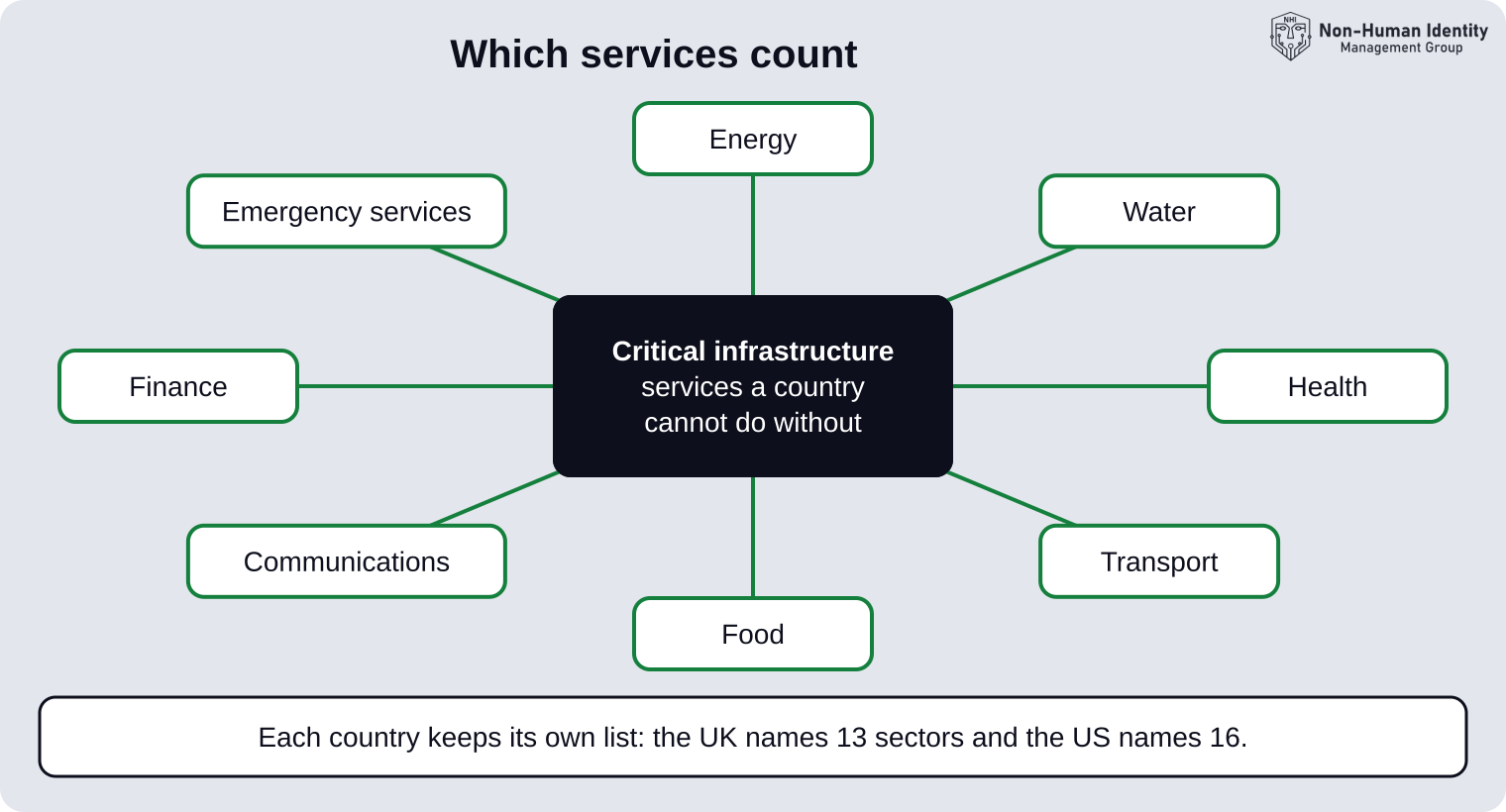
- Each country keeps its own list. The UK names 13 sectors and the US names 16.
- Many of these services run on computers that control real machines, so a cyber attack can have physical effects.
- Governments set rules, and the organisations protect themselves with layers: separate networks, careful remote access, backups and practised plans.
What you will learn
- Explain what critical infrastructure is in one sentence.
- Name the kinds of services that usually count.
- Explain how an attack on office computers can stop a physical service.
- Check whether your own job or supplier touches one of these services.
- Essential services (critical infrastructure)
- the services, sites and systems a country depends on, such as energy, water and health care.
- Machine control computers (operational technology)
- computers that run physical equipment like pumps, valves and power switches.
- Sector
- a group of similar services, such as the energy sector or the water sector.
What is critical infrastructure?
Think of the pipes and wiring hidden in the walls of your home. You rarely think about them. You notice them straight away when the tap runs dry or the lights go out.
Critical infrastructure is the same idea for a whole country. It covers the services people rely on every day, such as electricity, clean water, food supply, transport, banking and hospitals.
The UK government describes it as the parts of infrastructure whose loss could badly harm essential services, national security or the running of the state.[1] The US cyber agency calls it the systems and networks that keep our way of life going.[2]
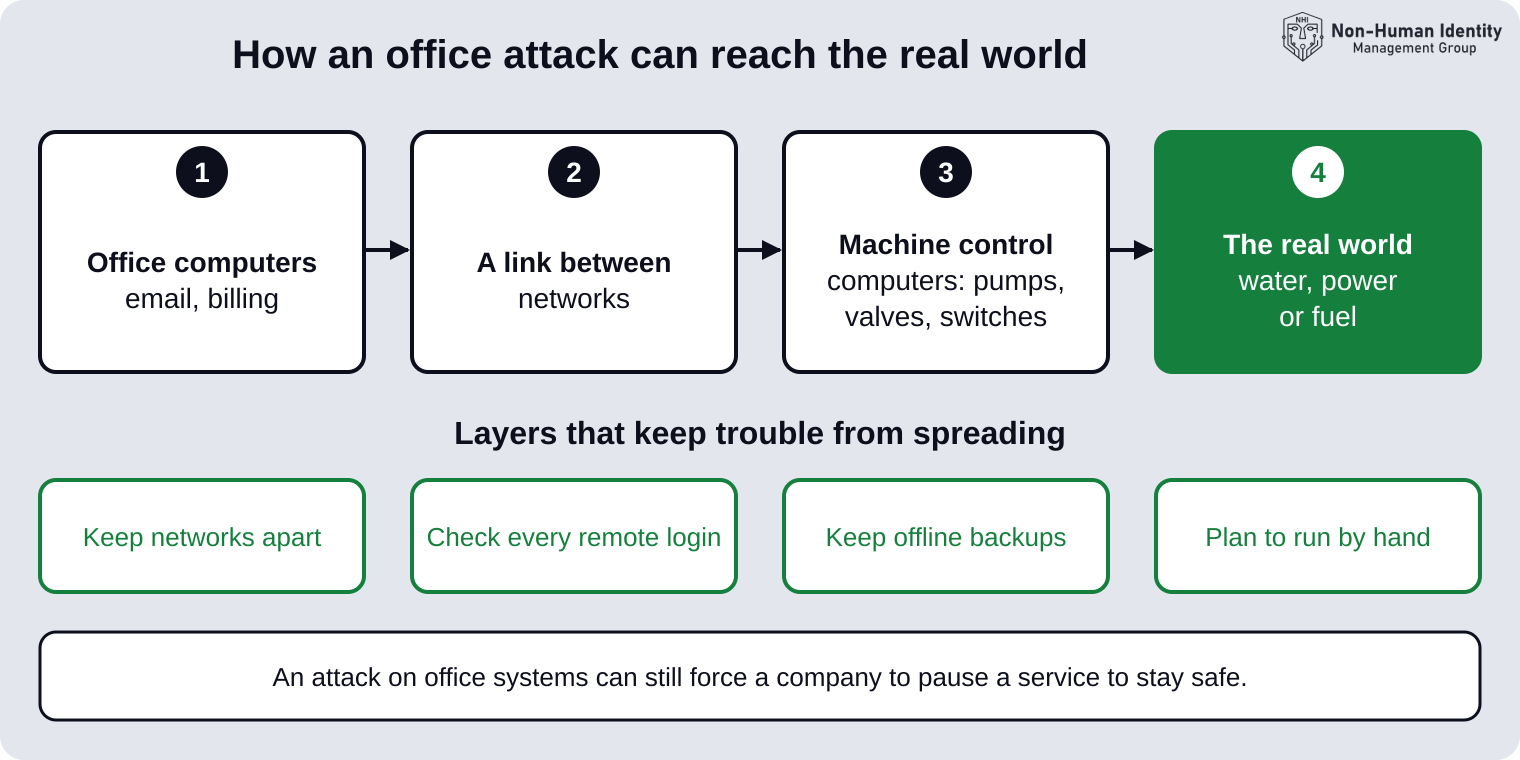
It is not only buildings. It includes the computer systems, networks and people that keep each service going.[1] Many of these services use operational technology, which means computers that run real machines, such as the pumps at a water works.
Where the comparison stops working: the pipes in your home serve one family. Critical services are linked to each other. A power cut can stop water pumps, phone masts and card payments at the same time.
Why does it matter?
When an office computer is hacked, files are lost. When a critical service is hit, people can lose heat, water, fuel or care. In May 2021, a US fuel firm called Colonial Pipeline was hit by ransomware. It shut down its whole pipeline as a safety step and restarted six days later.[3] Read our Colonial Pipeline attack page for the full story.
If you are a student or new to security
What could happen: you join a power or water firm and find the rules feel strict.
Check this: learn how office computers differ from those that run machines.
If you run a small supplier
What could happen: your login to a customer's site becomes an attacker's way in.
Check this: ask your customer which rules apply to you.
If you manage a team at an essential service
What could happen: an attack on billing or email forces you to pause the service to stay safe.
Check this: ask how the plan keeps the service going if office systems fail.
Next: Business Continuity and Disaster Recovery for Beginners
What does it look like?
Here is a short "Does my work touch critical infrastructure?" card. It is a starting point for a conversation, not an official test.
Example only. All values are made up.
Does my work touch critical infrastructure?
Organisation: EXAMPLE Facilities Ltd (made up)
[x] We maintain pumps for a water company      (1)
[x] Our engineers log in to customer sites      (2)
[ ] We supply software to hospitals
[x] A customer asked us to meet its security rules (3)
Result: likely part of the supply chain        (4)
- Work on equipment that keeps a water service running.
- Remote logins into a customer's systems, a common way in for attackers.
- Contract terms like this often pass the customer's rules down to suppliers.
- Not an official finding. Check with your customer or the regulator for your sector.
Why this is risky: small suppliers often think the rules are only for the big operator. Attackers know suppliers can hold a door into the bigger site.
The safer way: treat customer access as a privilege. Use separate accounts, a second login check and access only when it is needed. Agree in writing who to call if something goes wrong.
How does it work?
Protection works at two levels: the country sets the rules, and each organisation builds its own defences.
- The country picks the sectors. The UK names 13 sectors, including energy, water, health, transport, food and communications.[1] The US names 16 sectors.[2]
- Laws set duties. In the European Union, the NIS2 rules require medium and large firms in 18 sectors to manage cyber risk and report serious incidents.[4] A second EU law asks countries to name their critical organisations by 17 July 2026.[5]
- Regulators check. In the UK, many regulated firms are measured against a shared set of outcomes from the national cyber security centre. It is a benchmark, not a certificate.[6]
- Organisations build layers. They keep office networks apart from machine networks, control remote access, keep backups and practise what to do in an incident.
- Everyone plans for failure. The aim is to keep the service safe and running, or to bring it back fast if something breaks.
A worked example
Dana Engel is the operations manager at a small, fictional water company. It supplies drinking water to a few towns.
One Monday, the help desk finds a ransom note on the billing server. Staff cannot open invoices or email.
Dana remembers the pipes in the walls. People only notice when the tap runs dry, so keeping water flowing comes first. She asks one question: has anything reached the pumps?
The control engineer, Marek Varga, checks. The machine network is kept apart from the office network, with one guarded link between them. He closes that link as the plan says. The pumps keep running, and staff watch them from the control room.
Next, Dana calls the incident team and tells the regulator, as the company's rules require. The IT team restores billing from backups kept offline.
Later they find the way in. A supplier's old remote login had a reused password and no second check. They remove the account and ask every supplier to use named logins with a second check.
No customer loses water. Marek is glad the plan was on paper, because nobody had to guess under stress. Dana writes up what worked: the separate networks, the practised plan and the offline backups. She also notes what to fix, starting with supplier access.
Myths and mistakes
| What people think | What is true |
|---|---|
| Critical infrastructure only means power stations. | It covers many sectors, including water, food, health, finance and communications. |
| Only government sites count. | Many critical services are run by private companies and their suppliers. |
| Attackers must break into the machines to cause harm. | An attack on office systems can still force a company to stop a service to stay safe, as with Colonial Pipeline.[3] |
| Machine networks are not connected to the internet, so they are safe. | Many have links for remote support or data sharing. Each link needs to be known and guarded. |
| The rules are only for the big operator. | Operators often pass rules down to suppliers in contracts. |
What can I do this week?
- Find out if your employer or a customer is in a critical sector.
- List any remote logins you or your firm have into a customer's systems.
- Turn on a second login check for each remote account you control.
- Ask who you should call first if you spot something odd on a customer site.
Checklist
- We know whether our work touches a critical sector.
- Office networks and machine networks are kept apart, with known, guarded links.
- Every remote login is named, uses a second check and is removed when no longer needed.
- Backups are kept offline and restores are tested.
- There is a written plan to keep the service safe if office systems go down.
- The plan has been practised in the last year.
- Staff know when and how to report an incident to the regulator.
Common questions
Who decides what counts as critical infrastructure?
Each government decides. The UK lists 13 sectors and the US lists 16. EU countries name their own critical firms under EU law. The lists differ, so check the official list for the country you work in. Do not rely on a general summary.
Is critical infrastructure the same as operational technology?
No. Critical infrastructure is a list of key services. Operational technology is a kind of computer that runs machines. Many key services use it. So do many factories that are not on any list. See Industrial Control Systems and SCADA for Beginners.
Why do attackers target these services?
Reasons vary. Criminals may hope a firm under pressure will pay a ransom fast. Some groups backed by a state may want to spy or prepare to cause harm. Activists may want attention. The defence is much the same: know your systems, guard each way in and plan for failure.
Does NIS2 apply to my company?
Possibly. It covers many medium and large firms in the listed sectors that work in the EU. Some smaller firms are included too. This is general information, not legal advice. Check your national regulator and read NIS2 for Beginners.
How can I start a career protecting critical services?
Many people start in IT, networks or engineering. Then they learn how control systems work. Short courses and home study help. Read OT Security Engineer for Beginners to see what the day to day looks like.
Where next?
Ready for the detail? Read the practitioner guide: OT and Critical Infrastructure Executive Briefing. It goes further into board questions, regulation and personal accountability, and a 90-day plan for leaders.
Also useful:
- Critical Infrastructure Regulation Map
- Operational Technology Security for Beginners
- Industrial Control Systems and SCADA for Beginners
- NIS2 for Beginners
- Ransomware for Beginners
Related NHI Mgmt Group resources: Critical Infrastructure Identity Security Guide · Critical Infrastructure Cyber Statistics · OT Security Engineer for Beginners
Key terms
- Critical infrastructure
- The services, sites and systems a country depends on for daily life, safety and the economy.
- Operational technology
- Computers and control systems that run physical equipment such as pumps, valves and switches.
- SCADA
- A type of control system that lets staff watch and run equipment spread over a wide area.
- Network segmentation
- Splitting a network into separate parts so trouble in one part is harder to spread.
- Ransomware
- Harmful software that locks files or systems and demands payment to unlock them.
- NIS2
- An EU law that sets cyber security and incident reporting duties for important sectors.
Sources and further reading
- Critical National Infrastructure. National Protective Security Authority (UK). https://www.npsa.gov.uk/critical-national-infrastructure-0, accessed 28 Nov 2026.
- Critical Infrastructure Security and Resilience. Cybersecurity and Infrastructure Security Agency (US). https://www.cisa.gov/topics/critical-infrastructure-security-and-resilience, accessed 28 Nov 2026.
- Colonial Pipeline Cyber Incident. US Department of Energy, Office of Cybersecurity, Energy Security, and Emergency Response. https://www.energy.gov/ceser/colonial-pipeline-cyber-incident, accessed 28 Nov 2026.
- NIS2 Directive: securing network and information systems. European Commission. https://digital-strategy.ec.europa.eu/en/policies/nis2-directive, accessed 28 Nov 2026.
- Critical infrastructure resilience (Critical Entities Resilience Directive, Directive (EU) 2022/2557). European Commission, Migration and Home Affairs. https://home-affairs.ec.europa.eu/policies/internal-security/counter-terrorism-and-radicalisation/protection/critical-infrastructure-resilience_en, accessed 28 Nov 2026.
- Cyber Assessment Framework. UK National Cyber Security Centre. https://www.ncsc.gov.uk/collection/cyber-assessment-framework, accessed 28 Nov 2026.