Website caching means keeping ready-made copies of web pages so they load faster next time.
This guide is for anyone who runs, builds or pays for a website, and for students new to how the web works. You do not need to write code to be affected: if your site has customer accounts, a caching mistake can show one person's details to another.
In short
- A cache keeps copies of pages, pictures and files so the site does not rebuild them for every visit.
- Copies can be kept in your own browser, or on shared computers that serve many visitors.
- Shared caches are safe for public pages, like a price list. They are risky for private pages, like "My account".
- Private pages should be marked so shared caches do not keep them, and the cache settings should be checked after every change.
What you will learn
- Explain what a cache is in one sentence.
- Name the places where copies of a page can be kept.
- Spot a setting that could let a private page be shared.
- Ask your web supplier how private pages are kept out of shared caches.
- Stored copy (cache)
- a saved copy of a page or file that can be handed out again without rebuilding it.
- Delivery network (CDN)
- a group of computers in many places that keep copies of a site close to visitors.
- Cache instructions (Cache-Control)
- a short label sent with each page that tells caches whether and how long to keep it.
What is website caching?
Think of a busy café. Instead of making every sandwich to order, staff make the popular ones early and put them on the counter. Customers get served faster.
A cache does the same for a website. The first time someone asks for a page, the site builds it. A copy is then kept, so the next visitor gets the copy straight away.
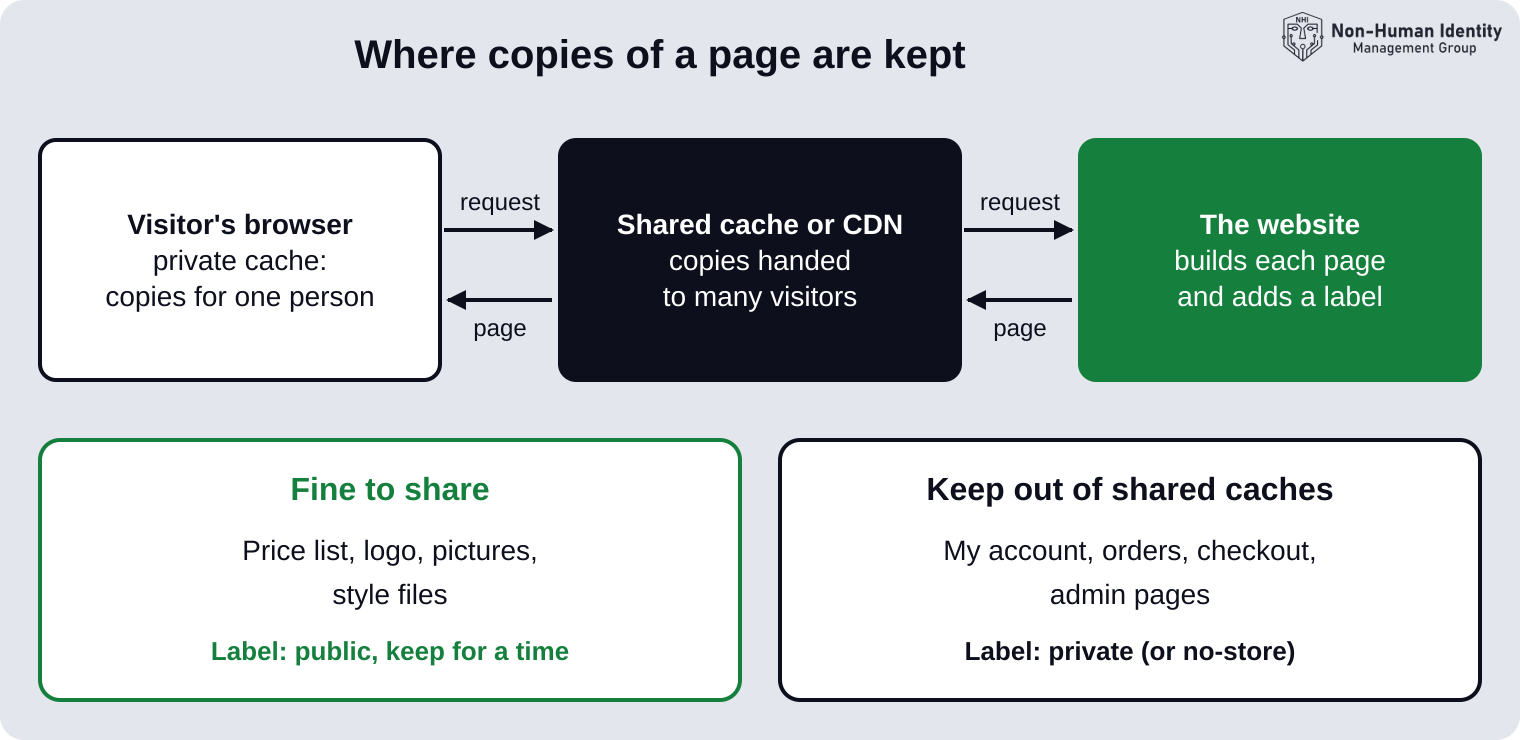
Copies can be kept in two kinds of place.[1] A private cache belongs to one person, usually their own web browser. A shared cache sits between visitors and the site and can hand the same copy to many people. A common shared cache is a content delivery network (CDN), a group of computers in many places that keep copies close to visitors.[2]
Where the comparison stops working: a café worker can see a name written on a special order and keep it aside. A shared cache only knows what the site's instructions tell it. If the instructions are wrong, it may put a private page on the counter for anyone.
Why does it matter?
Caching makes sites faster and helps them cope with busy times. Set up wrongly, it can show one customer's page to another. On Christmas Day 2015, the games store Steam made a caching change by mistake. Store pages for about 34,000 users may have been shown to other users.[3]
If you run an online shop or booking site
What could happen: a customer sees another person's name, address or order history.
Check this: ask your supplier which pages the shared cache is allowed to keep.
If you are learning web development
What could happen: you turn on caching for speed and it also stores logged-in pages.
Check this: mark account pages as private before you switch caching on.
If you use a shared or work computer
What could happen: the browser keeps a copy of a page you viewed, and the next person opens it.
Check this: log out and close the browser when you finish on a shared computer.
What does it look like?
Every page a website sends comes with a few hidden labels called headers. Here are made-up headers for a customer's order page.
Example only. All values are made up.
Page: shop.example.com/account/orders
Cache-Control: public, max-age=3600      (1)
Set-Cookie: session=FAKE-0000            (2)
X-Cache: HIT                             (3)
Page text: Hello EXAMPLE customer, order 0000
- This label tells every cache, shared ones included, that it may keep the page for an hour.
- In a real file, this line would hold the visitor's login session. A cookie alone does not stop a shared cache from keeping the page.
- This line says the page came from a stored copy, not freshly built for this visitor.
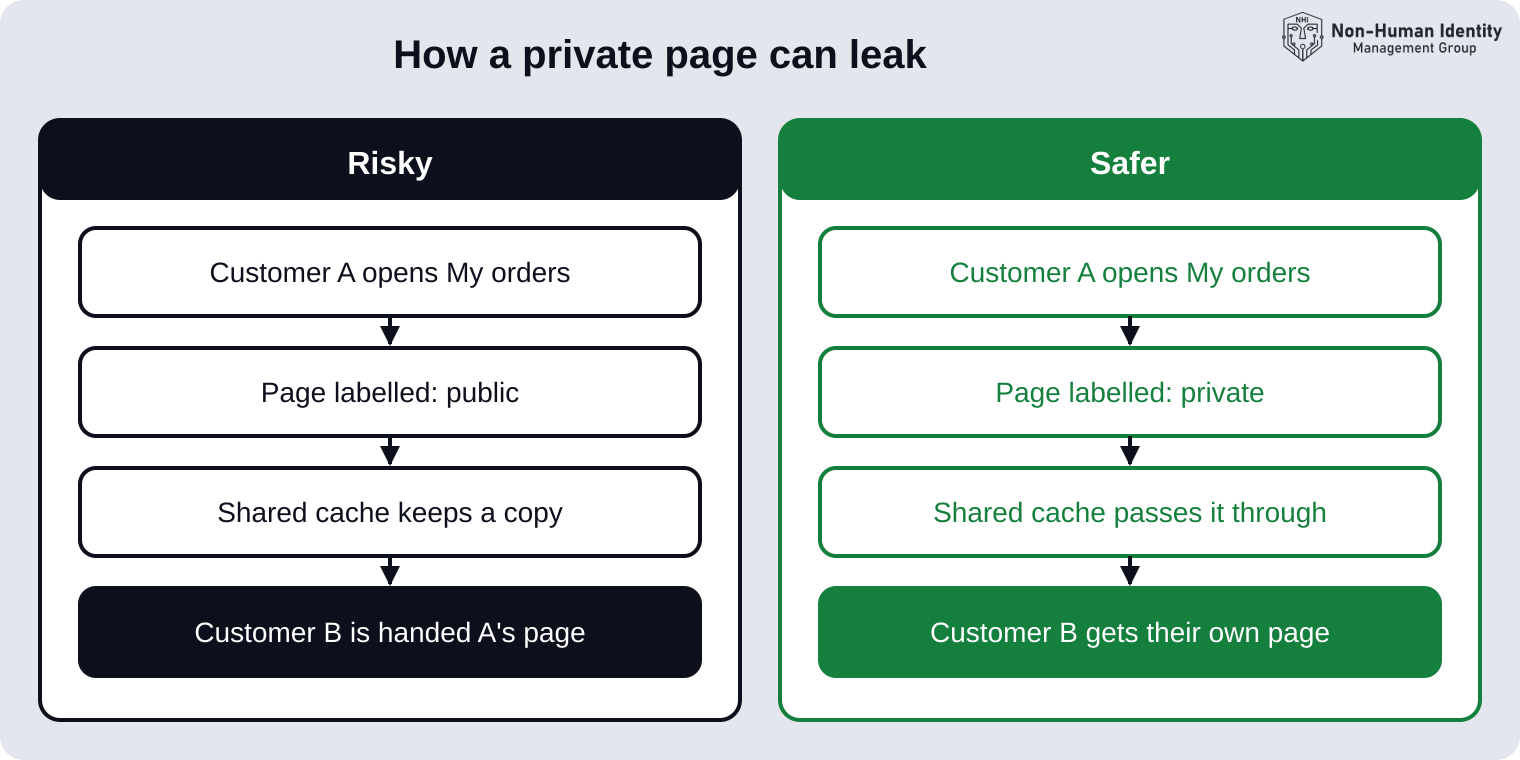
Why this is risky: a page with one person's orders is marked as fine for anyone. For the next hour, other visitors may be handed the stored copy.[1]
The safer way: pages for one person are marked private, so shared caches do not keep them. Very sensitive pages can be marked no-store, so no cache keeps them at all.[1][4] Public pages, pictures and style files can still be cached for speed.
Example only. All values are made up.
Page: shop.example.com/account/orders
Cache-Control: no-cache, private
Page: shop.example.com/images/logo-EXAMPLE.png
Cache-Control: public, max-age=86400
How does it work?
Here is what happens when a visitor asks for a page on a site that uses a shared cache.
- The request. The visitor's browser asks for a page. The request reaches the shared cache first.
- The check. The cache looks for a stored copy that matches the address. The matching rule is called the cache key.
- A hit or a miss. If a fresh copy exists, the cache sends it straight back. If not, it asks the website to build the page.
- The label decides. The website sends the page with its Cache-Control label. The cache follows it: keep for a time, keep only in the browser, or do not keep.[1]
- Where leaks happen. A leak can happen if a private page is labelled as shareable. It can also happen if the cache and the site read an address differently, so the cache files a private page as a public file. This trick is called web cache deception.[5]
A worked example
Otto Ulrich runs Meadow Studio, a fictional photo studio that sells prints online. Customers log in to see their orders and download their photos.
Ivo Mbeki, a freelance developer, turns on a delivery network to speed up the site before a busy holiday sale. Pages now load much faster.
Two days later, a customer emails. When she opened "My orders", she saw someone else's name and an order she did not place.
Otto thinks of the café counter. A named order has ended up where anyone can take it. He asks Ivo to stop the leak first.
Ivo checks the account pages. They are labelled as fine to share for an hour. He changes the rule so account and checkout pages are marked private, then clears all stored copies in the delivery network's dashboard.
Next, he tests it. He logs in as two made-up test customers on two computers. Each now sees only their own orders. The photos and price pages are still cached, so the site stays fast.
Otto checks the records available to him. He finds which pages were served from stored copies during those two days. He then asks for advice on whether he must report the leak, and he writes to the affected customers.
Ivo adds one step to every future change: test the account pages with two test users before going live.
Myths and mistakes
| What people think | What is true |
|---|---|
| A page with a login cookie will not be shared. | A cookie alone does not tell a shared cache to keep the page private. Mark it private.[1] |
| Caching is only a speed setting. | It also decides who can be handed a copy, so it is a privacy setting too. |
no-cache means "do not keep a copy". | It means "check with the website before reusing a copy". no-store means do not keep it.[1] |
| Fixing the label removes the leaked copies. | Copies already stored can stay until they expire or are cleared. Clear the cache after a fix. |
| The delivery network will follow our labels. | Many let you set rules that override the site's labels. Check those rules too.[5] |
What can I do this week?
- Ask your supplier whether your site uses a shared cache or delivery network.
- Ask how account, checkout and admin pages are kept out of it.
- Log in as two test users on two computers and check each sees only their own details.
- Agree that caching changes are tested with logged-in pages before going live.
Checklist
- We know which caches sit in front of our site.
- Pages for one person are marked private or no-store.
- Public pages, pictures and style files are cached for speed.
- Delivery network rules do not override the labels on private pages.
- Caching changes are tested with two logged-in test users.
- Someone knows how to clear the cache quickly.
- Staff on shared computers log out and close the browser.
Common questions
Should I clear my browser cache?
Now and then, yes, and always on a shared computer. Your browser cache holds copies of pages you visited. On your own device it is mostly harmless and makes sites faster. On a shared device, log out, close the browser or use a private window.
Is a CDN the same as a cache?
A CDN is one kind of shared cache. It is a network of computers in many places that keep copies of a site close to visitors. Keeping copies nearby helps a site stay fast, even when lots of people visit at once.[2]
Can caching leak my passwords?
It is less likely, because login forms send passwords rather than show them. The bigger risk is account pages showing names, addresses, orders or partial card details. Steam's 2015 incident exposed this kind of information, but not full card numbers or passwords.[3]
What is web cache poisoning?
It is a related attack. Instead of reading someone's private page, the attacker tricks a shared cache into storing a harmful copy of a public page. Every visitor then gets the harmful copy. The practitioner guide in Where next? explains both attacks.
Where next?
Ready for the detail? Read the practitioner guide: Web Cache Poisoning and Cache Deception Guide. It goes further into how these attacks work, how to detect them and how to harden cache and delivery network settings.
Also useful:
- CDN Security Guide
- How the Web Works for Beginners
- Session Tokens and Cookies for Beginners
- Website Security for Beginners
Related NHI Mgmt Group resources: Security Requirements for Selecting a CDN · DNS Cache Poisoning and Spoofing · Accidental Data Leaks for Beginners
Key terms
- Cache
- A store of saved copies of pages or files that can be reused without rebuilding them.
- Content delivery network
- A group of servers in many places that keep copies of a site's content close to visitors.
- Cache-Control
- A header that tells browsers and shared caches whether to store a page and for how long.
- Cache key
- The details a cache uses to decide whether a stored copy matches a new request, usually the page address.
- Web cache deception
- A trick that makes a shared cache store a private page as if it were a public file.
- Cache poisoning
- Getting a cache to store a harmful copy of a page so other visitors receive it.
- A small file a site gives your browser to remember that you are logged in.
Sources and further reading
- HTTP caching. MDN Web Docs, Mozilla. https://developer.mozilla.org/en-US/docs/Web/HTTP/Guides/Caching, accessed 28 Nov 2026.
- CDN (glossary). MDN Web Docs, Mozilla. https://developer.mozilla.org/en-US/docs/Glossary/CDN, accessed 28 Nov 2026.
- Steam news statement on the 25 December 2015 Store caching issue. Valve Corporation, December 2015. https://store.steampowered.com/news/19852/, accessed 28 Nov 2026.
- RFC 9111: HTTP Caching. IETF, June 2022 (Internet Standard, STD 98). https://www.rfc-editor.org/rfc/rfc9111.html, accessed 28 Nov 2026.
- Web cache deception. PortSwigger Web Security Academy. https://portswigger.net/web-security/web-cache-deception, accessed 28 Nov 2026.