A network security engineer protects the connections that let an organisation's computers talk to each other and the internet.
This guide is for anyone thinking about the job, or anyone who works with a network team and wants to know what they do. You do not need a technical job to be affected: if your workplace has Wi-Fi, email or remote working, its network needs this kind of care.
In short
- A network security engineer decides what traffic may travel where, and sets up the tools that allow, block and record it.
- Typical tools include firewalls (traffic checkpoints), secure remote access and systems that watch for unusual traffic.
- Much of the job is careful change work: reviewing requests, testing and keeping records.
- Many people move in from IT support or network administration jobs.
What you will learn
- Explain what a network security engineer does in one sentence.
- Describe the main places on a network where they add protection.
- Spot how a safe change to a firewall is handled.
- Choose a first step if you want to work towards the role.
- Traffic checkpoint (firewall)
- a device or program that allows or blocks network traffic based on rules.
- Separate areas (network zones)
- parts of a network kept apart, with checks on what may cross between them.
- Private tunnel (VPN)
- a scrambled connection that lets a remote worker reach the office network safely.
What is a network security engineer?
Think of the team that runs the gates, fences and paths of a large business park. They decide which gates open to the public and which need a pass. They also watch who moves between buildings. A network security engineer does this for an organisation's computer network.
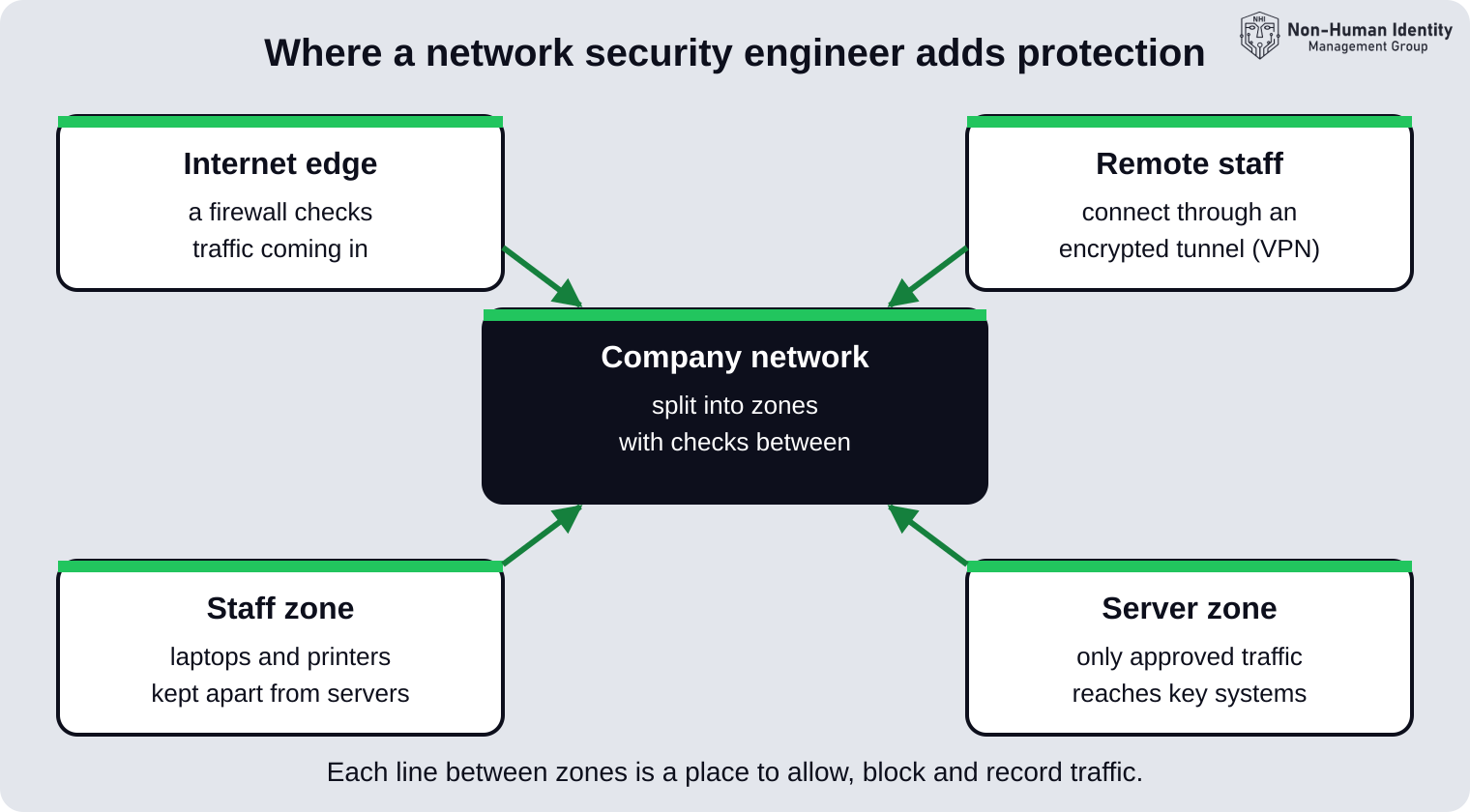
A network is the set of cables, Wi-Fi and devices that carry data between computers. The engineer splits it into areas, called zones, and decides what may pass between them. They set up firewalls, which are checkpoints that allow or block traffic by rules. They also set up safe ways for staff to connect from home.
The role is a specialist branch of security engineering. A general security engineer looks after many kinds of protection. A network security engineer goes deep on traffic: where it comes from, where it goes and whether it should be there.
Where the comparison stops working: a business park has a few gates you can see. A network can have thousands of hidden paths, and many staff now work from home or use cloud services. So the "edge" of the network is harder to draw, and access checks matter as much as fences.
Why does it matter?
Many attacks reach their target over a network. Good design can make it harder for an attacker to get in. It can also make it harder to move around once inside.
If you already work in IT support
What could happen: you set up Wi-Fi, printers and remote access every week without seeing it as security work.
Check this: note each task where you limited who could connect to what. These count as experience.
If you run a small business
What could happen: office laptops, guest Wi-Fi and the till system all share one network, so one infected device can reach the rest.
Check this: ask your IT supplier whether guest Wi-Fi is kept apart from your business systems.
If you are thinking about a career change
What could happen: job adverts list many network terms, and you are not sure where to begin.
Check this: learn how data moves across a network before you study security tools.
What does it look like?
A lot of the work arrives as change requests. Here is a made-up request to open a new path through a firewall.
Example only. All values are made up.
FIREWALL CHANGE REQUEST  CHG-0000 (EXAMPLE)
Asked by:   FAKE-FINANCE-TEAM
From:       staff zone, any computer            (1)
To:         payroll server, payroll.example.invalid
Allow:      all traffic                         (2)
Why:        "new payroll app needs it"
Until:      (blank)                             (3)
- Every staff computer would get the new path, not just the few that need it.
- All kinds of traffic would be allowed. In a real file, this line would name only the one type of connection the app uses.
- No end date, so the path could stay open long after the project ends.
Why this is risky: a rule this wide gives any infected staff computer a route to the payroll server.
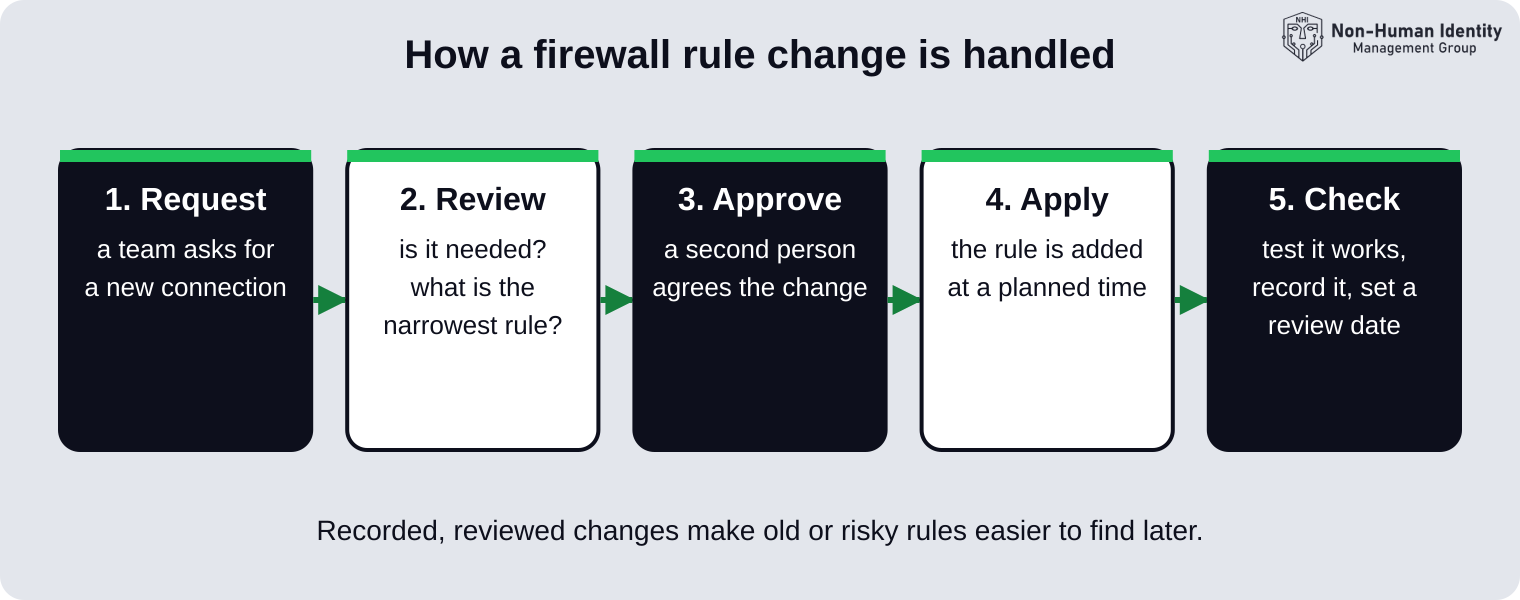
The safer way: the engineer limits the rule to named computers and one type of connection. A second person approves it, and it gets a review date.
How does it work?
Most of the work follows a few steps that repeat as the organisation changes.
- Map the network. Find out what devices exist and how they connect. You cannot protect what you do not know about.
- Split it into zones. Keep staff laptops, guest Wi-Fi and key servers apart, so trouble in one area is less likely to spread.
- Set the rules. Configure firewalls so that only needed traffic passes between zones and to the internet.
- Secure remote access. Give staff working away from the office a safe, checked way in, such as a VPN, a private scrambled tunnel.
- Watch and review. Read traffic records and alerts, and remove rules that are no longer needed.
A US government guide describes firewalls as devices or programs that control the flow of network traffic. It also gives advice on setting firewall rules and on testing and managing them.[1] That management work is where much of the engineer's time goes.
Skills and tools
You do not need all of these on day one. Most people build them up over several years.
- How networks work. How data moves between devices, Wi-Fi and the internet comes before any security tool.
- Firewalls. Writing narrow rules, testing them and removing old ones.
- Remote access and monitoring tools. VPNs for staff working away, and systems that watch for unusual traffic.
- Some scripting. Short scripts to check settings or make the same change on many devices.
- Careful records. Every change is reviewed, approved and written down.
A worked example
This is a made-up day in the life. Ingrid Solberg is a network security engineer at Tidemark Logistics, a UK delivery firm with three depots.
Ingrid starts by reading the overnight alerts. One depot computer tried to contact an unknown address abroad many times. The firewall blocked each attempt. She asks the IT team to check the computer and take it off the network until they know more.
Mid-morning, she handles the payroll change request. The finance team asked for all traffic from every staff computer. Ingrid calls them. Only two computers need the new app, and it uses one type of connection. She writes a narrow rule, a colleague approves it, and she sets a review date in six months.
After lunch, she joins a project meeting. The firm is adding tracking screens in the vans. Ingrid asks where the screens connect and what data they send. She suggests a separate zone for them, so a fault in a van screen cannot reach the main office systems.
Late afternoon, she reviews old firewall rules. Five belong to a project that ended last year. She checks with the owners, then removes them and records why.
Nothing dramatic happened. Most of Ingrid's day was careful, recorded change work and conversations with other teams.
Myths and mistakes
| What people think | What is true |
|---|---|
| A firewall at the edge is enough. | Attacks can start inside, through a laptop or a supplier. Zones and checks inside the network matter too. |
| Once a rule is set, it can be left alone. | Needs change. Old rules pile up and can leave paths open, so rules are reviewed. |
| Network security is only about hardware boxes. | Much of it is now software and cloud settings, plus checks on who is connecting. |
| It is the same job as a network engineer. | They overlap. A network engineer keeps traffic flowing. A network security engineer focuses on what should and should not flow. |
| A VPN makes any connection safe. | A VPN protects data on the way. It does not make the device at either end safe. |
What can I do this week?
- Read three network security engineer job adverts and list the skills they share.
- Find your home router's settings page and see which devices are connected.
- Check whether your router offers a separate guest Wi-Fi network, and use it for visitors.
- Take a free introductory course on how computer networks work.
Checklist
- I can explain what a network security engineer does in one sentence.
- I know what a firewall and a VPN are, in plain words.
- I understand why networks are split into zones.
- I can describe the five steps of a safe firewall change.
- I know how the role differs from a network engineer.
- I know at least one route in that fits my background.
- I know where to find the practitioner career guide for more detail.
Common questions
Do I need a degree to become a network security engineer?
Not always. A US careers handbook says network architects typically have a degree in a computer subject, but some employers do not require one.[2] Many people enter through IT support or network administration, adding training and certificates as they go.
Is this an entry-level job?
Usually not. Most employers want some hands-on network experience first. A common path starts in IT support or as a junior network administrator. People then take on firewall and access work, and move into the security role after a few years.
What is the difference between a network security engineer and a network architect?
The architect plans the overall network design, and the engineer builds and protects it day to day. A US careers handbook says network architects draw up plans and layouts and present designs to management.[2] Engineers often grow into architect roles.
Do network security engineers need to code?
Some scripting helps a lot. Many engineers write short scripts to check settings or make the same change on many devices. You do not need to be a software developer. But reading and editing simple scripts makes the daily work faster and less error-prone.
Is network security still needed if everything moves to the cloud?
Yes. Cloud services still use networks, and they have their own traffic rules and zones. The work shifts from physical boxes to cloud settings. Many network security engineers now spend part of their time on cloud networks and on checking who is connecting.
Where next?
Ready for the detail? Read the practitioner guide: Network Security Engineer Career Guide. It goes further into core skills and tools, certifications and how the career progresses.
Also useful:
- Network Security for Beginners
- Intrusion Detection and Prevention for Beginners
- Zero Trust Network Access (ZTNA) for Beginners
- Firewall Management Guide
Related NHI Mgmt Group resources: Cybersecurity Careers Guide · What does a security engineer do? A beginner's guide · Network Security Guide
Key terms
- Network security
- Protecting the connections, devices and traffic of a network from unwanted access, misuse and disruption.
- Firewall
- A safety control that filters network traffic by rules, so unwanted connections are blocked.
- Network segmentation
- Splitting a network into zones with controlled traffic between them, so trouble in one zone is less likely to spread.
- VPN
- An encrypted tunnel that carries traffic between a device and a private network.
- Intrusion detection
- Spotting signs that someone is acting on a network or system without permission.
- Router
- A device that sends network traffic towards where it needs to go.
Sources and further reading
- NIST SP 800-41 Rev. 1, Guidelines on Firewalls and Firewall Policy. National Institute of Standards and Technology, September 2009. https://csrc.nist.gov/pubs/sp/800/41/r1/final, accessed 28 Nov 2026.
- Computer Network Architects. Occupational Outlook Handbook, US Bureau of Labor Statistics. https://www.bls.gov/ooh/computer-and-information-technology/computer-network-architects.htm, accessed 28 Nov 2026.