A systems administrator keeps an organisation's computers, servers and user accounts running, updated and safe.
This guide is for students, career changers and new IT starters who want to know what the job really involves. You do not need to be an expert yet. If you have ever been the person friends call to fix a laptop, you already know part of the work.
In short
- Systems administrators, often called sysadmins, set up and look after servers, software and the accounts people use to sign in.
- Much of the job is steady care: installing updates, checking backups, fixing faults and giving people the right access.
- Sysadmins hold powerful accounts, so careful, security-minded habits matter as much as technical skill.
- Many people start in IT support or on the help desk, then move up into the role.
What you will learn
- Explain what a systems administrator does in one sentence.
- Describe a normal week of sysadmin work.
- Spot why admin accounts need extra care.
- Check which first steps could lead you into the job.
- Shared work computer (server)
- a computer that runs services, such as email or files, for many people at once.
- Software fix (patch)
- an update from a software maker that repairs a fault or closes a security gap.
- Powerful account (admin account)
- an account that can change settings, install software and manage other users.
What is a systems administrator?
Think of the caretaker of a large school. They keep the heating on, fix the lights, hold the keys and lock up at night. Most days nobody notices them, because everything just works.
A systems administrator does the same job for computers. They set up and look after the servers, the shared computers that run email, files and business apps. They install software and updates, add new users and decide what each person can open.[1] When something breaks, they find the fault and fix it.
Some sysadmins focus on networks, the cables and boxes that link computers together. Others focus on systems: servers, software and who can sign in.[1] In a small firm, one person may do all of it.
Where the comparison stops working: a caretaker can see a broken window. A computer problem is often hidden. So sysadmins rely on alerts and on logs, which are records of what happened on a system.
Why does it matter?
Almost every business depends on its systems. When a server stops or an account is misused, people cannot work, and data can be lost or stolen.
If you are a student or career changer
What could happen: you skip IT jobs because you think you must start in a security role.
Check this: notice how many security jobs ask for experience running systems first.
If you work on the help desk
What could happen: you reset passwords every day but never learn how the systems behind them work.
Check this: ask a sysadmin on your team if you can watch them install updates one evening.
If you run a small business
What could happen: nobody owns updates or backups, so a fault or attack hits harder than it needs to.
Check this: name the person, inside or outside the firm, who does sysadmin work for you.
What does it look like?
Sysadmins often work from a list of tasks, called tickets. Here is a made-up list for one morning.
Example only. All values are made up.
TICKETS  Monday  EXAMPLE Ltd
0001  New starter: create account for FAKE-USER-01     (1)
0002  Leaver: switch off account FAKE-USER-07          (2)
0003  File server FS-EXAMPLE disk 91% full             (3)
0004  Monthly updates due on 6 servers                 (4)
0005  Backup report: 1 job failed overnight            (5)
0006  Sales asks for admin rights "to install an app"  (6)
- A new person needs an account with access only to what their job needs. In a real file, this line would contain the person's name and team.
- Someone has left. Their account should be switched off quickly so it cannot be misused.
- A disk is nearly full. If it fills up, the service may stop.
- Updates need to be planned so they do not interrupt work.
- A failed backup means some data might not be recoverable. It needs checking today.
- A request for powerful access. A careful sysadmin finds a safer way to help.
Why this is risky: the dull jobs, such as leavers, backups and updates, are the ones that cause the biggest trouble when they slip.
The safer way: handle the security jobs first, keep a record of each change, and say no politely to access people do not need.
How does it work?
Every workplace is different, but a sysadmin's week often follows a cycle like this.
- Look after accounts. Add new starters, change access when people move teams and switch off accounts when people leave.
- Keep things updated. Install patches, the software fixes that close security gaps. The UK's national cyber security agency advises turning on automatic updates where possible and installing updates promptly, ideally within a few days.[2]
- Watch and fix. Check alerts and logs for faults, full disks or odd sign-ins. Fix problems that users or monitoring tools report.[1]
- Protect the data. Check that backups ran and test that files can really be restored.
- Plan and improve. Advise on new hardware and software, replace systems that are no longer supported and write down how things are set up.
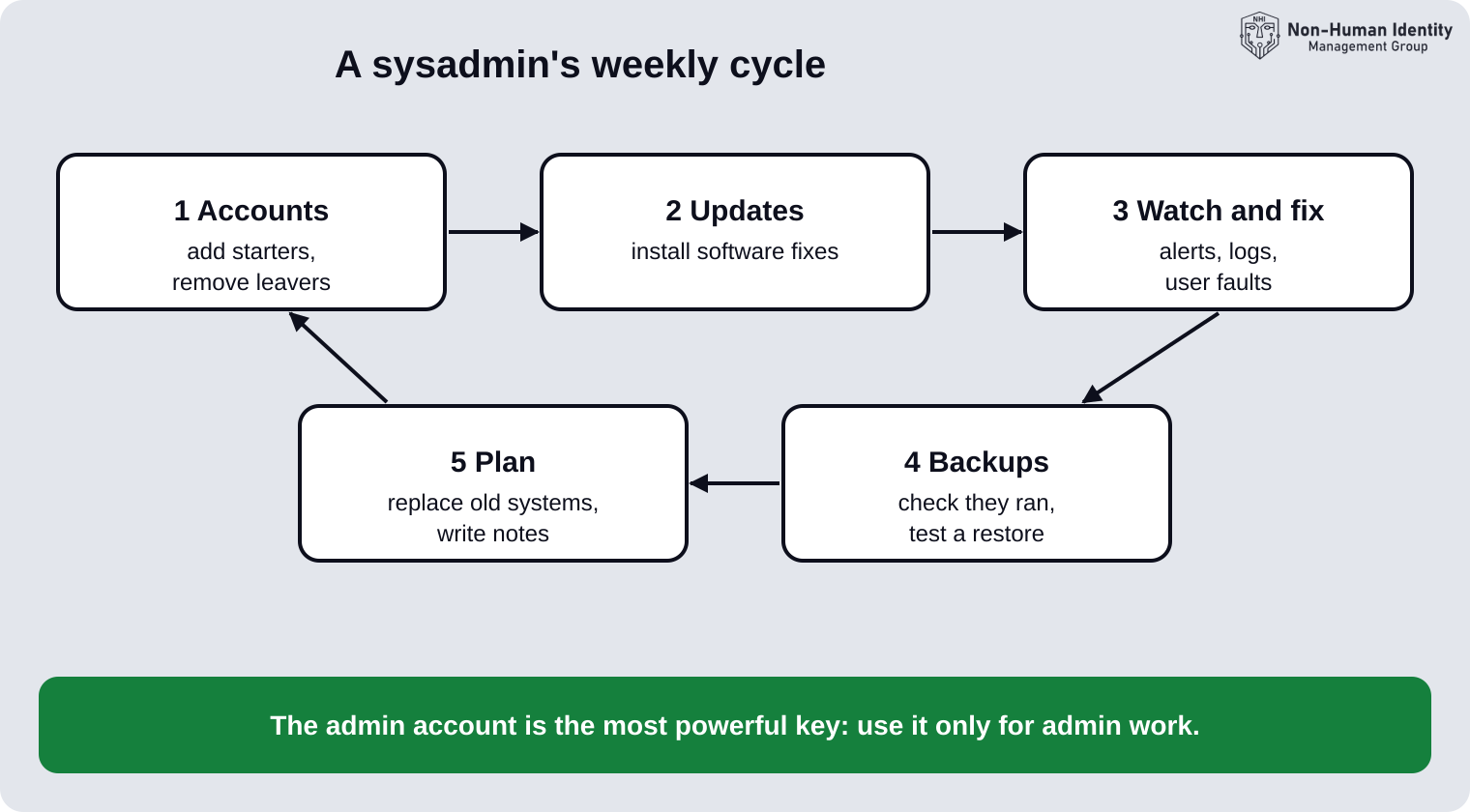
Because sysadmins hold powerful accounts, security guidance asks for extra care with them. The UK agency advises giving administrators only the access they need and removing it when it is no longer needed.[3] It also advises securing the computers used for admin work, so an attacker cannot use them to take over systems.[3]
Skills and tools
- Operating systems. Knowing Windows, Linux or both well, including settings and user management.
- Problem solving. Working calmly through a fault, one possible cause at a time.
- Basic scripting. Writing short scripts, small sets of instructions, to repeat routine tasks.
- Directories. Tools that store user accounts and groups, such as Active Directory.
- Ticketing and monitoring tools. Systems that track requests and raise alerts.
- Security habits. Updates, backups, least access and keeping records of changes.
- Clear communication. Explaining problems and changes to people who are not technical.
Routes in
There is no single route. In the US, many employers ask for a degree in computing or a related subject, while some accept a shorter college certificate. Some also want certifications from software makers.[1]
In England, a common route starts in IT support. The official careers service lists college courses, apprenticeships and starting as a trainee technician. It names network engineer and IT security co-ordinator as possible next steps.[4] Entry-level certificates, such as CompTIA A+, are often mentioned for support roles.[4]
A worked example
Wanda Zeller is the only systems administrator at Alder Removals, a fictional moving firm with 60 staff. Her Monday starts with the ticket list.
First she checks the overnight backup report. One job failed because a disk was full. She clears old files, runs the backup again and confirms it finished. Then she restores one test file, just to be sure it works.
Next comes a leaver. A driver left on Friday. Wanda switches off his account and removes him from the shared van schedule app. She notes the change in the ticket.
Mid-morning, Juno Rinaldi from sales asks for admin rights to install a route planning app. Wanda thinks of the school caretaker. You would not give every visitor the master key. Instead, she checks the app, installs it herself and adds it to the approved list. Juno gets what she needs without the extra power.
In the afternoon, Wanda plans the monthly updates. She picks a quiet evening, tells staff and checks that backups are fresh before she starts.
That evening she installs the updates on the servers one at a time. One server needs a restart. She checks that the booking system comes back before moving on. By ten o'clock, all six servers are updated, and she writes short notes for the next time.
Myths and mistakes
| What people think | What is true |
|---|---|
| Sysadmins just fix printers. | Support teams often handle printers. Sysadmins mostly run servers, accounts, updates and backups. |
| It is not a security job. | Updates, access and backups are some of the most important security tasks an organisation has. |
| Admins should use their admin account all day. | Security guidance advises limiting admin access and using it only where needed. |
| A backup that ran is a backup that works. | Only a test restore shows that the data can really be brought back. |
| You need a degree to start. | Many people start through support jobs, apprenticeships or college courses, then build up. |
What can I do this week?
- Read three systems administrator job adverts and list the tasks they share.
- Install a free Linux system on an old laptop or a virtual machine and create two user accounts.
- Turn on automatic updates on your own devices and check that they work.
- Read our Admin Rights for Beginners guide.
- Ask someone in IT what their least favourite routine task is, and why it matters.
Checklist
- I can explain what a systems administrator does in one sentence.
- I know what a server, a patch and an admin account are.
- I understand why leavers' accounts should be switched off quickly.
- I know that a backup should be tested with a restore.
- I can explain why admin accounts need extra care.
- I have looked at official careers pages, not just job boards.
- I have picked one first learning step.
Common questions
Is a systems administrator the same as IT support?
Not quite. IT support helps people with their own devices and problems. A systems administrator runs the shared systems behind them, such as servers and accounts. In small firms one person may do both. Many sysadmins started in support.
Do sysadmins need to code?
Some coding helps, but you do not need to be a developer. Many sysadmins write short scripts to repeat routine tasks, such as creating accounts. You can learn this on the job, one small script at a time.
Do sysadmins work nights and weekends?
Sometimes. Updates and repairs are often done outside office hours so they do not interrupt work. The US labour statistics office notes that some sysadmins work evenings, nights or weekends.[1] Many teams share an on-call rota.
Can a sysadmin move into cyber security?
Yes, and it is a common path. Sysadmins already handle updates, access and backups. Roles such as security engineer or SOC analyst build on that experience. See our IT to Cyber Security Career Guide.
How much does a systems administrator earn?
Pay varies by country, employer and experience, so we do not quote a figure. For official pay data, see the US Bureau of Labor Statistics page on this job,[1] or your own country's official careers service.
Where next?
Ready for the detail? Read the practitioner guide: Windows Server Hardening Guide. It goes further into secure server settings, admin account controls and how sysadmins lock down Windows servers in practice.
Also useful:
- Securing a Linux Server for Beginners
- Linux Server Hardening Guide
- Backup Security for Beginners
- Joiner, Mover, Leaver for Beginners
- Database Administrator for Beginners
Related NHI Mgmt Group resources: Cybersecurity Careers Guide · Career Change into Cyber Security Guide · Endpoint Security Engineer for Beginners
Key terms
- Operating system
- The main software that runs a computer, such as Windows or Linux.
- Patch
- An update that fixes a fault or security gap in software.
- Privileged account
- An account with extra power, such as the ability to change settings or manage other users.
- Least privilege
- Giving each person or program only the access it needs to do its job.
- Active Directory
- A Microsoft directory that stores user accounts and groups for a Windows network.
- Change management
- A process for planning, approving and recording changes to systems.
Sources and further reading
- Network and Computer Systems Administrators, Occupational Outlook Handbook. US Bureau of Labor Statistics, last modified 27 August 2026. https://www.bls.gov/ooh/computer-and-information-technology/network-and-computer-systems-administrators.htm, accessed 28 Nov 2026.
- Keeping devices and software up to date, Device security guidance. National Cyber Security Centre (UK), version 2.1, reviewed 13 May 2025. https://www.ncsc.gov.uk/collection/device-security-guidance/managing-deployed-devices/keeping-devices-and-software-up-to-date, accessed 28 Nov 2026.
- Secure system administration. National Cyber Security Centre (UK), version 1.1, reviewed 7 June 2023. https://www.ncsc.gov.uk/collection/secure-system-administration, accessed 28 Nov 2026.
- IT support technician, job profile. National Careers Service (England). https://nationalcareers.service.gov.uk/job-profiles/it-support-technician, accessed 28 Nov 2026.