An identity governance analyst checks that people have the right access at work, and can prove it.
This guide is for graduates, new IT hires and anyone curious about this behind-the-scenes security job. You do not need to code. If you like tidy records, spotting what does not add up and explaining a decision clearly, the role may suit you.
In short
- Identity governance analysts look after the record of who can use which systems, and why.
- They run access reviews, where managers confirm that each person still needs their access.
- They check that access is removed when people leave or change jobs, and they gather evidence for auditors.
- People often come in from IT support, audit, HR systems or business analysis work.
What you will learn
- Explain what an identity governance analyst does in one sentence.
- Describe how an access review works.
- Spot risky access, such as old accounts and clashing permissions.
- Check whether your skills fit the role.
- Access check (access review)
- a regular check where a manager confirms each person still needs their access.
- Starters, movers and leavers (joiner, mover, leaver)
- the three moments when someone's access should be added, changed or removed.
- Clashing access (segregation of duties)
- a rule that one person should not hold two powers that together allow fraud or serious mistakes.
What is an identity governance analyst?
Think of the membership secretary of a sports club. They keep the register of who belongs and which facilities each member can use. Each year, they check it and remove people who have left.
An identity governance analyst does this for an organisation's systems. Staff, contractors and even software get access to email, files and business apps. The analyst keeps track of that access. They ask who approved it, whether it is still needed and whether it was removed on time.
The role is part of identity governance, the wider work of controlling and proving who has access to what. It is different from building the sign-in systems, which is usually an engineer's job.
Where the comparison stops working: a club has one register. A large organisation may have hundreds of apps, each with its own list of users. The analyst's tools pull those lists together so they can be checked.
Why does it matter?
Access tends to pile up as people change jobs. Old accounts that nobody removed can be misused. Auditors and regulators also expect firms to show who has access and why.
If you are a graduate or new IT hire
What could happen: you see "IGA analyst" in a job advert and skip it because the term sounds technical.
Check this: read the duties. Many are about records, checks and clear writing.
If you work in audit or compliance
What could happen: you ask for access evidence and get a spreadsheet nobody can explain.
Check this: ask who owns access reviews in your organisation and how results are recorded.
If you manage a team
What could happen: you approve every line of an access review without reading it, and an old account stays open.
Check this: next time, question any access you do not recognise.
What does it look like?
A lot of the job is reading lists of access and spotting what does not fit. Here is a made-up, simplified extract.
Example only. All values are made up.
ACCESS REVIEW  Finance app  Q4  EXAMPLE plc
User          Team       Access              Manager says
FAKE-USER-01  Finance    Create payments     Keep        (1)
FAKE-USER-02  Finance    Create + approve    Keep        (2)
FAKE-USER-03  Sales      Read reports        Keep        (3)
FAKE-USER-04  (left)     Create payments     no answer   (4)
SVC-EXAMPLE   (none)     Read all            no answer   (5)
- Normal access for the job. Nothing to do.
- One person can both create and approve payments. That is a clash to raise.
- A salesperson who moved from finance. Does she still need this? In a real file, this line would contain her name and old team.
- Someone who has left still has access. It should be removed.
- An account used by software, with no owner. Someone must take responsibility for it.
Why this is risky: a review where everyone clicks "keep" looks complete, but it can leave clashes and old accounts in place.
The safer way: flag clashes, leavers and ownerless accounts before the review, then follow up until each one is fixed.
How does it work?
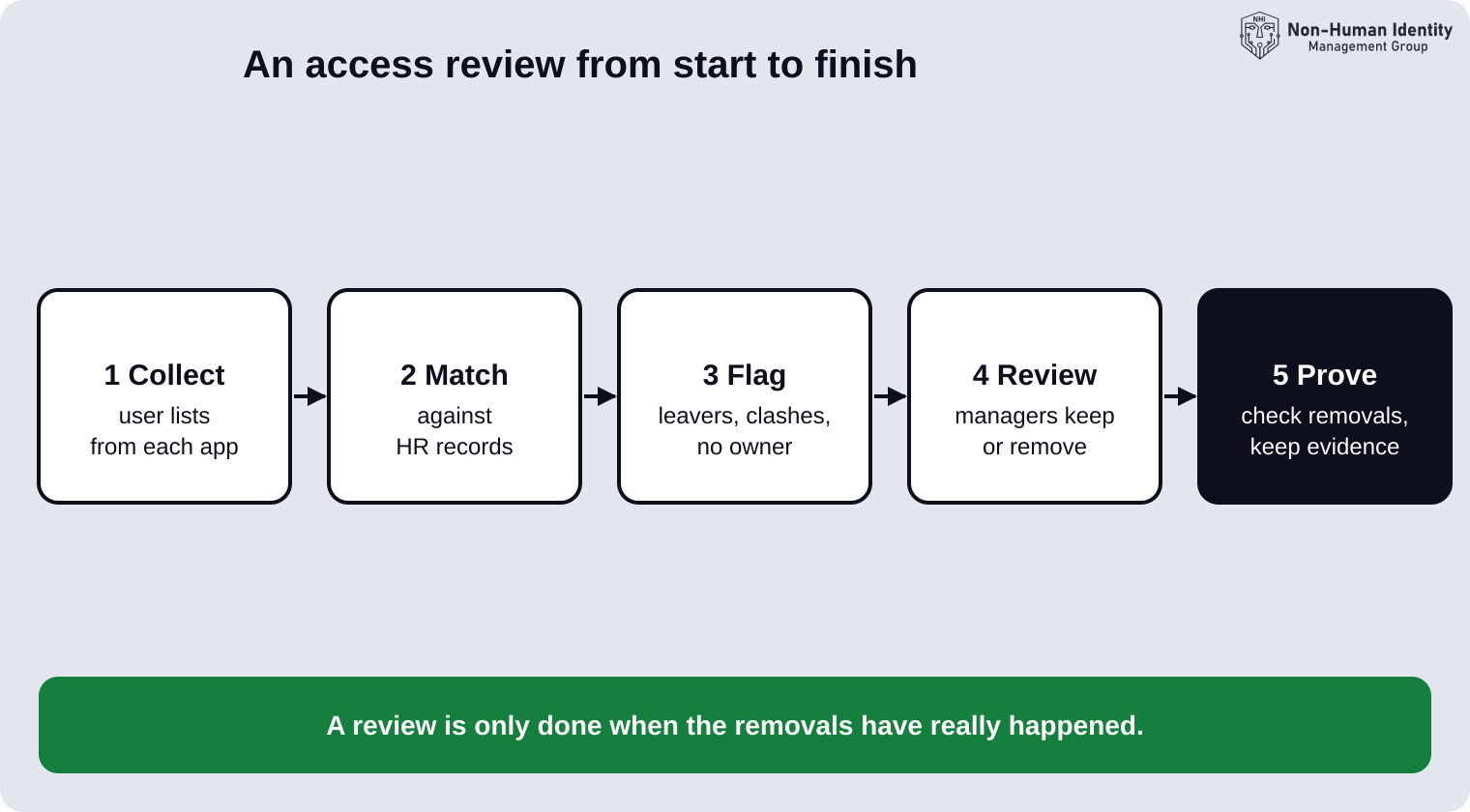
Every organisation is different, but the work often follows this cycle.
- Gather the facts. Pull user lists from each app and match them to staff records from HR.
- Watch starters, movers and leavers. Check that access is added, changed and removed when people join, move or leave. The UK's national cyber security agency says an access policy should cover this process.[1]
- Run access reviews. Send managers or app owners a list of who has access, and ask them to keep or remove each line.[2]
- Look for clashes. Check for one person holding two powers that should be split, such as preparing and approving payments.[3]
- Follow up and record. Make sure removals really happen, then keep the evidence for auditors.
Behind all of this sits a simple idea: give each person only the access they need. The UK agency recommends this, calling it least privilege.[1]
Skills and tools
- Working with data. Comparing lists in spreadsheets and spotting what does not match.
- Access ideas. Roles, groups, least privilege and segregation of duties.
- Governance tools. Platforms that collect access data and run reviews. Employers often name the one they use.
- Following a process. Doing each step the same way, so the result can be checked.
- Clear writing. Explaining a finding to managers and auditors who are not technical.
- Polite persistence. Chasing busy managers until reviews are finished.
Routes in
There is no single route. Many analysts start on the IT help desk, in audit, in HR systems or as business analysts. Some join straight from a degree in a graduate scheme. Certifications can help later. One example is CIDPRO, a vendor-neutral identity certification from the professional body IDPro.[4]
A worked example
Uma Thorne joined a fictional insurance firm as a junior identity governance analyst six months ago. Before that, she worked on the help desk. This quarter she is running the access review for the finance app.
Before sending the review out, she pulls the user list and matches it to HR records. Two names do not match anyone still employed. One left in the summer. The other is an account used by software, with no named owner.
She also spots that one person can both create and approve payments. Uma thinks of the club secretary checking the register. A member list should match reality, and two powers that should be split need a second look.
Uma sends the review to each manager with the risky lines marked. Gideon Haddad, the finance manager, confirms the clash was a mistake left over from a cover period. He asks for the approval power to be removed.
Uma raises tickets to remove the leaver's account and the extra power. She asks the app team to name an owner for the software account. A week later she checks the app again. Both removals have taken effect, and the software account now has an owner.
She saves the review results, the tickets and the before and after lists. When the auditors visit, she can show what was found and what was done.
Myths and mistakes
| What people think | What is true |
|---|---|
| It is just a paperwork job. | The paperwork leads to real changes, such as closing old accounts and splitting risky powers. |
| You need to be a programmer. | Data skills and clear writing matter more. Some scripting can help later. |
| Once managers click "keep", the job is done. | Reviews can be rubber-stamped. The analyst flags risks and checks that removals really happen. |
| Only people have access to review. | Software accounts also hold access, and they need owners and checks too. |
| It is the same as an IAM engineer. | Engineers build sign-in and access systems. Governance analysts check and prove the access is right. |
What can I do this week?
- Read three identity governance analyst job adverts and list the tasks they share.
- Practise matching two lists in a spreadsheet and finding the names that appear in only one.
- Read our Joiner, Mover, Leaver for Beginners guide.
- Ask someone in IT or audit how access reviews are run where you work.
Checklist
- I can explain what an identity governance analyst does in one sentence.
- I know what an access review is.
- I understand what joiners, movers and leavers mean for access.
- I can explain segregation of duties with an everyday example.
- I know why software accounts need owners too.
- I can point to times I checked records or followed a process carefully.
- I have picked one first learning step.
Common questions
What does IGA stand for?
IGA stands for identity governance and administration. It is the area of work that controls who gets access, checks it stays right and records the proof. Job adverts may say IGA analyst, identity governance analyst or access governance analyst for similar roles.
How is this different from an IAM engineer?
An IAM engineer builds and runs the systems people use to sign in and get access. An identity governance analyst checks that the access given out is right and can be proved. The two work closely. See IAM Engineer for Beginners.
Is this a good first job in security?
It can be. Some employers hire graduates or help desk staff into junior analyst roles. The work teaches how access, audit and business teams fit together. That knowledge carries across to many other security and identity jobs later on.
Do I need to learn a specific product?
Not at first. Employers often name the governance tool they use, and you can learn it on the job. The ideas behind access reviews, roles and segregation of duties are the same across tools. Learn those first.
How much does an identity governance analyst earn?
Pay varies by country, employer and experience, so we do not quote a figure. Official bodies do not publish one for this exact job title. Check your own country's official careers or labour statistics service for related roles.
Where next?
Ready for the detail? Read the practitioner guide: Identity Governance Analyst. It goes further into the skills and tool types employers test for, certifications and how the career progresses.
Also useful:
- Identity Governance for Beginners
- Access Reviews for Beginners
- Segregation of Duties for Beginners
- Privilege Creep for Beginners
- IAM Engineer for Beginners
Related NHI Mgmt Group resources: Cybersecurity Careers Guide · IAM Engineer Career Guide · Identity and Access Management for Beginners
Key terms
- Identity governance
- Controlling and proving who has access to which systems, and why.
- Access review
- A regular check where a manager or owner confirms each person still needs their access.
- Joiner mover leaver
- The process for adding, changing and removing access when people join, move or leave.
- Segregation of duties
- Splitting powers so one person cannot complete a risky task alone.
- Orphaned account
- An account with no current owner, such as one left behind by a leaver.
- Privilege creep
- The slow build-up of access as people change jobs and keep what they had.
- Least privilege
- Giving each person or program only the access it needs to do its job.
Sources and further reading
- Introduction to identity and access management. National Cyber Security Centre (UK), 22 January 2018. https://www.ncsc.gov.uk/guidance/introduction-identity-and-access-management, accessed 28 Nov 2026.
- What are access reviews? Microsoft Entra ID Governance documentation, Microsoft Learn, updated 12 March 2026 (one vendor's description). https://learn.microsoft.com/en-us/entra/id-governance/access-reviews-overview, accessed 28 Nov 2026.
- Glossary: separation of duty (from NIST SP 800-192). US National Institute of Standards and Technology, Computer Security Resource Center. https://csrc.nist.gov/glossary/term/separation_of_duty, accessed 28 Nov 2026.
- CIDPRO, Certified Identity Professional. IDPro. https://idpro.org/cidpro/, accessed 28 Nov 2026.