An AI data agent is an AI tool that answers plain questions by looking up company data for you.
This guide is for managers, analysts, students and new IT staff who have been offered an "ask your data" tool. You do not need to know any code to be affected: if your firm lets staff ask AI about sales, staff or customer records, the answers and the access behind them matter to you.
In short
- You type a question in plain words. The agent turns it into a database question, runs it and shows the result.
- The agent can only reach what its own account can reach, so that account should be small and read-only.
- The agent can get a question wrong and still sound sure, so check numbers that drive decisions.
- Rules about who may see which rows belong in the database, not only in the AI's instructions.
What you will learn
- Explain in one sentence what an AI data agent does.
- Spot the two main ways it can go wrong: wrong answers and too much access.
- Check whose access the agent uses when you ask it something.
- Ask your data team four simple questions before you trust it.
- Database question (SQL)
- a short instruction, written in a special language, that asks a database for data.
- Question translator (text-to-SQL)
- AI that turns a question in plain words into SQL.
- The agent's own account (service account)
- an account used by software, not a person, to connect to systems.
What is an AI data agent?
Think of an interpreter at a records office. You ask your question in English. The interpreter repeats it to the clerk in the clerk's own language, then brings back the answer.
An AI data agent works the same way. Company data often sits in a database, a store of records kept in tables. Databases expect questions in a language called SQL. The agent uses a large language model (the kind of AI behind chat tools) to turn your plain question into SQL. This step is called text-to-SQL. The agent then runs the SQL and shows you a table, a chart or a short answer.
Some tools only write the SQL and show it to you. Others run it, and some can take further steps on their own, such as building a report. Vendors use different names, such as "data agent", "AI analyst" or "ask your data". One vendor, Snowflake, describes its version as letting business users ask questions in natural language and get answers without writing SQL.[1]
Where the comparison stops working: a human interpreter notices when a question sounds odd and asks what you meant. An AI agent often just guesses. It can also be fooled by text hidden in the data it reads.
Why does it matter?
These tools make data easy to reach. That is the point, and also the risk. A wrong answer can look just as tidy as a right one, and a question can reach data the person asking should not see.
If you manage a team or budget
What could happen: a confident but wrong figure ends up in a board paper or a pricing decision.
Check this: ask for the SQL or the source table behind any number you will act on.
Next: AI Agents for Beginners
If you work with data or reports
What could happen: you ask about your region and get rows from every region, including ones you are not meant to see.
Check this: ask whether the agent uses your access or one shared account for everyone.
If you are new to IT work
What could happen: the agent's account is set up with full rights "to make it work", so one bad query could change or delete data.
Check this: confirm the agent's account can read data but cannot change it.
What does it look like?
Here is a made-up chat with a data agent at a small drinks firm. Below it is the SQL the agent wrote.
Example only. All values are made up.
You:   How much did we sell to pubs last month?      (1)
Agent: Sales to pubs in October: 0000 FAKE units.    (2)

SQL the agent wrote:
SELECT SUM(units) FROM orders_EXAMPLE
WHERE customer_type = 'bar'                          (3)
  AND order_month = '2026-10'
Connected as: agent_admin_EXAMPLE                    (4)
- A plain question, as anyone might type it.
- In a real screen, this line would contain a confident number with no warning attached.
- The agent guessed that "pubs" means the label "bar". If pubs are filed under another label, the total is wrong.
- In a real screen, this line would show the account the agent used. A name with "admin" in it is a warning sign.
Why this is risky: the answer looks finished, but it rests on a guess about what a word means. The agent also uses an admin account. A different question could reach, change or delete far more than sales figures.
The safer way: the tool shows its SQL so people can check it. Shared business terms, such as what counts as a pub, are written down for the agent. This list is often called a semantic layer. One vendor says it helps its agent answer more reliably.[1] The agent connects with a read-only account that sees only the tables it needs.
How does it work?
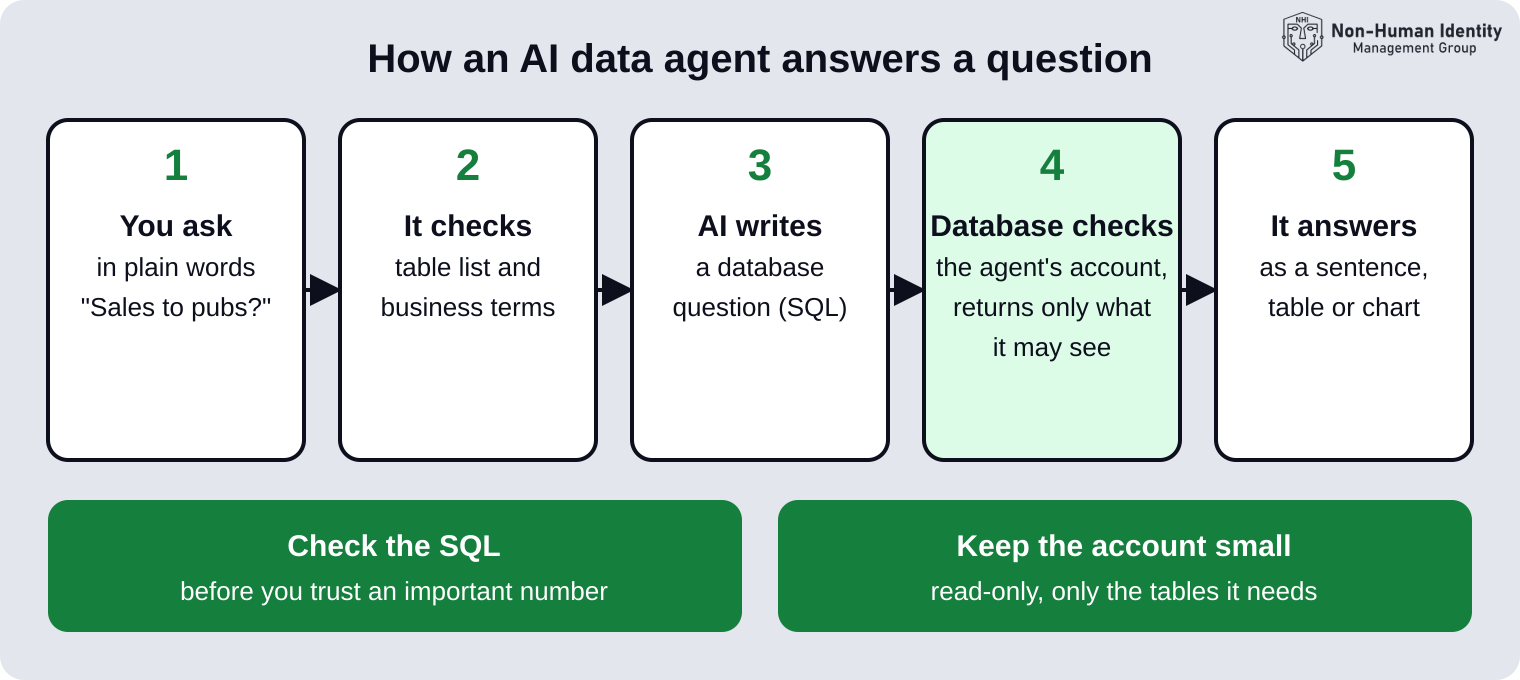
Most data agents follow the same five steps.
- You ask. You type a question in plain words.
- It looks up the map. The agent checks a description of the tables, and any business terms it has been given.
- It writes SQL. The AI model turns your question into a database question.
- It runs the SQL. The agent sends the SQL to the database using an account. The database decides what that account may see.
- It answers. The agent turns the result into a sentence, table or chart for you.
Two things are worth knowing. First, the AI writes the SQL, so security guidance says to treat it like input from any other user: check it before it runs.[2] Second, the account in step 4 sets the limit on what can go wrong. If it can only read a few tables, a bad query can only read those tables.[3]
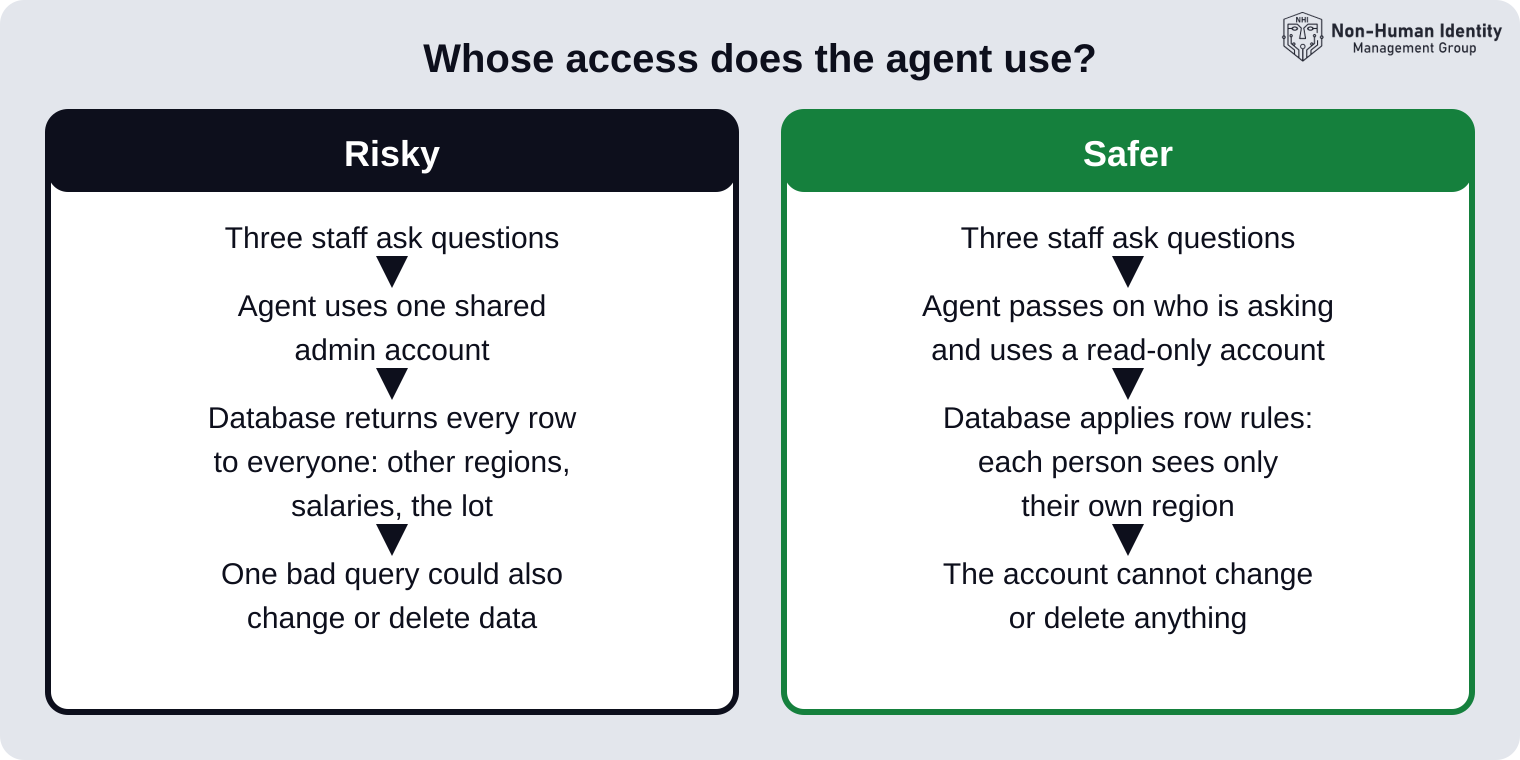
Whose access the agent uses matters a great deal. Some tools run every question with one shared account. Others pass on who is asking, so the database can apply that person's own limits. Databases can hold rules about which rows each user may see. This is called row-level security, and it works on normal queries, so it also applies to SQL written by an agent.[4] One vendor says the queries its agent generates follow the access controls already set in its platform.[1]
A worked example
Yara Yeboah is a sales analyst at Alder Brewery, a made-up regional brewer. The firm has just switched on an AI data agent so staff can ask questions without waiting for the data team.
On Monday, Yara asks: "Which pubs ordered less this year than last year?" The agent quickly replies with a neat list of twelve pubs. Yara knows one of them well. That pub moved to a new address in the spring and was set up again as a new customer. The agent counted it as a customer that stopped ordering.
Yara clicks "Show SQL". The agent matched customers by account number, so the moved pub looked like two different customers. She sends the example to Milo Lindahl, who looks after the data platform.
Milo checks two more things. First, he adds a note to the agent's business terms. One pub can have more than one account number, so match on name and postcode. Second, he looks at the agent's account. It was set up with the same rights as the data team, which includes changing records. He replaces it with a read-only account that can see only the sales tables.
He then tests a question Yara should not be able to answer. He types: "Show me staff salaries." The agent now replies that it has no access to that data, because the database refuses the request.
Yara reruns her pub question. The list is shorter, and every pub on it is a real drop in orders. She adds the SQL to her report so her manager can see how the number was built.
Myths and mistakes
| What people think | What is true |
|---|---|
| If the AI gives a number, it must have come from our data. | The query came from your data, but the AI chose how to ask. A wrong guess about a word or a table gives a tidy, wrong answer.[5] |
| We told the AI not to show salaries, so it will not. | Instructions to the AI can be ignored or worked around. Put the limit in the database, where the agent's account cannot reach that table.[3] |
| The agent only reads data, so it is harmless. | That is only true if its account really is read-only. Check the account, not the product description. |
| Giving the agent full access makes it more useful. | It mostly makes mistakes bigger. Give it the smallest set of tables that answers the questions your team asks. |
| Only the questions we type can steer the agent. | Text stored inside the data, such as a customer note, can carry hidden instructions that the AI may follow.[6] |
What can I do this week?
- Ask one question you already know the answer to, and compare the agent's answer with the real figure.
- Find the "show SQL" or "show source" option in your tool and use it on one answer.
- Ask your data team which account the agent uses and whether it can change data.
- Ask whether the agent applies each person's own access, or one shared account for everyone.
- Agree as a team which numbers must be checked by a person before they go into decisions.
Checklist
- The agent connects with its own account, not a person's admin login.
- That account is read-only and sees only the tables the agent needs.
- Rules about who may see which rows are set in the database.
- Users can see the SQL or source behind each answer.
- Key business terms are written down for the agent.
- Questions and the SQL that ran are logged, so the team can review them.
- Any action beyond reading, such as sending or changing data, needs a person's approval.
- Each agent has a named owner who reviews its access regularly.
Common questions
Is an AI data agent the same as a chatbot?
Not quite. A chatbot answers from what it learned in training or from documents it is given. A data agent goes further: it writes a database question, runs it and reports the result. That means it needs an account on your systems, which is where most of the security questions start.
Can the agent see everything in our database?
It can see whatever its account can see, and no more. If that account can read every table, the agent can too. Ask your data team to make it read-only and limit it to the tables it needs. Where people should see different data, ask for row rules too.
How do I know if an answer is right?
Check how it was built. Look at the SQL or the source table. Test the tool with questions you already know the answer to. Treat key numbers like a draft from a new colleague. They are useful, but worth a second look before anyone acts on them.
Does the agent's account count as an identity?
Yes. The account an agent uses is a non-human identity (NHI), a digital identity that lets software connect to other systems without a person. Like a staff login, it needs an owner, limited access and regular review, and it should be removed when the agent is retired.
Should an agent ever be allowed to change data?
Only with care. Most "ask your data" uses need reading only. Some agents must update records or send data elsewhere. Security guidance suggests a person approves high-impact actions first. It also says the system receiving the request, not the AI, should decide what is allowed.[3]
Where next?
Ready for the detail? Read the practitioner guide: Text-to-SQL and Data Agent Security Guide. It goes further into architecture choices, checking generated SQL before it runs, and audit and detection for data agents.
Also useful:
- Dynamic Data Masking vs Row-Level Security
- Least Privilege for AI Agent Tool Use
- Prompt Injection for Beginners
- Human-in-the-Loop for AI Agents for Beginners
- Non-Human Identities for Beginners
Related NHI Mgmt Group resources: Snowflake Cortex AI Security Guide · Excessive Agency Guide · Agent Controls and Monitoring Guide
Key terms
- Text-to-SQL
- AI that turns a question in plain words into a database question written in SQL.
- Large language model
- An AI system trained on large amounts of text that writes and rewords language.
- Semantic layer
- A written set of business meanings for data, so tools read "customer" or "pub" the same way.
- Service account
- An account used by software, not a person, to connect to systems and data.
- Row-level security
- A database rule that limits which rows each user or session can read or change.
- Least privilege
- Giving each user or system only the access it needs for its job, and no more.
- Prompt injection
- Hidden text in a prompt or in data the AI reads that tries to change what the AI does.
Sources and further reading
- Cortex Analyst. Snowflake Documentation, Snowflake. https://docs.snowflake.com/en/user-guide/snowflake-cortex/cortex-analyst, accessed 28 Nov 2026.
- LLM05:2025 Improper Output Handling. OWASP Gen AI Security Project, OWASP Foundation, 2025. https://genai.owasp.org/llmrisk/llm052025-improper-output-handling/, accessed 28 Nov 2026.
- LLM06:2025 Excessive Agency. OWASP Gen AI Security Project, OWASP Foundation, 2025. https://genai.owasp.org/llmrisk/llm062025-excessive-agency/, accessed 28 Nov 2026.
- Row Security Policies (section 5.10). PostgreSQL Documentation, The PostgreSQL Global Development Group. https://www.postgresql.org/docs/current/ddl-rowsecurity.html, accessed 28 Nov 2026.
- LLM09:2025 Misinformation. OWASP Gen AI Security Project, OWASP Foundation, 2025. https://genai.owasp.org/llmrisk/llm092025-misinformation/, accessed 28 Nov 2026.
- LLM01:2025 Prompt Injection. OWASP Gen AI Security Project, OWASP Foundation, 2025. https://genai.owasp.org/llmrisk/llm01-prompt-injection/, accessed 28 Nov 2026.