An AWS access key is a two-part secret that lets a program use an Amazon Web Services account.
This guide is for students, new developers and anyone who has been handed a key that starts with "AKIA". You do not need to run servers to be affected: if your business pays an AWS bill, a leaked key can add to it.
In short
- An access key has two parts: an ID that names the key and a secret that proves it. Together they let a program act in your AWS account.
- Keys that start with "AKIA" last until someone deletes them. Keys that start with "ASIA" are temporary.
- Leaked keys are often found and tried very fast. In one study, a key put on a public site was used within five minutes.
- AWS advises temporary credentials instead of long-lasting keys wherever possible. If a key leaks, replace it at once.
What you will learn
- Explain what the two parts of an access key do.
- Spot a long-lasting key by how its ID starts.
- Explain why a leaked key needs action straight away.
- Check whether your team could use temporary credentials instead.
- Key name (access key ID)
- the first part of the key, which says which key is being used.
- Key secret (secret access key)
- the second part, which proves the program really holds the key.
- Short-term key (temporary credential)
- a key that stops being valid after a set time.
What is an AWS access key?
Think of a front door key. The door does not ask who is holding it. Whoever has the key can walk in.
An AWS access key works the same way. Amazon Web Services (AWS) is a cloud service where businesses rent computers and storage. People sign in to it with a password. Programs, such as an app or a script, often use an access key instead.[1]
The key has two parts. The access key ID is like the number stamped on the key. The secret access key is the part that actually opens the door. A program needs both parts together.[1]
Access keys are a type of non-human identity (NHI). An NHI is a digital identity, or the credential behind it, that lets a machine, app or service connect without a person.
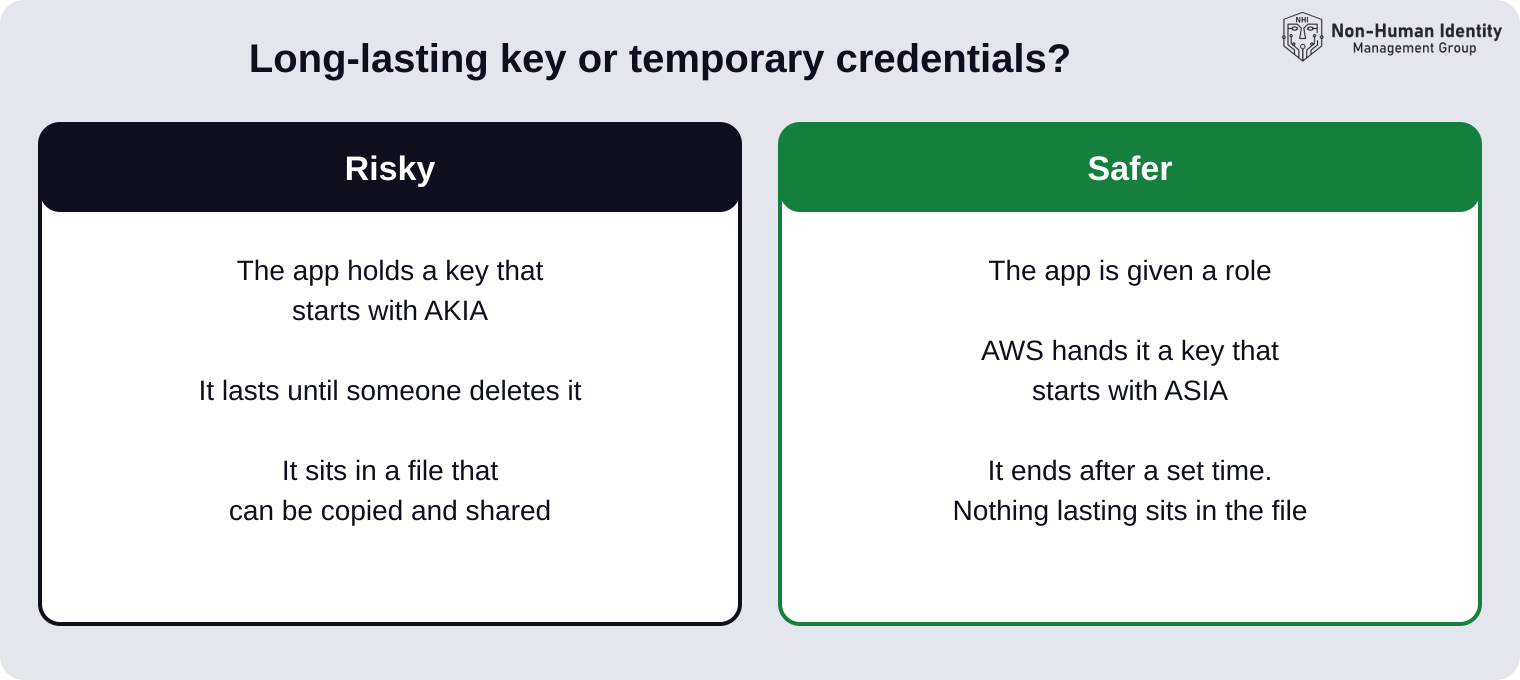
The first four letters of the ID tell you what kind of key it is. IDs that start with "AKIA" belong to long-lasting keys. IDs that start with "ASIA" belong to temporary keys, which only work for a limited time.[2]
Where the comparison stops working: a lost front door key is easy to notice, because it is gone. A copied access key leaves the original in place, so you may not know anyone else has it.
Why does it matter?
A long-lasting key keeps working until someone deletes it. If it leaks, a stranger can use it with whatever permissions it has, and the bill comes to you.
If you are learning AWS
What could happen: you put a key in a practice project, share the project publicly, and wake up to a large bill.
Check this: use AWS's browser-based tools or temporary credentials while you learn.
Next: AWS IAM for Beginners
If you are a new developer
What could happen: a key you paste into code is copied into the project's history and every copy of it.
Check this: keep keys out of code. Let the app get temporary credentials from AWS where it can.
If you run a small business on AWS
What could happen: an old key made by a past contractor is still active, and nobody knows who holds it.
Check this: ask for a list of every access key, who owns it and when it was last used.
What does it look like?
Programs often read access keys from a small settings file on a computer. Here is a made-up one.
Example only. All values are made up.
# credentials file on a developer's laptop (EXAMPLE)
[default]
aws_access_key_id = EXAMPLE-KEY-ID-0000          (1)
aws_secret_access_key = FAKE-SECRET-0000-EXAMPLE (2)
- In a real file, this line would contain the key's ID. A long-lasting key's ID starts with "AKIA".[2]
- In a real file, this line would contain the secret part, stored as plain text that anyone with the file can read.[1]
Why this is risky: the key lasts until someone deletes it. If the file is copied, the key goes with it.
The safer way: people sign in through AWS's single sign-on service, which hands out temporary credentials. Apps running on AWS use a role, which gives them temporary credentials automatically.[3]
How does it work?
Here is how a leaked key often travels from a laptop to a stranger.
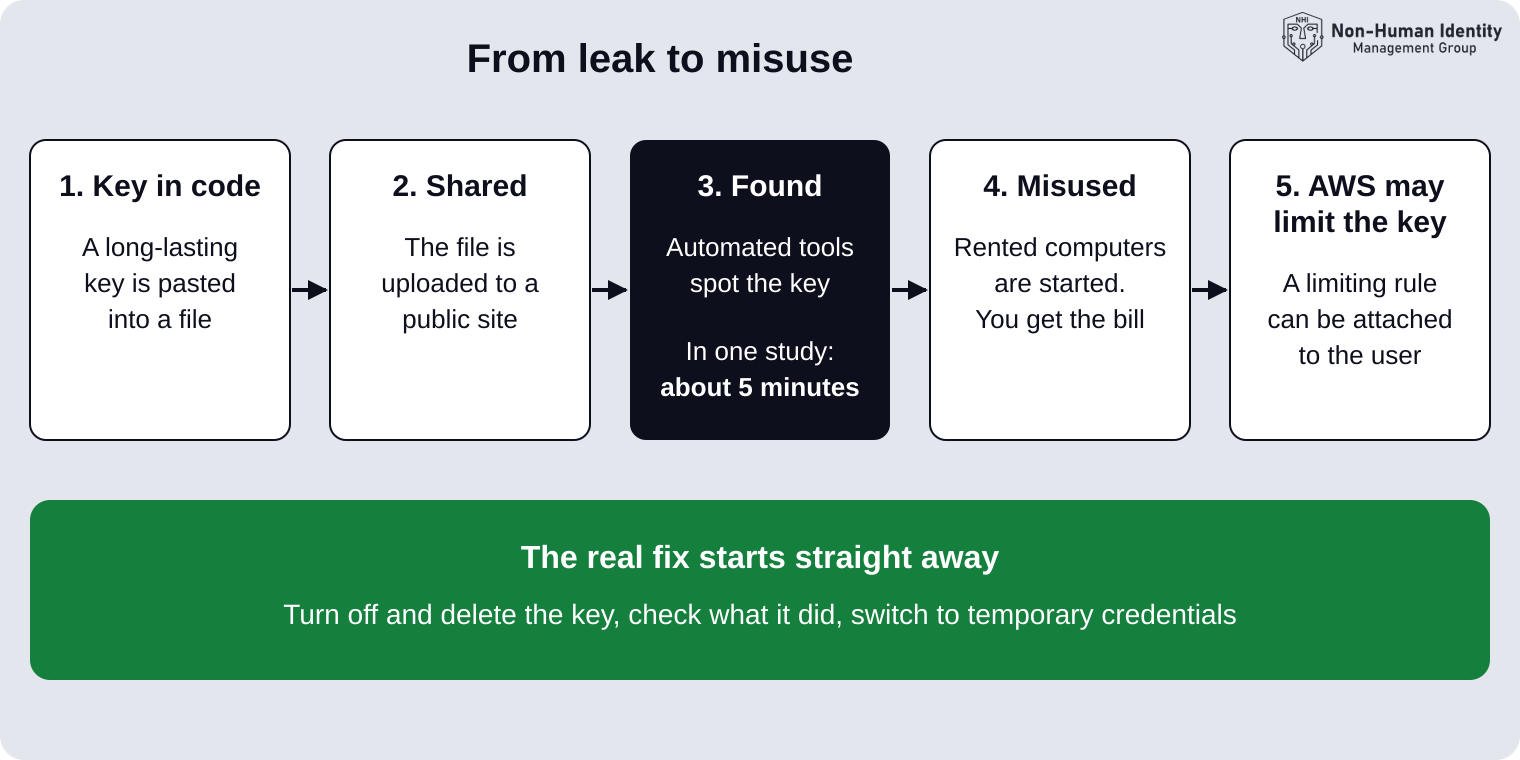
- The key is made. Someone creates a long-lasting key for a program. AWS shows the secret part only once, at that moment.[1]
- The key slips out. It ends up in code, a settings file or a message, and that gets shared somewhere public.
- Automated tools find it. Criminals run tools that watch public code for keys. In one study, a group found and used exposed keys within five minutes.[4]
- The key is misused. In that study, the group started rented computers in the victims' accounts to mine cryptocurrency, which the account owner pays for.[4]
- AWS may step in. When AWS learns a key is public, it can attach a limiting rule to the user. This rule is meant to cut fraud while you fix the problem.[5]
- You make the real fix. You turn off and delete the leaked key, check what it did, and give the program a safer way to connect.
A worked example
Darius Jensen is a student who builds a small weather app for a fictional coding club. To test it, he makes an AWS access key and pastes it into the app's code.
On Saturday evening he uploads the project to a public code site to show the club. On Sunday morning he gets an email from AWS saying a key from his account appears to be public. He also sees new computers running in his account that he did not start.
Darius remembers the front door key. Someone has a copy, and the copy still works. He messages Dario Erikson, the club's mentor, who calls him straight away.
Dario talks him through it. First, Darius turns off the leaked key and then deletes it. Next, he stops and removes the computers he did not start. Then he checks the account's activity records, which show what the key was used for.
Dario reminds him to read the AWS support message and follow its steps, rather than removing the limiting rule AWS attached. They also contact AWS support about the extra charges.
Last, Darius changes how the app connects. He removes the key from the code and runs the app with a role, so it gets temporary credentials. He also turns on billing alerts.
Dario tells the club the story at the next meeting. The lesson is simple: a key in public code can be found very quickly, and acting fast keeps the damage small.
Myths and mistakes
| What people think | What is true |
|---|---|
| Nobody will find my key in a small project. | Automated tools watch public code for keys. In one study, keys were used within five minutes of going public.[4] |
| Deleting the file fixes a leak. | The key still works until it is turned off. Copies may remain in history and elsewhere. |
| I can look up my secret later if I lose it. | AWS shows the secret only when the key is made. If it is lost, make a new key and delete the old one.[1] |
| The account's main sign-in should have a key for emergencies. | AWS says not to create access keys for the account's root user.[1] |
| AWS's limiting rule means it is all fixed. | The rule limits damage. You still need to delete the key and follow the support case steps.[5] |
What can I do this week?
- List every access key in your AWS account, with its owner and when it was last used.
- Delete keys nobody uses, and any key on the root user.
- Search your code and settings files for access keys, and move them out.
- Turn on billing alerts so a sudden spike gets noticed.
- Pick one app and plan to switch it to a role with temporary credentials.
Checklist
- The root user has no access keys.
- People sign in with temporary credentials, not long-lasting keys.
- Apps on AWS use roles rather than stored keys.
- Every remaining key has a named owner and a reason to exist.
- No keys are written in code, shared files or chat messages.
- Unused keys are found and deleted on a regular schedule.
- Billing alerts and activity records are switched on.
- Everyone knows to report a leaked key straight away, with no blame.
Common questions
What does AKIA mean at the start of a key?
AKIA marks the ID of a long-lasting access key. It stays valid until someone turns it off or deletes it. IDs that start with ASIA belong to temporary keys from AWS's token service, which end after a set time.[2]
Is an access key the same as my AWS password?
No. Your password is for signing in to the AWS website as a person. An access key is for programs and command-line tools. It has two parts, an ID and a secret, and both are needed together.[1]
What should I do first if my key leaks?
Turn the key off and delete it, then make a new one only if you still need it. Next, check what the key did and remove anything you did not create. Follow any AWS support message. See the Cloud Access Key Leak Playbook.
How many access keys can one user have?
Two at most. AWS allows a maximum of two access keys per user. That lets you make a new key, move your programs to it, and then delete the old one without a gap.[1]
Why did AWS add a policy to my user?
AWS may attach a limiting rule when it learns a user's key has been exposed. It is meant to reduce fraud while you fix the problem. AWS asks you not to remove it, and to follow the steps in the support case instead.[5]
Where next?
Ready for the detail? Read the practitioner guide: How to find secrets in Lambda environment variables. It goes further into where keys hide inside running cloud functions, how to search for them across an account and how to move them somewhere safer.
Also useful:
- AWS Access Keys Security Guide
- How to rotate an AWS IAM access key without downtime
- Cloud Root Accounts for Beginners
- API Keys for Beginners
- Non-Human Identities for Beginners
Related NHI Mgmt Group resources: Cloud Access Key Leak Playbook · How to find unused AWS IAM roles and access keys · AWS Security for Beginners
Key terms
- Access key
- A long-lasting, two-part secret that lets a program use an AWS account.
- Temporary credential
- A key that stops being valid after a set time.
- IAM user
- An account inside AWS for one person or program, which can hold access keys.
- AWS IAM role
- A set of permissions that a program can take on to get temporary credentials.
- Root user
- The all-powerful first sign-in of an AWS account, which should have no access keys.
- CloudTrail
- The AWS service that records actions taken in an account.
- Secret
- A password, key, token or certificate that software uses to prove who it is.
Sources and further reading
- Manage access keys for IAM users. AWS Identity and Access Management User Guide, Amazon Web Services. https://docs.aws.amazon.com/IAM/latest/UserGuide/id_credentials_access-keys.html, accessed 28 Nov 2026.
- IAM identifiers (unique ID prefixes). AWS Identity and Access Management User Guide, Amazon Web Services. https://docs.aws.amazon.com/IAM/latest/UserGuide/reference_identifiers.html, accessed 28 Nov 2026.
- Alternatives to long-term access keys. AWS Identity and Access Management User Guide, Amazon Web Services. https://docs.aws.amazon.com/IAM/latest/UserGuide/security-creds-programmatic-access.html, accessed 28 Nov 2026.
- EleKtra-Leak: Cryptojacking campaign uses exposed AWS IAM credentials from GitHub. Unit 42, Palo Alto Networks, 30 October 2023. https://unit42.paloaltonetworks.com/malicious-operations-of-exposed-iam-keys-cryptojacking/, accessed 28 Nov 2026.
- AWSCompromisedKeyQuarantineV3. AWS Managed Policy Reference, Amazon Web Services. https://docs.aws.amazon.com/aws-managed-policy/latest/reference/AWSCompromisedKeyQuarantineV3.html, accessed 28 Nov 2026.