BGP is the system the internet's networks use to tell each other which addresses they can reach.
This guide is for students, managers and anyone curious about why a big website can vanish for a whole country at once. You do not need to run a network to be affected: if your business has a website, an online shop or cloud apps, your customers reach you over routes that BGP chooses.
In short
- The internet is made of many separate networks. BGP is how they share directions with each other.
- Each network announces which addresses it looks after, and its neighbours pass that news on.
- BGP was built on trust, so a wrong announcement, by mistake or on purpose, can send traffic the wrong way.
- Signed records, called RPKI, let networks check who is allowed to announce an address. They help, but they do not check the whole route.
What you will learn
- Explain in one sentence what BGP does.
- Spot the difference between a route hijack and a route leak.
- Explain why a mistake in one country can break a website everywhere.
- Ask your internet or hosting provider whether they protect your addresses.
- Address on the internet (IP address)
- a number that tells the internet where to deliver data, a bit like a postcode.
- Independent network (autonomous system)
- one organisation's network, such as an internet provider, a university or a large company, with its own ID number.
- Directions message (route announcement)
- a message one network sends its neighbours saying "you can reach these addresses through me".
What is BGP?
Think of the internet as a huge map of towns, with signposts at every junction. Each town tells its neighbours which places can be reached through it. The neighbours update their signposts and pass the news on.
BGP, short for Border Gateway Protocol, is the set of rules for those signposts. Each "town" is a separate network run by one group, such as an internet provider, a cloud firm or a university. These networks are called autonomous systems, and the internet is made of a great many of them.[1]
When data leaves your laptop for a website, it hops from network to network. At each border, BGP has already picked the next hop. It uses the directions it was given and the network's own business deals.[1]
Where the comparison stops working: road signs belong to one council. Internet networks belong to many rival companies, and each one decides for itself which signposts to trust.
Why does it matter?
BGP mostly trusts what neighbours say. So a wrong signpost can spread fast and send traffic somewhere it should not go.[1] In 2008, a network in Pakistan announced part of YouTube's addresses to block the site at home. A larger provider passed that on, and YouTube traffic from around the world went to Pakistan for about two hours.[2]
If you run a business with a website or online shop
What could happen: customers in some places cannot reach your site, or their traffic takes a strange path, and you are not the cause.
Check this: ask your hosting or internet provider whether they publish signed route records for your addresses.
If you are studying networking or security
What could happen: you assume the internet checks every route, and miss why outages and hijacks happen.
Check this: learn the difference between "who may announce an address" and "which path the data takes".
If you manage IT or suppliers
What could happen: a provider's routing mistake takes your services offline, and nobody knows who to call.
Check this: keep a current contact for your internet provider's network team and agree how they will alert you.
Next: BGP Hijack Response
What does it look like?
Here is a made-up, simplified view of the directions one network might hold for a small company's website. Real tools show far more detail.
Example only. All values are made up.
Addresses          Reached through        Signed record?
203.0.113.0/24     EXAMPLE-NET 64500      yes, origin matches     (1)
203.0.113.0/25     FAKE-NET 64511         no, origin differs      (2)
198.51.100.0/24    EXAMPLE-NET 64500      no record published     (3)
- The usual route. The network that owns these addresses announces them, and a signed record agrees.
- In a real file, this line would contain a different network claiming a smaller slice of the same addresses. Routers prefer the closer match, so traffic may follow it.
- No signed record exists, so other networks have nothing to check this announcement against.
Why this is risky: line 2 can pull traffic away from the owner. Line 3 cannot be checked at all.
The safer way: the address owner publishes signed records for all its addresses. Networks that check them can drop announcements that do not match.[4]
How does it work?
Here is the journey of one set of directions.
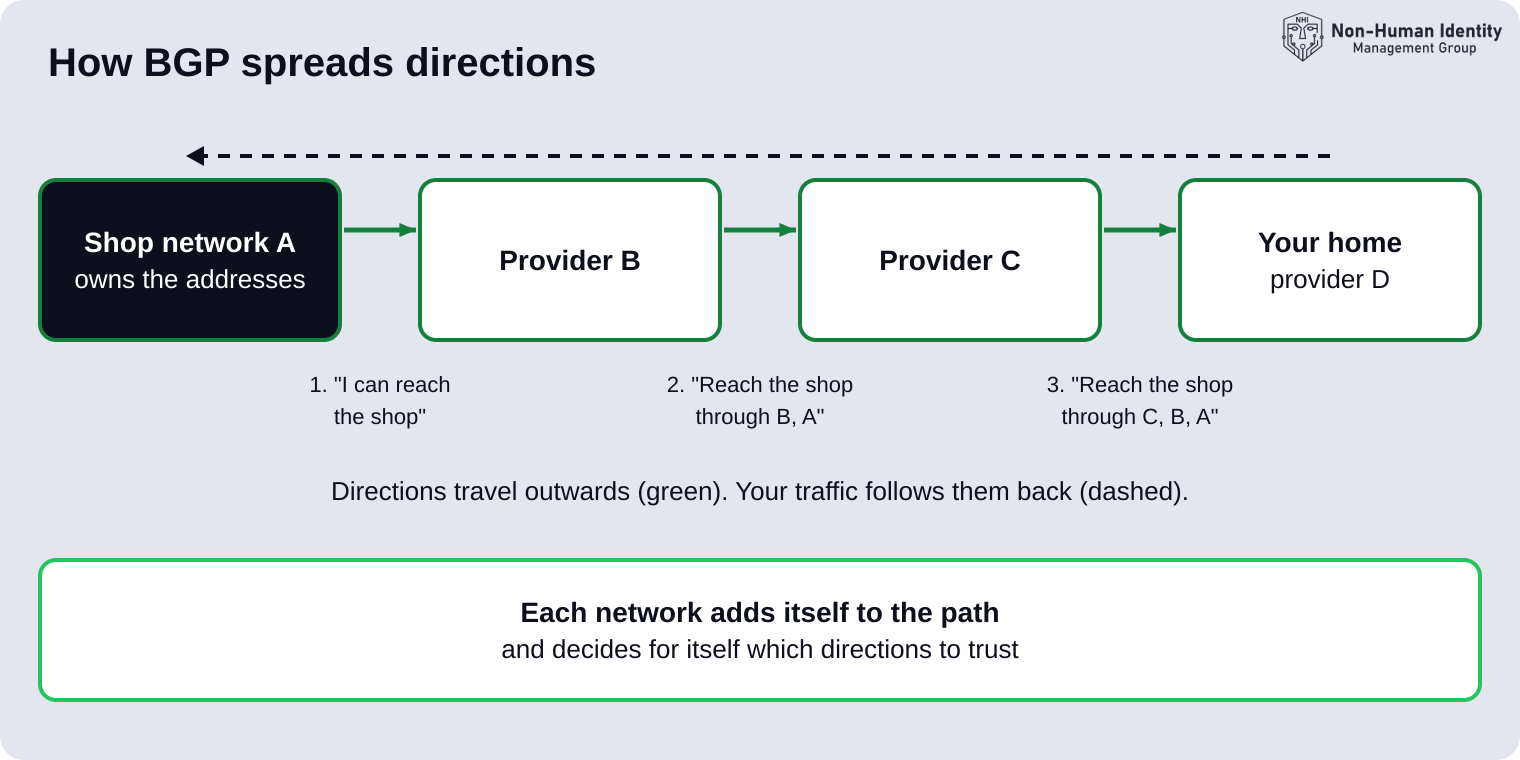
- A network announces. The network that looks after some addresses tells its neighbours, "you can reach these through me".
- Neighbours pass it on. Each neighbour adds itself to the path and tells its own neighbours. The news spreads across the internet.
- Routers pick a path. Each network compares the routes it has heard and picks one, using its own rules and business deals.[1]
- Traffic follows the signposts. Your data hops from network to network along the chosen path.
- Things change. If a network withdraws its announcement, its neighbours remove that route. If nobody announces the addresses, they become unreachable.
Two kinds of trouble come up often. A route hijack is when a network announces addresses it does not look after, so traffic goes to the wrong place. It can be a mistake or deliberate.[1] A route leak is when a network passes on directions it was meant to keep to itself. Traffic then takes a detour it was never meant to take.
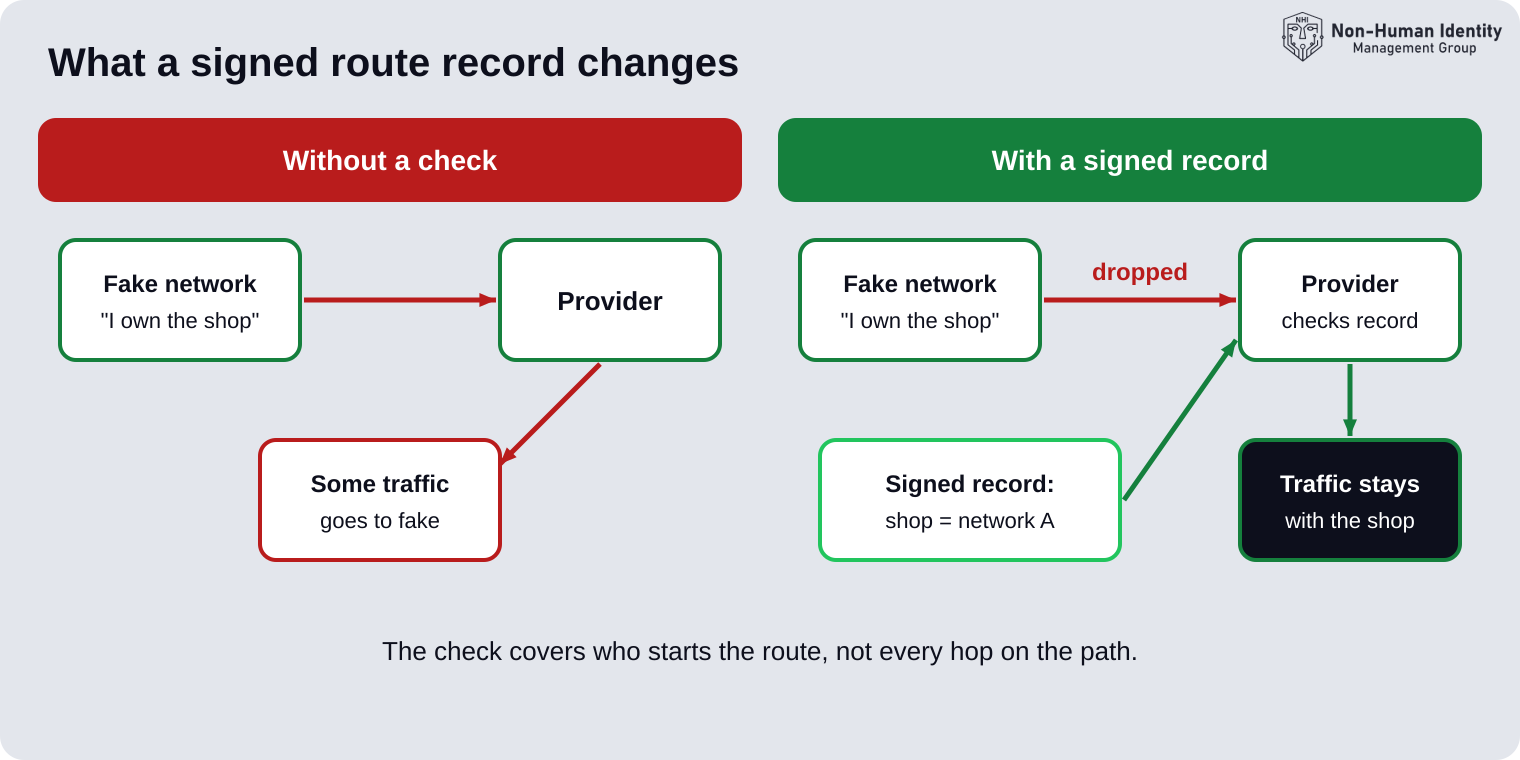
A fix called RPKI (Resource Public Key Infrastructure) lets an address owner sign a record saying which network may announce its addresses. Other networks can check announcements against it.[3] This checks the starting point of a route, not the whole path, so it helps most against wrong owners and less against leaks.[4]
A worked example
Elif Delmar runs Marigold Gym, a fictional chain of three gyms. Members book classes on its website, which a small hosting company looks after.
One Saturday morning, members in one region start messaging. The booking page will not load for them, but it works for Elif at home.
Elif calls Dana Yeboah, the network engineer at the hosting company. Dana checks the website first. It is running normally. Then she looks at public route monitoring tools.
She sees that another network is announcing a smaller slice of the hosting company's addresses. Remembering the signposts, she explains it to Elif simply. "Someone has put up a wrong sign. Some traffic for your site is being sent to them."
Dana announces the same smaller slices herself, so routers have a matching, more specific sign pointing back to her. She then contacts the other network's team. They say it was a typing mistake in a settings change and withdraw it within the hour.
Bookings recover. Some members may have reached the wrong network during the problem. So Elif posts a short note asking them to check their booking was saved.
The next week, Dana publishes signed route records for all of the hosting company's addresses. She explains to Elif that networks which check these records can now drop a wrong announcement like that one. Networks that do not check them may still accept it, so monitoring stays on.
Myths and mistakes
| What people think | What is true |
|---|---|
| The internet checks that every route is genuine. | BGP largely trusts what neighbouring networks announce. Checks like RPKI are added on top, and not every network uses them.[4] |
| If my website is down, my server must be broken. | Sometimes the server is fine and the routes to it are wrong or missing.[5] |
| RPKI stops all route problems. | It checks who may start a route, not the full path, so leaks can still happen.[4] |
| Route hijacks are always attacks. | Many are mistakes, such as a typing error in a network's settings. |
| Only internet providers need to care. | Any business that relies on being reachable online is affected. Ask your provider how they protect your addresses. |
What can I do this week?
- Find out who provides the internet addresses your website and services use.
- Ask that provider whether they publish signed route records (RPKI) for those addresses.
- Ask whether your provider checks the routes it receives from other networks.
- Save a current contact for your provider's network team in your incident plan.
Checklist
- You know which provider or providers announce your internet addresses.
- Signed route records exist for all of your addresses, and they are kept up to date.
- Your providers check the routes they accept from others.
- Someone watches public route monitoring for your addresses and gets alerts.
- Your incident plan covers "our site is unreachable but our servers are fine".
- Network contact details are current in public registry records.
Common questions
What is a BGP hijack in simple terms?
It is when a network tells the internet it looks after addresses that are not its own. Other networks may believe it and send traffic there. Sometimes it is a typing mistake, and sometimes it is deliberate, for example to read or block traffic.
What is the difference between a route hijack and a route leak?
A hijack claims addresses that belong to someone else. A leak passes on genuine directions to networks that were never meant to receive them, so traffic takes a detour. Both send data the wrong way, but they need different checks to catch them.
Can BGP problems take down big websites?
Yes, they can. In 2021 a faulty maintenance command cut Facebook's own network links, and its address servers then withdrew their BGP announcements. The rest of the internet lost the directions to Facebook's services until the network was restored.[5]
What is RPKI?
RPKI is a way for address owners to publish signed records saying which network may announce their addresses. Networks that check these records can drop announcements from the wrong network. It checks where a route starts, not every hop along the way.
Is there an industry effort to fix routing security?
Yes, there is. A global initiative called MANRS asks networks to filter wrong routes and block faked addresses. It also asks them to keep contact details current and publish routing data for others to check. Networks join it voluntarily.[6]
Where next?
Ready for the detail? Read the practitioner guide: BGP and Routing Security Guide. It goes further into signed route records and route checking, route leak protection and how providers filter what they accept.
Also useful:
- IP Addresses and Subnets for Beginners
- How DNS Works for Beginners
- RPKI Route Origin Validation Guide
- BGP Monitoring
Related NHI Mgmt Group resources: BGP Hijack Response · RPKI vs BGP Prefix Filtering · DDoS Attacks for Beginners
Key terms
- BGP
- Border Gateway Protocol, the system networks use to share directions to internet addresses.
- Autonomous system
- One organisation's network, with its own ID number, that exchanges directions with other networks.
- IP address
- A number that tells the internet where to deliver data.
- Route hijack
- When a network announces addresses that are not its own, by mistake or on purpose.
- Route leak
- When a network passes on directions it should have kept to itself, sending traffic on a detour.
- RPKI
- Signed records that say which network may announce a set of addresses, so others can check.
Sources and further reading
- Cloudflare Learning Center, "What is BGP? BGP routing explained". https://www.cloudflare.com/learning/security/glossary/what-is-bgp/, accessed 28 Nov 2026.
- RIPE NCC, "YouTube Hijacking: A RIPE NCC RIS case study", 2008. https://www.ripe.net/about-us/news/youtube-hijacking-a-ripe-ncc-ris-case-study/, accessed 28 Nov 2026.
- RIPE NCC, "Resource Certification (RPKI)". https://www.ripe.net/manage-ips-and-asns/resource-management/rpki/, accessed 28 Nov 2026.
- Cloudflare blog, "RPKI: The required cryptographic upgrade to BGP routing", 19 Sep 2018. https://blog.cloudflare.com/rpki/, accessed 28 Nov 2026.
- Meta Engineering, "More details about the October 4 outage", 5 Oct 2021. https://engineering.fb.com/2021/10/05/networking-traffic/outage-details/, accessed 28 Nov 2026.
- MANRS, "About MANRS". https://manrs.org/about/, accessed 28 Nov 2026.