Cloud computing means renting computers, storage and apps from a provider and using them over the internet.
This guide is for anyone who keeps hearing "it's in the cloud" and wants to know what that really means. You do not need a technical background: if your business uses online email, shared files or a web shop, you already use the cloud.
In short
- "The cloud" is other people's computers in large buildings called data centres, which you reach over the internet.
- You usually pay for what you use, and you can add or remove capacity quickly.
- There are three main kinds: rented computers, a ready platform to build on, and ready-made apps.
- The provider runs the buildings and machines. Your accounts, settings and data stay your job.
What you will learn
- Explain cloud computing in one sentence.
- Spot which kind of cloud service you are using.
- Check the first few settings that keep your cloud accounts safe.
- Ask a provider the right questions before you sign up.
- Online computing (cloud computing)
- computers, storage and apps you rent from a provider and use over the internet.
- Computer building (data centre)
- a large, secure building full of computers that a provider runs for many customers.
- Ready-made app (SaaS)
- finished software you use in a web browser or app, such as online email.
What is cloud computing?
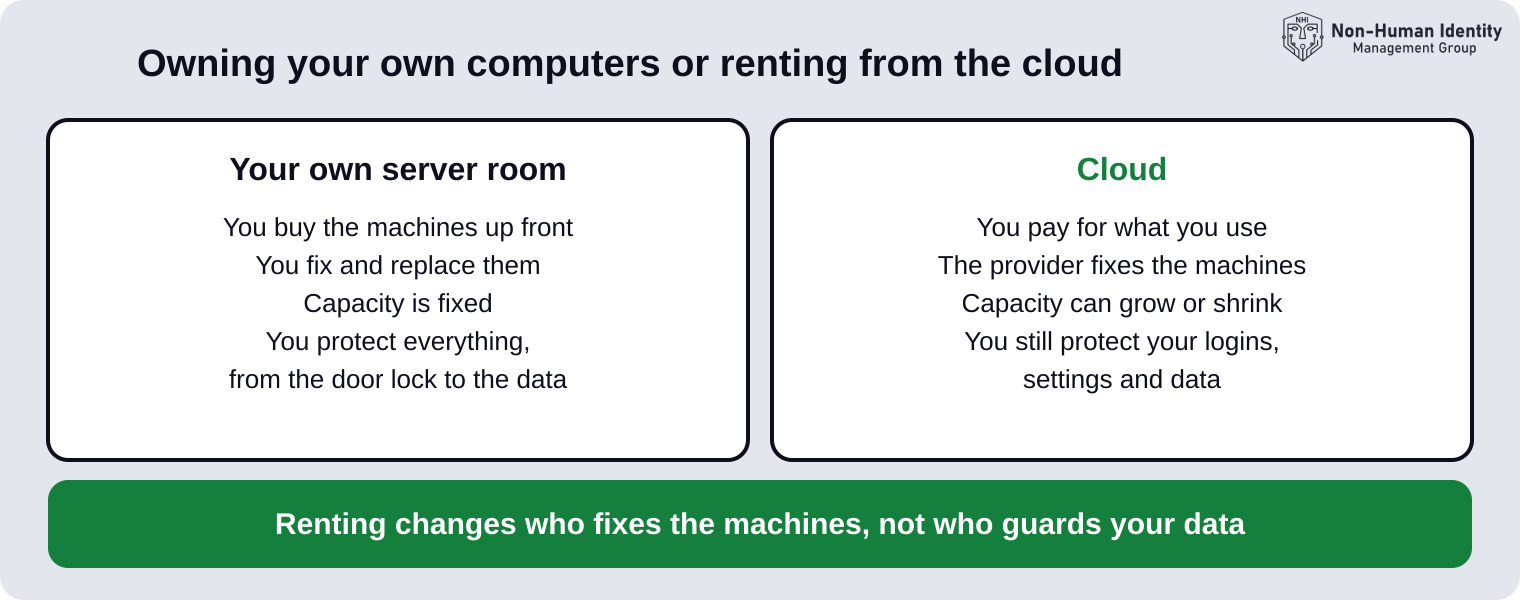
Think of electricity from the mains. You do not build a power station in your garden. You plug in, use what you need and pay for what you used.
Cloud computing works the same way for computers. A provider owns huge buildings full of machines, called data centres. You rent a share of them over the internet. You can ask for more storage or computing power when you need it, and hand it back when you do not.
A widely used US government definition calls it on-demand access, over a network, to a shared pool of computers.[1] It lists five features. You can sign up for more without phoning anyone. You can reach the service from many devices. Many customers share the same machines. Capacity can grow or shrink quickly. And use is measured, so you can see what you are paying for.[2]
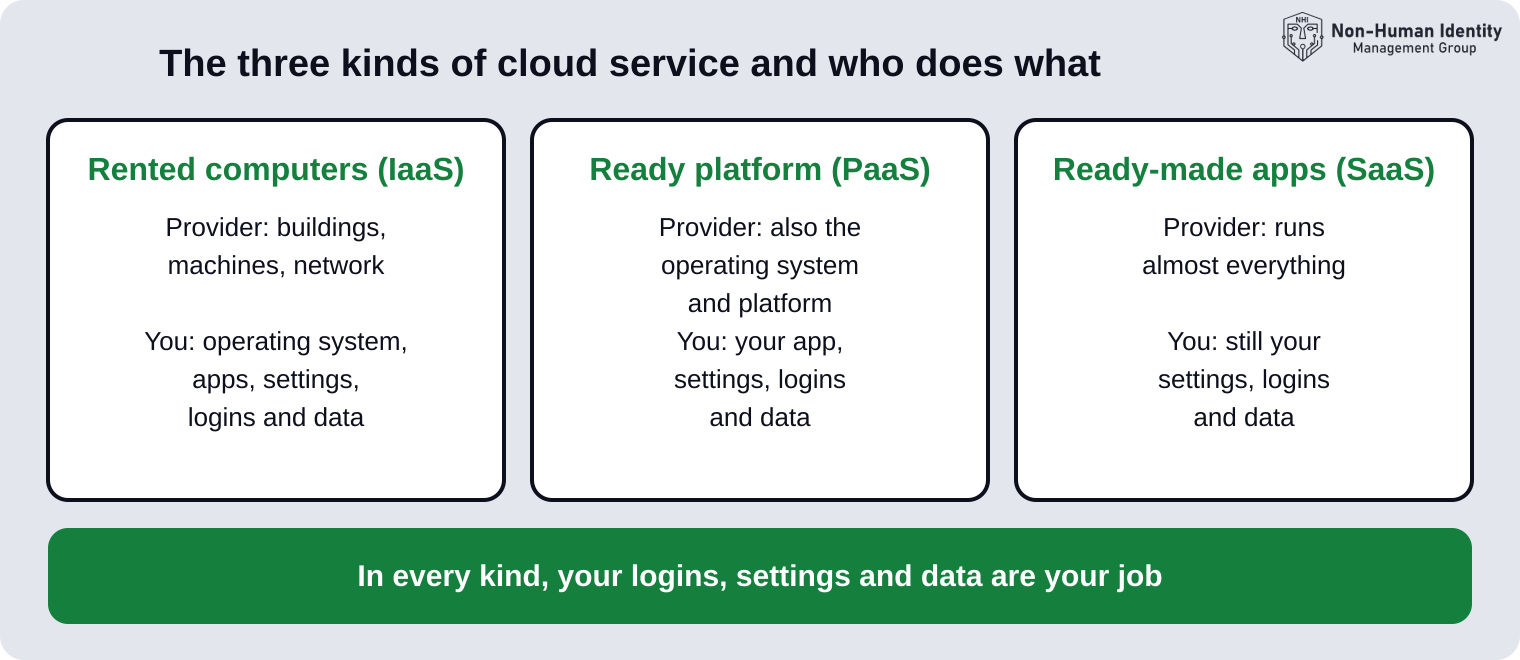
There are three main kinds of cloud service:[2]
- Rented computers, called infrastructure as a service (IaaS). You rent servers, storage and networks, and you run your own software on them.
- A ready platform, called platform as a service (PaaS). The provider runs the base, and you put your own app on top.
- Ready-made apps, called software as a service (SaaS). You simply use finished software, such as online email or accounts software.
Where the comparison stops working: electricity is the same wherever you plug in. Cloud services are not. Each one comes with its own settings, logins and sharing options, and those are yours to set.
Why does it matter?
Most organisations now rely on cloud services every day. The provider looks after its buildings and machines. What you do inside the service, such as who can log in and what is shared, stays your responsibility.[3] The UK's National Cyber Security Centre suggests letting the provider manage as much as possible, so your own share stays small.[6]
If you run a small business
What could happen: a staff member shares a folder of customer files with "anyone with the link", and it ends up in the wrong hands.
Check this: make a list of every cloud service you pay for and who has the admin login.
If you are a student or new to IT
What could happen: you leave a practice server running on a free trial and get a surprise bill.
Check this: set a spending alert in the provider's billing settings before you start.
If you manage a team
What could happen: teams sign up for cloud apps on their own, and nobody knows where the company's data lives.
Check this: agree one simple way to request and approve a new cloud service.
What does it look like?
Here is a made-up list of the cloud services used by a small courier firm. Most businesses could write a list like this in an afternoon.
Example only. All values are made up.
Cloud services list: Cobble Couriers (example)
Email and calendar   SaaS   admin: [email protected]      (1)
Shared files         SaaS   admin: [email protected]
Accounts software    SaaS   admin: FAKE-bookkeeper-login  (2)
Booking website      PaaS   admin: web-supplier (EXAMPLE) (3)
Backup storage       IaaS   admin: unknown                (4)
Monthly spend alert  set at 0000 (EXAMPLE)
- In a real file, this line would contain the name of the person who holds the main admin login for email.
- In a real file, this line would contain the login of an outside bookkeeper who also has access.
- The website runs on a platform the supplier manages for the firm.
- Nobody knows who controls the backup storage. That is the gap to fix first.
Why this is risky: a service nobody owns is a service nobody checks. Its login may be weak, its files may be shared too widely and its bill may grow unseen.
The safer way: every service on the list has a named owner. Admin logins have a second sign-in check, and someone looks at what is shared each month.
How does it work?
Here is what happens, in plain steps, when you use a cloud service.
- You sign up. You create an account with the provider, often in a few minutes on a web page.
- You choose what to rent. That might be a finished app, a platform for your website, or whole servers and storage.[4]
- The provider runs it. Your service runs on machines in the provider's data centres, which are shared with many other customers but kept separate by software.[2]
- You reach it over the internet. You use it from a browser, an app or another program, from almost any device.
- You pay for what you use. Use is measured, and many services charge by the hour, the user or the amount stored.[4]
- You look after your part. The provider protects the buildings and machines. You protect your logins, settings and data. How big your part is depends on which kind of service you chose.[3]
Cloud services also come in different setups. A public cloud is open to anyone who pays. A private cloud serves just one organisation. A hybrid cloud links cloud services with computers an organisation still runs itself.[2] Some organisations also use more than one provider, which the UK's National Cyber Security Centre notes adds complexity.[5]
A worked example
Soren Yilmaz runs Cobble Couriers, a fictional delivery firm with fifteen staff. For years the firm kept its files on an old computer in the back office.
One winter the old computer fails. Soren loses two days of bookings while it is repaired. His friend Yara Pajari, who works in IT, suggests moving to the cloud.
Yara explains it with the electricity picture. "You would not build your own power station. Why keep fixing your own server?"
They start small. Email and shared files move to a ready-made app. The booking website moves to a platform that the web supplier manages. Old backups go into rented cloud storage.
Yara then reminds Soren that the switch changes who fixes the machines, not who looks after the logins. So they write a list of every service, like the one above. Each service gets a named owner. Admin logins get a second sign-in check, such as a code from a phone app.
When they look at the storage settings, Yara finds the backup folder was set to be readable by anyone with the link. She changes it to staff only. In the records available to her, there are no signs that anyone outside the firm opened it.
Last, Soren sets a monthly spending alert, so a mistake shows up on his phone rather than on next month's bill.
A few months later, a laptop is stolen from a van. Because the files live in the cloud, Soren can sign the laptop out of the firm's accounts and carry on working from another device.
Myths and mistakes
| What people think | What is true |
|---|---|
| "The cloud" is somewhere magical in the sky. | It is real computers in real buildings, run by a provider and reached over the internet. |
| Once it is in the cloud, security is the provider's job. | The provider protects its buildings and machines. Your logins, settings and data stay your job.[3] |
| The cloud is always cheaper. | It can be, but costs follow use. Forgotten servers and storage keep costing money until someone switches them off. |
| All cloud services work the same way. | Rented computers leave you far more to manage than a ready-made app.[5] |
| Files in the cloud do not need a backup. | A deleted or overwritten file can be lost in the cloud too. Check what the service keeps and for how long. |
What can I do this week?
- Write a list of every cloud service you or your business pays for.
- Name one owner for each service and note who holds the admin login.
- Turn on a second sign-in check for every admin account.
- Set a spending alert on any service that bills by use.
- Look for files shared with "anyone with the link" and tighten them.
Checklist
- We have a list of every cloud service we use.
- Each service has a named owner.
- Admin logins use a second sign-in check.
- Only a small number of people have admin access.
- Sharing settings are checked regularly.
- Spending alerts are set on services that bill by use.
- We know what each service backs up and how to get files back.
- Leavers lose access to every cloud service on their last day.
Common questions
Where is the cloud, physically?
In data centres. These are large, guarded buildings full of computers, run by the provider in many countries. Many providers let you choose a region, which is the area where your data is stored. That choice can matter for data protection rules, so check it when you sign up.
Is the cloud safe?
It can be very safe, but safety is shared. Large providers can often protect buildings and machines better than a small firm could. Many problems come from the customer's side, such as weak logins or files shared too widely. Your settings still matter a great deal.
What is the difference between IaaS, PaaS and SaaS?
They differ in how much the provider runs for you. With IaaS you rent servers and run your own software. With PaaS the provider runs the base and you add your app. With SaaS you simply use a finished app. Your share of the work shrinks from IaaS to SaaS.
Do I need to be technical to use the cloud?
No, not for ready-made apps such as online email or file sharing. You do need to look after logins and sharing settings. Renting servers or platforms takes more skill, so many small firms use a trusted supplier for that part and keep the list of services themselves.
What happens to my data if I leave a provider?
You can usually take it with you, but the contract sets the terms. Before you sign up, check how you can export your data, in what format, and how long the provider keeps it after you leave. Plan your exit early, because moving large amounts of data later can take time and cost money.
Where next?
Ready for the detail? Read the practitioner guide: Top 10 Cloud Security Risks. It goes further into risky cloud permissions, leaked access keys and the misconfigurations that cause most cloud breaches.
Also useful:
- Cloud Security for Beginners
- Cloud Storage Buckets for Beginners
- Cloud Misconfigurations for Beginners
Related NHI Mgmt Group resources: Cloud Workload Identities for Beginners · Cloud Root Accounts for Beginners · Cloud Concentration Risk and Exit Strategy Guide
Key terms
- Cloud computing
- Renting computers, storage and apps from a provider and using them over the internet.
- Infrastructure as a service (IaaS)
- Renting servers, storage and networks, and running your own software on them.
- Platform as a service (PaaS)
- A ready platform run by the provider, where you add your own app.
- Software as a service (SaaS)
- Finished software the provider runs and you use over the internet.
- Public cloud
- Cloud services run by a provider and open to any customer who pays.
- Hybrid cloud
- A mix of cloud services and computers an organisation still runs itself.
- The split of security jobs between the cloud provider and the customer.
- Multi-factor authentication
- A second sign-in check, such as a phone code, on top of a password.
Sources and further reading
- The NIST Definition of Cloud Computing, SP 800-145 (publication page). National Institute of Standards and Technology, September 2011. https://csrc.nist.gov/pubs/sp/800/145/final, accessed 28 Nov 2026.
- P. Mell and T. Grance, The NIST Definition of Cloud Computing, NIST Special Publication 800-145 (PDF). National Institute of Standards and Technology, September 2011. https://nvlpubs.nist.gov/nistpubs/Legacy/SP/nistspecialpublication800-145.pdf, accessed 28 Nov 2026.
- Shared Responsibility Model. Amazon Web Services. https://aws.amazon.com/compliance/shared-responsibility-model/, accessed 28 Nov 2026.
- What is Cloud Computing? Amazon Web Services. https://aws.amazon.com/what-is-cloud-computing/, accessed 28 Nov 2026.
- Cloud security guidance: Service and deployment models. National Cyber Security Centre (UK). https://www.ncsc.gov.uk/collection/cloud/understanding-cloud-services/service-and-deployment-models, accessed 28 Nov 2026.
- Cloud security guidance: Understanding cloud services. National Cyber Security Centre (UK). https://www.ncsc.gov.uk/collection/cloud/understanding-cloud-services, accessed 28 Nov 2026.