A cloud misconfiguration is a wrong setting on a cloud service that leaves data or systems more open than intended.
This guide is for managers, small business owners, students and anyone new to cloud work. You do not need to be technical to be affected: if your business keeps files or customer details in an online service, someone chose the settings that decide who can reach them.
In short
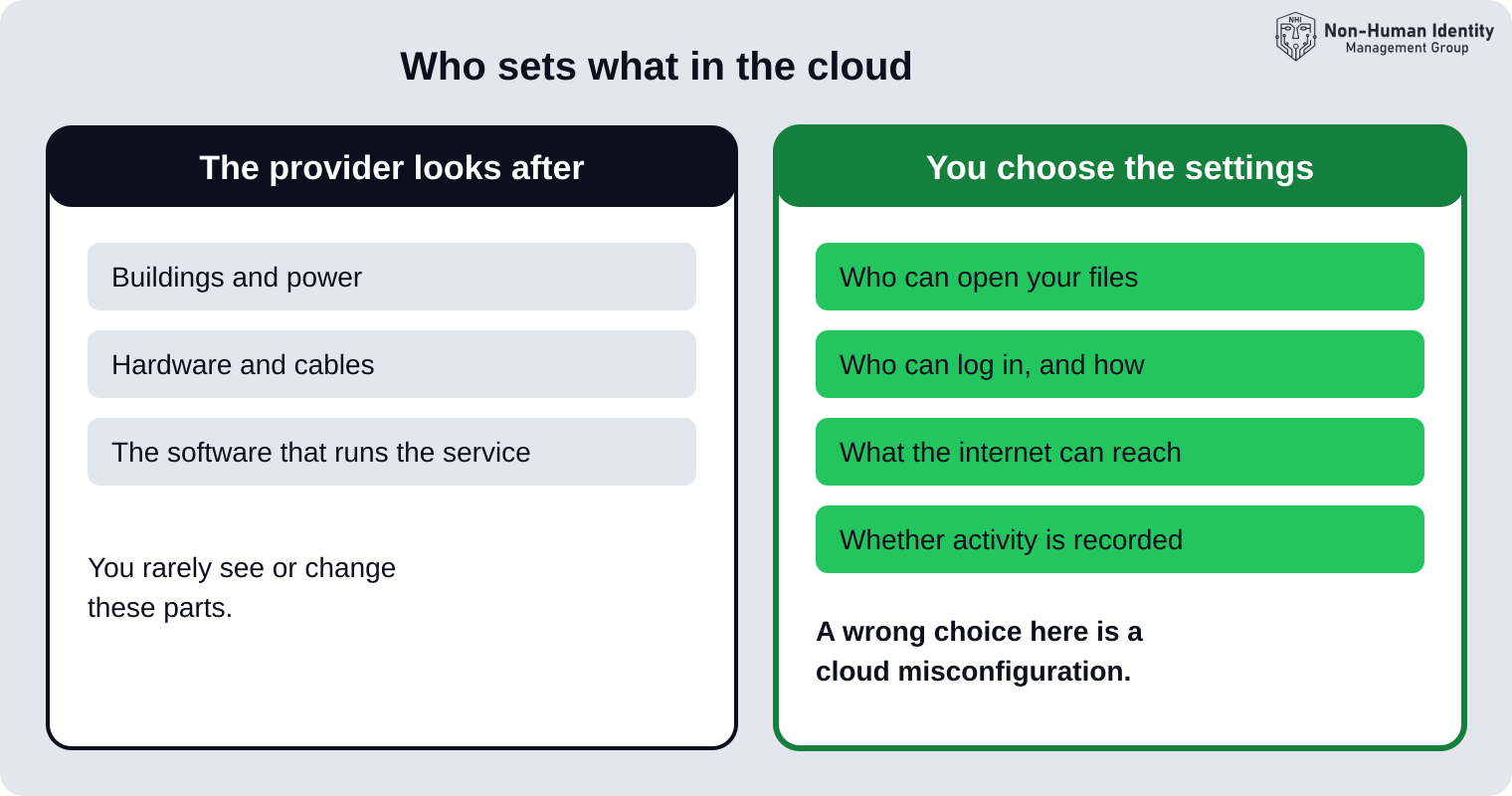
- The cloud provider looks after its buildings and machines. The settings you choose are your job.
- Common mistakes are files open to anyone, logins without a second check, too much access and no records of activity.
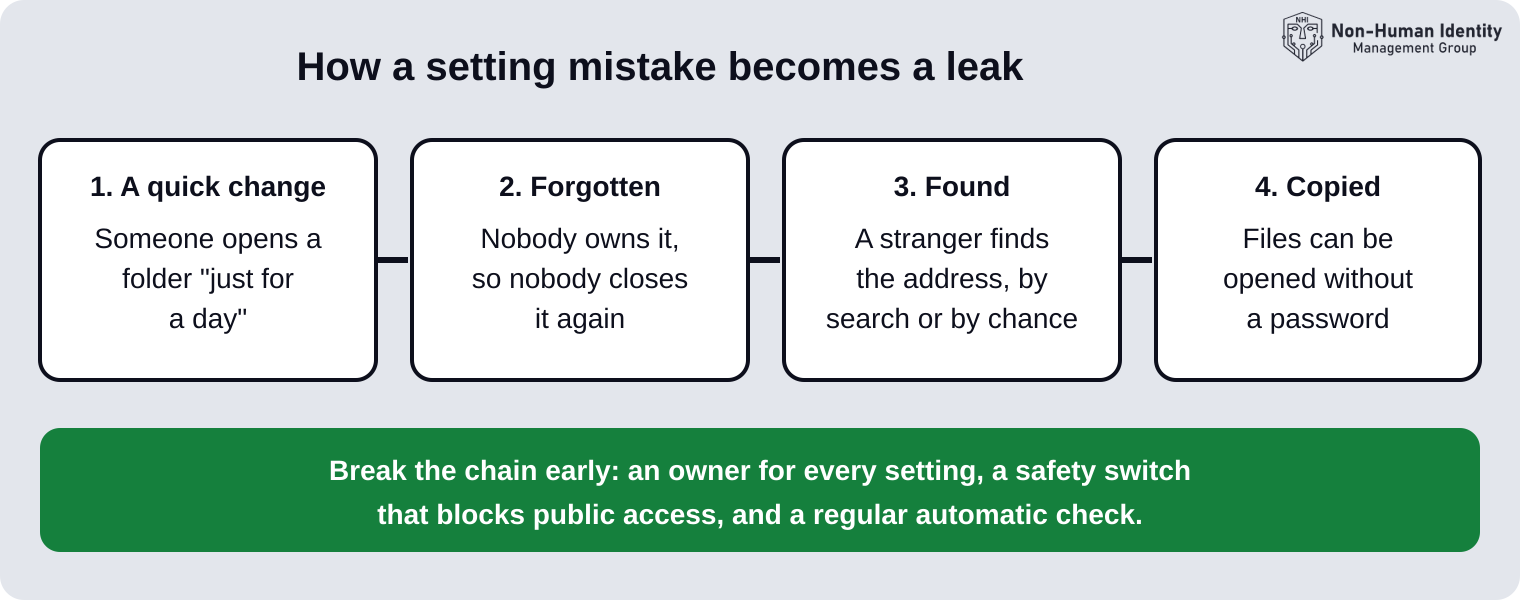
- Most of these mistakes come from quick changes that nobody owns or reviews later.
- Give every account an owner, turn on the provider's safety switches and let a tool check the settings regularly.
What you will learn
- Explain what a cloud misconfiguration is in one sentence.
- Spot the four most common setting mistakes in a made-up report.
- Check who owns the settings in your own cloud accounts.
- Ask your team or supplier the right questions about safety switches.
- Wrong setting (misconfiguration)
- a choice in a service's settings that leaves something more open than it should be.
- Split of duties (shared responsibility)
- the provider secures the platform, and you secure what you set up on it.
- Online folder (storage bucket)
- a place in the cloud that holds files for apps and people.
What is a cloud misconfiguration?
Think of going out and leaving a window open. The house is well built and the door is locked. But one small gap lets anyone climb in.
A cloud service is like that house. The provider builds it well. But every service comes with settings, and you choose them. A cloud misconfiguration is a setting that leaves a gap. It might let anyone on the internet open a folder of files. It might let staff log in with only a password, with no second check.
These are not bugs in the provider's software. They are choices made by the people who set the service up. That is why they are so common, and why they are fixable.
Where the comparison stops working: an open window is easy to see from the street. A cloud setting is hidden in a menu. You only notice it if you, or a tool, go and look.
Why does it matter?
Cloud providers are clear that your settings are your job. Amazon Web Services (AWS) says it protects the platform. Customers look after their own data and decide who can access it.[1] In 2024 an industry group, the Cloud Security Alliance, put misconfiguration first in its list of top cloud threats.[2]
If you run a small business
What could happen: a folder of customer orders is left open, and a stranger downloads it.
Check this: ask who set up your cloud accounts and who checks the settings now.
If you are a manager
What could happen: each team assumes another team owns the settings, so nobody does.
Check this: make sure every cloud account has one named owner.
If you are a developer or student
What could happen: you open something up to test it and forget to close it.
Check this: write down every setting you loosen, and set a reminder to undo it.
What does it look like?
Here is a made-up summary from a settings check, the kind of list a free cloud checking tool might show.
Example only. All values are made up.
Settings check: account EXAMPLE-0000 (Cobble Printers)
HIGH  Folder "proofs-FAKE" can be read by anyone          (1)
HIGH  Admin login "[email protected]" has no second check   (2)
MED   App account "print-app-FAKE" can change everything    (3)
MED   Activity records are switched off in one region      (4)
LOW   Test server "demo-0000" reachable from the internet  (5)
- In a real file, this line would name a storage folder that anyone with the address can open.
- An admin account that signs in with just a password. There is no second check.
- A program's account with far more power than its job needs.
- Without activity records, nobody can see later who did what.
- A forgotten test machine that the whole internet can try to connect to.
Why this is risky: each line is a small gap. Together they let a stranger get in and do a lot. They may also not be seen.
The safer way: folders stay private. Every person signs in with a second check. Each account gets only the access it needs. Activity records stay on.
How does it work?
Most cloud setting mistakes follow the same simple path.
- The split. The provider secures the platform. You pick the settings, such as who can open files and who can log in.[1]
- The quick change. Someone loosens a setting to get a job done, like sharing files with a customer or testing a new app.
- No owner. Nobody writes the change down or checks it again, so the gap stays open.
- The discovery. A stranger finds the open folder or server, by search or by chance, and can use it with no password.
- The fix. Safety switches, owners and regular checks close gaps early. They also help stop gaps coming back.[3]
Many providers now offer safety switches. For example, new AWS storage folders do not allow public access by default. A setting called Block Public Access can also stop anyone making them public later, across a whole account.[4] Other providers have similar switches with their own names.
A US government guide on cloud security, from the National Security Agency (NSA) and the Cybersecurity and Infrastructure Security Agency (CISA), lists ten habits. They include knowing your side of the shared responsibility split, careful control of logins and access, protecting data and keeping activity records.[3]
A worked example
Lina Wojcik runs Cobble Printers, a fictional print shop with eight staff. Customers upload their artwork, and the shop sends back proofs from an online storage folder.
Last spring a freelance developer, Jonah Quist, set up the folder. A big customer could not open a proof link. To fix it fast, Jonah made the whole folder readable by anyone. The customer was happy, and everyone moved on.
Months later, Lina hears about cloud settings at a local business event. She remembers the open window. She asks Jonah to run the provider's free settings check.
The check flags three things. The proofs folder is open to anyone. Lina's own admin login has no second check. And activity records are off.
Jonah makes the folder private again. He turns on the account-wide switch that blocks public access, so a quick fix cannot reopen it. Proofs now go out as links that expire after a week.
Lina turns on a second sign-in check for her admin account, using an app on her phone. Jonah switches the activity records on.
Then they check the records still available for the folder. They find no sign of unknown downloads in what they can see. But the records were off for months, so they cannot be sure. Lina decides to tell the affected customers and asks for advice on whether she needs to report it.
Last, Lina adds one line to the shop's rules: every cloud change has a named owner and an end date.
Myths and mistakes
| What people think | What is true |
|---|---|
| The cloud provider keeps my data safe, so settings are its job. | The provider secures the platform. You choose who can reach your data.[1] |
| Nobody will find my folder because the address is long. | Addresses get shared, guessed and searched for. Private by setting is safer than hidden by name. |
| We checked the settings when we set up, so we are fine. | Settings change every time someone makes a quick fix. Check them regularly. |
| Only big companies get caught out. | Small firms use the same services and the same settings, often with less time to check them. |
| A checking tool fixes the problems. | Tools find gaps. A person still has to decide and fix them. |
What can I do this week?
- List every cloud service your business uses, and name one owner for each.
- Turn on a second sign-in check for every admin account.
- Ask whoever runs your cloud to turn on the provider's switch that blocks public file access.
- Run the provider's free settings check and fix the most serious findings first.
- Check that activity records are switched on.
Checklist
- Every cloud account and service has a named owner.
- Storage folders are private unless there is a written reason.
- Public access is blocked with the provider's account-wide safety switch where it exists.
- Every person with admin rights signs in with a second check.
- People and programs have only the access their job needs.
- Activity records are switched on and kept.
- Test machines and old services are switched off when no longer needed.
- A settings check runs regularly, and someone reviews the serious findings.
Common questions
What is the most common cloud misconfiguration?
Storage left open to the public is one of the best-known examples, along with weak sign-in settings and too much access. Each provider's own checks flag these early. Start with public folders and admin logins, because those gaps tend to expose the most. See Cloud Storage Buckets for Beginners.
Is a misconfiguration the cloud provider's fault?
Usually not. The provider is responsible for its platform, and the customer is responsible for the settings they choose. Providers do help, with safer defaults and safety switches, but someone on your side still has to turn them on. The UK's National Cyber Security Centre says you need to think separately about how you set up cloud services securely.[5]
Do I need to buy a tool to find misconfigurations?
Not to start. The big cloud providers include free or low-cost settings checks. They compare your settings with a list of safe choices and show what does not match. Paid tools add more detail across many accounts. See Free Cloud Security Tools for Beginners.
How is this different from a security misconfiguration on a website?
It is the same idea in a different place. A website misconfiguration is an unsafe setting on a web server or app. A cloud misconfiguration is an unsafe setting in a cloud account, such as storage, logins or network access. See Security Misconfiguration for Beginners.
What should I do if I find an open folder with private data?
Close it first, then check the activity records for downloads. Tell your manager or security contact straight away. If personal data may have been exposed, ask for advice on whether you need to tell the people affected or a regulator. Write down what you found and when.
Where next?
Ready for the detail? Read the practitioner guide: Cloud Misconfiguration Guide. It goes further into snapshots and shared links, network and logging defaults, and guardrails written as code.
Also useful:
- CSPM for Beginners
- Least Privilege for Beginners
- Multi-Factor Authentication for Beginners
- Top 10 Cloud Security Risks
Related NHI Mgmt Group resources: Cloud Security Guide · CIS Cloud Foundations Benchmarks Guide · Cloud Security Finding Triage Playbook
Key terms
- Cloud misconfiguration
- A wrong setting on a cloud service that leaves data or systems more open than intended.
- The split where the provider secures the platform and the customer secures their own settings and data.
- Least privilege
- Giving each person or program only the access its job needs.
- Multi-factor authentication
- Signing in with a second check, such as a phone app, as well as a password.
- Audit logs
- Records of who did what, and when, in a system.
- Cloud security posture management
- Regular, automatic checking of cloud settings against a list of safe settings.
Sources and further reading
- Shared Responsibility Model. Amazon Web Services. https://aws.amazon.com/compliance/shared-responsibility-model/, accessed 28 Nov 2026.
- Cloud Security Alliance Releases Top Threats to Cloud Computing 2024 Report. Cloud Security Alliance, 6 August 2024. https://cloudsecurityalliance.org/press-releases/2024/08/06/cloud-security-alliance-releases-top-threats-to-cloud-computing-2024-report, accessed 28 Nov 2026.
- NSA's Top Ten Cloud Security Mitigation Strategies. National Security Agency and Cybersecurity and Infrastructure Security Agency, March 2024. https://media.defense.gov/2024/Mar/07/2003407860/-1/-1/0/CSI-CloudTop10-Mitigation-Strategies.PDF, accessed 28 Nov 2026.
- Blocking public access to your Amazon S3 storage. Amazon S3 User Guide, Amazon Web Services. https://docs.aws.amazon.com/AmazonS3/latest/userguide/access-control-block-public-access.html, accessed 28 Nov 2026.
- Cloud security guidance: the cloud security principles. National Cyber Security Centre (NCSC), reviewed 7 June 2023. https://www.ncsc.gov.uk/collection/cloud/the-cloud-security-principles, accessed 28 Nov 2026.