A CNAPP is one tool that joins several cloud security checks together, so teams see the real risks first.
This guide is for managers, students and new security hires who keep hearing "CNAPP", "CSPM" and "CWPP" and want to know what they mean. You do not need to run a cloud yourself: if your organisation keeps apps or data with a cloud provider, these tools may be watching over them.
In short
- CNAPP stands for cloud-native application protection platform: one product that combines several cloud security checks.
- Each part answers one question, such as "are the settings safe?" or "is something attacking this server now?".
- The main value is joining the answers, so a team can spot the few problems that together open a path to important data.
- A CNAPP finds and ranks problems; people still have to fix them.
What you will learn
- Joined-up cloud security tool (CNAPP)
- one product that brings several cloud security checks together and links their findings.
- Settings check (CSPM)
- a check that looks for cloud settings left more open than they should be.
- Path to the prize (attack path)
- a chain of weaknesses an attacker could follow from the internet to something valuable.
What is a CNAPP?
Think of a full health check at the doctor. You might have a blood test, a heart scan and an X-ray. Each test is useful alone, but the doctor reads them together to see what really matters.
A CNAPP works the same way for the cloud. The cloud means renting computers, storage and services from a provider over the internet. Organisations used to buy a separate tool for each cloud security job. A CNAPP puts several of those jobs into one product, and it links what they find.
Microsoft sells one such product. It describes a CNAPP as a single solution that combines several cloud security tools to protect apps across their whole life.[1] That is one vendor's wording, but it matches how the term is generally used.
Where the comparison stops working: a health check happens once a year. A CNAPP checks the cloud again and again, because cloud settings can change many times a day.
Why does it matter?
Cloud tools can produce thousands of warnings. Most are minor on their own. The danger often comes from a few small problems lined up together.
If you manage a team that uses the cloud
What could happen: your team drowns in warnings and misses the few that open a path to customer data.
Check this: ask how warnings are ranked, and who owns fixing the top ones.
If you are new to a security team
What could happen: you fix the loudest warning first, while a quieter chain of problems stays open.
Check this: look for problems that sit on the same server or account and connect.
Next: CSPM for Beginners
If you are studying for a cloud job
What could happen: job adverts list five acronyms and you cannot tell them apart.
Check this: learn the one question each part answers, using the table below.
Next: What does a cloud security engineer do? A beginner's guide
What does it look like?
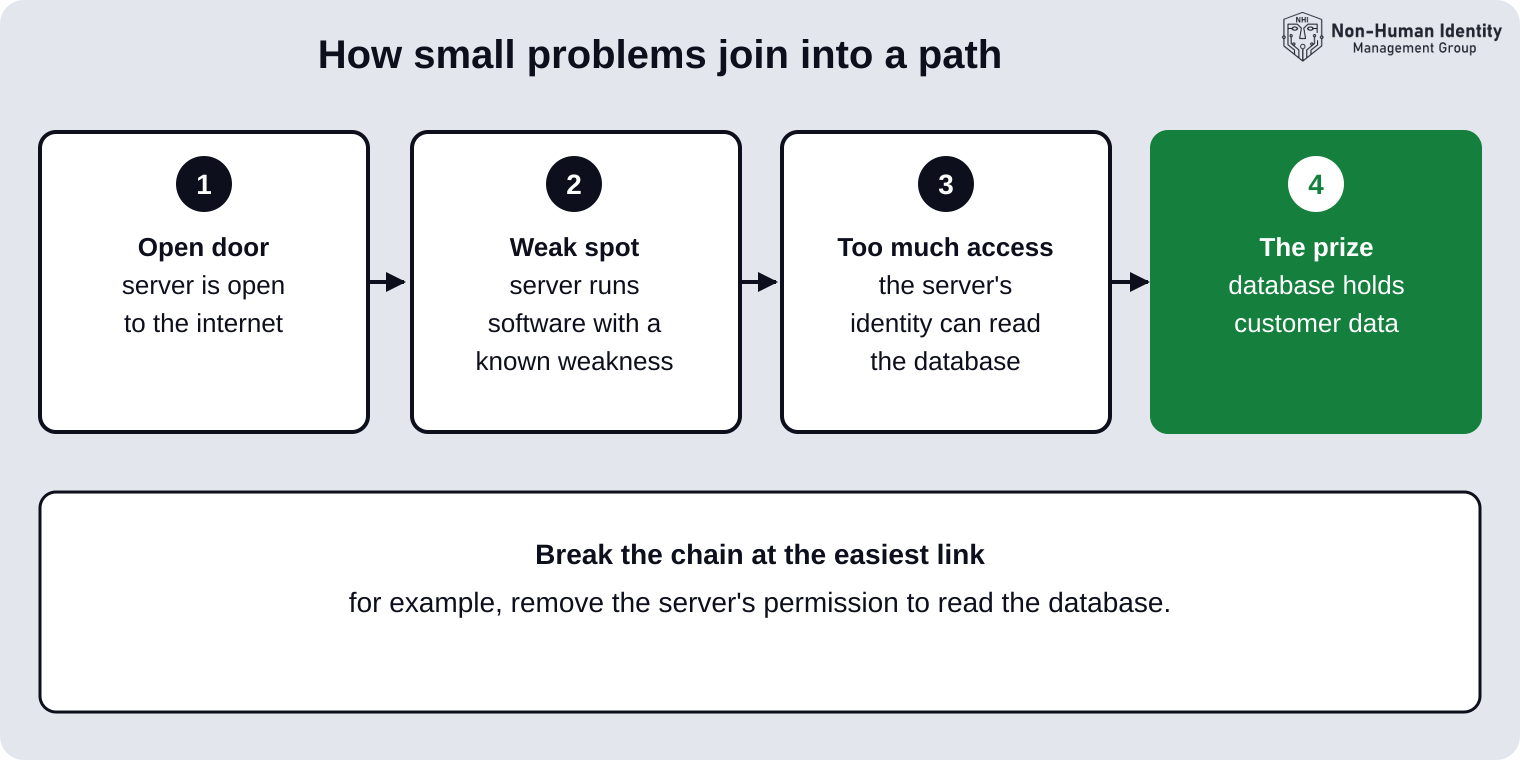
A CNAPP often shows its most serious risks as a short story of connected problems. Here is a made-up one.
Example only. All values are made up.
RISK: Critical path to customer data          ID: EXAMPLE-0000
Step 1  Server web-FAKE-01 is open to the internet      (1)
Step 2  It runs software with a known weakness          (2)
Step 3  Its identity can read "orders-db-FAKE"    (3)
Step 4  orders-db-FAKE holds customer addresses         (4)
Fix suggested: remove the read permission from step 3
Owner: platform team (example.invalid)
- A settings check finds the server is reachable from anywhere.
- A server check finds out-of-date software on it.
- A permissions check finds the server's own identity can read a database. In a real screen, this line would name the cloud role.
- A data check finds the database holds personal information.
Why this is risky: each problem alone might be marked "medium". Together they form a path from the internet to customer data.
The safer way: break the chain at the easiest link. Here, removing one permission means the weak server can no longer reach the data, while the team patches the software.
How does it work?
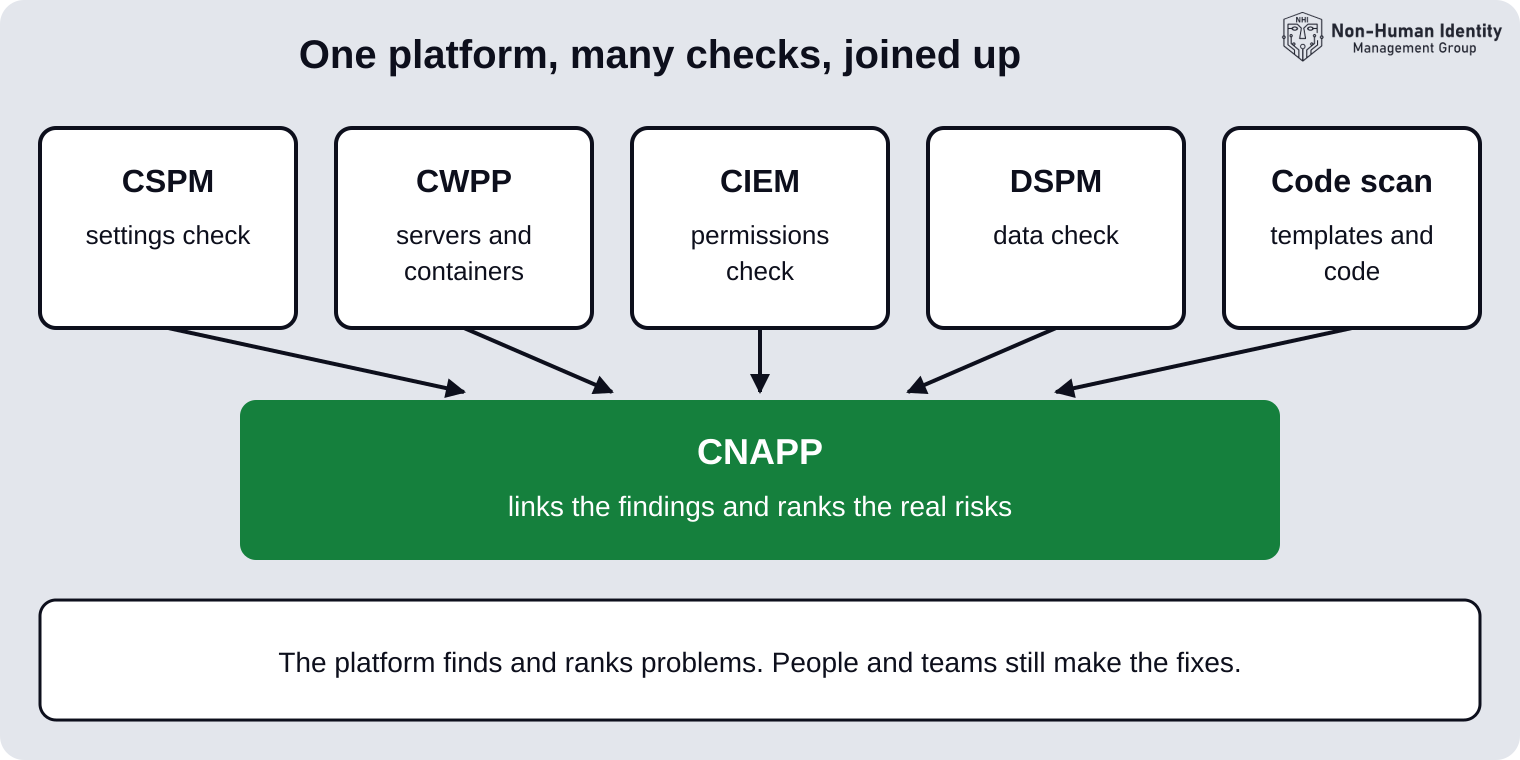
A CNAPP is made of parts. Each part answers one question. Names vary between products, but these are the common ones.[1]
| Acronym and plain name | The question it answers |
|---|---|
| CSPM: settings check | Are our cloud settings safe, or is something left open? |
| CWPP: server and container protection | Are our servers, containers and small cloud programs patched, and is anything attacking them now? |
| CIEM: permissions check | Which people and non-human identities can do what, and does any have far more access than it needs? |
| KSPM: Kubernetes settings check | Are the settings of our container system, Kubernetes, safe? |
| DSPM: data check | Where is our sensitive data, and who can reach it? |
| Code and template scanning | Are problems being built in before anything goes live? |
The parts then work together in a few steps.
- Connect. The CNAPP is given read access to your cloud accounts, and sometimes a small helper program on servers.
- List everything. It builds a list of what you have: servers, storage, databases, identities and permissions.
- Check each part. Each component runs its own checks and records what it finds.
- Join the dots. It links findings that touch the same things. Microsoft, for example, describes a map of your cloud used to find paths from an internet-facing weak point to important assets.[2]
- Rank and route. It ranks the connected risks and sends each fix to the team that owns it.
A CNAPP covers your side of the cloud. Providers explain that they secure the cloud itself, while customers secure what they put in it, such as settings, data and permissions.[3] Other providers offer similar built-in tools. Google, for example, describes its Security Command Center as finding settings that are too open, exposed resources and active threats.[4]
A worked example
Calla Quist has just joined Quarry Couriers, a fictional delivery firm, as its first security analyst. The firm runs its parcel tracking website in the cloud.
On her first day, her manager Bodhi Thorne shows her the new CNAPP screen. It lists over two thousand warnings. "Where do we even start?" he asks.
Calla thinks of the doctor's health check. One odd test result may not matter. Three linked results can point to something serious. So she skips the long list and opens the page of connected risks instead.
Near the top is one chain. A test server was left open to the internet. It runs old software. And its non-human identity (NHI) can read the customer address database. An NHI is the digital identity a machine or app uses to connect to other systems without a person.
No single item was marked critical. Together they make a path from the internet to customer data.
Calla asks the platform team who owns the test server. They agree on a quick fix: remove the server's permission to read the database. The software update follows the next week.
Calla checks the access records available to her. They show no unexpected reads of the database from that server.
Bodhi asks her to report on connected risks each month, not on the total number of warnings. The total still looks large. But the paths to customer data, the risks that matter most, are now getting shorter.
Myths and mistakes
| What people think | What is true |
|---|---|
| A CNAPP fixes cloud problems for us. | It finds and ranks problems. People and teams still make the fixes. |
| More warnings fixed means more secure. | Breaking a few connected paths to important data usually matters more than clearing many minor warnings.[2] |
| The cloud provider secures everything. | The provider secures the cloud itself. Your settings, data and permissions are your job.[3] |
| CNAPP is just CSPM with a new name. | CSPM is one part. A CNAPP adds server protection, permissions, data and code checks, and links them.[1] |
| Permissions are a side issue. | An identity with too much access is often the link that turns one weak server into a path to data. |
What can I do this week?
- Learn the one question each acronym answers, using the table on this page.
- Ask your team which cloud security tools you already use and what each covers.
- Ask who owns fixing the top risks, and how quickly.
- Ask for one example of a connected risk, and how it was fixed.
Checklist
- You know which cloud accounts are connected to your security tools.
- Someone owns each cloud account and the fixes for it.
- Connected risks are reviewed before single warnings.
- Non-human identities used by servers and apps have only the access they need.
- Fixes are made in the templates that build the cloud, so they stay fixed.
- The CNAPP's own access to your cloud is limited and reviewed.
- Progress is reported as paths closed, not just warnings counted.
Common questions
What does CNAPP stand for?
Cloud-native application protection platform. "Cloud-native" means apps built to run in the cloud. "Application protection platform" means one product that protects those apps, their servers, settings, permissions and data. In everyday talk, people use it to mean one joined-up cloud security tool.
What is the difference between CSPM and CNAPP?
CSPM is one part of a CNAPP. CSPM checks cloud settings. A CNAPP adds other checks, such as server protection and permissions, and links the findings. See CSPM for Beginners for the settings check on its own.
Do small organisations need a CNAPP?
Not always. A small cloud setup may be well served by the provider's own built-in security tools. A CNAPP tends to help more when you use several cloud accounts or providers, and when separate tools give too many disconnected warnings.
Why does a CNAPP care about identities and permissions?
Because permissions are often what connects a weak spot to valuable data. Servers and apps use their own digital identities, called non-human identities (NHIs), to connect without a person. If one has more access than it needs, a single weak server can become a path to the data.
Is a CNAPP itself a risk?
It can be, so it needs care. A CNAPP is given wide read access across your cloud. Limit that access, protect the accounts that run it and review them. See Securing the CNAPP and CSPM platform itself.
Where next?
Ready for the detail? Read the practitioner guide: CNAPP Guide. It goes further into each component, scanning with and without helper programs, attack path ranking and wiring findings into team workflows.
Also useful:
- CSPM for Beginners
- Cloud Permissions and CIEM for Beginners
- What Is Cloud Security? A Beginner's Guide
- Cloud Workload Identities for Beginners
- CNAPP Buyer's Guide
Related NHI Mgmt Group resources: CWPP vs CSPM · CIEM vs CSPM · ASPM vs CNAPP
Key terms
- CNAPP
- A cloud-native application protection platform: one product combining several cloud security checks and linking their findings.
- CSPM
- Cloud security posture management: checking cloud settings for anything left more open than it should be.
- CWPP
- Cloud workload protection platform: protecting servers, containers and cloud programs from weaknesses and attacks.
- CIEM
- Cloud infrastructure entitlement management: finding who and what has too much access in the cloud.
- DSPM
- Data security posture management: finding sensitive data and checking who can reach it.
- Attack path
- A chain of weaknesses an attacker could follow to reach something valuable.
- The split where the cloud provider secures the cloud itself and the customer secures what they put in it.
- Misconfiguration
- A setting that leaves something more open or less protected than intended.
Sources and further reading
- What is Microsoft Defender for Cloud? Microsoft Learn, Microsoft. https://learn.microsoft.com/en-us/azure/defender-for-cloud/defender-for-cloud-introduction, accessed 28 Nov 2026.
- Identify and remediate attack paths (attack path analysis and the cloud security graph). Microsoft Learn, Microsoft. https://learn.microsoft.com/en-us/azure/defender-for-cloud/concept-attack-path, accessed 28 Nov 2026.
- Shared Responsibility Model. Amazon Web Services. https://aws.amazon.com/compliance/shared-responsibility-model/, accessed 28 Nov 2026.
- Security Command Center overview. Google Cloud documentation, Google. https://docs.cloud.google.com/security-command-center/docs/security-command-center-overview, accessed 28 Nov 2026.