Comment and review spam is junk or fake posts added to websites, often by automated programs, to mislead readers.
This guide is for small business owners, bloggers, club and charity web volunteers, and anyone who lets the public post on a website. You do not need to be technical. If your site has comments, a forum or customer reviews, spam will probably try to get in.
In short
- Spammers post junk comments to push links, scams or fake praise, usually with automated programs called bots.
- Fake reviews mislead shoppers, and in the UK and US there are rules against writing, buying or hiding them.
- A few simple settings cut most of it: a spam filter, approval for new posters and a human check at sign-up.
- Mark links in visitor posts so search engines do not treat them as your recommendations.
What you will learn
- Spot the signs of spam comments and fake reviews.
- Explain why spammers bother posting on small websites.
- Check the basic settings that keep most spam off your site.
- Describe what UK and US rules say about fake reviews, in plain words.
Status: correct as at 28 November 2026, based on guidance from the UK Competition and Markets Authority and the US Federal Trade Commission. Rules change; check the official text.
This guide explains the topic in general terms and is not legal advice.
- Junk posts (spam)
- unwanted messages posted in bulk, usually to advertise or trick people.
- Automated poster (bot)
- a program that fills in forms and posts on its own, many times a minute.
- Holding pen (moderation queue)
- a waiting list where new posts sit until someone approves them.
What is comment and review spam?
Think of a notice board in a shop window. Anyone can pin up a card. Soon strangers pin adverts, scams and fake thank-you notes over the real messages. A website's comments and reviews work like that board.
Comment spam is junk posted in comment boxes, forums and guest books. It often contains links to shady shops, scam pages or harmful downloads. Google calls this user-generated spam, meaning spam added through a space meant for visitors' posts. It notes that site owners are often unaware of it.[1]
Review spam is about trust. It means fake reviews that praise a business or attack a rival. It also includes reviews that were paid for without saying so. These mislead people deciding what to buy.
Where the comparison stops working: a shop notice board gets a few cards a week. A website can get thousands of spam posts in a day, because bots post them automatically.
Why does it matter?
Spam makes a site look neglected and can send visitors to scams. Fake reviews can also break consumer law.
If you run a blog or club website
What could happen: hundreds of comments link to scam shops, and visitors click them thinking you approved them.
Check this: turn on a spam filter and hold first-time comments for approval.
If you run a small business with reviews
What could happen: a rush of fake five-star or one-star reviews skews your rating and misleads customers.
Check this: publish a short reviews policy and look into sudden bursts of reviews.
If you shop online
What could happen: you buy something on the strength of reviews that were faked or quietly paid for.
Check this: read the middling and negative reviews, not just the star rating.
What does it look like?
Here is a made-up moderation queue on a small website, the list of posts waiting for approval.
Example only. All values are made up.
Pending posts  |  example.com/blog
1. "Great post!!! Visit cheap-pills.example.invalid"          (1)
2. "Very informative, thanks for sharing" from user8812 0000  (2)
3. "Best plumber ever, 5 stars" x 14 in 10 minutes            (3)
4. "Awful service" from a rival's EXAMPLE staff account       (4)
5. "Loved the bike ride report, see you Sunday!" (Sam)        (5)
- Praise that has nothing to do with the post, plus a link. The link is the point.
- Bland praise from a made-up user name. Bots often post this to test whether posts get through.
- Many near-identical reviews in a short burst often point to a bot or a paid batch.
- A negative review from someone linked to a competitor, without saying so.
- A genuine comment. Specific, on topic and from a known reader.
Why this is risky: if all five are published, readers see scam links and fake ratings next to your real content.
The safer way: a spam filter removes most of lines 1 to 3. A person checks the rest before anything goes live.
How does it work?
Spam usually follows the same path. Each step is also a place to stop it.
- Find a target. Bots search the web for pages with open comment boxes, forums or review forms.
- Sign up or post. They fill in the form automatically, often from many internet addresses at once.
- Add the payload. The post carries a link, a scam or fake praise. Links are often there to try to boost another site in search results.
- Get published. If nothing checks the post, it goes live straight away.
- Repeat. If posts get through, the same site is often hit again, at larger scale.
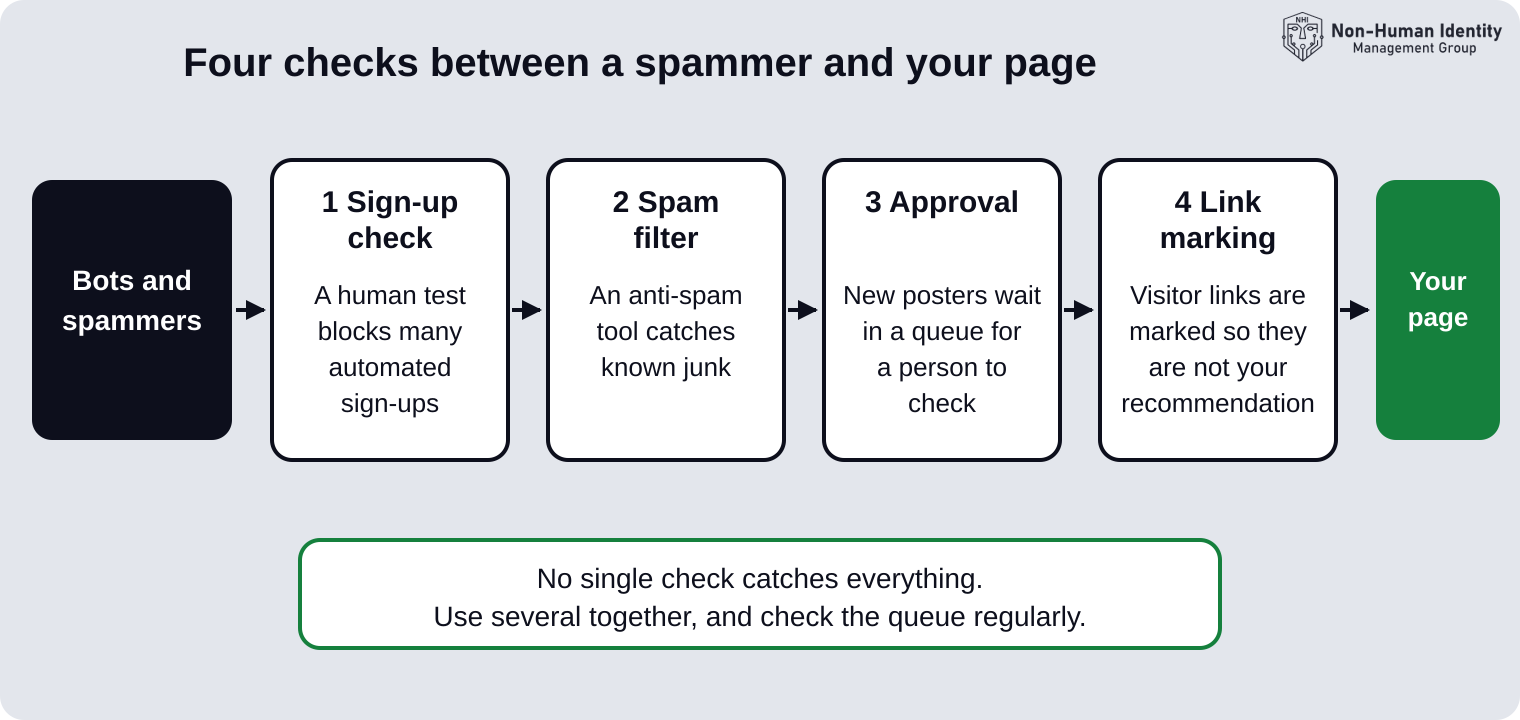
Google's advice for site owners matches these checks. It suggests a clear abuse policy and a CAPTCHA (a test that tries to tell people from bots) on sign-up forms. It also mentions anti-spam plugins and block lists. Other steps include manual approval for some posts, and watching for sudden spikes in new accounts or posts.[2]
Links need care too. Google recommends marking links in comments and forum posts as user-generated content, using a small label in the page code called rel="ugc".[3] Many website platforms can add this for you.
What do the rules say about fake reviews?
In the US, the Federal Trade Commission announced a rule in August 2024 banning fake reviews and testimonials. It covers reviews from people who do not exist, including ones written by AI, and from people with no real experience of the business. It also bans paying for reviews that must be positive or negative, and hiding negative reviews in certain ways.[4]
In the UK, the Competition and Markets Authority published guidance in April 2025, linked to legal changes that month.[5] It says fake reviews and hidden paid-for reviews are banned. Businesses that publish reviews should have a policy, assess the risk, and take steps to find, remove and reduce banned reviews.[6] The steps should be proportionate to the size and type of site.[6]
A worked example
Yusuf Fairweather runs Juniper Lodge, a fictional guest house with a small website. The site has a blog and a page where guests can leave reviews. His niece, Petra Yeboah, helps him look after it.
One morning, Yusuf finds 300 new comments on an old blog post. Most say "Great article!" and link to sites selling cheap medicines. Two guests also email to say his reviews page lists a rival guest house as "much better".
Petra deletes the junk and then looks at the settings. Comments go live straight away, with no filter. She turns on the platform's anti-spam plugin and sets first-time comments to wait for approval. She also switches off comments on posts older than a year.
For the reviews page, she adds a simple human check to the form. Next, she writes a short reviews policy, saying fake and paid-for reviews are not allowed. Yusuf agrees to read every new review before it goes live, and to note any he removes and why.
Petra checks that links in visitor posts are marked as user content. The platform already does this, so nothing needs changing.
A week later, the queue holds 40 posts. The filter has caught 38. Yusuf approves the other two, both from real guests. No filter is perfect, so he keeps checking the queue each week.
Myths and mistakes
| What people think | What is true |
|---|---|
| My site is too small for spammers to bother. | Bots look for any open comment box, whatever the size of the site. |
| A few spam comments do no harm. | They can send readers to scams and make the site look abandoned. |
| Buying a few good reviews to get started is fine. | UK and US rules ban buying fake reviews and hiding paid-for ones.[4][6] |
| A CAPTCHA alone solves spam. | It blocks many bots, but some get past. Use it with a filter and approval. |
| Deleting every bad review keeps my rating clean. | Hiding genuine negative reviews can itself mislead customers and may break the rules.[4] |
What can I do this week?
- Turn on your platform's spam filter or anti-spam plugin.
- Set first-time comments and reviews to wait for approval.
- Close comments on old posts that no longer get genuine replies.
- Write a short policy that says fake and paid-for reviews are not allowed.
- Check that links in visitor posts are marked as user content.
Checklist
- A spam filter or anti-spam plugin is switched on.
- New posters wait for approval before their posts go live.
- Sign-up and review forms include a human check.
- Links in visitor posts are marked as user-generated content.
- Comments are closed on old posts where they are not needed.
- A reviews policy is published and says fake and paid-for reviews are not allowed.
- Someone checks the queue regularly and looks into sudden bursts of posts.
- Genuine negative reviews are kept, not hidden.
Common questions
Why do spammers post on small websites?
Mostly for links and visitors. Each link may bring clicks to a scam or shop, and some spammers hope links boost their site in search results. Bots can post on thousands of sites cheaply, so even a small blog is worth a try to them.
How can I tell if a review is fake?
No single sign proves it, but some patterns are common. Look for bursts of similar reviews in a short time and vague praise that could fit any business. New accounts with one review and repeated wording are other signs. Treat these as reasons to look closer, not proof.
Can I ask customers for reviews?
Yes, asking real customers for honest reviews is normal. Problems start when you only ask happy customers, offer rewards for positive reviews, or hide that a reviewer was paid or linked to you. Check the UK CMA or US FTC guidance for the details.
What should I do if a rival posts fake reviews about me?
Keep a record, with screenshots and dates. Report the reviews to the platform that hosts them, using its own reporting tools. Reply calmly and briefly in public if the platform allows it. If the problem is serious, get advice on your options.
Is comment spam the same as an SEO spam hack?
No. Comment spam is posted through your public comment boxes. An SEO spam hack means someone broke into the site and planted pages or links in its files. Both push links, but a hack needs a clean-up of the site itself.
Where next?
Ready for the detail? Read the practitioner guide: Bot Farms and Fake Engagement Guide. It goes further into how fake engagement is produced at scale, the signals platforms use to detect it, and how organisations respond.
Also useful:
- Bots and Bot Traffic for Beginners
- CAPTCHA for Beginners
- SEO Spam Hacks for Beginners
- Spam Filters for Beginners
Related NHI Mgmt Group resources: Online Scams for Beginners · CAPTCHA and bot challenges · Online Fraud and Scam Statistics Guide
Key terms
- Spam
- Unwanted messages sent or posted in bulk, usually to advertise or trick people.
- Bot
- A program or automated account that performs actions at scale without a person doing each one.
- CAPTCHA
- A challenge-response test used to separate likely humans from automated systems.
- Rate limiting
- Limiting how many requests or posts one visitor can make in a set time.
- Moderation queue
- A list of posts waiting for a person to approve or reject them.
- User-generated content
- Anything visitors add to a site, such as comments, forum posts and reviews.
Sources and further reading
- Spam policies for Google web search (user-generated spam). Google Search Central. https://developers.google.com/search/docs/essentials/spam-policies, accessed 28 Nov 2026.
- Prevent user-generated spam on your site and platform. Google Search Central. https://developers.google.com/search/docs/monitor-debug/prevent-abuse, accessed 28 Nov 2026.
- Qualify your outbound links to Google. Google Search Central. https://developers.google.com/search/docs/crawling-indexing/qualify-outbound-links, accessed 28 Nov 2026.
- Federal Trade Commission Announces Final Rule Banning Fake Reviews and Testimonials. US Federal Trade Commission, 14 August 2024. https://www.ftc.gov/news-events/news/press-releases/2024/08/federal-trade-commission-announces-final-rule-banning-fake-reviews-testimonials, accessed 28 Nov 2026.
- Fake reviews (CMA208). Competition and Markets Authority, GOV.UK, 4 April 2025. https://www.gov.uk/government/publications/fake-reviews-cma208, accessed 28 Nov 2026.
- Short guide for businesses: publishing consumer reviews and complying with consumer protection law. Competition and Markets Authority, GOV.UK, 4 April 2025. https://www.gov.uk/government/publications/fake-reviews-cma208/short-guide-for-businesses-publishing-consumer-reviews-and-complying-with-consumer-protection-law, accessed 28 Nov 2026.