A content delivery network (CDN) is a set of servers in many places that delivers a website from nearby.
This guide is for anyone who runs, builds or pays for a website, and for students new to how the web works. You do not need to set one up yourself to be affected: many web hosts and website builders put a CDN in front of your site for you.
In short
- A CDN keeps copies of a site's files on servers around the world, so visitors get them from somewhere nearby.
- It sits in front of your own server, so it can also soak up busy spells and some attacks.
- Your visitors' traffic passes through the CDN, so you are trusting the CDN company with it.
- Lock your own server so it only talks to the CDN, protect the CDN account, and plan for a CDN outage.
What you will learn
- Explain what a CDN does in one sentence.
- Name the three parts: the visitor, the CDN's edge servers and your own server.
- Spot two settings that can leave a site exposed even with a CDN.
- Ask your web supplier the right questions about your CDN.
- Your own server (origin)
- the computer where your website really lives and where pages are first built.
- Nearby server (edge server)
- one of the CDN's many servers, placed close to visitors, that hands out copies of your site.
- Secure connection (HTTPS)
- the padlock in the browser, which means the traffic is scrambled so others cannot read it on the way.
What is a content delivery network?
Think of a publisher with one big warehouse. Shipping every book from there to every country is slow. So the publisher keeps stock in local shops, and readers buy from the shop down the road.
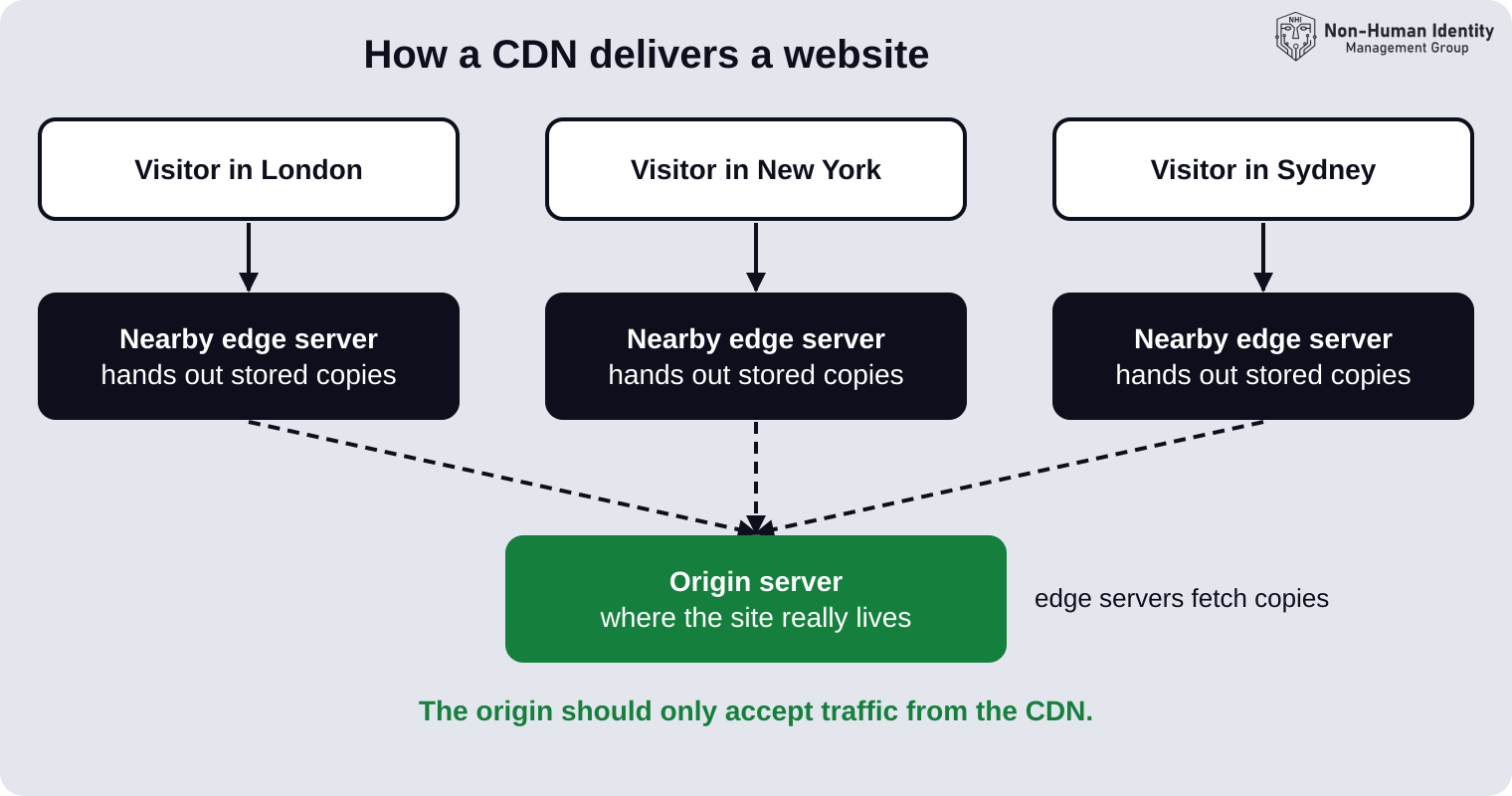
A CDN does the same for a website. Your site lives on one main computer, called the origin. The CDN keeps copies of its pictures, pages and files on many edge servers, which are servers placed near visitors. Each visitor is sent to a nearby one.[1]
A CDN does not replace your web host. Your origin still has to exist, because the CDN only keeps copies.[2] Keeping those copies is called caching. Our Website Caching for Beginners guide covers which pages are safe to copy.
Where the comparison stops working: a local bookshop only sells books. A CDN also stands at the door of your site. Every visitor walks through it, so it can block troublemakers, and it can also see what passes through.
Why does it matter?
A CDN can make a site faster and help it stay up when traffic is heavy.[2] It also becomes a part of your site that you depend on and must look after.
If you run a small business website
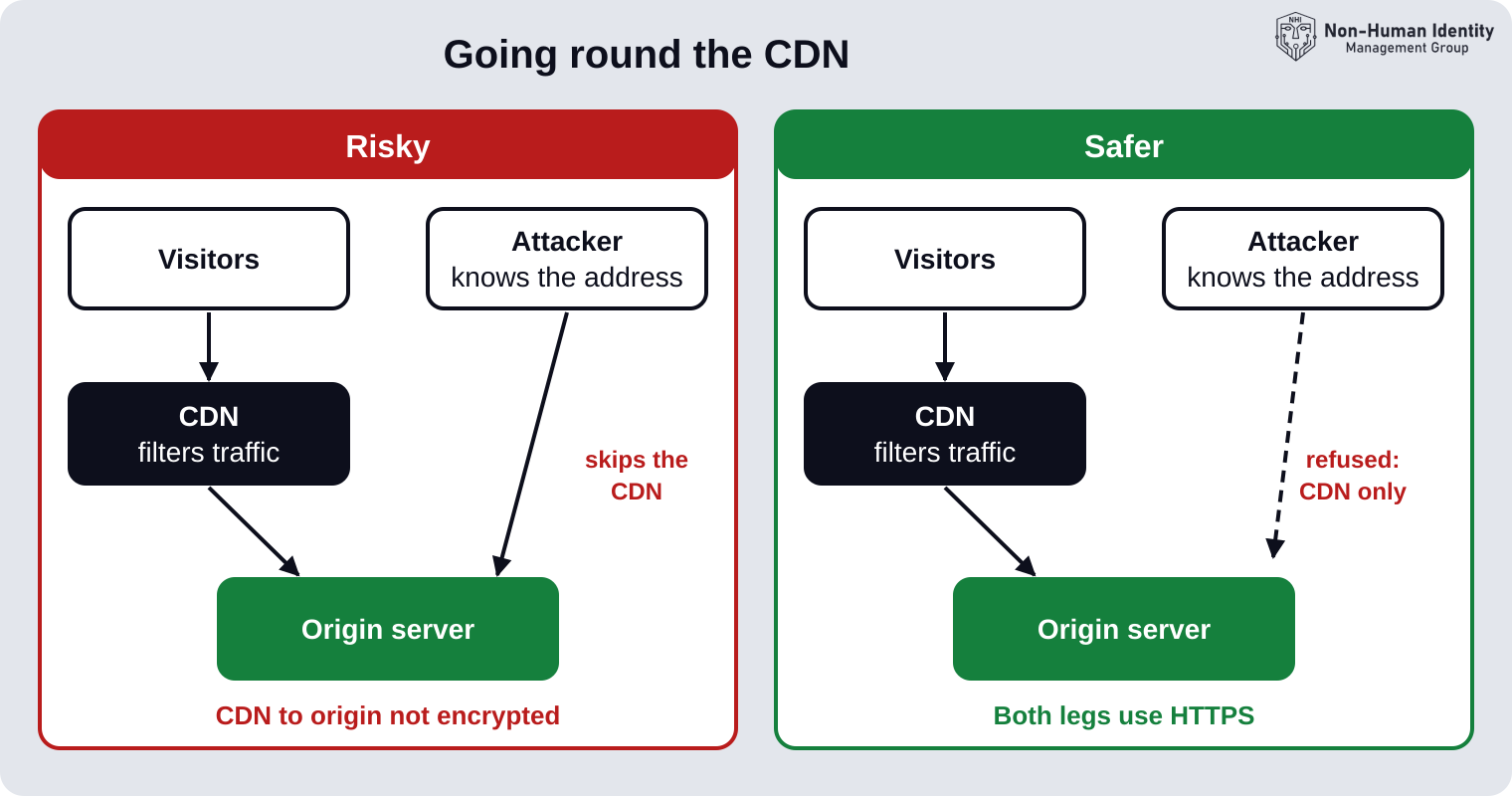
What could happen: your site has a CDN, but your own server can still be reached directly, so attackers go round it.
Check this: ask your supplier whether your server only accepts traffic from the CDN.
If you are learning web development
What could happen: you see the padlock and assume the whole path is scrambled. The link from the CDN to your server may not be.
Check this: find the CDN's encryption setting and make sure both legs use HTTPS.
If you manage an online service
What could happen: the CDN company has a fault and your site goes down with thousands of others.
Check this: agree what you will tell customers, and who decides, if the CDN fails.
What does it look like?
Most CDNs have a settings page in a web dashboard. Here is a made-up summary of one site's settings.
Example only. All values are made up.
Site:                 shop.example.com
Traffic through CDN:  ON                  (1)
Origin server:        203.0.113.10        (2)
Origin accepts:       anyone              (3)
Encryption mode:      Visitor to CDN only (4)
Dashboard login:      password only       (5)
- Visitors reach the site through the CDN's edge servers.
- In a real file, this line would contain the address of your own server. Keep it out of public view.
- Your server answers anyone who knows its address, not just the CDN.
- The padlock covers the visitor to the CDN, but the CDN talks to your server without encryption.
- Whoever gets this password can change every setting above.
Why this is risky: attackers who find the server's address can skip the CDN and its protection.[4] Traffic between the CDN and your server can be read on the way.[3]
The safer way: your server only accepts traffic from the CDN. Both legs use HTTPS, and the CDN checks your server's certificate. The dashboard needs a second sign-in step.[3][4]
How does it work?
Here is what happens when someone visits a site that uses a CDN.
- The address points to the CDN. The site's web address is set up so visitors are sent to the CDN, not straight to your server. The address book of the internet, called DNS, makes this link.
- A nearby edge server answers. The visitor is connected to an edge server close to them, and the padlock connection starts there.[1]
- Copy or fetch. If the edge server already has a fresh copy of the file, it sends it straight back. If not, it asks your origin, then keeps a copy for the next visitor.
- Filtering on the way. Many CDNs can filter floods of junk traffic and some attacks before they reach your server, if they are set up to.[2]
- Your server stays behind. Because most requests are answered at the edge, your server has less work. It is best kept so it only accepts traffic from the CDN.[4]
A worked example
Juno Okafor runs Sorrel Joinery, a fictional furniture workshop with an online shop. Her site slowed to a crawl last spring when a magazine mentioned her tables.
Vik Iyer, a freelance web developer, turns on a CDN for the site. Pictures of the furniture now load from servers near each visitor. The next busy weekend, the site stays quick.
A month later, Vik notices something odd in the server's records. Lots of junk requests are arriving at the server directly, not through the CDN. Someone has found the server's address in an old DNS record from before the CDN.
Juno thinks of the publisher's warehouse. Readers should buy from the local shops, but someone has found the warehouse's back door.
Vik makes three changes. First, the server now only accepts traffic from the CDN's addresses. Second, he asks the host for a new server address, because the old one is known. Third, he switches the encryption setting so the link from the CDN to the server also uses HTTPS, with the certificate checked.[3][4]
Juno adds a security key as a second sign-in step on the CDN dashboard. She also writes a short note on what to post on social media if the CDN ever goes down.
The junk requests to the server drop away in the records available to Vik. The shop stays fast.
Myths and mistakes
| What people think | What is true |
|---|---|
| A CDN is a type of web hosting. | It keeps copies. Your own server still has to exist and be looked after.[2] |
| Once we have a CDN, attackers cannot reach our server. | They can if they find its address and it accepts anyone. Lock the server to the CDN.[4] |
| The padlock means the whole path is encrypted. | It covers the visitor to the CDN. Some settings leave the CDN to server leg unencrypted.[3] |
| Big CDNs do not go down. | They can. In June 2021 a fault made most of one large CDN return errors for a while.[5] |
| Loading a script from a free public CDN is always safe. | The file can change if the domain changes hands. Host key scripts yourself where you can.[6] |
What can I do this week?
- Ask your web supplier whether your site uses a CDN, and which company runs it.
- Ask whether your own server only accepts traffic from the CDN.
- Check that the CDN's encryption setting covers both legs of the connection.
- Turn on a second sign-in step for everyone who can log in to the CDN dashboard.
- Write down what you will do and say if the CDN goes down.
Checklist
- We know which CDN company sits in front of our site.
- Our own server only accepts traffic from the CDN.
- Our server's address is not listed in public DNS records.
- Traffic is encrypted from the visitor to the CDN and from the CDN to our server.
- CDN dashboard logins need a second sign-in step, and leavers are removed.
- Private pages are kept out of the CDN's stored copies.
- We have a short plan for a CDN outage.
- Scripts from outside sites are reviewed before we load them.
Common questions
Do small websites need a CDN?
Not always, but many get one anyway. Lots of hosts and website builders include a CDN by default. It helps most when visitors come from far away, when traffic comes in bursts, or when you want help with floods of junk traffic. Ask your supplier what you already have.
Can the CDN company see my visitors' data?
Usually, yes. The padlock connection normally starts at the CDN's edge server, so the CDN handles your traffic in readable form on the way through. That is why choosing the CDN company is a trust decision, and why its contract and security matter.[3]
Does a CDN stop DDoS attacks?
It can help a lot, but it does not block every attack. A well set up CDN can absorb or filter many floods of traffic before they reach your server. That help is lost if attackers can go straight to your server, so lock the server to the CDN as well.[2][4]
What happens if my CDN goes down?
Your site may stop loading even though your own server is fine. In the June 2021 outage at one large CDN, most of the network was working again within about 50 minutes. Plan what you will tell customers, and ask your supplier whether a backup route is possible.[5]
Is a CDN the same as a firewall?
No, though many CDNs offer one. A CDN's main job is delivering copies from nearby. A web application firewall checks each request for signs of attack. Many CDN companies sell both together, so check which parts you have actually switched on.
Where next?
Ready for the detail? Read the practitioner guide: CDN Security Guide. It goes further into origin protection methods, encryption between edge and origin, and how to govern CDN accounts and settings.
Also useful:
- Website Caching for Beginners
- Web Application Firewalls for Beginners
- How the Web Works for Beginners
- Security Requirements for Selecting a CDN
Related NHI Mgmt Group resources: polyfill.io CDN Supply Chain Attack (2024) · DNS Security for Beginners · Website Security for Beginners
Key terms
- Content delivery network
- A group of servers in many places that keep copies of a site's content close to visitors.
- Origin
- The server where a website really lives and where its content is first created.
- Edge server
- One of a CDN's servers, placed close to visitors, that hands out stored copies.
- Cache
- A store of saved copies of pages or files that can be reused without rebuilding them.
- HTTPS
- The secure version of the web's language, which scrambles traffic so others cannot read it on the way.
- Subresource Integrity
- A browser check that a file loaded from another site has not changed from the version you expected.
Sources and further reading
- CDN (glossary). MDN Web Docs, Mozilla. https://developer.mozilla.org/en-US/docs/Glossary/CDN, accessed 28 Nov 2026.
- What is a CDN? How do CDNs work? Cloudflare Learning Center (one vendor's explainer). https://www.cloudflare.com/learning/cdn/what-is-a-cdn/, accessed 28 Nov 2026.
- Encryption modes. Cloudflare SSL/TLS documentation. https://developers.cloudflare.com/ssl/origin-configuration/ssl-modes/, accessed 28 Nov 2026.
- Protect your origin server. Cloudflare Fundamentals documentation. https://developers.cloudflare.com/fundamentals/security/protect-your-origin-server/, accessed 28 Nov 2026.
- Summary of June 8 outage. Fastly, June 2021. https://www.fastly.com/blog/summary-of-june-8-outage, accessed 28 Nov 2026.
- polyfill.io CDN Supply Chain Attack (2024). NHI Mgmt Group breach analysis, citing Sansec, Cloudflare and Fastly. https://nhimg.org/polyfill-io-supply-chain-attack-2024, accessed 28 Nov 2026.