A cyber security portfolio is a small collection of your own work that shows employers what you can do.
This guide is for students, career changers and IT staff who want a first security job but have little work history in the field. A portfolio helps a hiring manager see your skills in a few minutes, not just read about them on a CV.
In short
- A portfolio is three to six finished pieces of work, each with a short explanation of what you did and why.
- Good pieces include lab write-ups, small tools or scripts, and sample documents such as a risk list for a made-up firm.
- Explain your thinking, including what went wrong. Reviewers look for reasoning, not just screenshots.
- Only use systems you own or are allowed to test, and never publish passwords, keys or real people's data.
What you will learn
- Explain what a security portfolio is and why it helps.
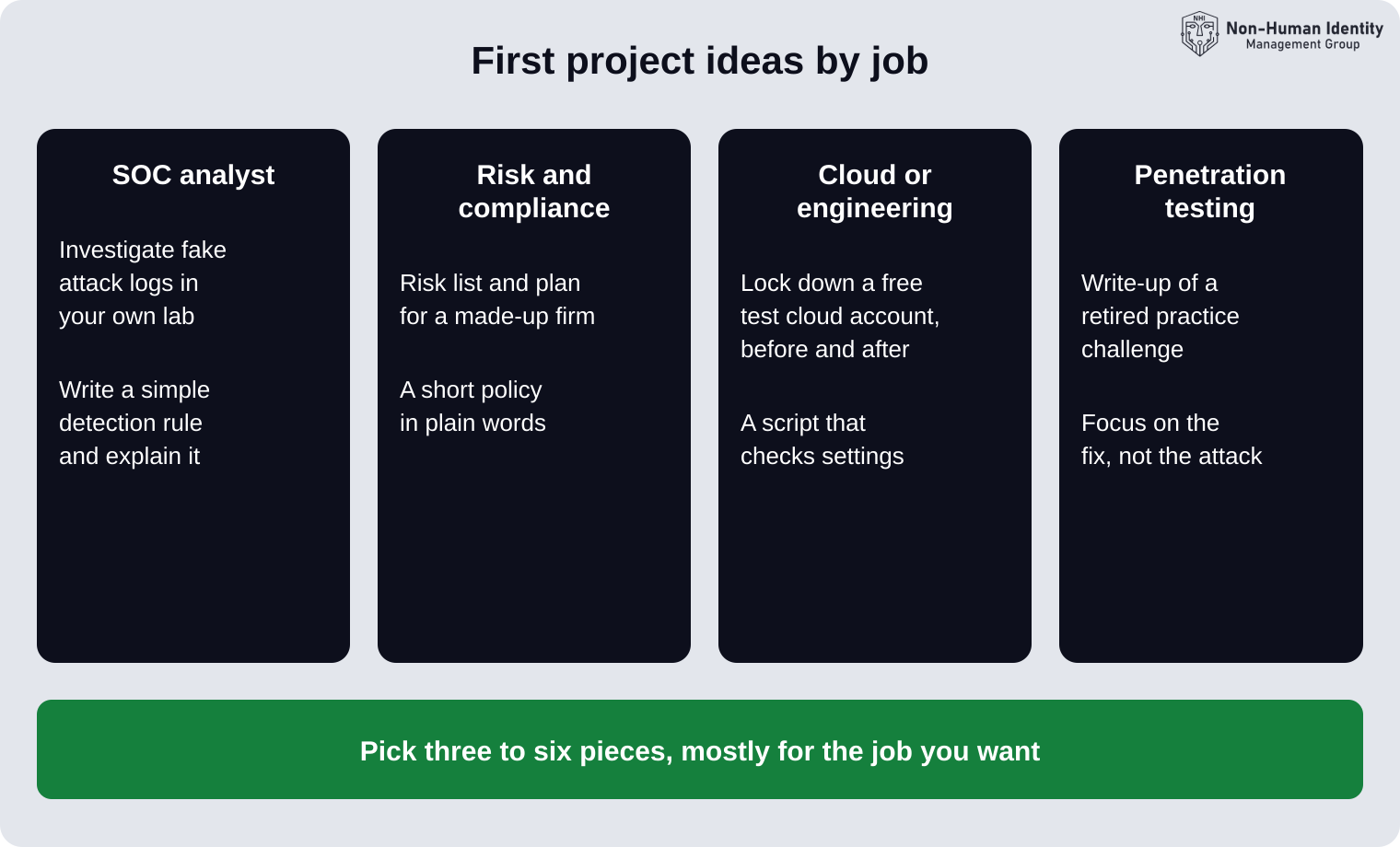
- Choose first projects that match the job you want.
- Write up a project so a busy reviewer can follow it.
- Check a piece is safe and legal to publish.
- Project story (write-up)
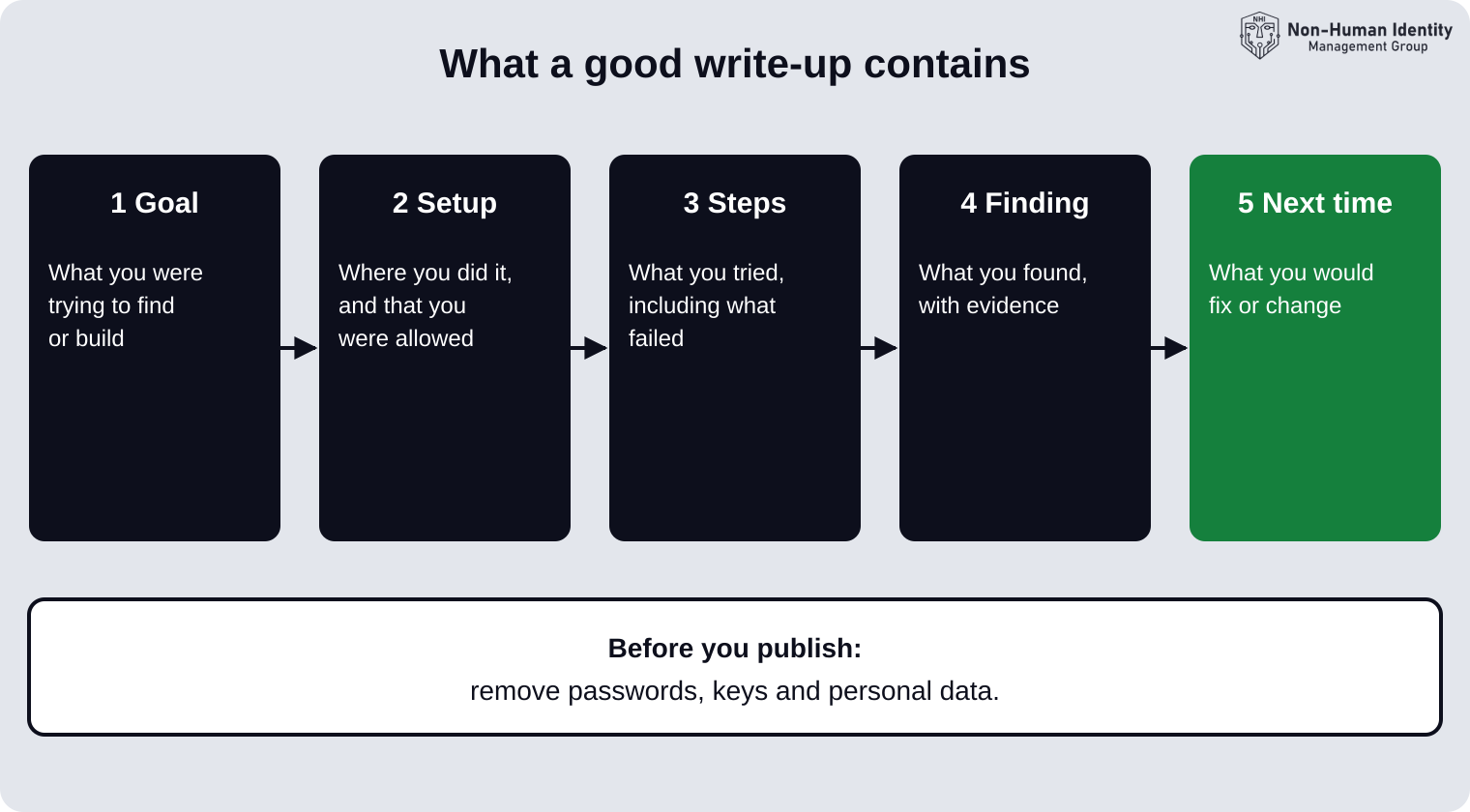
- a short report on a task you did: the goal, the steps, what you found and what you learned.
- Code sharing site (GitHub)
- a website where people store and share code and documents in folders called repositories.
- Practice computer setup (home lab)
- computers or virtual machines you own and use to practise safely.
What is a cyber security portfolio?
Think of a builder's photo album of finished jobs. A customer can flick through it and see the work, not just hear the builder say they are good. A security portfolio does the same for your skills.
It usually lives online, in one or two places. Many people use GitHub, a code sharing site, plus a simple blog for longer write-ups. Each piece shows one skill, such as spotting an attack in log files (the records computers keep of what happened).
A portfolio is not a list of courses or certificates. Those go on your CV. The portfolio shows what you did with what you learned.
Where the comparison stops working: a builder's photos show the finished wall. In security, reviewers care most about how you thought: what you tried, what failed and why you chose the next step.
Why does it matter?
Many people apply for first security jobs with similar certificates. A portfolio gives the person hiring something real to look at and to ask you about in an interview.
If you are changing career
What could happen: your CV shows years of other work, and the reader cannot see your new skills.
Check this: add one link on your CV to two or three of your best pieces.
If you are a student
What could happen: course work stays on a university drive, and nobody outside sees it.
Check this: pick one project you are proud of and write it up in your own words.
If you hire junior staff
What could happen: you skip a strong candidate because their CV is short.
Check this: ask applicants for one piece of work and discuss it in the interview.
Next: Cyber Security CV
What does it look like?
Here is a made-up front page for a beginner's portfolio. Many people put a short page like this at the top of their GitHub profile.
Example only. All values are made up.
# EXAMPLE Name: aiming for a first SOC analyst role   (1)

Pinned projects
1. Finding a fake break-in in lab logs (write-up)     (2)
2. Script that flags failed sign-ins (code + README)  (3)
3. Risk list and plan for a made-up bakery            (4)
4. Hardening my home lab router: before and after     (5)

All work done on my own lab or retired practice
challenges. No real company data.                     (6)
Contact: via the link on my CV
- One line on the job you want, so the reader knows what to look for.
- A write-up: the goal, the steps, the finding and what you learned.
- A small tool with clear instructions on how to run it.
- A non-technical piece, which shows you can think about business risk.
- A before and after piece, which shows a change you made.
- A scope line. In a real file, this line would say where the work was done.
Why this is risky: without the job line and the scope line, a reviewer has to guess what you want. They may also wonder if you worked safely.
The safer way: keep phone numbers and home addresses off the page. Share contact details only through your CV or a job site.
How does it work?
Building a portfolio is a slow, steady job. Here is a simple way to start.
- Pick the job you want. A SOC analyst (someone who watches for attacks) shows log investigations. A risk and compliance analyst shows risk lists and policies. A US government framework, called NICE, gives a common language for security work and the skills it needs, which can help you name your skills.[5]
- Do the work somewhere safe. Use your own home lab or practice platforms. In the UK, getting into a computer you know you have no right to access is a crime.[4]
- Follow the platform's rules. Practice sites often limit what you may publish. One popular site allows public write-ups for retired content only.[3]
- Write it up. Give the goal, your steps, what failed, what you found and what you would do next. Keep it short and plain.
- Publish a few good pieces. On GitHub you can pin up to six repositories or gists to your profile.[1] You can also add a profile README, a short page that tells visitors about you.[2]
- Check before you share. Remove passwords, keys and personal data. GitHub's push protection, on by default for personal accounts, tries to block known types of secrets from being pushed to public repositories.[6] It does not catch everything, so check yourself too.
A worked example
This story is made up to show how it can happen.
Hal Lomax has worked on a hotel reception for eight years. He studies security in the evenings and passes an entry-level exam. He applies for ten junior SOC analyst jobs and hears nothing back.
His friend Bea Haddad works in a security team. She looks at his CV and says the reader cannot see what he can do. She suggests a portfolio with three pieces.
Hal builds a small home lab on his laptop, using free virtual machines (software computers that run inside a real one). He sets up a fake attack against his own lab machine and collects the log records.
His first write-up explains how he found the fake break-in in the logs. He includes the two searches that did not work and why.
His second piece is a short script that counts failed sign-ins and flags spikes. The README file explains how to run it with sample data.
His third piece is non-technical. He writes a risk list for a made-up small hotel, drawing on what he knows from work.
Before publishing, Hal checks every file for passwords and personal details. He pins the three pieces on his GitHub profile and adds the link to his CV.
At his next interview, the manager asks about the failed searches. Hal explains his thinking, and the talk turns into a real discussion.
Myths and mistakes
| What people think | What to do instead |
|---|---|
| More projects look better. | Show three to six finished, well-explained pieces. Quality beats volume. |
| Screenshots prove I did it. | Explain your thinking: the goal, the steps, the dead ends and the result. |
| I can practise on any website I find. | Only test systems you own or have written permission to test.[4] |
| I can post answers to any practice challenge. | Check the platform's rules. Some allow write-ups only for retired content.[3] |
| Only technical work counts. | Risk lists, policies and clear reports show skills many teams need. |
| A test password in my code does not matter. | Any key or password left in a public repository counts against you. Remove it and change it. |
What can I do this week?
- Write one sentence on the job you are aiming for.
- Pick one thing you have already done, in a course or lab, and write it up in under a page.
- Create a GitHub account, or tidy the one you have, and add a short profile README.
- Check your existing public files for passwords, keys and personal details.
- Ask someone outside security to read your write-up and tell you where they got lost.
Checklist
- My portfolio says which job I am aiming for.
- I have three to six finished pieces, mostly for that job.
- Each piece has a short write-up with goal, steps, finding and next steps.
- Each piece says where the work was done and that I was allowed to do it.
- I have followed each practice platform's publishing rules.
- No passwords, keys, real company data or personal data appear anywhere.
- Code pieces have a README that explains how to run them.
- My CV links to the portfolio.
Common questions
Do I need a portfolio to get a security job?
Not always, but it often helps, especially without security work history. A portfolio gives the person hiring something concrete to look at and talk about. Many people get interviews through certificates and networking too, and a portfolio supports both.
What should my first project be?
Something small you can finish in a week or two, linked to the job you want. A write-up of a lab exercise or a retired practice challenge is a common start. Finishing and explaining one piece well teaches more than starting five.
Do I need to know how to code?
No. Some roles, such as risk and compliance, value clear documents more than code. Short scripts do help for technical roles, so many people add one simple tool once they are comfortable. Explain what it does in plain words.
Is GitHub the only place to put it?
No. GitHub suits code and short write-ups. A simple blog suits longer stories. Some people use both and link them together. What matters is that a reviewer can find your best work quickly from the link on your CV.
Can I write about my current job?
Only with great care and your employer's permission. Never share real systems, company data, customer details or internal documents. A safer route is to rebuild the idea in your own lab or with a made-up company, then write about that.
Where next?
Ready for the detail? Read the practitioner guide: Building a Cyber Security Portfolio. It goes further into what reviewers check, portfolio pieces for each career track and how to structure write-ups and repositories.
Also useful:
- Cyber Security Home Labs for Beginners
- Capture the Flag and Hacking Labs for Beginners
- Cyber Security CV
- Computer Misuse Laws for Beginners
- Secrets in Code for Beginners
Related NHI Mgmt Group resources: Cybersecurity Careers Guide · SOC Analyst for Beginners · GRC Analyst Career Guide
Key terms
- GitHub
- A website for storing, sharing and working on code and documents together.
- Home lab
- A personal practice setup, kept apart from real work systems, for learning safely.
- Capture the flag
- A security game where players solve challenges in a practice setup to find hidden answers.
- Git repository
- A project folder whose files and their history of changes are tracked.
- Write-up
- A short report on a task: the goal, the steps, what you found and what you learned.
- README
- A text file at the top of a project that explains what it is and how to use it.
Sources and further reading
- Pinning items to your profile. GitHub Docs, GitHub. https://docs.github.com/en/account-and-profile/setting-up-and-managing-your-github-profile/customizing-your-profile/pinning-items-to-your-profile, accessed 28 Nov 2026.
- Managing your profile README. GitHub Docs, GitHub. https://docs.github.com/en/account-and-profile/setting-up-and-managing-your-github-profile/customizing-your-profile/managing-your-profile-readme, accessed 28 Nov 2026.
- Streaming, writeups and walkthrough guidelines. Hack The Box Help Center, Hack The Box. https://help.hackthebox.com/en/articles/5188925-streaming-writeups-walkthrough-guidelines, accessed 28 Nov 2026.
- Computer Misuse Act 1990, section 1: unauthorised access to computer material. legislation.gov.uk, The National Archives (UK). https://www.legislation.gov.uk/ukpga/1990/18/section/1, accessed 28 Nov 2026.
- NICE Framework Resource Center. National Institute of Standards and Technology (NIST). https://www.nist.gov/itl/applied-cybersecurity/nice/nice-framework-resource-center, accessed 28 Nov 2026.
- About push protection. GitHub Docs, GitHub. https://docs.github.com/en/code-security/secret-scanning/introduction/about-push-protection, accessed 28 Nov 2026.