An indicator of compromise is a clue in a computer system that suggests an attacker may have been there.
This guide is for students, new IT staff and anyone who reads security alerts and wants to know what the clues mean. You do not need to be a security expert to help: knowing what a clue looks like means you can pass it on quickly.
In short
- An indicator of compromise (IOC) is a trace left behind by an attack, such as a bad web address or a known harmful file.
- Security teams share these clues so others can search their own systems for them.
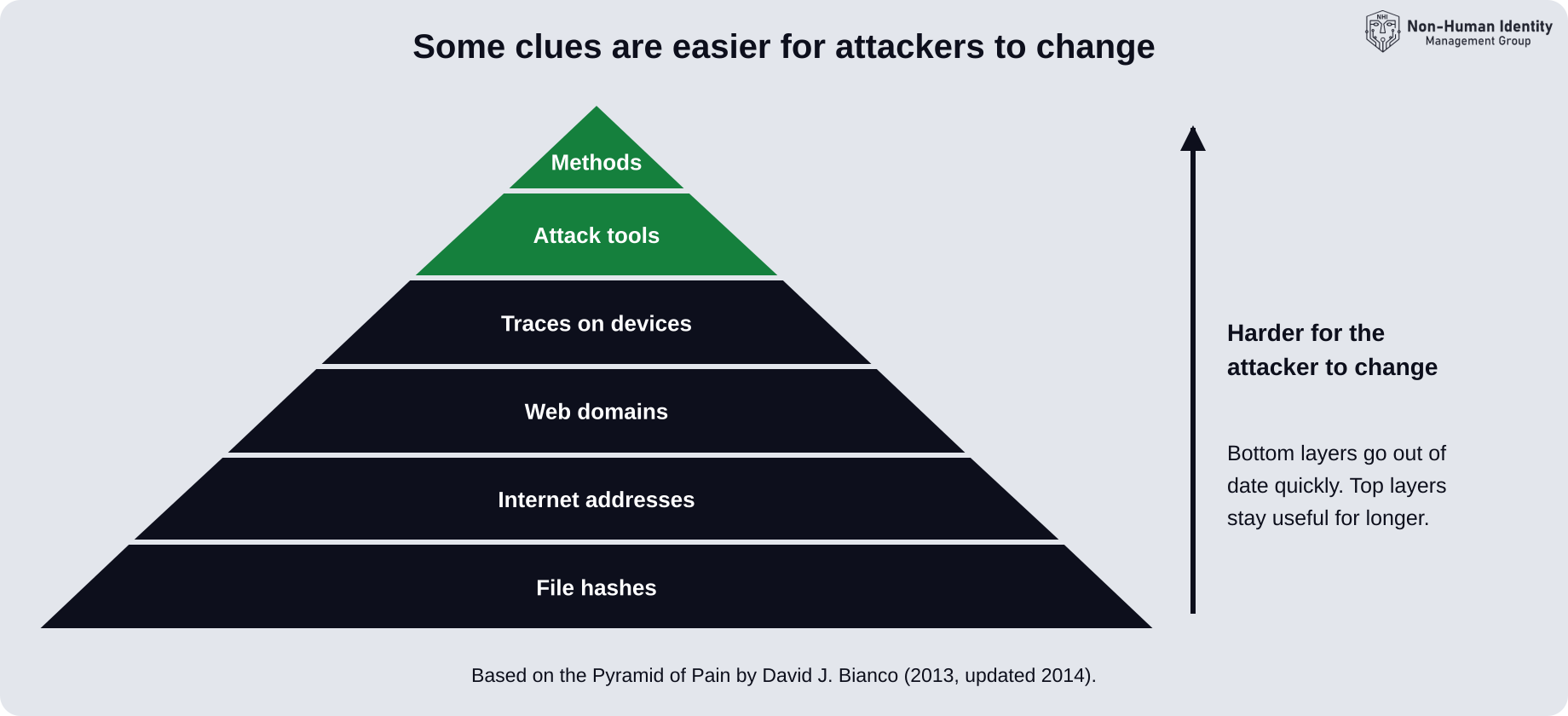
- Simple clues, like an internet address, are easy for attackers to change, so they go out of date fast.
- A match is a reason to look closer, not proof of an attack. Check it, then act.
What you will learn
- Explain what an indicator of compromise is in one sentence.
- Spot the common kinds of clue in a security report.
- Explain why some clues stop being useful quickly.
- Check what to do when one of your systems matches a clue.
- Attack clue (indicator of compromise, IOC)
- a trace in a system that suggests an attack may have happened.
- Clue list (IOC feed)
- a list of known bad addresses, files and names that teams share.
- File fingerprint (hash)
- a short code worked out from a file, used to recognise that exact file.
What is an indicator of compromise?
Think of a detective at a break-in. There is a muddy footprint, a broken window latch and a getaway car seen on the street. None of these alone proves who did it, but together they tell a story.
An indicator of compromise is the same kind of clue, left in a computer system. A US standards body says these traces suggest an attack is coming, is under way or has already happened.[1]
Common clues include an internet address the attacker used, a fake web site or a harmful file. Files are often known by a hash. This is a short code worked out from the file. It acts like a fingerprint for that exact file.
Where the comparison stops working: a footprint stays the same shape. Attackers can change their address or tweak a file quickly. So a computer clue can go stale much faster than a muddy one.[3]
Why does it matter?
When one team finds an attack, the clues it shares can help other teams check whether the same attacker has reached them too. Guidance from the same standards body says sharing this kind of information can help both the team that shares and the teams that receive it.[2]
If you are studying cyber security
What could happen: you read a security report full of addresses and codes and are not sure what to do with them.
Check this: learn to sort each clue by type: address, web name, file or account.
If you are new to an IT or help desk job
What could happen: a security tool flags a match on a laptop and you are first to see it.
Check this: write down what matched and where, then pass it to the security contact. Do not delete files first.
If you manage a small team or business
What could happen: a supplier warns of an attack and sends a list of clues, but nobody knows who should check them.
Check this: name one person or provider who receives these lists and searches your systems.
What does it look like?
Security warnings often end with a table of clues. Here is a made-up one, in the style of a warning a security company might send.
Example only. All values are made up.
Clues seen in the EXAMPLE campaign (shared 01 Nov)
Type        Value                              Note
IP address  192.0.2.45                         (1)
Domain      login-update.example.invalid       (2)
File hash   FAKE0000aaaa1111bbbb2222cccc3333   (3)
File name   invoice_FAKE.pdf.exe               (4)
Account     svc-backup-EXAMPLE added at 02:13  (5)
- In a real file, this line would contain an internet address the attacker's computers used.
- In a real file, this line would contain a web address for a fake sign-in page.
- In a real file, this line would contain the hash of a harmful file, so tools can spot that exact file.
- A file name made to look like a PDF. Names are easy to change, so this clue is weak on its own.
- A new account created in the middle of the night. This kind of clue points to something the attacker did.
Why this is risky: if one of these clues turns up in your own records, the same attacker may have reached you. If nobody looks, the attacker may stay for weeks.
The safer way: load the list into the tools that search your records. Check any match by hand. Remove old clues after a set time, so they do not cause false alarms.
How does it work?
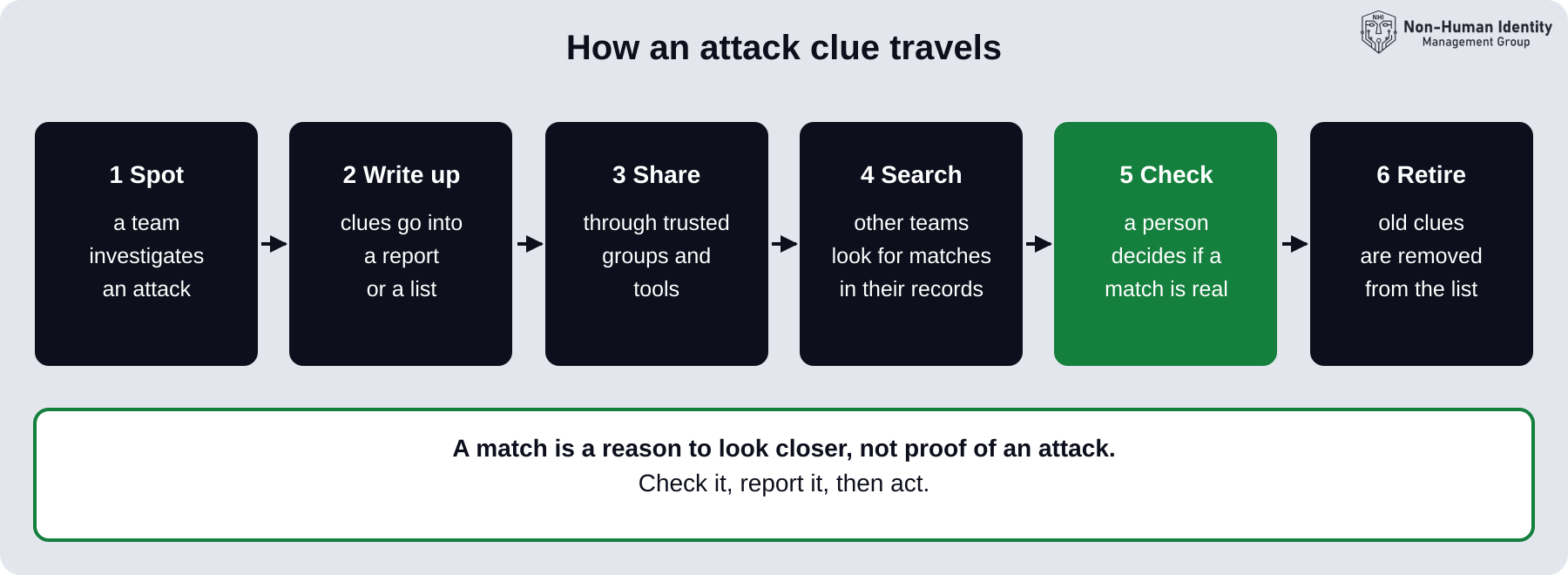
Here is how a clue usually travels from one attack to many defenders.
- Someone spots an attack. A security team investigates and notes the traces the attacker left.
- The clues are written up. They go into a report or a shared list, often in a standard format so computers can read them.
- The clues are shared. Teams swap them through trusted groups and tools. One example is MISP, a free open source platform that teams use to store and share clues such as web addresses and file hashes.[4]
- Other teams search. They load the list into their security tools, which look for matches in records and on devices. Some tools can warn, alert or block when a clue is seen.[5]
- A person checks each match. A match might be a real attack, or an address that a harmless service now uses. Someone has to decide.
- Old clues are retired. Clues that have aged and no longer help are removed from the list.
Not all clues are equally useful. A security researcher, David Bianco, drew a well-known picture called the Pyramid of Pain. It ranks clues by how much trouble it causes an attacker when defenders spot them. At the bottom are file hashes and internet addresses, which attackers can change easily. At the top is the attacker's way of working, which is much harder to change.[3]
So many teams also look for indicators of attack. These are signs of what an attacker is doing, such as a new account at 2am. They do not depend on the exact tools used.
A worked example
Uma Jensen has just started on the IT team at Larch Brewery, a fictional brewery with forty staff. On Monday, a supplier emails a warning about a fake invoice campaign, with a short list of clues.
Uma remembers the detective. A footprint matters only if it turns up in your own house. So she asks the brewery's security provider to search the past month of records for every clue on the list.
One clue matches. A laptop in the finance office visited one of the listed web addresses last Thursday.
Uma does not wipe the laptop straight away, because that could destroy evidence. Instead she writes down the time, the laptop name and the address. Then she passes it all to the provider, as the brewery's incident plan says.
The provider looks closer. The finance worker clicked a link in a fake invoice email, but the browser warned her and she closed the page. There are no signs in the records available of any download from that site, and no new accounts or odd logins.
To be safe, the worker changes her password. The provider blocks the web address and adds the email sender to the block list.
Two months later, Uma reviews the clue list. The web address no longer points anywhere useful, so the block has done its job and the clue is retired.
The brewery adds one line to its incident plan: who receives clue lists from suppliers, and who searches for them.
Myths and mistakes
| What people think | What is true |
|---|---|
| A match means we have been hacked. | A match is a reason to look closer. Shared addresses and old clues can match harmless activity. |
| No matches means we are safe. | Attackers change simple clues easily, so a clean search only shows those clues were not found.[3] |
| Block every address on every list and leave it there. | Old clues can block real services later. Give clues an expiry date and review them. |
| Delete the bad file as soon as it is found. | Report first. Evidence helps work out what else the attacker touched. |
| Clues are only for big companies. | Many security tools for small firms can take clue lists. A supplier or provider can do the searching. |
What can I do this week?
- Find out who at work gets security warnings and clue lists.
- Ask if your tools or provider can search your records for a list of clues.
- Read one public security warning. Sort its clues into addresses, web names, files and accounts.
- Write down what staff should do if a tool flags a match: note it, report it and leave the device alone.
Checklist
- One named person or provider receives clue lists and acts on them.
- Security tools can search records and devices for shared clues.
- Records are kept long enough to search back several weeks.
- Every match is checked by a person before anyone wipes or blocks.
- Clues have a review or expiry date, and old ones are removed.
- Staff know to report a match before deleting anything.
- The team also watches for suspicious behaviour, not just known clues.
Common questions
What is the difference between an IOC and an IOA?
An indicator of compromise is a leftover trace, such as a bad file or address. An indicator of attack is a sign of what the attacker is doing, such as a new admin account at night. Attack signs are harder for attackers to change. See Indicators of Compromise vs Indicators of Attack Guide.
Where do IOCs come from?
Mostly from investigations of real attacks. Security companies, government agencies and industry groups publish them in warnings and reports. Teams also share them directly through trusted groups and tools, often in a standard format so computers can read them.
Why do IOCs go out of date?
Because attackers can change many of them quickly. They can move to a new internet address or alter a file so its hash changes. Internet addresses are also reused, so an address that was bad last year may belong to a harmless service now.
What should I do if my computer matches a clue?
Report it to your IT or security contact straight away, with the time and what matched. We suggest you do not delete files or restart the device first, unless you are told to, because that can destroy evidence the team needs.
How do teams check a file's hash?
They work out the file's hash and look it up in lists of known good and known bad files. A match with a known bad hash is a strong clue. But a file changed by even one letter gets a new hash, so no match does not prove a file is safe. See File Hashes and Reputation Checks for Beginners.
Where next?
Ready for the detail? Read the practitioner guide: Indicators of Compromise vs Indicators of Attack Guide. It goes further into the types of clue and how long they last, the standard formats used to share them, and how teams score and expire them.
Also useful:
- Threat Intelligence for Beginners
- Threat Hunting for Beginners
- SIEM for Beginners
- IOC Lifecycle and Expiry Guide
Related NHI Mgmt Group resources: Incident Response for Beginners · MITRE ATT&CK for Beginners · Security Operations Centres for Beginners
Key terms
- Indicator of compromise
- A measurable sign that suspicious or harmful activity may have happened, such as a bad address, file or account.
- Indicators of attack
- Signs of what an attacker is doing, such as unusual new accounts, rather than the exact tools they use.
- Hash
- A short fixed-length code worked out from data, used to recognise an exact file.
- IP address
- A number that identifies where internet traffic comes from or goes to.
- Domain name
- A readable web name, such as example.com, that points to an internet address.
- Pyramid of Pain
- A picture that ranks clues by how hard they are for an attacker to change.
- Threat intelligence
- Useful information about attackers and their methods that helps teams decide what to do.
- False positive
- An alert that looks like a problem but turns out to be harmless.
Sources and further reading
- Indicator of compromise (glossary entry, from NIST SP 800-61 Rev. 3 and SP 800-150). NIST Computer Security Resource Center. https://csrc.nist.gov/glossary/term/indicator_of_compromise, accessed 28 Nov 2026.
- NIST SP 800-150, Guide to Cyber Threat Information Sharing. National Institute of Standards and Technology, October 2016. https://csrc.nist.gov/pubs/sp/800/150/final, accessed 28 Nov 2026.
- The Pyramid of Pain. David J. Bianco, Enterprise Detection and Response blog, 1 March 2013 (updated 17 January 2014). https://detect-respond.blogspot.com/2013/03/the-pyramid-of-pain.html, accessed 28 Nov 2026.
- MISP features. MISP Project. https://www.misp-project.org/features/, accessed 28 Nov 2026.
- Overview of indicators in Microsoft Defender for Endpoint. Microsoft Learn, Microsoft. https://learn.microsoft.com/en-us/defender-endpoint/indicators-overview, accessed 28 Nov 2026.