Command and control is how an attacker sends orders to a computer they have broken into.
This guide is for students, career changers and anyone new to security work who keeps hearing "C2". It covers how defenders spot it and cut it off, not how to build it. If your business has computers on the internet, this is one of the signs a security team looks for.
In short
- After malware gets onto a computer, it usually needs to reach the attacker for orders. That link is called command and control, or C2.
- Infected machines often "check in" with the attacker's server again and again, which is called beaconing.
- Attackers try to hide C2 inside normal-looking web or DNS traffic, or inside popular cloud services.
- Defenders look for odd, regular check-ins and block known bad addresses, which can cut the attacker off.
What you will learn
- Explain what command and control means in one sentence.
- Spot the pattern of a machine checking in on a timer.
- Check which basic controls, such as protective DNS, your organisation uses.
- Ask good questions when an alert mentions C2 or beaconing.
- Harmful software (malware)
- a program made to damage, spy on or take over a computer.
- Regular check-in (beaconing)
- an infected machine contacting the attacker's server again and again, often on a timer.
- Address book of the internet (DNS)
- the system that turns names like example.com into the numbers computers use to connect.
What is command and control?
Think of a spy planted inside a building. The spy has a radio. Every so often, they call their handler outside: "Any new orders?" Most of the time the answer is "Not yet". Sometimes it is "Copy those files and send them out".
Command and control works the same way. Malware on a computer is the spy. The attacker's server is the handler. The connection between them is the command and control channel, often shortened to C2.
Through that channel, the attacker can send commands and get results back. A well-known public list of attacker behaviour puts the goal simply. The attacker is trying to talk to the machines they have taken over, to control them.[1]
Where the comparison stops working: a real spy can only be in one place. One attacker's server can steer hundreds of infected machines at once. And the "radio calls" look like ordinary internet traffic, not a strange signal.
Why does it matter?
Without a working C2 link, a lot of malware can do much less. Cutting that link is one of the ways defenders limit the harm while they clean up.
If you are studying security
What could happen: you see "C2 beacon detected" in a lab or a job interview and do not know what it means.
Check this: you can explain beaconing, C2 and how DNS fits in, in plain words.
Next: Malware for Beginners
If you are new to a security team
What could happen: an alert about a laptop calling an odd address every few minutes is closed as noise.
Check this: you know who to escalate to, and what to collect first.
If you look after IT for a small organisation
What could happen: an infected PC talks to an attacker for weeks, and nobody notices.
Check this: your internet connection uses a filtering DNS service that blocks known bad sites.
What does it look like?
Here is a made-up extract from a network log. It shows one computer's connections out to the internet over a short time.
Example only. All values are made up.
Time      From         To                          Bytes out
09:00:02  PC-FRONTDESK update.example.invalid       212   (1)
09:05:01  PC-FRONTDESK update.example.invalid       209   (1)
09:10:03  PC-FRONTDESK update.example.invalid       214   (1)
09:12:40  PC-FRONTDESK news.example.com            3,880  (2)
09:15:02  PC-FRONTDESK update.example.invalid       211   (1)
03:15:00  PC-FRONTDESK update.example.invalid     98,400  (3)
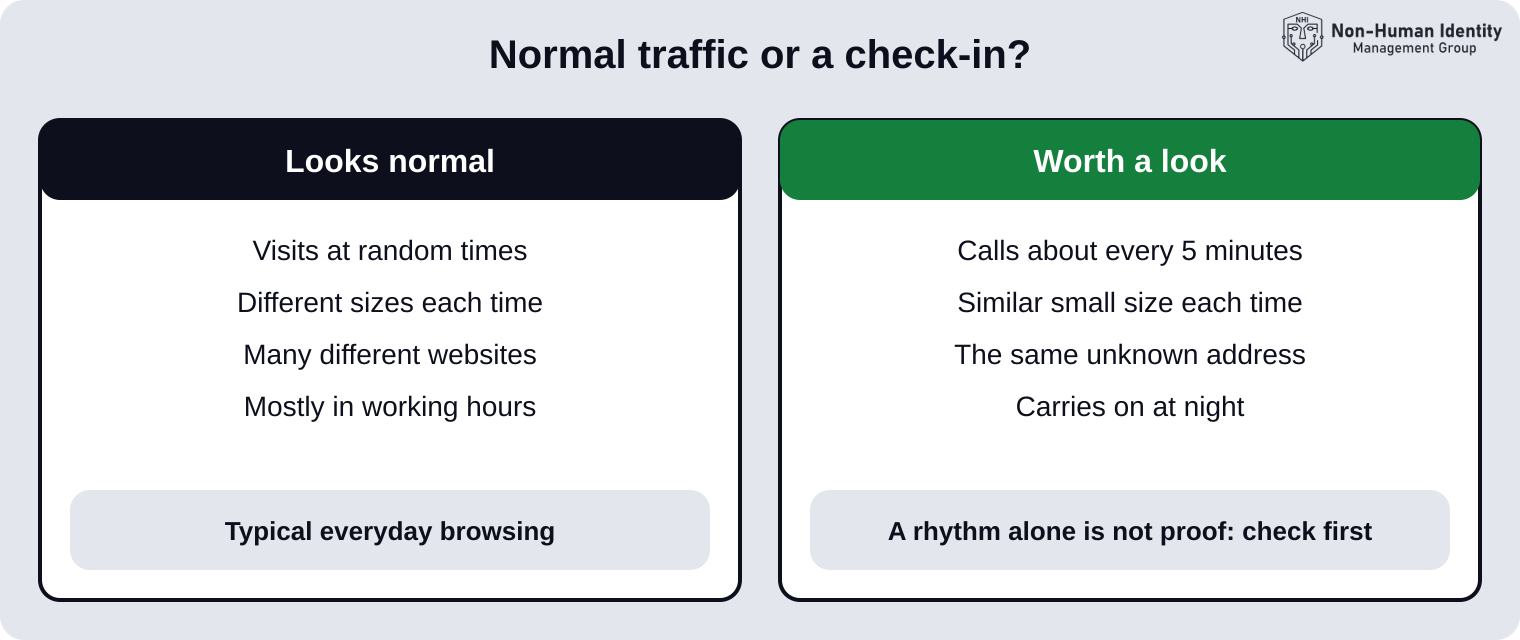
- Small, similar-sized calls to the same place, about every five minutes, even at quiet times.
- Normal browsing: one visit, a different size, no pattern.
- A much bigger send at three in the morning, when nobody is at the desk.
Why this is risky: a steady rhythm of small calls is the pattern many tools look for. Elastic's beaconing feature, for example, looks for signals repeating at regular intervals with little change in size.[6] The large night-time send could be data leaving.
The safer way: do not panic or switch the machine off straight away, because that can lose evidence. Report it, look up the address, and let the team decide whether to isolate the computer. Elastic notes that many normal programs also check in on a timer, so a rhythm alone is not proof.[6]
How does it work?
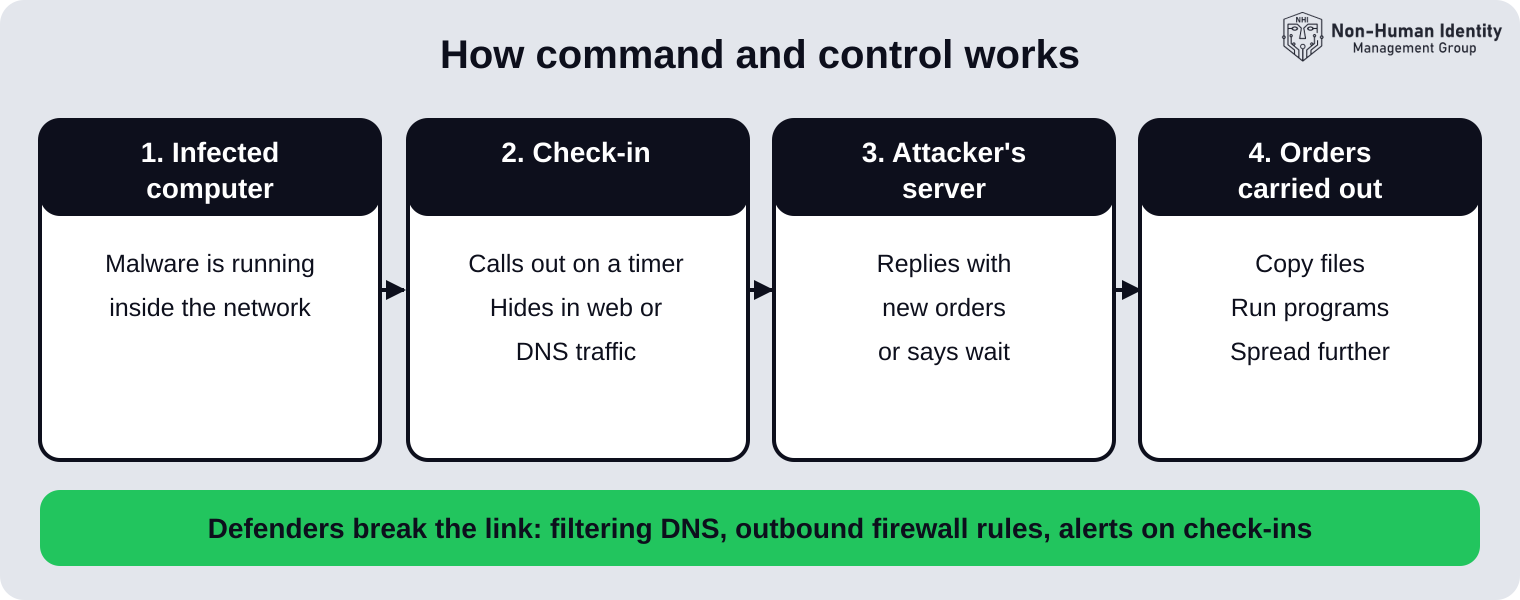
Here is the usual pattern, seen from the defender's side.
- The machine is infected. Malware arrives, for example through a harmful email attachment.
- It phones home. The malware contacts the attacker's server. Attackers often try to copy normal, expected traffic to avoid being noticed.[1]
- It hides in common traffic. Many C2 links use the same methods as web browsing or email.[2] Some hide messages inside DNS lookups, which is called DNS tunnelling.[3] Others use popular websites and cloud services, because many computers already talk to them.[4]
- It waits for orders. The machine checks in again and again. Its timing may vary a little each time, which is called jitter. Detection tools allow for this.[6]
- Defenders break the link. Filtering DNS can refuse to look up names known to be bad. The UK's National Cyber Security Centre (NCSC) says its protective DNS service blocks malware communication, which helps contain active threats.[5] Firewalls that limit outbound traffic and tools that spot regular check-ins add more layers.
A worked example
Idris Zeller looks after the computers at Quarry Opticians, a small chain of three shops. The shops use a filtering DNS service that blocks known bad websites.
On Monday morning he gets an email from the service. The reception PC in one shop tried to look up a blocked name 280 times over the weekend. That is roughly once every ten minutes, even while the shop was shut.
Idris thinks of the spy with the radio. Someone inside is calling out, but the line is being cut. He does not switch the PC off. Instead he unplugs its network cable, so it cannot call anyone, and leaves it running.
He calls Anil Dube, an analyst at the security firm the shops use. Anil asks what changed recently. Idris remembers that a member of staff opened a "delivery note" attachment on Friday.
Anil's team finds malware on the PC. They also check the other machines for the same check-ins and find none in the records available to them. The firm rebuilds the PC from a clean copy, and Idris changes the passwords that were used on it.
Afterwards, Idris adds a short rule to the staff guide: report odd attachments, even after opening them. The block slowed things down, and the alert gave him a head start.
Myths and mistakes
| What people think | What is true |
|---|---|
| Antivirus will always catch malware before it calls out. | Some malware gets past it. Watching outbound traffic adds a second chance to spot it. |
| Traffic to a big cloud service must be safe. | Attackers can use popular web and cloud services for C2, because the traffic blends in.[4] |
| Every regular check-in is an attack. | Updates, backups and chat apps also call home on a timer. Check what the program is before acting. |
| Switch the computer off the moment you see an alert. | Cutting the network is often better. It stops the C2 link and keeps evidence in memory for the team. |
| DNS is just an address book, so nobody attacks it. | Attackers can hide messages inside DNS lookups, and DNS traffic is very common on most networks.[3] |
What can I do this week?
- Find out whether your network uses a filtering DNS service that blocks known bad sites.
- Ask who gets the alerts from your firewall or DNS filter, and who acts on them.
- Write down the first steps for a suspected infection: cut the network, keep the machine on, report it.
- Learn what normal looks like: list the programs that call home on a timer, such as updates and backups.
- Read one real C2 alert or lab write-up and explain it in plain words to a friend.
Checklist
- I can explain command and control and beaconing in one sentence each.
- Our network uses filtering DNS that blocks known bad names.
- Outbound traffic is limited to what our systems need.
- Someone is named to read and act on DNS and firewall alerts.
- Staff know to report odd attachments, even after opening one.
- We have a short plan to cut a machine off the network without switching it off.
- We know which normal programs check in on a timer.
Common questions
What does C2 stand for?
C2 is short for command and control. It means the link an attacker uses to send orders to computers they have broken into, and to get results back. You will also see it written as C&C. Security teams use the term for both the link and the attacker's server.
What is a beacon?
A beacon is a check-in message from an infected machine to the attacker's server. It often repeats on a timer, sometimes with small changes in timing. Security tools look for this rhythm, but normal software also checks in, so each alert needs a closer look.
Can C2 traffic be encrypted?
Yes, often. Many C2 links use the same secure web connections as normal sites, so defenders cannot read the content. They look at other clues instead: where the traffic goes, when, how often and how big it is. That is why patterns matter so much.
How do defenders block C2?
Usually with layers. Filtering DNS refuses to look up names known to be bad. Firewalls limit which places computers can reach. Detection tools flag regular check-ins and odd data sends. When one is confirmed, the team cuts the machine off and cleans it.
Is learning about C2 only for hackers?
No. Defenders need to understand C2 to spot and stop it. It is a common topic in security courses and entry-level analyst jobs. This guide covers the defender's view only. Building or running C2 against systems you do not own is illegal in many countries.
Where next?
Ready for the detail? Read the practitioner guide: Beaconing and C2 Detection Guide. It goes further into the data sources to use, how beacon scoring works, DNS tunnelling and how to cut false alarms.
Also useful:
- Command and Control (C2) Guide
- Egress Filtering for Beginners
- Indicators of Compromise for Beginners
- Threat Hunting for Beginners
Related NHI Mgmt Group resources: Protective DNS Guide · SOC Analyst for Beginners · Malware Analysis for Beginners
Key terms
- Command and control channel
- The communication path an attacker uses to send orders to, and get data from, a machine they control.
- Beaconing
- An infected machine checking in with an attacker's server again and again, often on a timer.
- Jitter
- Small changes in the timing of repeated check-ins, so they are not exactly regular.
- DNS tunnelling
- Hiding messages inside DNS lookups so they pass as normal traffic.
- Protective DNS
- A DNS service that refuses to look up names known to be harmful.
- Egress filtering
- Rules that limit which outside places a network's computers can reach.
- Malware
- Software made to damage, spy on or take over a computer.
Sources and further reading
- Command and Control, Tactic TA0011. MITRE ATT&CK Enterprise v20, The MITRE Corporation. https://attack.mitre.org/tactics/TA0011/, accessed 28 Nov 2026.
- Application Layer Protocol, Technique T1071. MITRE ATT&CK Enterprise v20, The MITRE Corporation. https://attack.mitre.org/techniques/T1071/, accessed 28 Nov 2026.
- Application Layer Protocol: DNS, Technique T1071.004. MITRE ATT&CK Enterprise v20, The MITRE Corporation. https://attack.mitre.org/techniques/T1071/004/, accessed 28 Nov 2026.
- Web Service, Technique T1102. MITRE ATT&CK Enterprise v20, The MITRE Corporation. https://attack.mitre.org/techniques/T1102/, accessed 28 Nov 2026.
- Protective Domain Name Service (PDNS). National Cyber Security Centre (UK). https://www.ncsc.gov.uk/information/pdns, accessed 28 Nov 2026.
- Network Beaconing. Elastic Security documentation (7.x), Elastic. https://www.elastic.co/guide/en/security/7.x/network-beaconing-framework.html, accessed 28 Nov 2026.