Cyber security for recruitment agencies means keeping candidate data, inboxes and pay runs safe from criminals.
This guide is for agency owners, recruiters, office staff and anyone new to working in recruitment. You do not need to be technical. If your agency keeps CVs, ID copies or bank details, this applies to you.
In short
- A recruitment agency holds a lot of personal data about people, so a leak can harm many candidates at once.
- Recruiters open CVs and links from strangers all day, which makes trick emails a common way in.
- Criminals may copy an agency's name to fool jobseekers, and may target weekly pay runs.
- Two-step login, limits on who can export data, and deleting old CVs cover a large part of the risk.
What you will learn
- Spot the four areas of an agency where cyber risk sits.
- Explain why a fake CV link can lead to a data leak.
- Check who can export your candidate database this week.
- Ask the right questions about bank detail changes and old records.
- Candidate database (applicant tracking system)
- the software where an agency keeps CVs, notes and contact details.
- Trick email (phishing)
- a message that pretends to be from someone you trust, to steal a password or money.
- Second check (two-step login)
- a code or app prompt asked for after the password, so a stolen password alone is not enough.
What is cyber security for recruitment agencies?
Think of a filing cabinet full of other people's life stories. Each folder has a CV, a passport copy and maybe bank details. You would lock that cabinet and be careful who gets a key.
Cyber security for an agency is the same care, applied to computers and online accounts. Most agencies keep candidate records in an applicant tracking system, a database built for recruiters. Staff also use email, job boards, timesheet tools and payroll software. Each one holds part of the cabinet.
The job is to know where the folders are, who holds a key, and when to shred what you no longer need.
Where the comparison stops working: a filing cabinet only lets one person take one folder at a time. A database can let one stolen login copy thousands of records in a few clicks.
Why does it matter?
Agencies hold personal data about candidates, temps, referees and emergency contacts. Some of it is sensitive, such as health details or past convictions.[1] If it leaks, the people harmed are often strangers to the agency's owner.
If you own a small agency
What could happen: one stolen login is used to copy the whole candidate database.
Check this: list who can export records in bulk, and cut it down to the few who need it.
If you are a recruiter
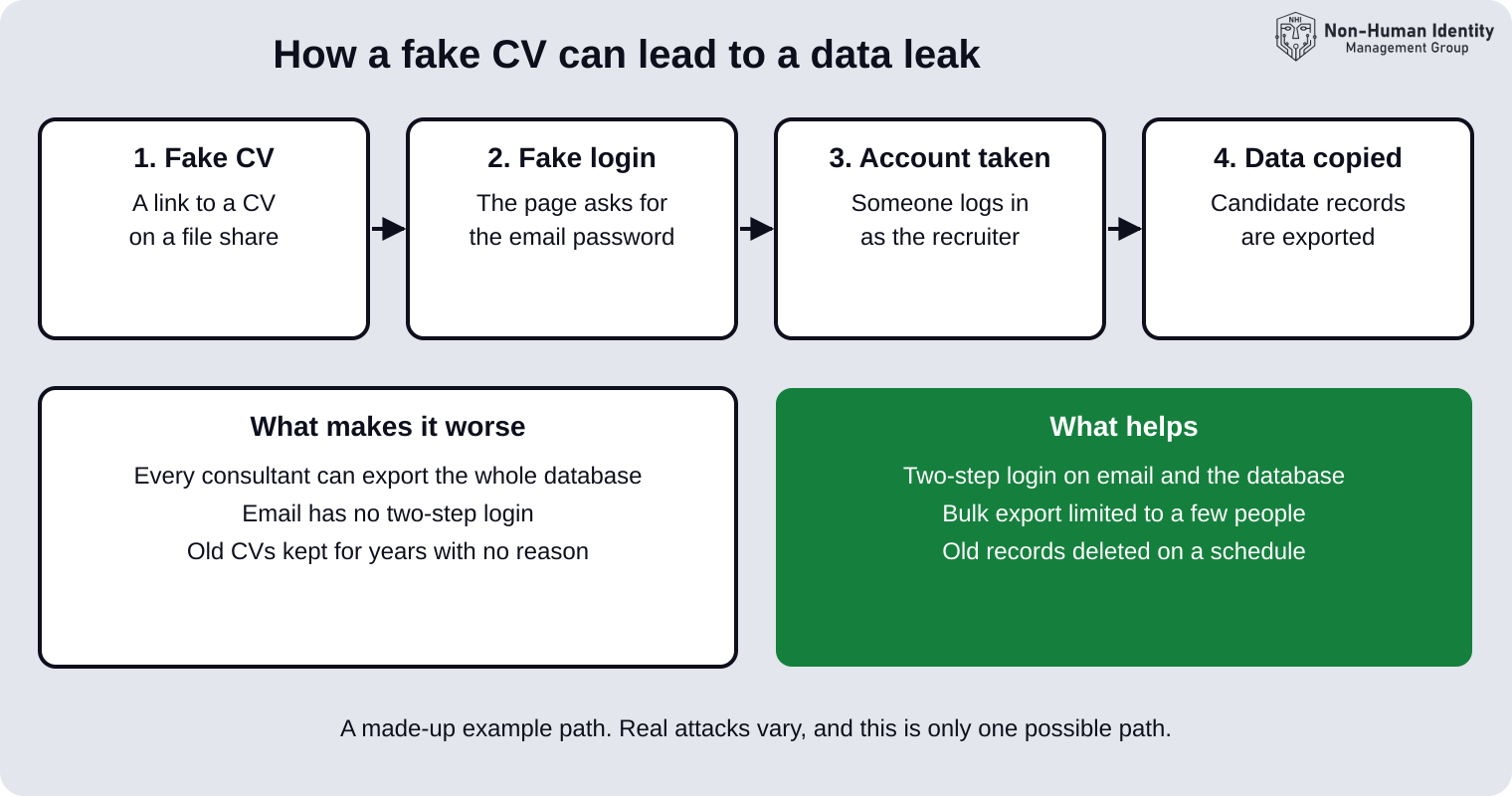
What could happen: a "CV" link opens a fake login page, and your email password is stolen.
Check this: turn on two-step login for your email and the candidate database.
Next: Phishing for Beginners
If you run payroll or timesheets
What could happen: a message asks to change a worker's bank details, and the wages go to a criminal.
Check this: confirm every bank detail change by phone, on a number you already hold.
If you are new to recruitment
What could happen: you download a candidate list to your own laptop and forget it is there.
Check this: keep candidate data inside the agency's systems, not in personal files or chats.
Next: UK GDPR for Beginners
What does it look like?
Here is a made-up email of the kind a recruiter might get. It looks like a normal application.
Example only. All values are made up.
From: Alex Example <[email protected]>   (1)
Subject: Application - Senior Accountant role
Hi, please see my CV at the link below. The file
was too large to attach.                            (2)
View CV: https://cv-files.example.invalid/open      (3)
I am free for a call today, it is quite urgent.     (4)
- A sender you have never heard from. That is normal in recruitment, which is why this trick works.
- An excuse for using a link instead of an attachment.
- In a real message, this link could open a page that asks you to sign in to your email.
- Rush is a common pressure sign.
Why this is risky: a password typed into the page can be copied. Someone else may then log in as you and reach candidate records.
The safer way: ask candidates to apply through your job portal or to attach the CV. If a link asks you to sign in, stop and check with the sender another way.
How does it work?
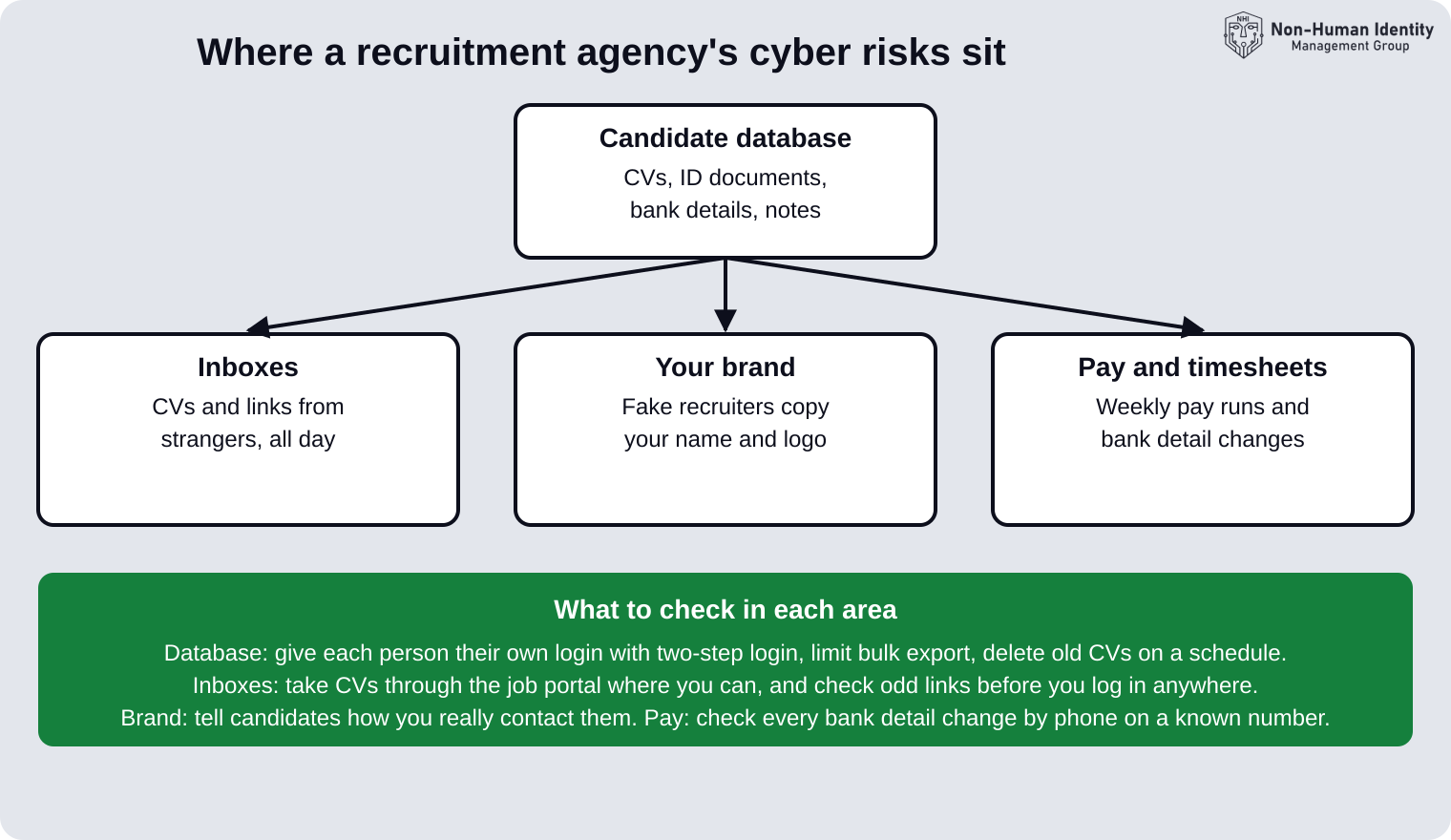
Agencies face three common kinds of attack. Most of them start with people and passwords, not clever technology.
- Stealing logins. A trick email, often dressed as a CV, gets a recruiter's password. The criminal then logs in as that recruiter.
- Copying data. From that account, they search or export candidate records. These can be used for fraud or sold.
- Pretending to be you. Criminals pose as recruiters or employers, sometimes with lookalike web addresses. They ask jobseekers for ID, bank details or upfront fees.[2][3]
- Redirecting pay. A message asks to change where a worker's pay goes. If nobody checks, wages land in a criminal's account.
Keeping less data also helps. Records you have deleted on schedule cannot leak later. Data protection law expects you to keep personal data only as long as you need it, so a clear deletion rule supports both goals.[1]
A worked example
Petra Whitlock runs a fictional recruitment agency with six consultants. They place office and finance staff with local firms.
On a Monday, consultant Milo Zamora gets an email with a "CV link". The page asks him to sign in to email to view the file. Milo stops, because the agency now has a rule: CVs come by attachment or through the job portal. He forwards the email to Petra instead.
That prompts Petra to look at the filing cabinet. She finds every consultant can export the full candidate list. She changes the settings so only she and her operations lead can do bulk exports. She also turns on two-step login for email and the database.
Next she looks at how long CVs are kept. Some date back nine years. She agrees a deletion rule with her data protection adviser, and the oldest records are removed.
A week later, the payroll clerk, Rania Engel, gets an email from a "temp worker" asking to change bank details. Rania rings the worker on the number in their file. The worker has sent no such email, so the change is refused.
Last, Petra adds a line to the agency website and job adverts. It says the agency never charges candidates a fee. Real employers do not charge you to get a job, so this helps candidates spot fakes using her name.[2]
Myths and mistakes
| What people think | What is true |
|---|---|
| We are too small to be a target. | Small organisations are often targeted too.[4] An agency's data is valuable whatever its size. |
| Every recruiter needs to export the whole database. | Most need to search and contact. Keep bulk export for the few who need it. |
| Old CVs are harmless. | Old records can still leak. Keep them only as long as you need them.[1] |
| Fake recruiters using our name are not our problem. | Candidates may blame your agency. Tell them how you really contact them. |
| A bank change request from a worker's email must be real. | Email accounts can be taken over. Check by phone on a number you already hold. |
What can I do this week?
- Turn on two-step login for email and the candidate database.
- Check who can bulk export candidate records, and remove that right from anyone who does not need it.
- Agree a rule: CVs come by attachment or the job portal, not by sign-in links.
- Agree a rule: every bank detail change is checked by phone on a known number.
- Add a line to your website saying how you contact candidates and that you never charge them fees.
Checklist
- Each person has their own login, with no shared accounts.
- Email and the candidate database use two-step login.
- Bulk export is limited to named people.
- There is a written rule for how long CVs and ID copies are kept.
- Old records are deleted on that schedule.
- Bank detail changes are checked by phone before payroll runs.
- Leavers lose access on their last day.
- Candidates are told how the agency really contacts them.
- Files with candidate data are backed up, with one copy kept offline.
Common questions
What is the most useful first step?
Turn on two-step login for email and your candidate database. Many attacks start with a stolen password. With two-step login, a password alone is usually not enough to get in. It takes little time and needs no expert, so it is a good place to start.
How long should we keep CVs?
Only as long as you have a clear reason. Data protection law asks you to set and follow a retention period. The right length depends on your situation, so agree it with your data protection adviser and write it down. Then delete old records on that schedule.
Someone is posing as our agency online. What should we do?
Warn candidates on your website and social pages. Report the fake profile or advert to the platform it is on. Tell candidates how you really contact them, and that you never ask for fees. Victims can also report job scams to the police or a national fraud service.
Do we need an IT company?
Not to start. The steps in this guide can be done by the owner or office manager. An IT supplier helps later, for example with backups and device updates. Choose one carefully, because they will hold keys to your systems.
What if candidate data does leak?
Act quickly and follow your plan. Change passwords, find out what was taken and write down what happened. Depending on the risk to people, the law may require you to tell the data protection regulator, and sometimes the people affected. Get advice early.
Where next?
Ready for the detail? Read the practitioner guide: Cybersecurity for Recruitment Agencies. It goes further into job board and payroll integrations, checking candidate identity before placement, and the data protection rules for agencies acting for clients.
Also useful:
- Small Business Cyber Security for Beginners
- Job Scams for Beginners
- Fake IT Workers for Beginners
- Data Breach Notification for Beginners
Related NHI Mgmt Group resources: Small Business Identity and Access Security Guide · Backups for Small Businesses
Key terms
- Applicant tracking system
- Software recruiters use to store and search CVs and candidate details.
- Personal data
- Any information about a person who can be identified, such as a name, CV or bank details.
- Phishing
- A trick message that pretends to come from someone trusted, to steal passwords or money.
- Multi-factor authentication
- Logging in with a second check, such as a code or app prompt, as well as a password.
- Data minimisation
- Collecting and keeping only the personal data you really need.
- Business email compromise
- A scam where criminals use or fake a business email account to redirect payments.
Sources and further reading
- Employment practices and data protection: recruitment and selection. Information Commissioner's Office, 9 July 2025. https://ico.org.uk/for-organisations/uk-gdpr-guidance-and-resources/employment/recruitment-and-selection/, accessed 28 Nov 2026.
- Job Scams. Consumer Advice, Federal Trade Commission. https://consumer.ftc.gov/articles/job-scams, accessed 28 Nov 2026.
- Cyber Criminals Use Fake Job Listings To Target Applicants' Personally Identifiable Information. Public Service Announcement I-012120-PSA, Federal Bureau of Investigation, 21 January 2020. https://www.ic3.gov/PSA/2020/PSA200121, accessed 28 Nov 2026.
- Small organisations guide to cyber security. National Cyber Security Centre. https://www.ncsc.gov.uk/collection/small-business-guide, accessed 28 Nov 2026.