A fake IT worker is someone who gets a remote tech job using a false or stolen identity.
This guide is for people who hire, manage or work alongside remote staff, and for students curious about the news stories. You do not need to be technical: the warning signs often show up in hiring and payroll, not in code.
In short
- Some people take remote IT jobs under borrowed names and send the pay to others, including, the FBI says, the North Korean government.[1]
- Once hired, a fake worker has real access, so they can copy code or data and sometimes demand a ransom.[1]
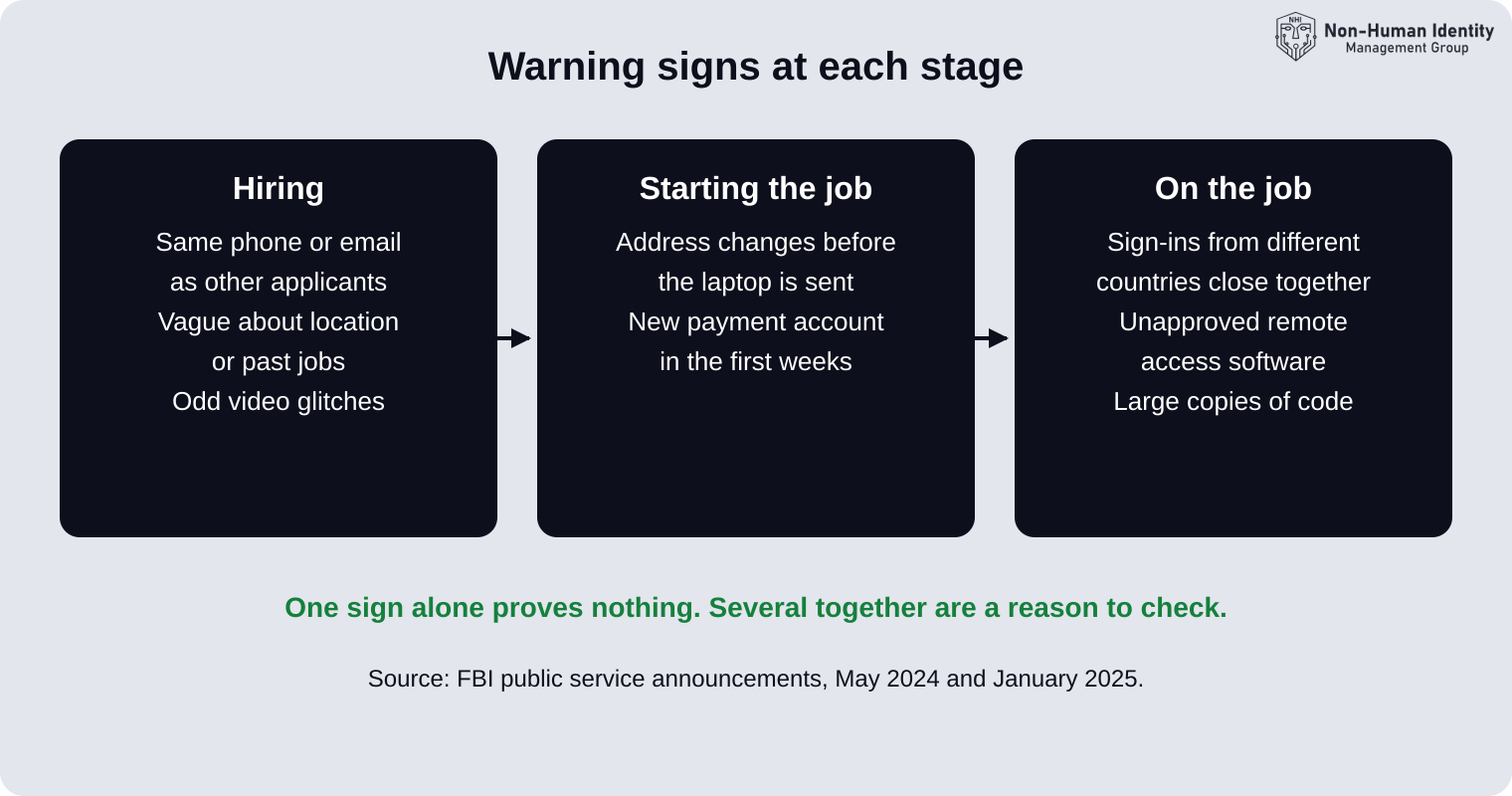
- Common signs are odd video calls, address or bank changes before the laptop ships, and sign-ins from far-off places.
- Careful identity checks, in-person steps where possible and limited access make the scheme much harder.
What you will learn
- Explain how a fake IT worker scheme works, step by step.
- Spot the warning signs during hiring, onboarding and the job itself.
- Check what your hiring process does to confirm who a person is.
- Ask the right questions if a remote worker does not add up.
- Checking a person is who they claim (identity verification)
- confirming that an applicant's name, face and documents belong to the same real person.
- Room of hosted laptops (laptop farm)
- a home where a helper keeps company laptops switched on so workers abroad can use them remotely.
What is a fake IT worker?
Think of a stand-in sitting an exam under someone else's name. The paper looks right and the name is right, but a different person is in the seat.
A fake IT worker does the same with a job. They apply for remote roles, such as coding jobs, using a stolen or made-up name. After they are hired, the company sends them a laptop and gives them access, meaning the right to sign in to its systems.
The FBI has warned that North Korean IT workers use these schemes to earn money for their government. It says some also steal company code and data, then demand payment not to leak it.[1] Here the firm that hires, not the job seeker, is the one who gets fooled.
Where the comparison stops working: an exam ends after a few hours. A fake worker can stay in the job for months, with growing access, and may do useful work so nobody looks closely.
Why does it matter?
A fake hire is not just a bad recruit. It is a stranger with a company laptop and a password. US prosecutors say North Korean workers got remote jobs at more than 100 US companies.[3]
If you hire or work in HR
What could happen: you hire someone whose face, name and documents belong to different people.
Check this: how does your process confirm that the person on the video call matches the ID?
If you run a small business
What could happen: a contractor you never met copies your customer list or source code.
Check this: give new remote staff only the access they need for their first tasks.
If you work in IT support
What could happen: a new starter's laptop runs remote control software you did not install.
Check this: know which remote access tools are approved, and flag any others.
What does it look like?
Here is a made-up note about a new starter. It shows the kind of signs the FBI warns about.
Example only. All values are made up.
New starter: Alex EXAMPLE (FAKE)
Role: Remote developer
Phone: +00 0000 000000 (also on 2 other CVs)   (1)
Interview: video froze, face blurred at times  (2)
Laptop address: changed 2 days before shipping (3)
Pay account: changed in week 1                 (4)
Sign-ins: two countries in one hour            (5)
- The same phone number turns up on other job applications.[1]
- Odd video can be a sign of tools that swap one face for another.[1]
- The address changes after the job offer, just before the laptop is sent.[2]
- The bank or pay details change in the first days of the job.[1]
- In a real file, this line would come from the sign-in records kept by IT.
Why this is risky: each sign alone may have a simple, honest reason. Taken together, they suggest the person may not be who or where they say.
The safer way: pause access and check who the person is again in a way you trust. Bring security and HR together before you decide anything.
How does it work?
Court cases and FBI warnings describe a similar path each time.[2][3]
- Borrow an identity. The worker applies for a job with a stolen or made-up name, often backed by false papers.[3]
- Pass the interview. Interviews take place over video, and the FBI warns that AI or face-swapping tools may be used.[1]
- Get the laptop to a helper. A helper in the employer's country gets the laptop and keeps it running at home, in what officials call a laptop farm.[3]
- Work from abroad. The worker controls the laptop from overseas using remote access software, so they appear to be local.[2]
- Move the money and data. Pay goes to accounts the helpers set up. Some workers also copy code or data and later demand a ransom.[1][2]
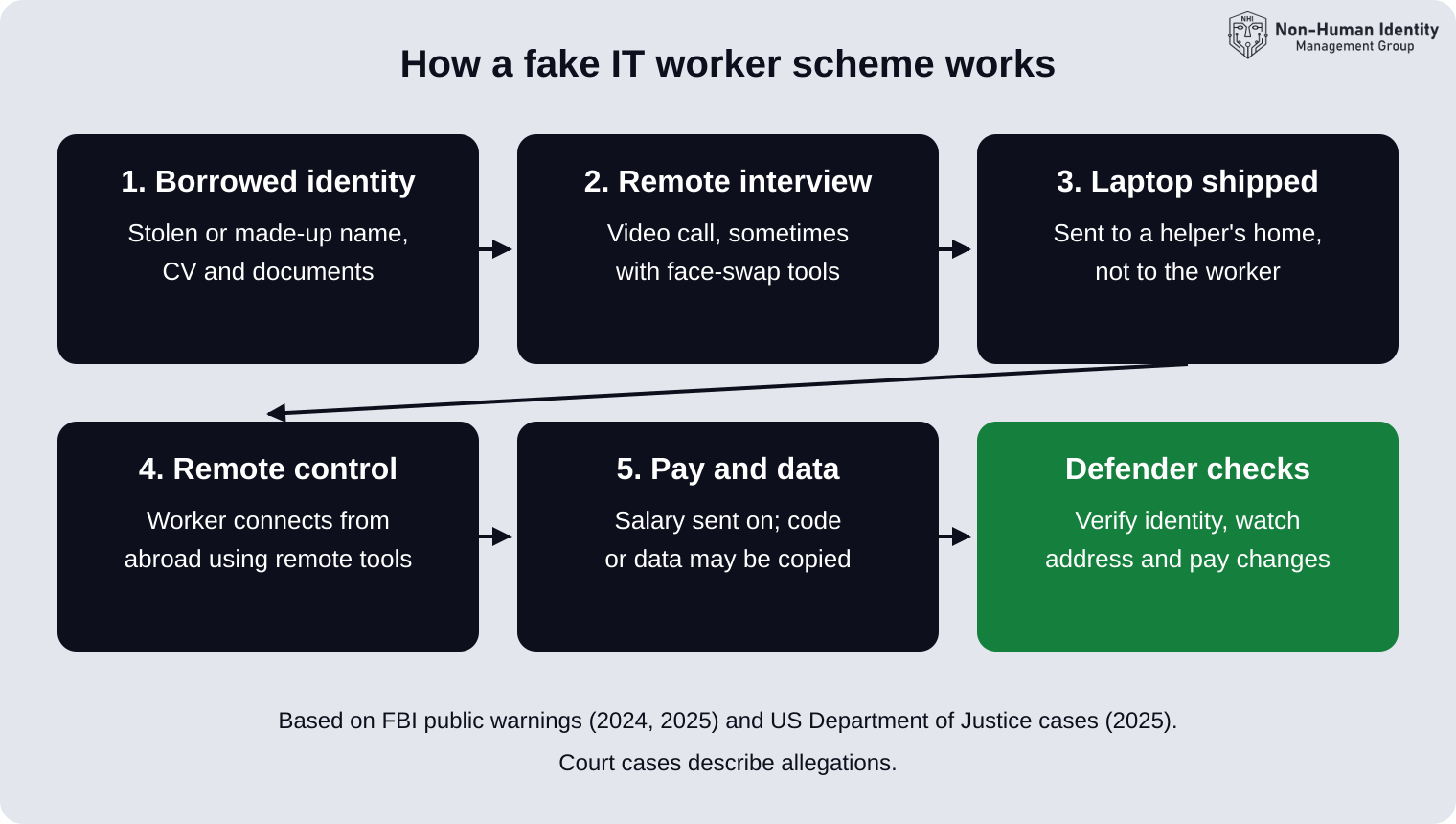
The good news is that the signs show up at several stages. Hiring, payroll and IT each see a different part of the picture.
A worked example
Fen Thorne is a hiring manager at Copperfield Apps, a fictional software firm with sixty staff. She needs a remote developer quickly.
One applicant has a strong CV and does well in a video interview, though the picture freezes now and then. Fen makes an offer.
Two days before the laptop ships, the new starter asks to change the delivery address. In the first week, they also change their bank details. Payroll notes both, but nobody connects them.
Rania Kader runs IT security. In week three, she sees the new developer's account sign in from two different countries within an hour. The laptop also has a remote control tool that the firm does not use.
Rania thinks of the exam stand-in picture. The name is right, but who is in the seat?
She and Fen meet with HR. They compare notes and find the same phone number on another recent application. They pause the account's access and ask the starter to come in person to confirm their identity. The starter stops replying.
Rania checks what the account touched. It had copied part of one code project, so the firm changes the passwords and keys that project used. They report the case to the authorities.
Afterwards, Copperfield adds an in-person or trusted identity check before any laptop ships. HR, payroll and IT now share address and payment changes for new starters.
Myths and mistakes
| What people think | What is true |
|---|---|
| A good video interview proves who someone is. | The FBI warns that face-swapping tools may be used in interviews. Check identity another way too.[1] |
| Fake workers do no real work. | Some do useful work, which is why they can stay hidden for a long time. |
| This only hits big tech firms. | Any firm hiring remote IT staff can be a target, including through staffing agencies.[1] |
| Firing the person ends the problem. | They may have copied data or kept passwords. Remove access and change shared secrets too. |
| It is just an HR issue. | Hiring, payroll and IT each see different signs. They need to share them. |
What can I do this week?
- Ask HR how a remote applicant's identity is checked, and whether any step is in person.
- Agree that address or bank changes for new starters are flagged to IT and security.
- Check which remote access tools are approved on company laptops.
- Give new remote staff only the access their first tasks need.
- Ask any staffing agency you use how they confirm who their workers are.
Checklist
- Identity is checked at hiring, at onboarding and again later in the job.
- At least one step happens in person or through a trusted check where possible.
- Laptop delivery address changes are reviewed before shipping.
- Payment detail changes for new starters are reviewed.
- Only approved remote access tools are allowed on company devices.
- New starters get the least access they need.
- Sign-ins from unexpected countries raise an alert.
- Staffing agencies are asked about their identity checks.
Common questions
Is this the same as a job scam?
No. In a job scam, a criminal fools a job seeker, often to steal money or personal details. Here it is the other way round: the criminal is the applicant, and the employer is fooled into hiring them and giving them access.
Why does North Korea come up so often?
US officials have named North Korea as a major source of these schemes. The FBI says the workers earn money for the regime, and some also steal data.[1] Other fraudsters can use similar tricks, so the checks matter whoever is behind them.
What is a laptop farm?
It is a home where a helper keeps many company laptops switched on. Workers overseas connect to them remotely, so their activity seems to come from inside the employer's country. US prosecutors say they searched 29 known or suspected laptop farms across 16 states.[3]
Could hiring one by mistake get my company in legal trouble?
It may. Paying a worker who sends money to a sanctioned government can raise sanctions issues in some countries. If you suspect a case, take legal advice and report it to the authorities rather than handling it alone.
What should I do if I suspect a current worker?
Do not confront them alone. Bring in security, HR and legal together. Quietly review what the account can reach and has copied. Then decide whether to pause access and ask for an in-person identity check. Report it to the authorities.
Where next?
Ready for the detail? Read the practitioner guide: Insider Threat from Fake IT Workers Guide (North Korean IT Worker Schemes). It goes further into detection signals across the job, endpoint and identity controls, sanctions exposure and safe offboarding.
Also useful:
- Insider Threats for Beginners
- Deepfakes and AI Fraud for Beginners
- Job Scams for Beginners
- Remote Access Tools for Beginners
Related NHI Mgmt Group resources: Deepfake and Payment Fraud Executive Briefing · Threat Actors for Beginners · Data Exfiltration for Beginners
Key terms
- Candidate identity verification
- Checking that a job applicant is the real person they claim to be.
- Deepfake interview fraud
- Using faked video or voice to pose as a different person in a job interview.
- Remote access tool abuse
- Misusing normal remote control software to run a computer without permission.
- Least privilege
- Giving each person only the access they need for their work.
- Insider threat detection
- Spotting risky behaviour by people who already have trusted access.
- Data extortion
- Stealing information and then demanding money not to publish or misuse it.
Sources and further reading
- North Korean IT Workers Conducting Data Extortion (Alert I-012325-PSA). Federal Bureau of Investigation, Internet Crime Complaint Center, 23 January 2025. https://www.ic3.gov/PSA/2025/PSA250123, accessed 28 Nov 2026.
- Democratic People's Republic of Korea Leverages U.S.-Based Individuals to Defraud U.S. Businesses and Generate Revenue (Alert I-051624-PSA). Federal Bureau of Investigation, Internet Crime Complaint Center, 16 May 2024. https://www.ic3.gov/PSA/2024/PSA240516, accessed 28 Nov 2026.
- Justice Department Announces Coordinated, Nationwide Actions to Combat North Korean Remote Information Technology Workers' Illicit Revenue Generation Schemes. US Department of Justice, 30 June 2025. https://www.justice.gov/opa/pr/justice-department-announces-coordinated-nationwide-actions-combat-north-korean-remote, accessed 28 Nov 2026.