Data minimisation means collecting and keeping only the personal information you actually need for a clear purpose.
This guide is for small business owners, people who design forms or apps, and anyone new to privacy. You do not need to be a lawyer to apply it: every form, spreadsheet and sign-up page you run is a chance to ask for less.
In short
- Ask only for the personal details you need for a stated reason.
- Data you never collect cannot be lost, leaked or misused.
- UK and EU data protection law expects it, and US guidance for businesses gives the same advice.
- Start by checking one form: for each box, ask "what do we use this for?"
What you will learn
- Explain data minimisation in one sentence.
- Spot boxes on a form that ask for more than you need.
- Check whether a piece of data has a clear purpose.
- Ask your team or supplier to remove fields you do not use.
Status: correct as at 28 November 2026, based on guidance from the UK Information Commissioner's Office and the US Federal Trade Commission. Laws change; check the official text.
This guide explains the topic in general terms and is not legal advice.
- Information about a person (personal data)
- anything that can identify someone, such as a name, email address or date of birth.
- The reason you hold it (purpose)
- the clear job you need the data for, decided before you collect it.
What is data minimisation?
Think of packing for a short trip. You take what the trip needs, not everything you own. A light bag is easier to carry, and there is less to lose if it goes missing.
Data minimisation works the same way for information about people. Before you collect a detail, you decide what it is for. Then you collect only what that job needs. You also keep it only as long as you need it.
The UK regulator, the Information Commissioner's Office (ICO), puts it in three words. Data should be adequate, which means enough to do the job. It should be relevant, which means clearly linked to the job. And it should be limited, which means no more than the job needs.[1]
Where the comparison stops working: if you forget something on a trip, you can often buy it there. Data you collect without a reason does not just weigh you down. It can also harm the people it is about if it leaks.
Why does it matter?
Every extra detail you hold is one more thing to protect. If you are breached, you can only lose what you have. US guidance for businesses puts it simply. If you have no real business need for sensitive personal details, do not keep them. In fact, do not even collect them.[2]
If you run a small business
What could happen: an old spreadsheet full of customer birth dates leaks, and you had no use for them.
Check this: list what you ask customers for, and why.
If you design forms or apps
What could happen: a "nice to have" field on a sign-up form fills a database with details nobody uses.
Check this: make each field earn its place, and make extras optional.
If you manage staff records
What could happen: you record health details for every worker when only a few roles need them.
Check this: ask whether each detail is needed for everyone, or only for some people.
Next: UK GDPR for Beginners
What does it look like?
Here is a made-up booking form for an opticians, with a note on each box.
Example only. All values are made up.
Book an eye test
Full name:         Alex EXAMPLE                 (1)
Email or phone:    [email protected]             (2)
Date of birth:     01/01/1900                   (3)
Home address:      1 Example Street             (4)
Job title:         FAKE-Manager                 (5)
How did you hear about us?  [optional]          (6)
- Needed, so staff know who is coming.
- Needed, but one way to reach the customer is enough.
- Useful for an eye test, since some checks depend on age. Keep it if you can say why.
- In a real system, this line would contain a home address that a booking may not need.
- Not linked to an eye test. Remove it.
- Fine as an optional box, if someone actually reads the answers.
Why this is risky: the address and job title add nothing to the booking. They still need protecting, and they could be lost in a breach.
The safer way: keep the boxes you can explain, make "nice to have" boxes optional, and remove the rest. The ICO says you should not collect personal data on the off chance that it might be useful later.[1]
How does it work?
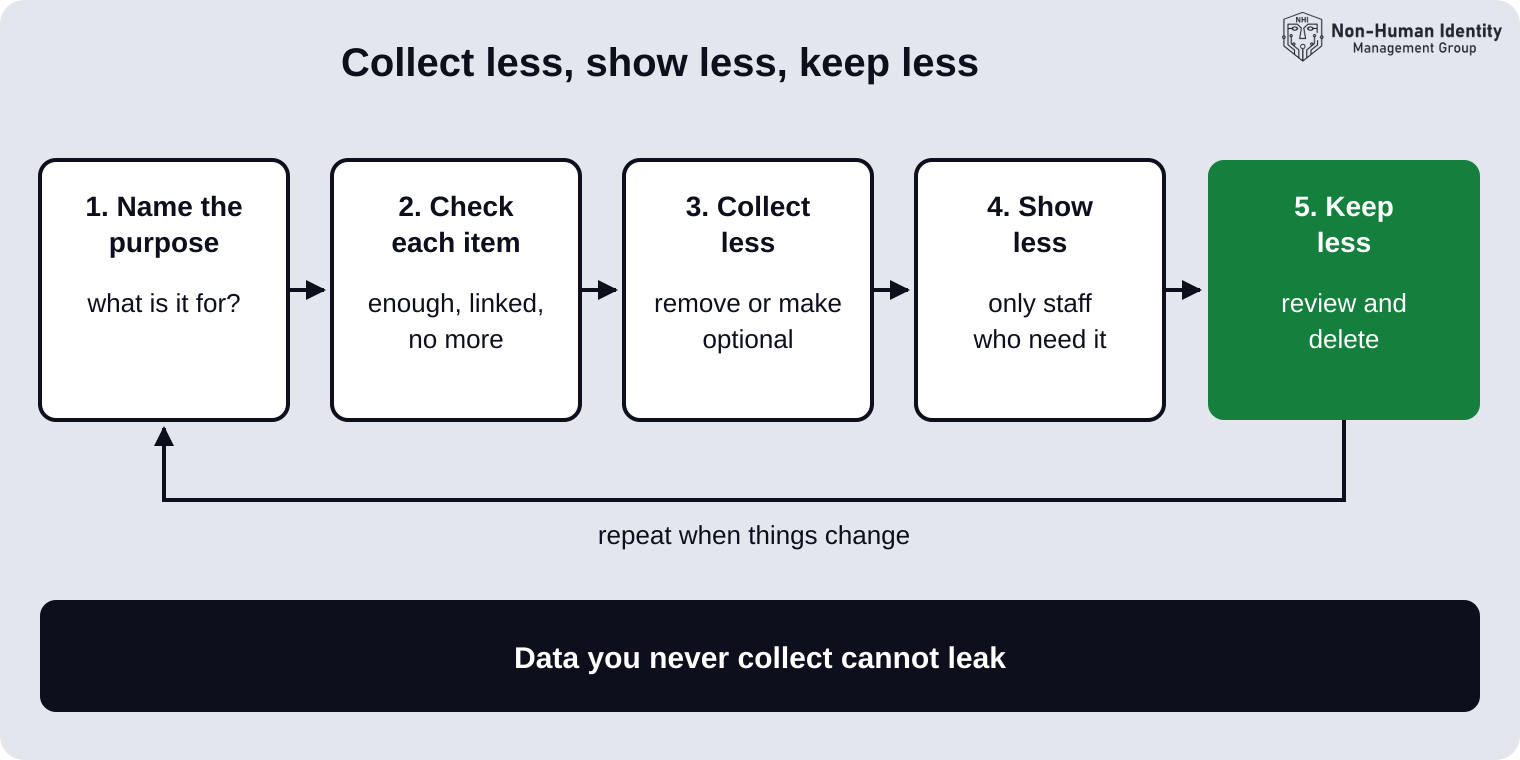
Data minimisation is a habit you repeat, not a one-off task.
- Name the purpose. Write down what you need the data for before you collect it.
- Check each item. For every field, ask whether it is enough, linked to the purpose and no more than needed.[1]
- Collect less. Remove boxes you cannot explain. Make extras optional.
- Show less. Let staff see only the data their job needs. US guidance calls this the principle of least privilege.[2]
- Keep less. Review what you hold from time to time, and delete what you no longer need. The ICO links this to the rule on not keeping data for too long.[1]
"Enough" matters too. The ICO notes that holding too little data can also be a problem, for example if a growing club cannot tell its members apart.[1] The aim is the right amount, not the smallest amount.
European data protection regulators also publish guidance on data protection by design and by default. In plain words, that means building privacy into a system from the start.[3]
A worked example
Mira Pereira owns Larch Opticians, a fictional high street shop with two branches. Sana Strand, a freelance web developer, is building its new online booking page.
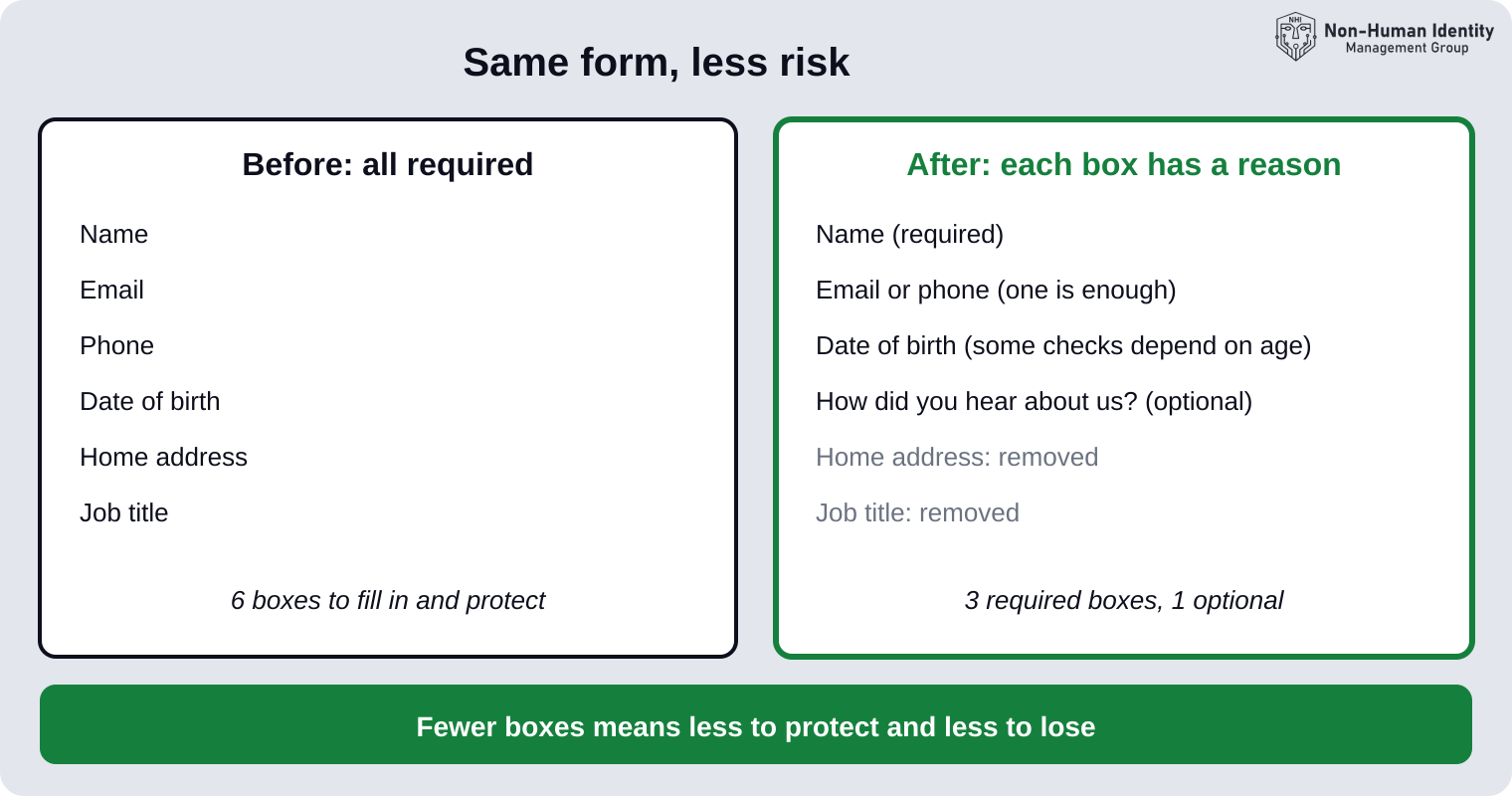
Sana copies the old paper form. It asks for name, email, phone, date of birth, home address and job title. Before going live, Mira asks a simple question. "What do we use each of these for?"
They go through the boxes one by one. The name and one way to contact the customer are clearly needed. The optometrist says date of birth helps, because some checks depend on age. So it stays, with a short line explaining why.
Nobody can say why the shop needs a job title. It goes. The home address is only needed when glasses are posted, so Sana moves it to the order step for postal orders only.
Next, Mira looks at who can see the bookings. Reception staff need names and times. They do not need dates of birth, so Sana hides that column from their screen.
Last, they agree to delete booking details for people who never turn up after a set period, and to write that period down.
The new form is shorter, so it is quicker to fill in. Mira also has less to protect, and a clear answer if a customer asks why she needs their details.
Myths and mistakes
| What people think | What is true |
|---|---|
| We should collect it in case it is useful later. | The ICO says not to collect personal data on the off chance it might be useful.[1] |
| Less data is always better. | The aim is enough for the purpose. Too little can also cause problems.[1] |
| It only matters for big companies. | Small firms hold personal data too. A leak can hurt their customers just as much. |
| Optional boxes do not count. | Whatever people type in is still data you hold and must protect. |
| Once we decide what to collect, we are done. | Needs change. Review what you hold now and then, and delete what you no longer need. |
What can I do this week?
- Pick one form and write the reason next to every box.
- Remove any box nobody can explain, or make it optional.
- Check who can see your customer list, and narrow it if you can.
- Find one old file of personal data you no longer use, and delete it safely.
Checklist
- Each form and system has a written purpose.
- Every required field can be linked to that purpose.
- Extra fields are optional or removed.
- Sensitive details, such as health or ID numbers, are collected only where clearly needed.
- Staff see only the data their job needs.
- Copies, exports and test files do not hold more personal data than needed.
- There is a set time to review and delete data.
- Suppliers who build forms for you follow the same rules.
Common questions
Is data minimisation a legal requirement?
Yes, in the UK and the EU it is one of the core principles of data protection law. Other countries have similar rules, and US business guidance gives the same advice. Check the rules where you operate, and see GDPR for Beginners for the wider picture.
How do I know how much data is enough?
Start from the purpose. If you can explain how a detail helps you do that job, it may be needed. If you cannot, leave it out. The ICO says the answer can differ between people, so some details may be needed for some customers only.
Is data minimisation the same as deleting old data?
Not quite. Deleting old data is part of it, and is covered in Data Retention and Secure Deletion for Beginners. Data minimisation starts earlier, by not collecting what you do not need in the first place.
Can I keep data to train AI or for analytics later?
Only if you have a clear purpose for it and can explain it to people. Using fewer details, or replacing names with codes, can reduce the risk. See Anonymisation and Pseudonymisation for Beginners for how that works.
Does it apply to staff data too?
Yes. It applies to employees, job applicants and suppliers as well as customers. The ICO gives an example. Asking office job applicants about health conditions that matter only for manual roles would be irrelevant and excessive.
Where next?
Ready for the detail? Read the practitioner guide: Data Minimisation. It goes further into field-level reviews, limits in apps and logs, analytics and AI, and how to audit the principle.
Also useful:
- Data Privacy for Beginners
- Data Retention and Secure Deletion for Beginners
- Data Protection Impact Assessments for Beginners
- Data Classification for Beginners
Related NHI Mgmt Group resources: Privacy by Design Guide for Engineering Teams · Data Retention and Secure Deletion Guide · UK GDPR for Beginners
Key terms
- Data minimisation
- Collecting, using and keeping only the personal data needed for a clear purpose.
- Personal data
- Information that can identify a person directly or indirectly, such as a name or email address.
- Purpose limitation
- The rule that data is collected for a clear stated reason and not reused for something unrelated.
- Storage limitation
- The rule that personal data is not kept longer than needed for its purpose.
- Pseudonymisation
- Replacing names and other direct identifiers with a code, with the key kept separately.
- Data protection by design
- Building privacy into systems from the start, with the most protective settings as the default.
- Least privilege
- Giving each person or system only the access it needs, and no more.
Sources and further reading
- Principle (c): Data minimisation. Information Commissioner's Office (UK), 9 September 2025. https://ico.org.uk/for-organisations/uk-gdpr-guidance-and-resources/data-protection-principles/a-guide-to-the-data-protection-principles/data-minimisation/, accessed 28 Nov 2026.
- Protecting Personal Information: A Guide for Business. Federal Trade Commission (US), October 2016. https://www.ftc.gov/business-guidance/resources/protecting-personal-information-guide-business, accessed 28 Nov 2026.
- Guidelines 4/2019 on Article 25 Data Protection by Design and by Default, version 2.0. European Data Protection Board, 20 October 2020. https://www.edpb.europa.eu/our-work-tools/our-documents/guidelines/guidelines-42019-article-25-data-protection-design-and_en, accessed 28 Nov 2026.