GitHub security means keeping your GitHub account, your code projects and your access tokens safe.
This guide is for students, junior developers, people who look after open-source projects and anyone whose team keeps code on GitHub. You do not need to be an expert: if your business pays someone to build software, its code may well live on GitHub.
In short
- There are three things to protect: your account, your projects and the tokens that let tools act for you.
- Turn on two-factor sign-in, so a stolen password alone is not enough to get in.
- Protect your main branch and switch on the free scanning tools for public projects.
- Give each token only the access it needs, set an end date and remove the ones you no longer use.
What you will learn
- Explain the three parts of GitHub you need to protect.
- Spot a token with far more access than its job needs.
- Check your own account settings in about ten minutes.
- Ask your team the right questions about how code is reviewed.
- Code project (repository)
- a folder of code plus its full history of saved changes.
- Second check at sign-in (two-factor authentication)
- a code or device you need as well as your password.
- Software pass (access token)
- a long secret string that lets a tool or script use GitHub as you.
What is GitHub security?
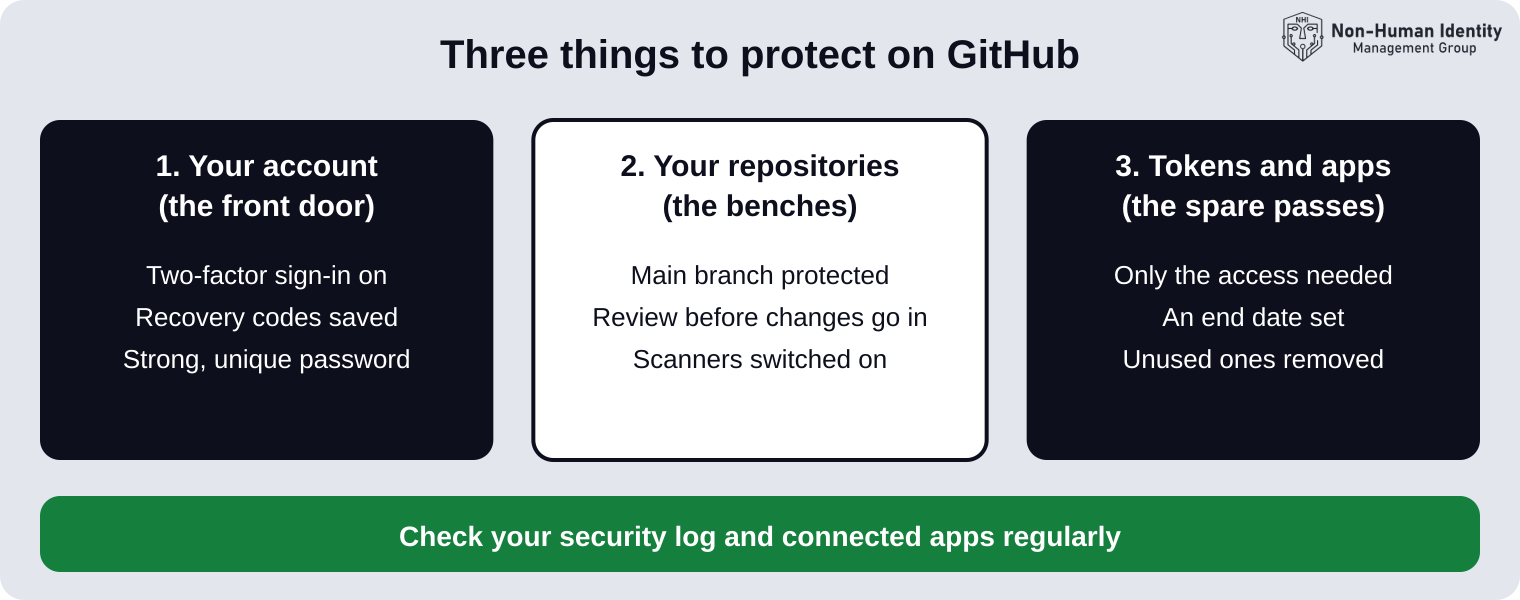
Think of GitHub as a shared workshop where your project lives. You have a key to the front door. Each project sits on its own bench. You may also hand out spare passes so helpers can come in while you are away.
GitHub is a website where people store and share code. Each project is kept in a repository (a folder of code plus its history). Your account is the front door key. The repositories are the benches.
The spare passes are access tokens. A token is a long secret string. A script or tool shows it to GitHub to act as you, without your password.[2] Tokens and the apps that hold them are non-human identities (NHIs). An NHI is a digital identity, or the credential behind it, that represents a machine, application, automated process, service or AI agent.
GitHub security means keeping all three safe: the door, the benches and the passes.
Where the comparison stops working: a lost workshop pass is easy to notice, because it is missing from your pocket. A copied token leaves no gap. The original still works for you, so you may not know someone else has a copy.
Why does it matter?
Code on GitHub is often used by other people and other software. If someone takes over an account or a token, they may change code that many others download.
If you are a student or learning to code
What could happen: a guessed password lets a stranger delete your projects or post harmful code under your name.
Check this: two-factor sign-in is on and you have saved your recovery codes.
If you look after an open-source project
What could happen: someone pushes a harmful change, and people who depend on your project download it.
Check this: changes to your main branch need a review before they go in.
If your business pays someone to build software
What could happen: a former contractor still has access to your code months after the work ended.
Check this: ask who can see your repositories, and remove anyone who has left.
What does it look like?
Here is a made-up list of the tokens on one student's account. GitHub shows a list like this in the account settings.
Example only. All values are made up.
Token name        Access                     Expires     Last used
laptop-backup     ALL repositories, admin    never  (1)  10 months ago (2)
homework-bot      1 repository, read only    in 30 days  yesterday    (3)
token value:      EXAMPLE-TOKEN-0000-FAKE    (4)
- This token never ends, so it keeps working until someone removes it.
- It has not been used for ten months, so nobody seems to need it.
- This one is limited to one project, can only read, and ends soon.
- In a real screen, the token value is shown only once, when it is made. Treat it like a password.
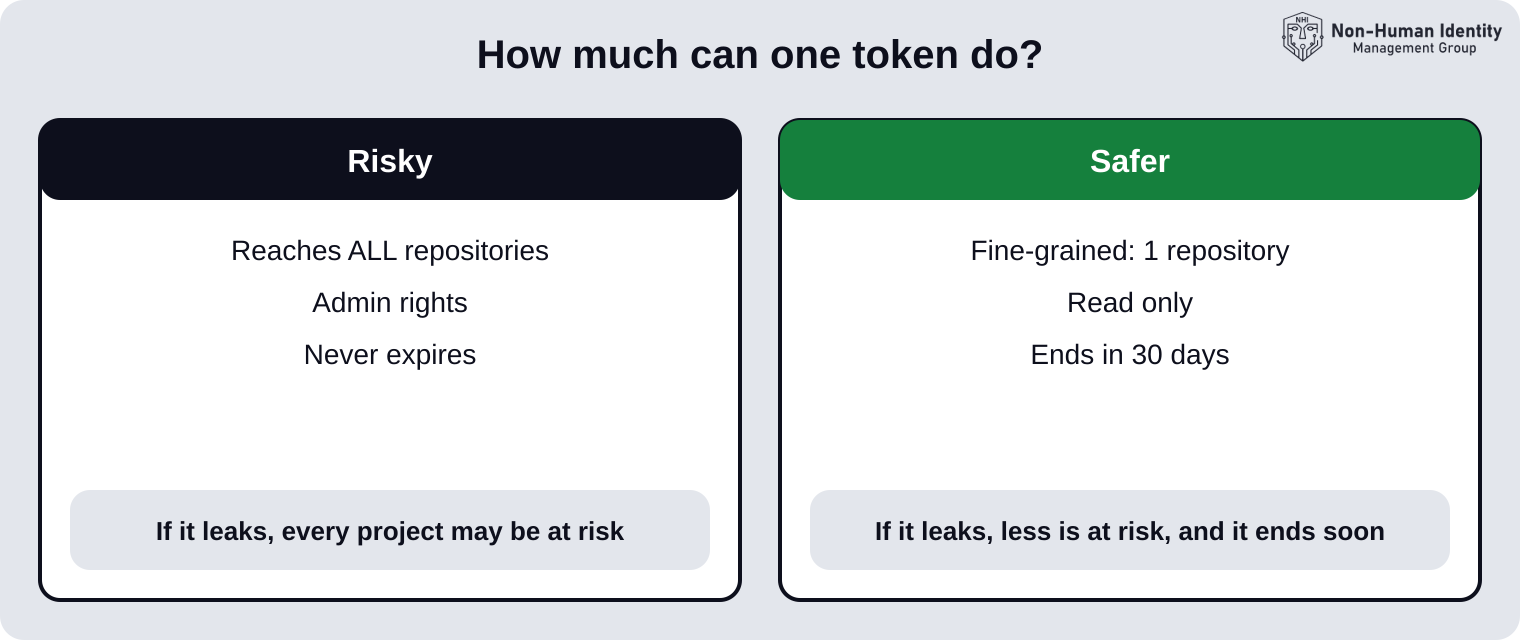
Why this is risky: the first token can change every project on the account, has no end date and is forgotten. If a copy sits in an old script or backup, whoever finds it may be able to use it.
The safer way: delete tokens you do not use. GitHub recommends fine-grained tokens, which can be limited to chosen repositories and chosen permissions. It also strongly recommends setting an end date.[2]
How does it work?
Good GitHub security comes in layers. Each one covers a different way in.
- Lock the front door. Turn on two-factor sign-in. GitHub has required it for people who contribute code since March 2023. It recommends an authenticator app (a phone app that shows a new code every 30 seconds) as the main method.[1]
- Guard the main bench. Protect the main branch (the copy of the code people actually use). A branch protection rule can require an approving review before a change is merged in. By default it also blocks a forced overwrite or deletion of that branch.[4]
- Switch on the scanners. Dependabot alerts warn you when a building block your code uses has a known flaw. Secret scanning looks for passwords and keys left in code. These features are available for all public repositories.[3]
- Keep passes small. Give each token only the access its job needs, and set an end date.[2]
- Check who has been in. Your security log lists actions on your account from the past 90 days.[5] You can also review apps you have allowed to use your account, and remove any you do not recognise.[6]
A worked example
Lina Erikson is a computer science student. She keeps her coursework and a small open-source tool on GitHub. About forty people use the tool.
One evening she gets an email from Emil Ueda, a stranger who uses her tool. "There is a new change on your main branch that I don't recognise," he writes. "It sends data to an odd web address."
Lina opens her security log. She sees a sign-in from a country she has never visited, two days ago. Her password was one she had used on an old gaming site.
She remembers the workshop. The front door key was copied, so she changes the lock first. She sets a new, unique password in her password manager. Then she turns on two-factor sign-in with an authenticator app and saves the recovery codes.
Next she checks the spare passes. She finds an old token called "laptop-backup" with access to every project and no end date. She deletes it, along with an app she does not remember allowing.
Then she undoes the harmful change and posts a short note for her users. She thanks Emil.
Last, she protects the main branch, so every change now needs a review. She switches on Dependabot alerts and secret scanning.
The whole fix takes one evening. The quick report from a user made the difference.
Myths and mistakes
| What people think | What is true |
|---|---|
| My projects are tiny, so nobody will target me. | Attackers often reuse passwords leaked from other sites against many accounts at once. Size does not matter much. |
| A private repository is safe, so I can relax. | Private projects can still be reached through a stolen password or token. Lock the account as well. |
| A token is less important than my password. | GitHub says to treat tokens like passwords.[2] A token may work without the second check at sign-in. |
| A token that never expires saves me effort. | It also keeps working for anyone who copies it. Set an end date and make a new one when needed. |
| Text message codes are the best second check. | GitHub recommends an authenticator app as the main method. It notes text messages carry risks some people may not accept.[1] |
What can I do this week?
- Turn on two-factor sign-in and save your recovery codes somewhere safe and offline.
- Open your token list and delete every token you do not recognise or use.
- Review the apps you have allowed to use your account, and revoke the ones you no longer need.
- Switch on Dependabot alerts and secret scanning for your public projects.
- Add a branch protection rule to the main branch of any project other people use.
Checklist
- My GitHub password is unique and stored in a password manager.
- Two-factor sign-in is on, with an authenticator app as the main method.
- My recovery codes are saved somewhere I can reach if I lose my phone.
- Every token has a clear job, the smallest access it needs and an end date.
- Unused tokens and apps have been removed.
- The main branch of shared projects needs a review before changes go in.
- Dependabot alerts and secret scanning are on where my plan allows.
- I look at my security log after anything unusual.
Common questions
Do I have to use two-factor sign-in on GitHub?
If you contribute code, very likely yes. Since March 2023, GitHub has required two-factor sign-in for users who contribute code, choosing accounts in stages based on what they do. Even if you have not been asked yet, turning it on is one of the simplest ways to protect your account.
What is the difference between a token and an app?
A token is a secret string tied to your own account. A GitHub App is a separate identity with its own permissions, often for automated tools. Both let software act on your projects. The practitioner guide explains when to use each, and why apps are often the better choice for teams.
What should I do if I pushed a token or password to GitHub?
Cancel or change it at the service that issued it first, so the old copy no longer gives access. Deleting the line is not enough, because older versions stay in the history. Then work out where else it was used. See Secrets in Code for Beginners.
Are GitHub's security features free?
For public projects, many are. GitHub says its code security and secret scanning features are available for all public repositories. Private repositories usually need an organisation or business plan that includes them. Check GitHub's current plan pages, because what is included can change.
What is a branch, and why protect it?
A branch is a separate line of work on the same project. Most projects have one main branch that people actually use. Protecting it means changes must follow rules, such as an approving review, before they reach the copy everyone downloads.
Where next?
Ready for the detail? Read the practitioner guide: GitHub Apps vs Personal Access Tokens vs OAuth Apps. It goes further into how each kind of access works, which to choose for automation and how to detect misuse.
Also useful:
- GitHub Personal Access Tokens Security Guide
- GitHub Organisation Security Checklist
- Secrets in Code for Beginners
- Passkeys for Beginners
- Non-Human Identities for Beginners
- NHI Foundation Level Training
Related NHI Mgmt Group resources: GitHub and GitHub Actions Security Guide · GitHub Token Types and Prefixes Reference · CI/CD Pipeline Security for Beginners
Key terms
- GitHub
- A website where people store, share and work together on code projects.
- Repository
- A project's files plus their full history of saved changes.
- Two-factor authentication
- Signing in with your password plus a second proof, such as a code from an app.
- Fine-grained personal access token
- A GitHub token that can be limited to chosen repositories and chosen permissions.
- Branch protection
- Rules that control how changes reach an important branch, such as needing a review.
- Dependabot
- A GitHub tool that warns about known flaws in the building blocks your code uses.
- Security log
- A record of recent actions on your account, such as sign-ins and setting changes.
Sources and further reading
- About mandatory two-factor authentication. GitHub Docs, GitHub. https://docs.github.com/en/authentication/securing-your-account-with-two-factor-authentication-2fa/about-mandatory-two-factor-authentication, accessed 28 Nov 2026.
- Managing your personal access tokens. GitHub Docs, GitHub. https://docs.github.com/en/authentication/keeping-your-account-and-data-secure/managing-your-personal-access-tokens, accessed 28 Nov 2026.
- Quickstart for securing your repository. GitHub Docs, GitHub. https://docs.github.com/en/code-security/getting-started/quickstart-for-securing-your-repository, accessed 28 Nov 2026.
- About protected branches. GitHub Docs, GitHub. https://docs.github.com/en/repositories/configuring-branches-and-merges-in-your-repository/managing-protected-branches/about-protected-branches, accessed 28 Nov 2026.
- Reviewing your security log. GitHub Docs, GitHub. https://docs.github.com/en/authentication/keeping-your-account-and-data-secure/reviewing-your-security-log, accessed 28 Nov 2026.
- Reviewing your authorized OAuth apps. GitHub Docs, GitHub. https://docs.github.com/en/apps/oauth-apps/using-oauth-apps/reviewing-your-authorized-oauth-apps, accessed 28 Nov 2026.