Hacked website recovery is getting a broken-into website clean, closed to the attacker and trusted again.
This guide is for small business owners, charity and club volunteers, students and anyone whose website has just started acting strangely. You do not need to build websites to follow it: most of the first steps are phone calls, passwords and decisions.
In short
- Stay calm and write down what you see before you change anything.
- Call your web host or supplier, and consider taking the site offline while it is cleaned.
- Change every password linked to the site, clean or restore it, and find how the attacker got in.
- Only then bring the site back, ask search engines to review it, and check whether you must report a data breach.
What you will learn
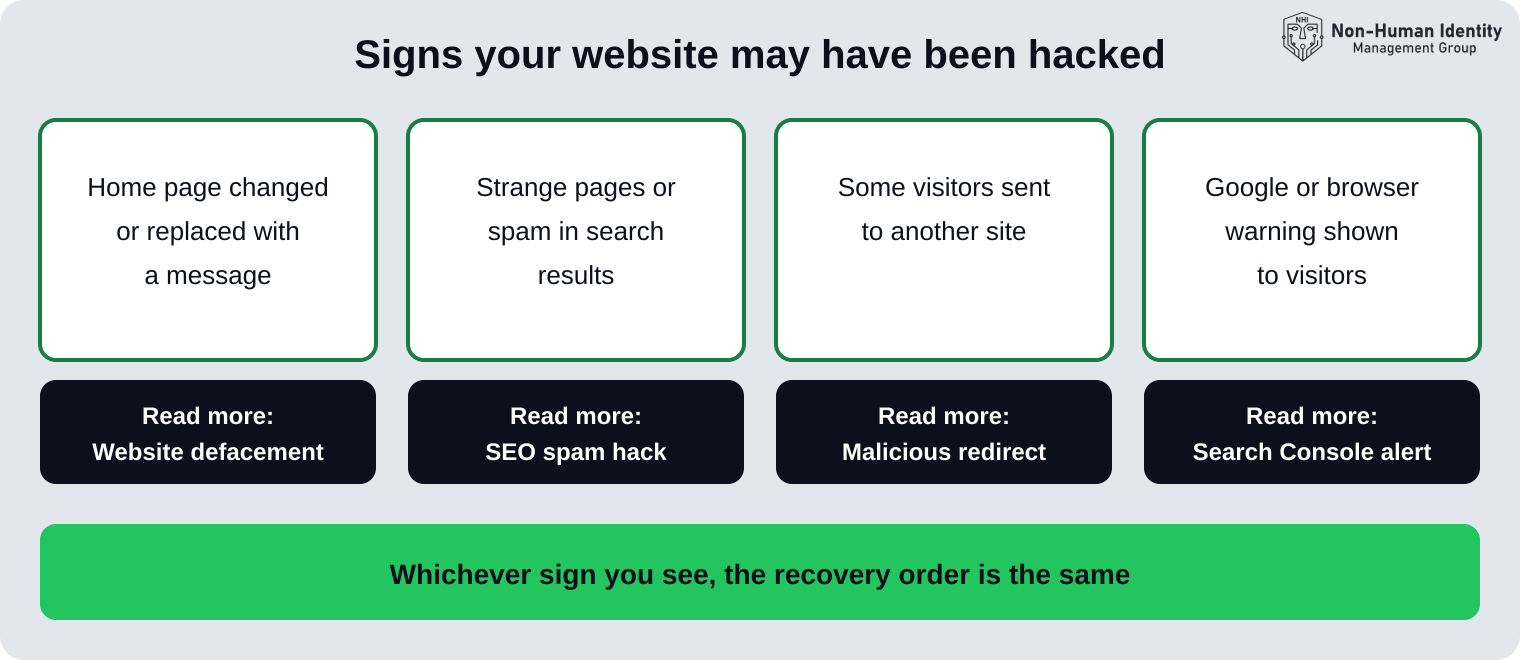
- Spot the common signs that a website has been hacked.
- Explain the safe order of steps to recover it.
- Check who to call and which passwords to change.
- Ask your supplier how the attacker got in, so it does not happen again.
- Web host
- the company whose computers store your website and show it to visitors.
- Hidden way back in (backdoor)
- a secret file or account an attacker leaves behind so they can return.
- Website builder software (content management system)
- the software you use to edit pages, such as WordPress.
What is hacked website recovery?
Think of a break-in at a small shop. You do not just sweep up the glass and open the next morning. You call for help, find the window they forced, change the locks and check nothing was left behind.
A hacked website is the same. Someone has got into the site and changed it. They may have swapped the home page, added spam pages, sent visitors to another site or hidden harmful code. Recovery means removing their changes, closing the way they got in and proving to visitors and search engines that the site is safe again.
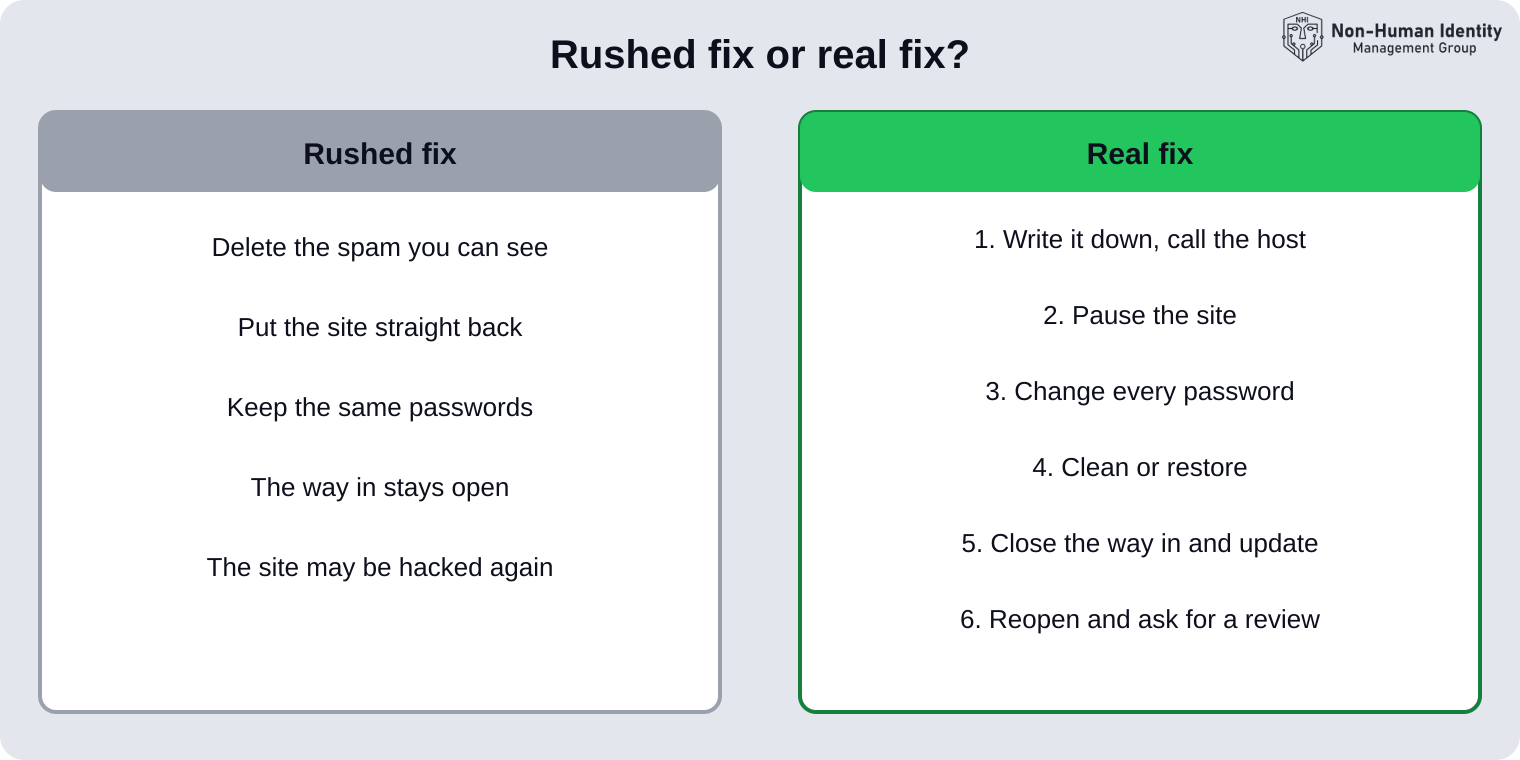
Many site owners fix the part they can see and stop there. But attackers often leave a backdoor, so the site can be hacked again soon after.[3]
Where the comparison stops working: a shop break-in leaves broken glass. A website break-in can leave no sign you can see as the owner, while visitors or search engines see something quite different.
Why does it matter?
A hacked site can harm your visitors, your name and your search ranking. If customer details were taken, you may also have legal duties to report it.[6]
If you run a small business
What could happen: browsers warn visitors away from your shop, and sales stop until the site is cleaned and reviewed.
Check this: know who your web host is and how to reach your web supplier out of hours.
If you look after a club or charity website
What could happen: the site sends members to a scam page, and nobody notices for weeks.
Check this: make sure more than one person has admin access and receives security alerts.
If you are a student or new to web work
What could happen: you restore an old backup, but the weak spot is still there and the site is hacked again.
Check this: update the software and close the way in before the site goes back online.
What does it look like?
Here is a made-up incident note, the kind a site owner might write in the first hour.
Example only. All values are made up.
Incident note: www.example.com
09:10 Customer says our site opens a prize page. (1)
09:20 Search shows pages for pills we do not sell. (2)
09:25 New admin user "FAKE-admin-0000" found.   (3)
09:30 Called web host. Site paused for cleaning. (4)
09:40 Screenshots saved. Nothing deleted yet.    (5)
- A sign of a hidden redirect.
- A sign of spam pages added for search engines.
- An account nobody created. Note its name, then remove it.
- The host may show a "back soon" page during the clean-up.
- Notes and screenshots help the clean-up and any report.
Why this is risky: if the owner only deleted the spam pages, the unknown admin would stay. So would the way in.
The safer way: write down what you see, call the host and follow the steps below in order.[5]
How does it work?
Recovery usually follows the same order.[1] Your web supplier may do the technical parts, but you should know the steps.
- Write it down. Note what you saw, when you saw it and anything that changed recently, such as a new add-on.[5]
- Get help and pause the site. Tell your web host, because their systems may be affected too. Consider taking the site offline while it is cleaned. Google says short downtime during recovery is unlikely to hurt your search ranking.[2]
- Lock the doors. Remove accounts you do not recognise. Change the passwords for every account linked to the site, including hosting, file upload and database access.[2] Scan the computers used to manage the site, because malware there can steal passwords.[3]
- Clean or restore. Keep a copy of the hacked site for reference. Then replace the site software with fresh copies, or restore a backup from before the hack. Hacks often add new files, so simply copying files over the top can leave them behind.[5]
- Close the way in. Find how they got in. Common causes are weak or reused passwords, out-of-date software or add-ons, and infected admin computers.[3] Update everything, then change the passwords again.[5]
- Reopen and ask for a review. Bring the site back. If Google flagged it, ask for a review once the site is clean and the weak spot is fixed.[4]
After a hack, also ask whether personal data, such as customer names, emails or orders, could have been seen or taken. In the UK, a breach likely to put people at risk must be reported to the Information Commissioner's Office. Report it as soon as possible, and within 72 hours where you can.[6] The regulator has a short online check to help you decide.[7] Other countries have their own rules, so check with your local regulator.
A worked example
Juno Abara runs a fictional online yarn shop from her spare room. One Monday a customer emails: "Your site just sent me to a page saying I'd won a phone."
Juno's first thought is to log in and delete whatever is wrong. Instead, she takes screenshots, writes down the time and calls Talia Ulrich, the freelancer who built the site.
Talia asks the web host to show a "back soon" page. Then she checks the admin list and finds an account neither of them created. She notes its name and removes it.
Next, they change every password: Juno's admin account, the hosting account and the password the site uses to reach its database. Juno also runs a scan on her laptop, which finds nothing.
Talia takes a copy of the hacked site, then puts fresh copies of the site software in place. She restores the shop's pages and products from a backup taken before the problem started.
The cause turns out to be an old add-on that had not been updated for two years. Talia removes it, updates everything else and changes the passwords once more.
The site is back on Tuesday afternoon. Juno checks Google's site tool and finds no warnings listed. No customer card details are held on the site, but she uses the regulator's online check to be sure about the email addresses. She keeps her notes, in case anything changes.
Myths and mistakes
| What people think | What is true |
|---|---|
| Deleting the bad pages fixes the hack. | Attackers often leave a hidden way back in. Close the way in, or the site may be hacked again.[3] |
| Restoring a backup is enough. | A backup brings back the old weak spot too. Update and change passwords before reopening.[5] |
| Taking the site offline will ruin our search ranking. | Google says short downtime during recovery is unlikely to hurt rankings.[2] |
| Only big companies get hacked. | Small sites are hacked too, often through old software or weak passwords.[3] |
| Changing passwords once is enough. | Change them at the start, and again once the site is clean.[5] |
What can I do this week?
- Write down who your web host is and how to contact your web supplier in a hurry.
- Check the list of admin users and remove anyone who no longer needs access.
- Turn on two-step sign-in for your website admin and hosting accounts.
- Ask your supplier when the site software and add-ons were last updated.
- Check that a recent backup is kept away from the website, and that someone has tested it.
Checklist
- We know who to call first if our site is hacked, day or night.
- We write down what we see before changing anything.
- We can take the site offline or show a holding page quickly.
- Every password linked to the site is changed after a hack, and again after clean-up.
- Unknown admin accounts are noted and removed.
- The site is cleaned or restored, and the way in is found and closed, before it reopens.
- We ask for a search engine review only once the site is clean.
- We check whether any personal data was at risk and whether we must report it.
Common questions
How do I know if my website has been hacked?
Look for a changed home page, strange pages in search results or visitors sent to other sites. New admin users and browser or Google warnings are signs too. Some hacks only show to certain visitors, so take customer reports seriously even if the site looks fine to you.
Should I take my site offline?
Often yes, while it is cleaned. It stops visitors being harmed and stops the attacker interfering with the clean-up. Ask your web host how to show a holding page. Google says short downtime during recovery is unlikely to hurt your search ranking.
Can I fix a hacked website myself?
Some owners can, using guidance from their host or their website software. If you are not confident, ask your web supplier or a specialist. The hardest part is finding every change and the way in, and missing one can mean the site is hacked again.
How long does a Google review take?
From about a day to several weeks. Google says reviews for phishing take about a day, malware a few days and spam up to several weeks. Once Google finds the site clean, it says warnings are removed within 72 hours.
Do I need to report a hacked website?
Sometimes, if personal data may have been seen or taken. Check your local rules. In the UK, the regulator's online check helps you decide. Likely risks must be reported as soon as possible, within 72 hours where you can.
Where next?
Ready for the detail? Read the practitioner guide: How to Clean Up a Hacked Website. It goes further into finding hidden files and accounts, cleaning each type of hack, and writing a strong review request.
Also useful:
- Website Defacement for Beginners
- SEO Spam Hacks for Beginners
- Malicious Website Redirects for Beginners
- Search Console Security Alerts for Beginners
- Small Business Website Security Guide
Related NHI Mgmt Group resources: Website Defacement Playbook · PHP and WordPress Security Guide · Website Security for Beginners
Key terms
- Backdoor
- A hidden file, account or setting an attacker leaves so they can get back in.
- Web shell
- A small hidden program on a web server that lets an attacker send it commands.
- Malware
- Software made to harm, spy on or take over a computer or website.
- Plugin
- An add-on that gives website software extra features, and needs updates like the main software.
- Multi-factor authentication
- Signing in with a second check, such as a code on your phone, as well as a password.
- Clean restore
- Bringing a system back from a copy that is checked to be free of the attacker's changes.
Sources and further reading
- Help, my site has been hacked. web.dev, Google. https://web.dev/articles/hacked, accessed 28 Nov 2026.
- Quarantine your site. web.dev, Google. https://web.dev/articles/quarantine-your-site, accessed 28 Nov 2026.
- Identify the vulnerability. web.dev, Google. https://web.dev/articles/identify-the-vulnerability, accessed 28 Nov 2026.
- Request a review. web.dev, Google. https://web.dev/articles/request-a-review, accessed 28 Nov 2026.
- FAQ: My site was hacked. WordPress.org Documentation. https://wordpress.org/documentation/article/faq-my-site-was-hacked/, accessed 28 Nov 2026.
- Personal data breaches: a guide. Information Commissioner's Office (UK). https://ico.org.uk/for-organisations/report-a-breach/personal-data-breach/, accessed 28 Nov 2026.
- Personal data breach self-assessment. Information Commissioner's Office (UK). https://ico.org.uk/for-organisations/report-a-breach/personal-data-breach-assessment/, accessed 28 Nov 2026.