JavaScript security means writing and running JavaScript so that strangers cannot misuse your website or app.
This guide is for students, people learning web development and anyone who looks after a website. You do not need to write code to be affected: if your business has a website, its JavaScript decides what visitors can see and do.
In short
- JavaScript sent to a web browser can be read by anyone, so it must never hold passwords or private keys.
- Show visitor text with
textContent, notinnerHTML, so it cannot turn into code. - Packages from npm can run code when you install them, so check them and lock their versions.
- Keep secrets on the server, in settings that are not shared with the code.
What you will learn
- Explain the difference between browser code and server code.
- Spot risky lines such as
innerHTML,evaland a key in browser code. - Check that a project locks its package versions.
- Ask where a website keeps its secret keys.
- Browser code (front end)
- JavaScript that is sent to each visitor's browser and runs on their device.
- Server code (back end)
- JavaScript, often run with Node.js, that runs on your own server where visitors cannot read it.
- Package store (npm)
- the main public place where JavaScript packages are shared and downloaded.
What is JavaScript security?
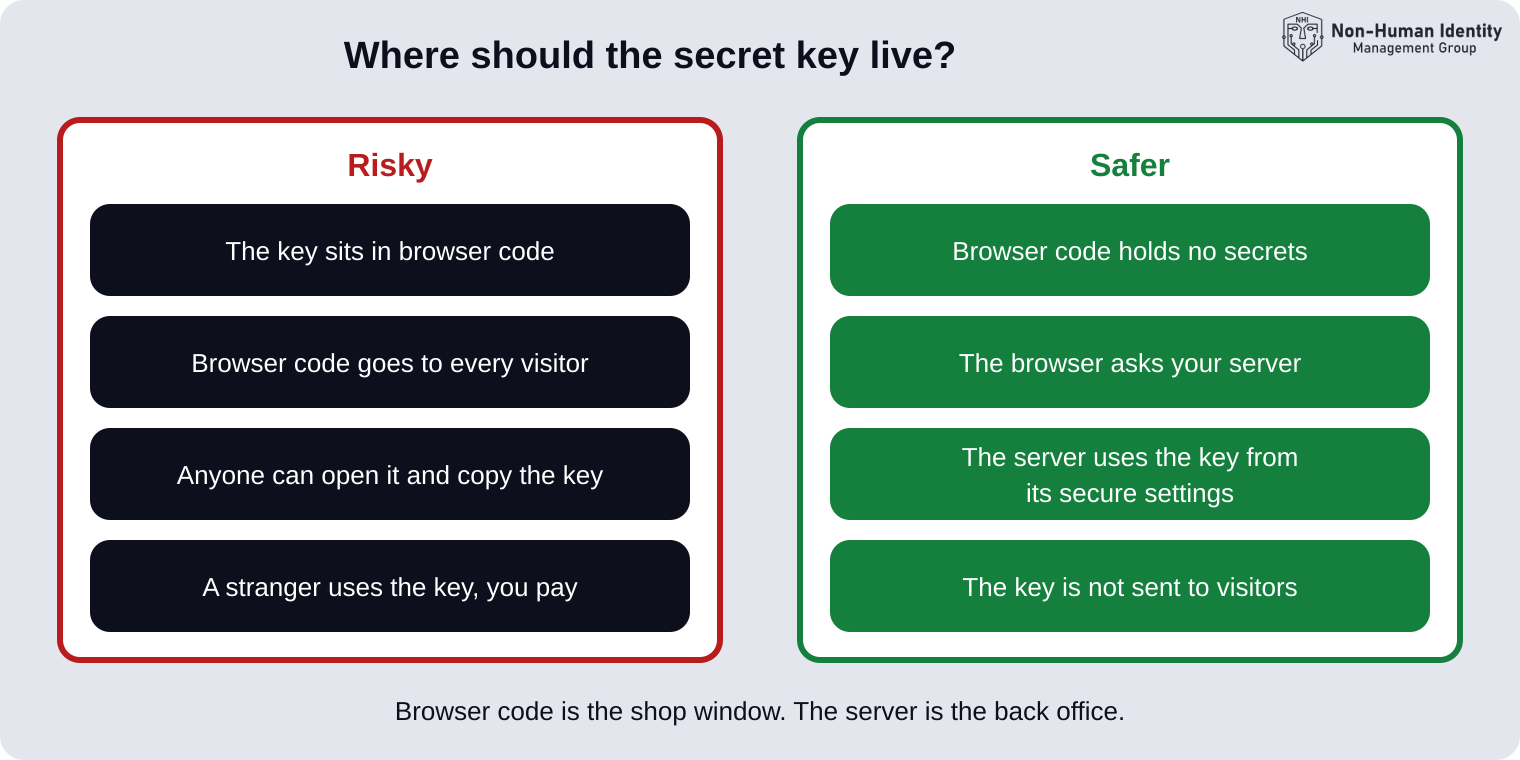
Think of a shop window. Everything you put in it can be seen by anyone walking past, and some passers-by look very closely.
Browser code works the same way. JavaScript is the language that makes web pages interactive. When someone visits your site, their browser downloads your JavaScript and runs it. They can open it and read every line.
JavaScript also runs on servers, using a program called Node.js. Server code is more like the back office of the shop. Visitors cannot see it, so it is the right place for passwords and private keys.
JavaScript security covers both sides. It is about what you put in the window, how you handle what visitors type in, and which ready-made packages you build on.
Where the comparison stops working: a shop window only shows things. Browser code also runs, so a visitor can change it on their own device and send your server whatever they like.
Why does it matter?
Almost every website uses JavaScript, and many sites are built from hundreds of shared packages. One careless line or one bad package can affect every visitor.
If you are learning web development
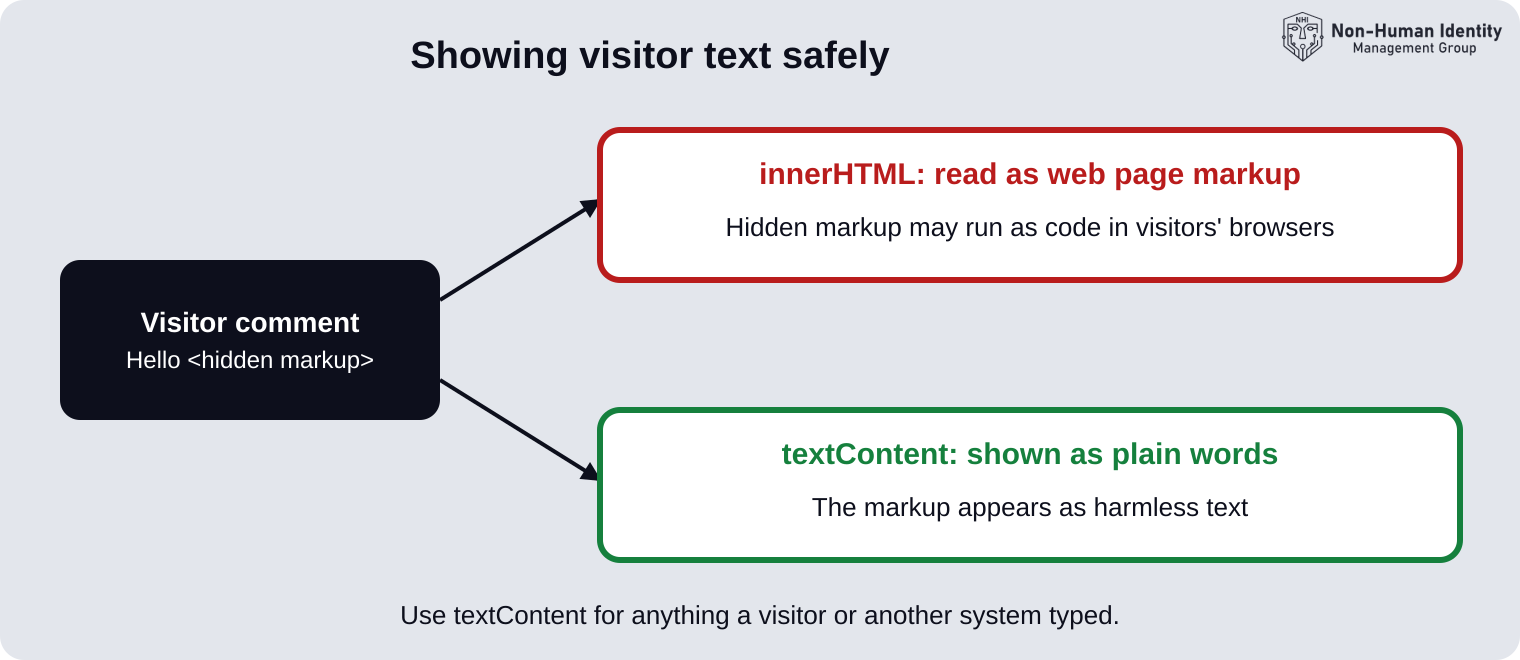
What could happen: you show a visitor's comment with innerHTML, and someone posts a comment that runs code in other visitors' browsers.
Check this: use textContent whenever you show text that someone else wrote.
If you build apps with Node.js
What could happen: a package you install has been taken over, and it runs harmful code on your laptop or build server.
Check this: lock package versions, and look at what each new package does before you add it.
If you run a business website
What could happen: a payment or AI service key is placed in the browser code, and a stranger copies it and runs up bills.
Check this: ask your developer whether any secret key is sent to the browser.
Next: API Keys for Beginners
What does it look like?
Here is a short, made-up piece of browser code for a small bakery's order page. It works, but it has four risky lines.
Example only. All values are made up.
// order-page.js (made-up example, sent to every visitor)
const PAY_KEY = "EXAMPLE-SECRET-KEY-0000";    (1)
box.innerHTML = "Thanks, " + nameFromForm;     (2)
const total = eval(priceText);                 (3)
// package.json: "date-helper": "*"            (4)
- In a real file, this line would contain a secret payment key. Because this file goes to every browser, anyone could copy it.
- Visitor text is added to the page as HTML, so it can be read as code, not just words.
- Text from the page is run as JavaScript code.
- The star means "any version". The next install may pull in a version nobody has checked.
Why this is risky: browser code is public, so a key in it is public too. MDN, the main web developer reference, calls innerHTML probably the most common route for cross-site scripting.[1] Cross-site scripting (XSS) means tricking a site into running a stranger's code in visitors' browsers. eval runs any text it is given as code.[2]
The safer way: the payment key stays on the server, and the browser asks the server to take the payment. Visitor text is shown with textContent. Prices are turned into numbers with Number(). Package versions are locked in a lockfile (a file that records the exact version of every package).
How does it work?
Most JavaScript safety comes down to five habits.
- Know which side you are on. Anything in browser code is public. Some build tools bundle settings into browser code. Vite, a popular one, warns that settings it exposes to the browser should not hold secrets such as API keys.[3]
- Treat visitor text as text. When you show something a person typed, use
textContent, which shows it as plain words. MDN recommends it when the content should be plain text.[1] - Do not run text as code. Avoid
eval,new Functionand timers given text. The OWASP cheat sheet on browser-side scripting warns that these all treat text as code.[4] - Lock your packages. Keep the lockfile in your project. The
npm cicommand installs exactly what the lockfile lists, and stops with an error if it does not match the project's package list.[5] Remember that npm runs install scripts by default, so new packages deserve a look first.[6] - Check for known problems. The
npm auditcommand asks the package store about known flaws in your packages and suggests fixes.[7] Add a second person's review before changes go live.
Package risks are real. In October 2021, three versions of ua-parser-js, a widely used npm package, were published with harmful code. GitHub's advice was to treat any computer that installed or ran them as fully compromised, and to change its secrets from a different computer.[8] Read our ua-parser-js npm hijack page for the full story.
A worked example
Orla Vance has just finished a coding course. Her first paid job is an order page for a fictional bakery, so customers can order birthday cakes online.
The page works on her laptop. Before it goes live, she asks Kemal Rosen, a web developer she met on the course, to look it over.
Kemal opens the site in his browser and opens the developer tools. He soon finds the payment key in the page's JavaScript. "If I can see it, so can everyone," he says.
Orla moves the payment step to a small Node.js server. The key now lives in the server's secure settings. The browser only sends the order, and the server talks to the payment service.
Next, Kemal types a name into the order form with some made-up markup in it. The thank-you message shows it as part of the page, because Orla used innerHTML. She switches to textContent, and the markup now shows as plain words.
Then they look at the package list. One package is set to "any version". Orla sets an exact version, keeps the lockfile and runs npm audit. It reports one known flaw, and the suggested update fixes it.
The old key had been on her test site for a week. So Orla also creates a new key at the payment service and turns the old one off. The page goes live two days later than planned, and Orla adds Kemal's checks to her own list.
Myths and mistakes
| What people think | What is true |
|---|---|
| Squashed or minified code hides my keys. | Minified code can still be read with free tools. Keep keys on the server. |
| Checking the form in the browser is enough. | Visitors can change browser code. Check everything again on the server. |
innerHTML is safe because it does not run script tags. | MDN says attackers have many other ways to run code through it. Use textContent for plain text.[1] |
| Popular packages are always safe. | Popular packages have been taken over before. Lock versions and update with care.[8] |
A .env file keeps keys secret in a browser app. | Values a build tool puts into browser code become public. Only server code keeps them private.[3] |
What can I do this week?
- Open your site in a browser, view its JavaScript and search for words like "key", "secret" and "token".
- Search your code for
innerHTMLandeval, and replace any that handle visitor text. - Check that your project keeps its lockfile, and use
npm cifor builds. - Run
npm auditand read what it reports.
Checklist
- No passwords, secret keys or tokens appear in browser code or its build settings.
- Secrets live on the server, in settings that are not shared with the code.
- Visitor text is shown with
textContentor a trusted cleaning library. - Code does not use
eval,new Functionor timers given text. - Everything typed in the browser is checked again on the server.
- The lockfile is kept, and builds use
npm ci. - New packages are checked before they are added, and
npm auditruns regularly. - A second person reviews changes before they go live.
Common questions
Can people really see my website's JavaScript?
Yes. A browser has to download your JavaScript to run it, so anyone can open it with built-in developer tools. Squashing the code makes it harder to read, but not secret. That is why passwords, secret keys and business rules that must be enforced belong on the server.
What is the difference between innerHTML and textContent?
innerHTML reads text as web page markup, so hidden markup in it can act as code. textContent shows the text exactly as plain words. Use textContent for anything a visitor or another system typed. If you truly need to show markup, clean it with a trusted library first.
Is Node.js less safe than other languages?
No, not by nature. Node.js faces the same kinds of risks as other server languages, such as unchecked input and leaked secrets. Its big strength, a huge shared package store, also means you must choose and lock packages with care.
Does npm audit find harmful packages?
Partly. npm audit reports packages with known, published problems. A package that was taken over very recently may not be listed yet. So use audit alongside other habits: check new packages, lock versions and avoid updating to brand-new releases without a look.
Where should I keep API keys for a JavaScript app?
On the server. Store them in the server's secure settings or a secrets manager, and let the browser ask your server to do the job. Some services offer special public keys meant for browsers. Use those only as the service's own documentation describes.
Where next?
Ready for the detail? Read the practitioner guide: Node.js Security Guide. It goes further into install scripts, safe package publishing and runtime risks on the server.
Also useful:
- TypeScript and JavaScript Secure Coding Guide
- Secrets in Frontend JavaScript Bundles and Source Maps
- Cross-Site Scripting for Beginners
- Content Security Policy for Beginners
- Secure Coding for Beginners
Related NHI Mgmt Group resources: npm Tokens Security Guide · Secrets in Code for Beginners · Environment Variables and .env Files
Key terms
- JavaScript
- The language that makes web pages interactive, which can also run on servers.
- Node.js
- A program that runs JavaScript on a server or computer, outside the browser.
- npm
- The main package store and install tool for JavaScript.
- Cross-site scripting (XSS)
- Tricking a website into running a stranger's code in its visitors' browsers.
- innerHTML
- A way to add content to a page that reads it as markup, so it can carry code.
- textContent
- A way to add content to a page as plain words only.
- Lockfile
- A file that records the exact version of every package a project uses.
Sources and further reading
- Element: innerHTML property, Security considerations. MDN Web Docs, Mozilla. https://developer.mozilla.org/en-US/docs/Web/API/Element/innerHTML, accessed 28 Nov 2026.
- eval(). MDN Web Docs, Mozilla. https://developer.mozilla.org/en-US/docs/Web/JavaScript/Reference/Global_Objects/eval, accessed 28 Nov 2026.
- Env variables and modes. Vite documentation. https://vite.dev/guide/env-and-mode, accessed 28 Nov 2026.
- DOM based XSS Prevention Cheat Sheet. OWASP Cheat Sheet Series, OWASP Foundation. https://cheatsheetseries.owasp.org/cheatsheets/DOM_based_XSS_Prevention_Cheat_Sheet.html, accessed 28 Nov 2026.
- npm ci. npm Docs, npm. https://docs.npmjs.com/cli/v11/commands/npm-ci, accessed 28 Nov 2026.
- scripts. npm Docs, npm. https://docs.npmjs.com/cli/v11/using-npm/scripts, accessed 28 Nov 2026.
- npm audit. npm Docs, npm. https://docs.npmjs.com/cli/v11/commands/npm-audit, accessed 28 Nov 2026.
- ua-parser-js security advisory GHSA-pjwm-rvh2-c87w. GitHub Advisory Database, GitHub, 22 October 2021. https://github.com/advisories/GHSA-pjwm-rvh2-c87w, accessed 28 Nov 2026.