A magic link is a one-time sign-in link sent to your email, so you can log in without a password.
This guide is for anyone who has been asked to "check your email to sign in", and for people who run a website or small online service. If a site lets you in through email, your email account becomes the key to that site too.
In short
- Some sites skip the password and email you a link or a short code instead. You click the link or type the code to get in.
- Each link or code should work once and only for a short time.
- Whoever can read your email can usually use the link, so your email account needs strong protection.
- Only use a link or code you asked for just now. Ignore any you did not request.
What you will learn
- Explain how a magic link sign-in works in one sentence.
- Spot a sign-in email you did not ask for.
- Check that your email account is well protected.
- Ask the right questions if you run a site that uses email sign-in.
- Sign-in link (magic link)
- a web link, emailed to you, that logs you in when you open it.
- One-time code (OTP)
- a short number that works once, for a few minutes, to prove you got the message.
- Passwordless sign-in
- logging in without typing a password you made up.
What is a magic link?
Think of a parcel collection slip posted through your letterbox. It works once, for a short time, and only for that parcel. Anyone who takes it from your letterbox can collect the parcel.
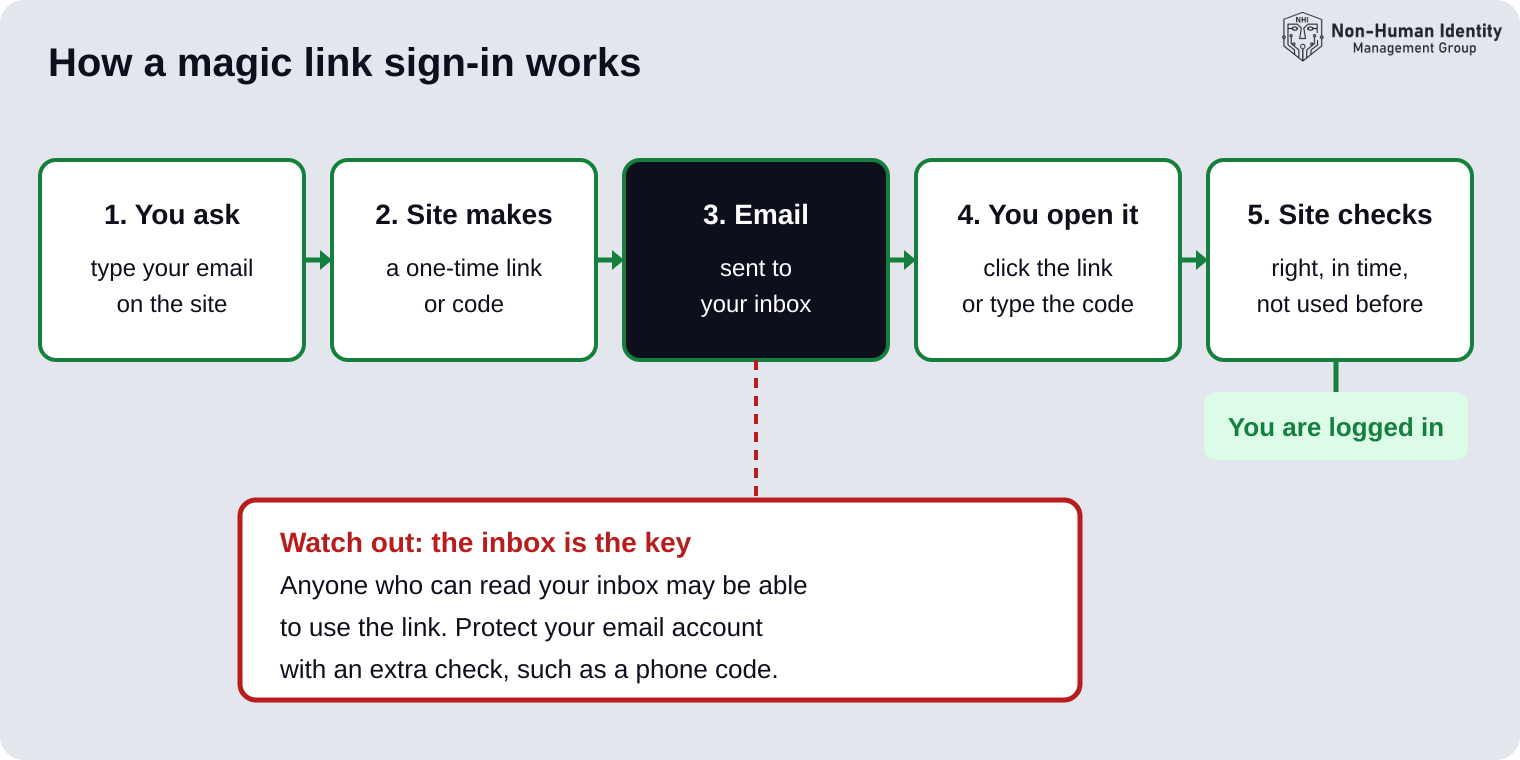
A magic link works in a similar way. You type your email address on a site. The site sends you an email with a special link. When you open the link, the site checks it is valid and logs you in. There is no password to remember.
A one-time code is the same idea in a different form. Instead of a link, the email holds a short number, such as six digits, that you type into the site. Codes are handy when you read email on your phone but sign in on a laptop.
Where the comparison stops working: a collection slip is a piece of paper in one place. An email can be read on several devices at once, and anyone who has got into your email account from anywhere may see it too.
Why does it matter?
With email sign-in, your inbox becomes the front door. If someone gets into your email, they may be able to ask for sign-in links to your other accounts and use them.
If you sign in to sites this way
What could happen: someone who got into your email logs in to your shopping or delivery accounts too.
Check this: turn on extra sign-in checks for your email account itself.
If you run a website or online service
What could happen: links that last for days, or work many times, give a stranger more chances to use one.
Check this: ask your developer how long links last and whether each one works only once.
If you are learning to build websites
What could happen: you treat email sign-in as strong security for admin pages, when it rests on someone else's inbox.
Check this: use stronger sign-in, such as passkeys, for admin or payment areas.
Next: Passkeys for Beginners
What does it look like?
Here is a made-up sign-in email from a delivery company's customer site.
Example only. All values are made up.
From:    Rowan Couriers <[email protected]>
Subject: Your sign-in link
You asked to sign in at 10:42.                       (1)
Sign in: https://track.example.com/login?t=FAKE0000  (2)
Or type this code: 000000                            (3)
This link and code expire in 10 minutes.             (4)
Did not ask? Ignore this email.                      (5)
- A good email says when the request was made. You can match it to what you just did.
- In a real email, this line would contain a long, random link that works only once.
- In a real email, this line would contain a short code, for when you sign in on another device.
- A short time limit means an old email is of little use to anyone who finds it later.
- If you did not ask, do not click. Someone may have typed your address by mistake, or on purpose.
Why this is risky: anyone who opens this email in the next few minutes may be able to sign in as you. A fake email can copy this layout and point to a look-alike site.
The safer way: only use a sign-in email you asked for just now. Check the web address belongs to the site you meant to visit. Protect your email account with a strong password and an extra check, such as a passkey.
How does it work?
Here is what happens behind the scenes when you sign in with a magic link or code.
- The request. You type your email address on the site and press "Send me a link".
- The secret. The site makes a long random link, or a short random code, and remembers it for a few minutes.
- The email. The site emails the link or code to you.
- The check. You open the link or type the code. The site checks it matches, is still in time and has not been used before.
- The session. If all checks pass, the site logs you in and the link or code should no longer work.
Security standards set limits on codes like these. A US government digital identity standard covers codes sent to a device. It says they should be at least six digits, work only once and be used within 10 minutes.[1] The same standard says email should not be used as one of these proof-of-device sign-in steps. Its reasons: an email account may be reachable with only a password, and messages can be intercepted or redirected on the way.[1] That is why many sites treat email sign-in as convenient, not as their strongest option.
A worked example
Nadia Rosen uses the customer site of Rowan Couriers, a fictional delivery firm, to track parcels. The site has no password. It emails her a sign-in link each time.
One evening an email arrives: "Your sign-in link." Nadia has not tried to sign in. She remembers the collection slip. A slip she did not expect means someone else may be at the depot.
She does not click. She opens the courier's site by typing its address herself, and checks her account. Nothing has changed.
Next, she looks at her email account's recent activity page. She sees no sign-ins she does not recognise in the records available to her. Still, she changes her email password and turns on an extra check with an authenticator app.
Then she writes to the courier's help page. Vik Nakamura, who runs the site, replies the next day. He explains that anyone can type an email address into the sign-in box, so unwanted emails can happen. He confirms that their links work once and run out after 10 minutes.
Nadia deletes the email. She now knows that a sign-in email sent to her own inbox does not let a stranger in by itself. What matters is who can open it. That evening she also adds a passkey to the courier site, so she has a second way in.
Myths and mistakes
| What people think | What is true |
|---|---|
| No password means nothing to steal. | The email account is now the thing to steal. Protect it well. |
| A sign-in email I did not ask for means I have been hacked. | Not always. Anyone can type your address into a sign-in box. Do not click, and check your email account's security. |
| It is fine to forward a sign-in link to a friend. | Whoever opens it may get into your account. Never share sign-in links or codes. |
| Email codes are as strong as passkeys. | Passkeys are tied to your account on the real site and are designed to resist fake sites.[2] Email codes can be read by anyone with your email, or typed into a fake site. |
| Old sign-in emails are harmless to keep. | Usually, if links expire quickly. A link that lasts for days is a bigger risk, so delete old ones. |
What can I do this week?
- Turn on an extra check for your main email account.
- Look at your email account's recent sign-in activity.
- Delete old sign-in emails you no longer need.
- If you run a site, ask how long its sign-in links last.
- Offer passkeys as well, if your sign-in service supports them.
Checklist
- My email account has a strong, unique password.
- My email account has an extra check turned on.
- I only use sign-in links and codes I asked for just now.
- I never share a sign-in link or code, even with support staff.
- For site owners: each link or code works once.
- For site owners: links and codes expire after a short time, such as 10 minutes.
- For site owners: admin and payment areas use stronger sign-in than email alone.
Common questions
Are magic links safe?
They are reasonably safe for everyday sites, if your email account is well protected. They remove the risk of a reused or weak password. But anyone who can read your email may be able to use the link, so protect your inbox with an extra check.
Why did I get a sign-in link I did not ask for?
Usually because someone typed your email address into a sign-in box, by mistake or to test it. The email alone does not let them in. Do not click it. Check your email account's activity, and change your password if anything looks wrong.
What is the difference between a magic link and a one-time code?
They do the same job in different forms. A magic link logs you in when you open it. A one-time code is a short number you type into the site. Codes help when you read email on one device and sign in on another.
Why has my sign-in link stopped working?
Most likely it has expired or been used already. Good sites make links work once and only for a few minutes. Ask for a new link and use it straight away. If links fail every time, contact the site's help team.
Is a passkey better than a magic link?
For security, usually yes. A passkey is stored on your devices and tied to your account on the real site, so it is designed to resist fake sites. A magic link depends on your email. Many sites offer both, so you can choose.
Where next?
Ready for the detail? Read the practitioner guide: Magic Links and Email OTP Security Guide. It goes further into token design, link scanners that open links early, recovery flows and what the standards require.
Also useful:
Related NHI Mgmt Group resources: Passwordless and Passkeys Guide · Password Reset Security for Beginners
Key terms
- Magic link
- A one-time sign-in link sent by email that logs you in when opened.
- One-time password
- A code that works once, for a short time, to prove you can receive a message.
- Passwordless authentication
- Signing in without a password you made up, for example with a link, a code or a passkey.
- Passkey
- A sign-in secret stored on your devices and tied to your account on one site, designed to resist fake sites.
- Multi-factor authentication
- Needing two different kinds of proof, such as a password and a phone code, to get in.
- Phishing
- A fake message that tricks you into giving away sign-in details or clicking a harmful link.
Sources and further reading
- NIST Special Publication 800-63B-4, Digital Identity Guidelines: Authentication and Authenticator Management, sections 3.1.3.1 and 3.1.3.2. National Institute of Standards and Technology. https://pages.nist.gov/800-63-4/sp800-63b.html, accessed 28 Nov 2026.
- Passkeys. FIDO Alliance. https://fidoalliance.org/passkeys/, accessed 28 Nov 2026.