A managed service provider is an outside company you pay to run some or all of your IT.
This guide is for small business owners and managers who use, or plan to use, an outside IT or security firm. You do not need to be technical: if someone else looks after your computers, they hold keys to your business, and you choose who that is.
In short
- An IT provider often has powerful access to your computers, email and files.
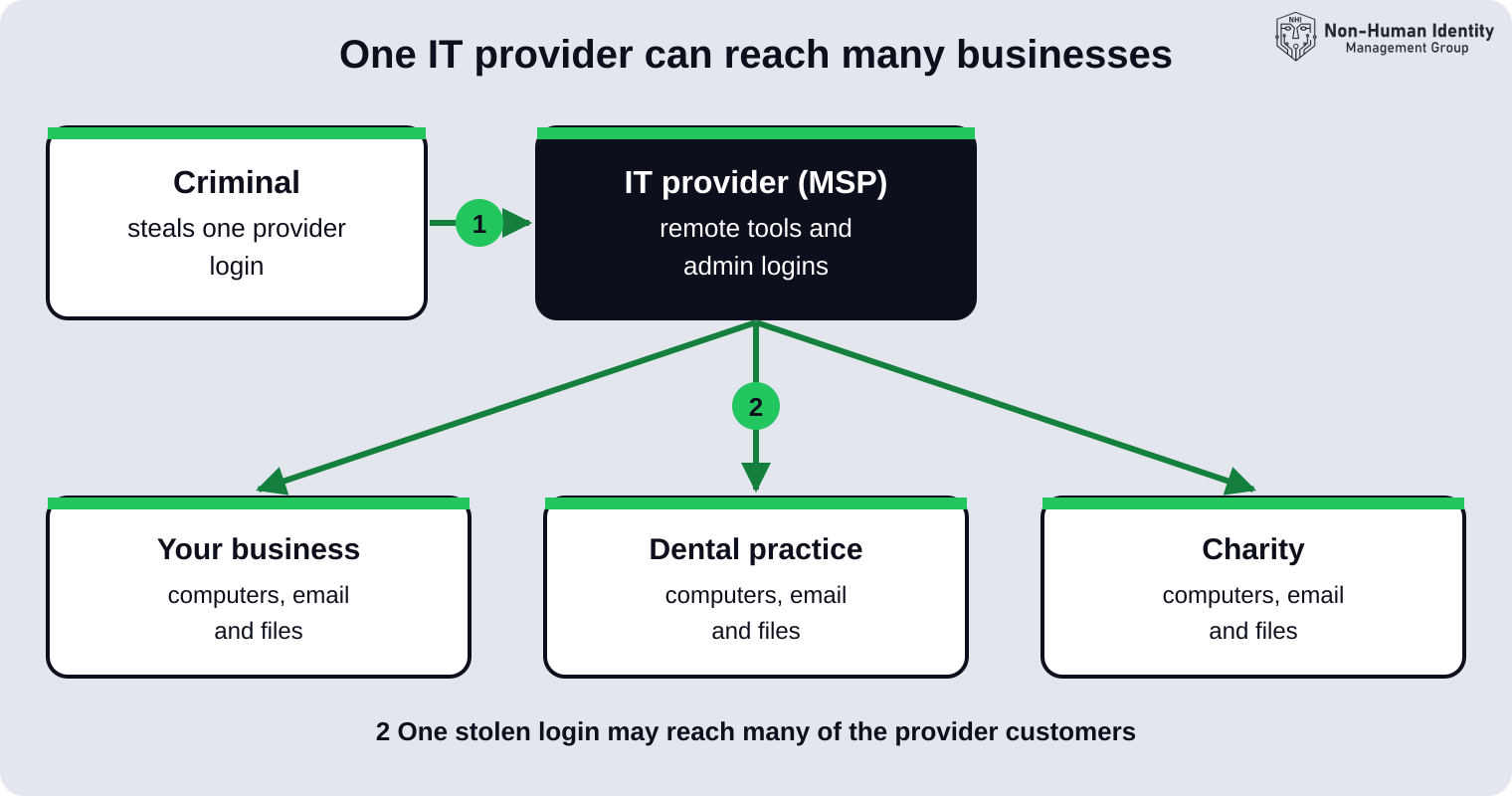
- Criminals target providers, because one break-in can reach many customers.
- Before you sign, ask how they protect their own access to your systems, and ask for proof.
- Put who does what in the contract, check it each year and plan how you would leave.
What you will learn
- Explain what a managed service provider does.
- Ask the security questions that matter before you sign.
- Check how your provider reaches your systems.
- Spot the warning signs in a provider's answers.
- Outside IT firm (managed service provider, MSP)
- a company that runs IT tasks for you, often from a distance.
- Remote control software (remote access tool)
- software that lets someone work on your computer from another place.
- Second sign-in check (multi-factor authentication)
- a code or tap on a phone, as well as a password, before you can get in.
What is a managed service provider?
Think of a caretaker firm that holds the keys to many buildings on your street. It saves you work. But whoever gets hold of its key ring can open many doors. A managed service provider, or MSP, is that firm for your IT.
An MSP might set up your laptops, run your email, apply updates, keep backups and answer the help desk. Some also offer security work, such as watching for attacks. A firm that does only security is sometimes called a managed security service provider.
To do the job, the provider needs a way in. It often uses remote control software. This lets its staff work on your computers from their own office. It also often holds admin logins, which are accounts that can change almost anything.
Where the comparison stops working: a caretaker's keys open doors one at a time. Some remote tools can reach many computers at once, so a single misuse can spread further and faster.
Why does it matter?
Your provider's security becomes part of your own security. Cyber agencies in the UK, US, Australia and Canada have warned about this together. They say criminals can use a weak provider as a way into many of its customers.[2]
If you run a small business
What could happen: a criminal breaks into your provider and uses its tools to lock your files.
Check this: ask how the provider protects its own logins to your systems.
If you manage an office or practice
What could happen: your contract ends, but the old provider's logins still work.
Check this: keep a list of every provider account, and remove them when the contract ends.
If you are new to IT work
What could happen: you join a provider and find one admin password used for every customer.
Check this: ask how logins are kept separate for each customer, and raise it if they are not.
If you look after a charity or club
What could happen: a helpful friend runs your IT, but nobody wrote down how backups work.
Check this: ask how often backups run and when a restore was last tested.
What does it look like?
Here is a made-up page of answers from a provider you are thinking of hiring. Some answers are good. Some should make you ask more.
Example only. All values are made up.
FakeIT Ltd: answers to your security questions
Ref: EXAMPLE-0000
Q: Do you hold a security certificate?
A: Yes, Cyber Essentials Plus, cert FAKE-0000       (1)
Q: How do your staff sign in to our systems?
A: One shared admin login for our whole team       (2)
Q: Do you use a second sign-in check?
A: On request                                      (3)
Q: How quickly will you tell us about an incident?
A: Within 24 hours, in writing                     (4)
Q: What happens when the contract ends?
A: We remove our access and hand back all data      (5)
- A good sign. In a real message, this line would contain a certificate number you can look up on the official search page.
- A warning sign. One shared login means nobody can tell which staff member did what.
- A warning sign. A second sign-in check should be on for every provider login, not on request.
- A good sign. A clear, written time to tell you.
- A good sign. Ask for this in the contract too.
Why this is risky: a shared admin login with no second check is a common way in for criminals. If it leaks, it may open your systems and other customers' too.
The safer way: ask for named logins for each staff member, a second sign-in check on all of them, and records you can see.
How does it work?
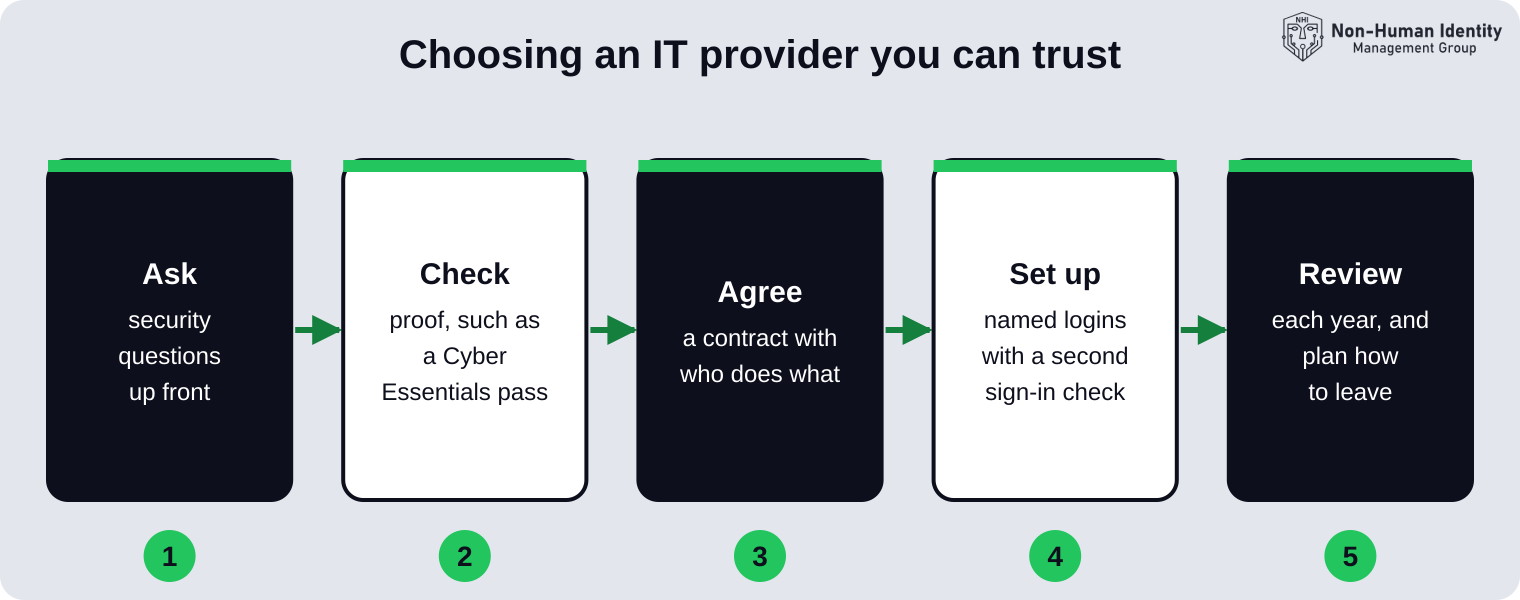
Here is a simple way to choose a provider and keep the relationship safe.
- Ask security questions up front. The UK's national cyber security agency suggests asking about certificates, patching, backups and incident reporting.[1]
- Check the proof. A Cyber Essentials certificate is a UK government-backed badge for basic security. You can look it up on the official search page.[1]
- Agree a clear contract. It should say who does what, how fast they reply, and how and when they tell you about incidents.[1][2]
- Set up their access safely. Each provider worker gets a named login with a second sign-in check. Their access is limited to the systems they look after, and it is logged.[2]
- Review and plan your exit. Check the service each year. When the contract ends, remove the provider's accounts.[2]
A worked example
This story is made up to show how it can happen.
Adaeze Fontaine runs Dovecote Cafe, a business of eight people. Their old IT person has retired, and Adaeze needs a new provider. Two firms send quotes. One is much cheaper.
Before she signs, Adaeze sends both firms the same short list of questions. She asks about certificates, backups, how they sign in to client systems and what happens when a contract ends.
The cheaper firm sends back just one line. It says not to worry, because it has everything covered. When she pushes, it admits its staff share one admin login for all clients. It does not use a second sign-in check.
The other firm sends a full page. Each engineer has a named login with a second check. It holds a Cyber Essentials Plus certificate, which Adaeze looks up on the official search page. It tests a backup restore every three months and will report incidents in writing within a day.
Adaeze picks the second firm. She asks for the incident promise and the exit steps to go into the contract. She also keeps a simple list of every account the provider has in her systems.
A year later she reviews the service. She asks for the list of provider logins and finds one for an engineer who has left. The provider removes it that day.
What made the difference: Adaeze judged the providers on their answers, not just their price, and she kept checking after she signed.
Myths and mistakes
| What people think | What is true |
|---|---|
| Once I hire a provider, security is their job. | You still decide who gets in and what goes in the contract. The provider runs the work, but the risk stays with your business. |
| A big provider must be safe. | Size is not proof. Ask the same questions of every provider, and ask for evidence. |
| The cheapest quote is fine for a small firm. | Small firms hold client data and money too. Compare answers on security, not just price. |
| When the contract ends, their access ends. | Not unless someone removes it. Agencies note this step is often missed.[2] |
| A certificate means nothing can go wrong. | A certificate shows a basic level at one point in time. Keep checking each year. |
What can I do this week?
- Ask your provider for a list of every login it has to your systems.
- Check that each of those logins has a second sign-in check turned on.
- Find your contract and look for how fast the provider must tell you about an incident.
- Ask when a backup was last restored as a test.
- Look up your provider's certificate on the official search page, if it says it has one.
Checklist
- I know which provider looks after each part of our IT.
- I have a list of every provider login to our systems.
- Each provider login is named and uses a second sign-in check.
- The provider can reach only the systems it looks after.
- The contract says how and when we hear about incidents.
- Backups run on a schedule, and a restore has been tested.
- The contract says how we leave and get our data back.
- We review the provider at least once a year.
Common questions
How do I choose a safe IT provider for my business?
Ask every provider the same security questions, and ask for proof. Look for named logins with a second sign-in check, tested backups and a written promise to report incidents. Check any certificate on the official search page, and get the answers into the contract.
What is the difference between an MSP and an MSSP?
An MSP runs general IT, such as laptops, email and updates. An MSSP, or managed security service provider, focuses on security, such as watching for attacks. Some firms do both. Ask the same access and contract questions of either kind.
Should my provider share one admin login between its staff?
No. Each worker should have a named login with a second sign-in check. A shared login hides who did what and is harder to remove when someone leaves. The UK cyber agency also says admin accounts should go only to people who really need them.[1]
What should happen when I change provider?
Plan it before you start. Get your data and passwords handed back, then remove every account and remote tool the old provider used. Change any passwords they knew. Ask the new provider to check that nothing was missed.
Where next?
Ready for the detail? Read the practitioner guide: Choosing an IT Support Provider or MSP Securely. It goes further into contract clauses, how the provider's access should be set up, and how to check and leave a provider safely.
Also useful:
- Third-Party Access for Beginners
- Third Party Risk Management for Beginners
- Remote Access Tools for Beginners
- Supply Chain Attacks for Beginners
Related NHI Mgmt Group resources: Shared Accounts for Beginners · Backup Security for Beginners · Ransomware for Beginners
Key terms
- Managed service provider
- An outside company that runs systems, users or IT tasks for its customers, often with powerful access.
- Remote monitoring and management
- Software that providers use to look after many computers from a distance, often with high levels of access.
- Third-party access
- Access given to suppliers or contractors who are not your own staff.
- Cyber Essentials
- A UK scheme that checks a set of basic security controls, such as updates, access and malware protection.
- Service level agreement
- The part of a contract that sets targets, such as how fast the provider must reply.
- Multi-factor authentication
- Asking for two or more kinds of proof, such as a password and a code, before letting someone in.
Sources and further reading
- Choosing a managed service provider (MSP). National Cyber Security Centre (NCSC), 24 November 2025. https://www.ncsc.gov.uk/guidance/choosing-a-managed-service-provider-msp, accessed 28 Nov 2026.
- Protecting Against Cyber Threats to Managed Service Providers and their Customers (joint advisory AA22-131A). Australian Signals Directorate's Australian Cyber Security Centre, Canadian Centre for Cyber Security, CISA, NSA, FBI, NCSC-UK, May 2022. https://www.cyber.gov.au/about-us/advisories/protecting-against-cyber-threats-managed-service-providers-and-their-customers, accessed 28 Nov 2026.