NTP is the service computers use to set their clocks from a trusted time source over the network.
This guide is for students, people new to IT or security work and anyone who wonders why a computer's clock matters. If you run a business, wrong clocks can cause sign-in failures and website errors, and can make an investigation much harder.
In short
- Computer clocks drift. NTP keeps them right by checking a more accurate clock over the network.
- Sign-in systems, website certificates and security logs all depend on the time being right.
- In a typical Windows work network, a clock more than 5 minutes out can make sign-ins fail.
- Basic NTP does not prove who sent the time. A newer add-on, Network Time Security, can, and several sources help too.
What you will learn
- Explain what NTP does in one sentence.
- Spot three security problems a wrong clock can cause.
- Explain how time is passed down a chain of clocks.
- Check where your own devices get their time.
- Time service (NTP)
- short for Network Time Protocol, the rules computers use to set their clocks over a network.
- Time record (timestamp)
- the date and time written next to an event, such as a sign-in.
- Clock gap (clock skew)
- the difference between two computers' clocks.
What is NTP?
Imagine a town where everyone sets their watch by the clock at the railway station. The station clock is checked against an even better clock. So the whole town ends up agreeing on the time. NTP does this for computers.
Every computer has its own small clock, and it slowly drifts, gaining or losing seconds. NTP lets a computer ask a time server, "What time is it?", and adjust its clock to match. It uses network port 123, a numbered door that time messages pass through.[3]
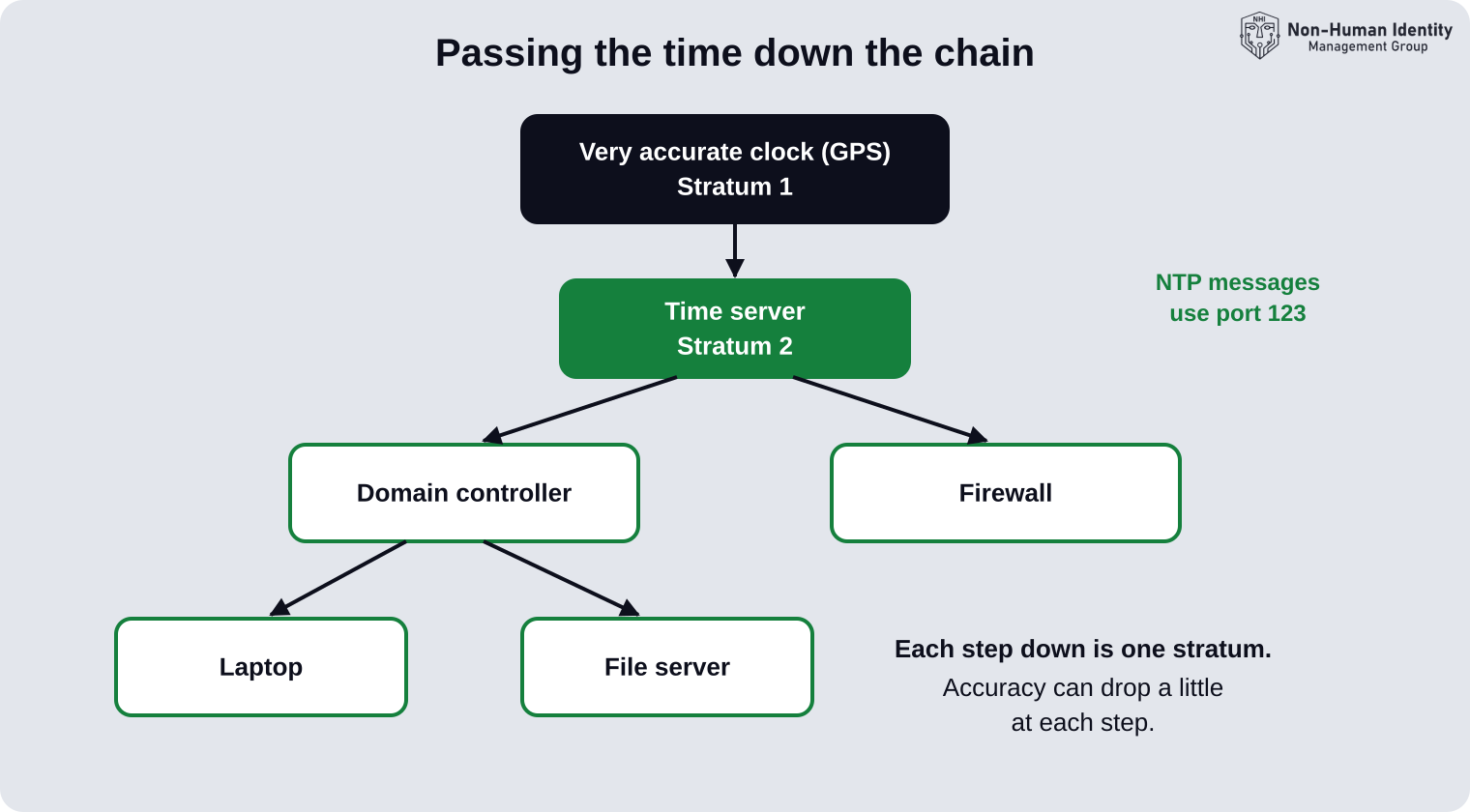
Time servers form a chain. The most accurate clocks, such as ones linked to GPS, sit at the top. Each step down the chain is called a stratum, and the further down a computer sits, the less accurate its time may be.[3]
Where the comparison stops working: you can see the station clock with your own eyes. A computer only receives a message that claims to be the time. In basic NTP, it has no proof of who sent it.
Why does it matter?
Many security checks compare a time with the computer's own clock. If the clock is wrong, those checks give wrong answers.
If you work in IT support
What could happen: a laptop with a wrong clock cannot sign in to the work network.
Check this: when sign-ins fail on one device, compare its clock with a working one.
Next: Kerberos for Beginners
If you are new to security monitoring
What could happen: logs from two systems disagree by minutes, so you put events in the wrong order.
Check this: make sure every log uses the same time zone and an accurate time source.
If you run a small business
What could happen: a till or server with a wrong date shows certificate errors and stops connecting to services.
Check this: ask your IT supplier where your systems get their time from.
What does it look like?
Here are made-up log lines from two systems in the same office. They record the same sign-in.
Example only. All values are made up.
EXAMPLE firewall log (time synced)
  09:14:05 UTC  user FAKE-0000 connects from 203.0.113.7   (1)
EXAMPLE file server log (clock not synced)
  09:21:47 UTC  user FAKE-0000 opens payroll.example.xlsx  (2)
EXAMPLE sign-in error on a laptop
  Clock gap with server: 7 minutes. Sign-in refused.       (3)
- The firewall's clock is correct.
- The file server's clock is about 7 minutes fast, so this event looks later than it was.
- A laptop with the same drift fails the 5-minute limit used by Windows sign-in.
Why this is risky: an investigator could think these were separate events. The laptop user also cannot work.
The safer way: point every system at the same trusted time source. Record logs in one time zone, UTC.
How does it work?
- A top clock sets the time. At the top of the chain is a very accurate clock, such as one linked to GPS or a national time service.[3]
- Time is passed down. Servers below ask the top clock, and devices below them ask those servers. In a Windows work network, devices ask a domain controller, the main sign-in server. One chosen domain controller asks an outside source.[3]
- The device adjusts. The device compares answers and nudges its clock to match. It repeats this regularly, because clocks keep drifting.
- Security checks use the clock. Sign-in systems, certificates and logs then rely on that clock being right.
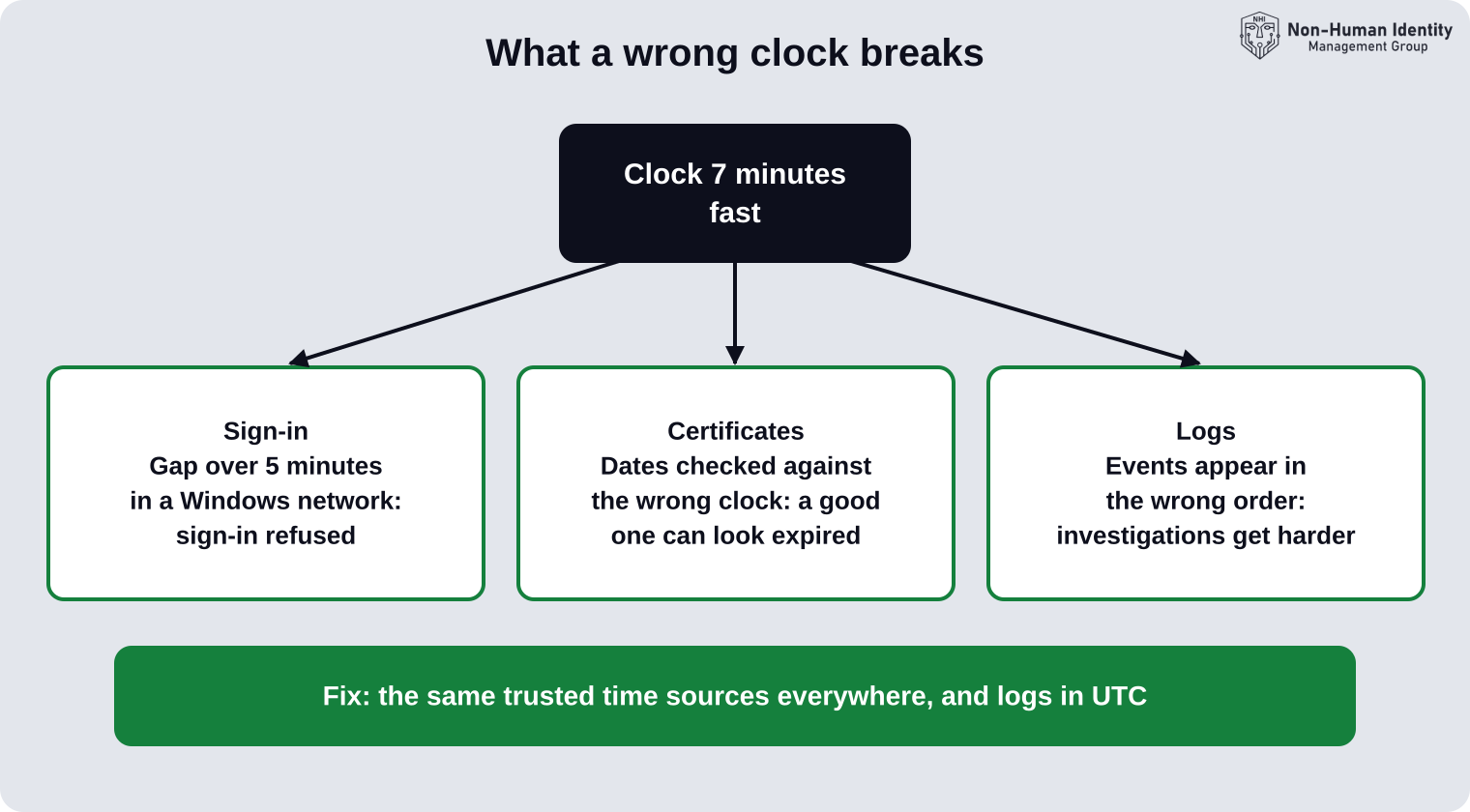
Here is why a wrong clock causes trouble.
- Sign-in. Windows work networks use a sign-in system called Kerberos. It puts times on its messages to stop an attacker replaying an old one. By default, it accepts a clock gap of up to 5 minutes between a computer and the sign-in server.[1]
- Certificates. A website's security certificate carries a start date and an end date.[5] A device checks those dates against its own clock. So a wrong clock can make a good certificate look expired or not yet valid.
- Logs. Investigators line up events from many systems by their times. The UK's National Cyber Security Centre advises syncing log sources to an accurate time source and recording times in UTC.[4]
Basic NTP sends time without proof of where it came from. So someone on the network path could try to feed a computer a false time. A newer standard, Network Time Security (NTS), lets a computer check that time messages really come from its chosen server.[2] Even so, the standard notes that an attacker who delays messages can still shift the clock a little. Using several time sources helps.[2]
A worked example
Lina Osei has just joined the security team at a fictional builders' merchant, Elm Yard Supplies. Her manager, Bea Abara, asks her to look into a possible break-in on the file server.
The firewall log shows an unknown address connecting at 09:14. The file server log shows a payroll file being opened at 09:21. Lina writes them down as two separate events, seven minutes apart.
That afternoon, a member of staff calls IT. Her laptop keeps refusing to sign in, with a message about the time. Lina looks at the laptop clock. It is about seven minutes fast.
The number rings a bell. She checks the file server clock, and it is also seven minutes fast. Both machines had been set up by hand and were not getting their time from the domain controller.
Lina takes seven minutes off the file server times. Now the connection and the file being opened happen at the same moment. It looks like one event, not two, and Bea treats it as a real incident.
After the incident is handled, Bea and Lina fix the cause. They point both machines back at the domain controller for time. They check that the domain controller gets time from a trusted outside source. They also set every log to record in UTC. Then they add a weekly check that shows any clock out by more than a minute.
Myths and mistakes
| What people think | What is true |
|---|---|
| A few minutes out does not matter. | In a Windows network, more than 5 minutes can stop sign-in. Even a smaller gap can confuse an investigation. |
| Once a clock is set, it stays right. | Clocks drift, so devices need to keep checking a time source. |
| Any time server on the internet will do. | Basic NTP has no proof of who sent the time. Use trusted sources, more than one, and NTS where supported. |
| Logs in local time are fine. | Mixed time zones and summer time changes cause confusion. Recording in UTC keeps logs comparable. |
| Time is only an IT tidiness issue. | Sign-in, certificates and investigations all depend on it, so it is a security issue too. |
What can I do this week?
- Check that your phone and laptop set their time automatically.
- At work, ask which server your devices get their time from.
- Look at a few logs and check which time zone they use.
- Compare the clocks on two or three servers and note any gap.
- Ask whether anyone is alerted when a clock drifts too far.
Checklist
- I can explain what NTP does in one sentence.
- I know a wrong clock can break sign-in, certificates and logs.
- I know the usual Windows sign-in limit is a 5-minute gap.
- Our devices get time from a known, trusted source.
- Our main time server uses more than one outside source.
- Our logs record times in UTC.
- Someone checks for clocks that drift too far.
Common questions
Where does my laptop get its time?
Usually from a time server set by the maker or your employer. At home, a laptop often asks a public time server on the internet. On a Windows work network, it usually asks a domain controller, which in turn gets its time from a trusted source.
Why do security logs use UTC?
UTC is one shared time standard with no summer time changes. If every system logs in UTC, events from different places and devices line up without converting time zones. The UK National Cyber Security Centre advises logging with UTC timestamps.
Can an attacker change my computer's clock?
It is possible in some cases. Basic NTP does not prove who sent the time, so someone on the network path could try to send a false answer. Network Time Security adds that proof, and several time sources make one bad answer easier to spot.
What is a stratum?
A stratum is a step in the chain of clocks. Stratum 1 is a server linked directly to a very accurate clock. A server that gets time from stratum 1 is stratum 2, and so on. Higher numbers may be slightly less accurate.
Where next?
Ready for the detail? Read the practitioner guide: NTP Security Guide. It goes further into attacks on time, setting up Network Time Security, designing a time chain with several sources and hardening common time servers.
Also useful:
- Kerberos for Beginners
- TLS and HTTPS for Beginners
- Log Management and Retention Guide
- Kerberos Security Guide
Related NHI Mgmt Group resources: IEEE 1588 PTP Time Synchronisation Security Guide · Incident Response for Beginners · Network Security for Beginners
Key terms
- Network Time Protocol (NTP)
- The rules computers use to set their clocks from a time server over a network.
- Stratum
- A step in the chain of time servers, counted from the most accurate clock.
- Clock drift
- A computer clock slowly gaining or losing time.
- Clock skew
- The gap between the times on two computers' clocks.
- Timestamp
- The date and time recorded with an event.
- UTC
- Coordinated Universal Time, one shared world time standard with no summer time changes.
- Kerberos
- A sign-in system used in Windows work networks that relies on closely matched clocks.
- Network Time Security (NTS)
- An add-on to NTP that lets a computer check where its time messages came from.
Sources and further reading
- Maximum tolerance for computer clock synchronization. Microsoft Learn, Microsoft. https://learn.microsoft.com/en-us/previous-versions/windows/it-pro/windows-10/security/threat-protection/security-policy-settings/maximum-tolerance-for-computer-clock-synchronization, accessed 28 Nov 2026.
- RFC 8915: Network Time Security for the Network Time Protocol. IETF, September 2020. https://www.rfc-editor.org/rfc/rfc8915.html, accessed 28 Nov 2026.
- How the Windows Time service works. Microsoft Learn, Microsoft. https://learn.microsoft.com/en-us/windows-server/networking/windows-time-service/how-the-windows-time-service-works, accessed 28 Nov 2026.
- Introduction to logging for security purposes. National Cyber Security Centre (UK), July 2018. https://www.ncsc.gov.uk/guidance/introduction-logging-security-purposes, accessed 28 Nov 2026.
- RFC 5280: Internet X.509 Public Key Infrastructure Certificate and Certificate Revocation List (CRL) Profile. IETF, May 2008. https://www.rfc-editor.org/rfc/rfc5280, accessed 28 Nov 2026.