Dark web monitoring is a service that looks for your stolen details on hidden criminal websites and warns you.
This guide is for people, small business owners and managers who have seen dark web monitoring offered and want to know what it really does. You do not need technical skills. If you have ever had an email saying your details were found online, this guide explains what to do next.
In short
- The dark web is a part of the internet reached with special software, used by both privacy seekers and criminals.
- Criminals buy and sell stolen logins, personal details and access to company networks there and in other hidden places.
- Monitoring can tell you that your details have turned up. It cannot remove them or stop them being used.
- The useful part is what you do next: change the password, turn on a second login check and watch your accounts.
What you will learn
- Explain what the dark web is in one sentence.
- Describe what kinds of stolen data are traded there.
- Check what a dark web monitoring alert means for you.
- Ask the right questions before paying for a monitoring service.
- Hidden part of the internet (dark web)
- websites you can only reach with special software, such as the Tor Browser.
- Watch service (dark web monitoring)
- a service that searches leaked data for your details and alerts you.
- Stolen login list (credential leak)
- usernames and passwords taken from a company or a person and shared by criminals.
What is dark web monitoring?
Think of a hidden street market that only opens to people who know the secret door. Some stalls sell harmless things. Others sell goods that were stolen from people's homes.
The dark web works in a similar way. It is made of websites that normal browsers cannot open. You reach them with special software, most often the Tor Browser. The Tor Project says these sites, called onion services, can only be reached over Tor.[1] News outlets and human rights groups run some of them for privacy.[1]
Criminals use the same hidden spaces to trade stolen data. Dark web monitoring is a service that checks these places, and other leaked data, for your email address, passwords or company name. If it finds a match, it sends you an alert.
Where the comparison stops working: a stolen bike on a stall can be taken back. A copied password stays copied. Monitoring can tell you it is out there, but your real protection is changing it.
Why does it matter?
Stolen logins are a common way into accounts and company networks. Europe's police agency says stolen logins are sold in bulk.[2]
If you use the same password on several sites
What could happen: one leak lets criminals try your password on your email, shopping and bank accounts.
Check this: give each important account its own password, kept in a password manager.
If you run a small business
What could happen: a staff login found in a leak lets a criminal into your email.
Check this: make sure every work account has a second login check turned on.
If you manage a team or a budget
What could happen: you pay for monitoring, but nobody acts when an alert arrives.
Check this: name who reads alerts and what they do within one working day.
What does it look like?
Here is a made-up alert from a monitoring service.
Example only. All values are made up.
ALERT: your details were found
Email:      [email protected]                 (1)
Password:   Sum*****00 (partly hidden)            (2)
Source:     stolen login list, shared on a forum  (3)
First seen: 01 Jan 2000
Suggested:  change this password, turn on 2-step  (4)
- In a real message, this line would show your email address that was found in the leaked data.
- Good services show only part of a password, or none, so the alert does not leak it again.
- The alert says where the data was seen, but it rarely knows which company lost it.
- The useful part: what to do now.
Why this is risky: if that password is still used anywhere, a criminal can try it there. Alerts can also be faked by scammers, so a link inside an alert is not a safe way to log in.
The safer way: open the website or app yourself, not through the alert's link. Change the password everywhere you used it, and turn on a second login check.
How does it work?
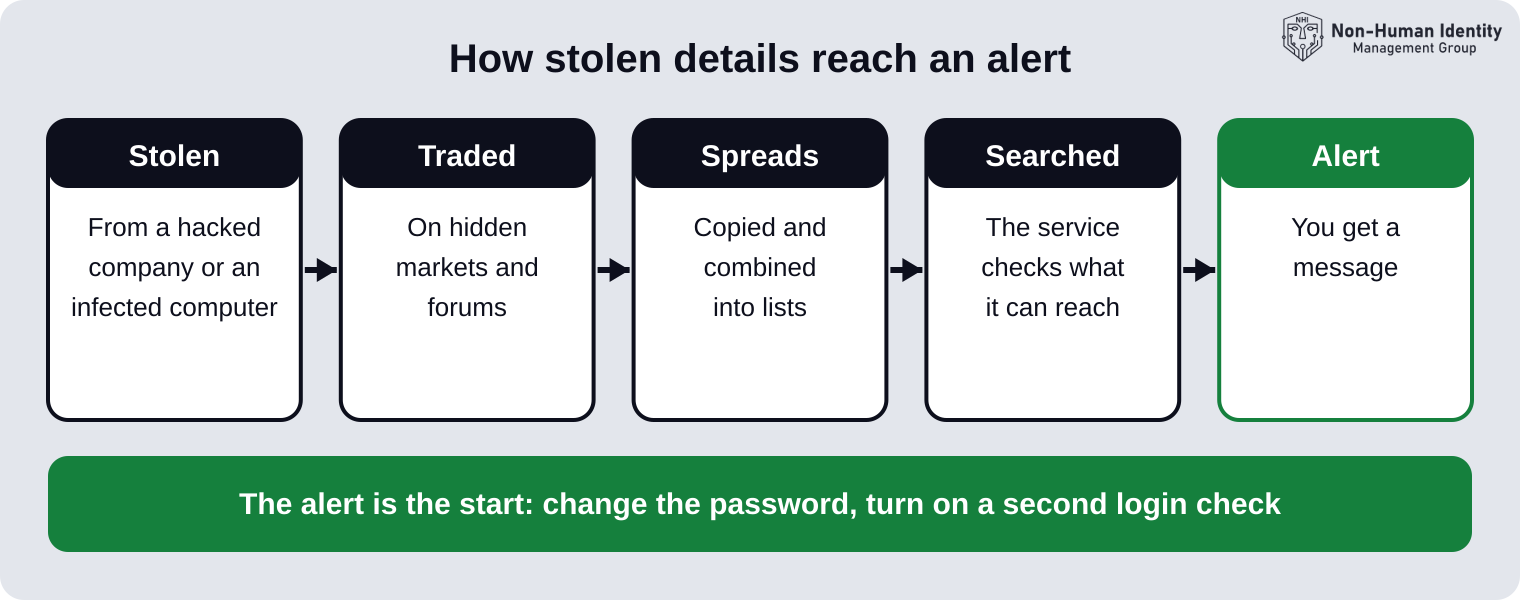
Here is how stolen details usually reach the dark web, and how monitoring spots them.
- Data is stolen. A company is hacked, or a person's computer is infected with an infostealer (harmful software that copies saved passwords). The UK's cyber security agency says these "stealers" are sold on criminal forums.[3]
- Data is traded. Criminals sell the stolen logins on marketplaces, or to people who sell access into company networks.[3]
- Data spreads. Lists are copied, combined and shared in forums, chat groups and leak sites, some on the dark web and some on the normal internet.
- Monitoring collects. A monitoring service gathers leaked data it can reach and searches it for the details you gave it.
- You get an alert. If there is a match, you get a message. Some services, such as Have I Been Pwned, only let a company search its own email domain after it proves it controls that domain.[4]
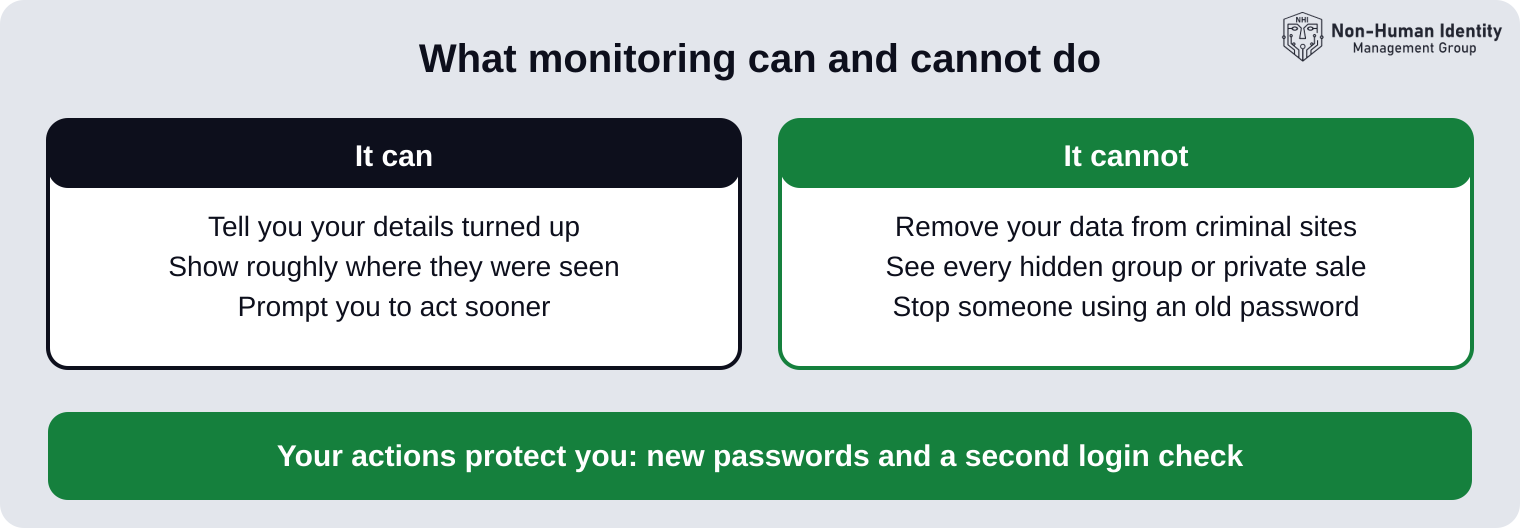
No service can see everything. Many trades happen in private groups that monitoring tools may not reach. So a quiet result means "nothing found where we looked", not "you are safe".
A worked example
Gita Wojcik is the practice manager at Slate Dental, a fictional dental surgery with eight staff. Their IT supplier includes dark web monitoring for the practice's email domain.
On Monday an alert arrives. The reception email address and a partly hidden password were found in a stolen login list. Gita remembers the hidden market. The password is already on a stall, so the only fix is to make it worthless.
She does not click the link in the alert. Instead, she logs in to the email system the usual way and changes the reception password. She asks the supplier to sign out every device still logged in to that account.
Next, she asks the reception team a simple question. "Did anyone use this password anywhere else?" One person used it for the practice's supplies website, so Gita changes that too.
The supplier checks the email system's records. There are no unusual logins in the records available to them. They turn on a second login check, using an authenticator app, for every staff account.
Finally, Gita writes a short rule for the practice. Every account gets its own password, stored in the practice's password manager. She also notes who reads monitoring alerts when she is on holiday.
Myths and mistakes
| What people think | What is true |
|---|---|
| Dark web monitoring removes my data. | It finds and reports it. Removing stolen data from criminal sites is rarely possible. |
| No alerts means my details are safe. | It means nothing was found where the service looked. Private sales and groups can stay out of view. |
| The dark web is only used by criminals. | Privacy tools like Tor are also used by news outlets, human rights groups and ordinary people.[1] |
| I should go and look for my data on the dark web myself. | Leave it to services and specialists. Browsing criminal markets can expose you to scams and harmful files. |
| An old leaked password does not matter. | If you reused it anywhere, it may still open that account. Change it there too. |
What can I do this week?
- Check your main email address on a reputable breach checking service, such as Have I Been Pwned.
- Change any password you have used on more than one important account.
- Turn on a second login check for your email, bank and work accounts.
- If you run a business, ask your IT supplier whether monitoring is included and who reads the alerts.
Checklist
- Each important account has its own password, kept in a password manager.
- A second login check is on for email, banking and work accounts.
- I know which monitoring or breach alert services I use.
- Alerts are opened through the real website or app, not through links.
- At work, one named person reads alerts, with a backup for holidays.
- There is a simple plan for an alert: change, sign out devices, check records, tell people.
- Any paid service has been asked what it searches and what it cannot see.
Common questions
Is the dark web illegal?
No, in many countries using the dark web is not illegal in itself. Tools like Tor are used for privacy by journalists, campaigners and ordinary people. Buying or selling stolen data, drugs or other illegal goods there is still a crime, just as it is anywhere else.
Is dark web monitoring worth paying for?
It can be, if someone acts on the alerts. Free tools let individuals check their email address against known leaks. Businesses may get more from a service that watches their whole email domain. Ask what each service searches, how fast it alerts and what help it gives.
Can someone remove my details from the dark web?
Usually not. Criminal sites do not take requests, and copies spread quickly. Focus on making the stolen details useless: change passwords, turn on a second login check and watch your bank statements. If money is involved, contact your bank or card provider.
My password was found. What should I do first?
Change it first, on every account where you used it. Then turn on a second login check, sign out any unknown devices and look at recent activity. If it was a work account, tell your IT team or supplier straight away.
How do I know an alert is genuine?
Do not trust the alert's links. Open the monitoring service's website or app yourself and check the alert there. Scammers send fake "your data was found" messages to make people log in to fake pages. See Data Breach Alerts for Beginners.
Where next?
Ready for the detail? Read the practitioner guide: Dark Web Monitoring Guide. It goes further into what monitoring services can see, how to sort alerts by risk and how to respond to leaked company logins.
Also useful:
- Tor for Beginners
- Data Breach Alerts for Beginners
- Identity Theft for Beginners
- Dark Web Exposure Guide for Individuals
- Dark Web Monitoring Buyer's Guide
Related NHI Mgmt Group resources: Infostealer Threat Guide · Combolists and ULP Files Guide · Threat Intelligence for Beginners
Key terms
- Dark web
- Websites that can only be reached with special software, such as the Tor Browser.
- Dark web monitoring
- A service that searches leaked data for your details and alerts you to matches.
- Tor
- Free software that hides where internet traffic comes from and opens onion websites.
- Credential leak
- Usernames and passwords exposed to people who should not have them.
- Infostealer
- Harmful software that copies saved passwords and other details from a computer.
- Combolist
- A large list of email and password pairs, often merged from many leaks.
- Credential stuffing
- Trying leaked username and password pairs on many websites to break into accounts.
Sources and further reading
- Onion Services. Tor Project. https://community.torproject.org/onion-services/, accessed 28 Nov 2026.
- Europol published report on how cybercriminals trade and exploit data (IOCTA 2025, Steal, deal and repeat). European Commission, Migration and Home Affairs, 16 June 2025. https://home-affairs.ec.europa.eu/news/europol-published-report-how-cybercriminals-trade-and-exploit-data-2025-06-16_en, accessed 28 Nov 2026.
- Ransomware, extortion and the cyber crime ecosystem. National Cyber Security Centre (UK), 11 September 2023. https://www.ncsc.gov.uk/whitepaper/ransomware-extortion-and-the-cyber-crime-ecosystem, accessed 28 Nov 2026.
- Frequently asked questions. Have I Been Pwned. https://haveibeenpwned.com/FAQs, accessed 28 Nov 2026.