Online safety for older adults means a few simple habits that keep scammers away from your money and accounts.
This guide is for older people who use a phone, tablet or computer, and for the family and friends who help them. You do not need to be good with technology to stay safe. Most scams work by rushing people, not by clever computing.
In short
- Most scams start with a call, text or email from someone pretending to be a bank, the police or a company you know.
- Pressure to act fast is the biggest warning sign. Stop, hang up and check.
- Your bank or the police will never ask you to move money to a "safe account" or tell them your PIN.
- Strong passwords, a second sign-in step and regular updates protect your accounts.
What you will learn
- Spot the signs that a call, text or email is a scam.
- Explain three things your bank will never ask you to do.
- Check that your email and bank accounts are well protected.
- Know who to call and where to report a scam.
- Pretending to be someone trusted (impersonation)
- when a scammer claims to be your bank, the police or a company you use.
- Second sign-in step (two-step verification)
- an extra check, such as a code, on top of your password.
What is online safety for older adults?
Think of the chain and spyhole on your front door. You do not open the door to every knock. You look first, and you only let in people you expected.
Online safety works the same way. Calls, texts and emails are knocks at the door. Before you act on one, you check who it really is.
Scammers often pretend to be people you trust. They may say they are from your bank, the police, a delivery firm or a computer company. This is called social engineering: tricking people, not breaking machines.
The good news is that a few habits go a long way. Most of them take minutes to set up.
Where the comparison stops working: a spyhole shows you the real face. A phone screen can show a fake name or number, so the caller ID alone is not proof.
Why does it matter?
Scams cost older people a great deal. In 2024, people over 60 reported losses of nearly 4.9 billion US dollars to the FBI's cyber crime service.[1]
If you are an older person at home
What could happen: a caller who sounds like your bank talks you into moving your savings.
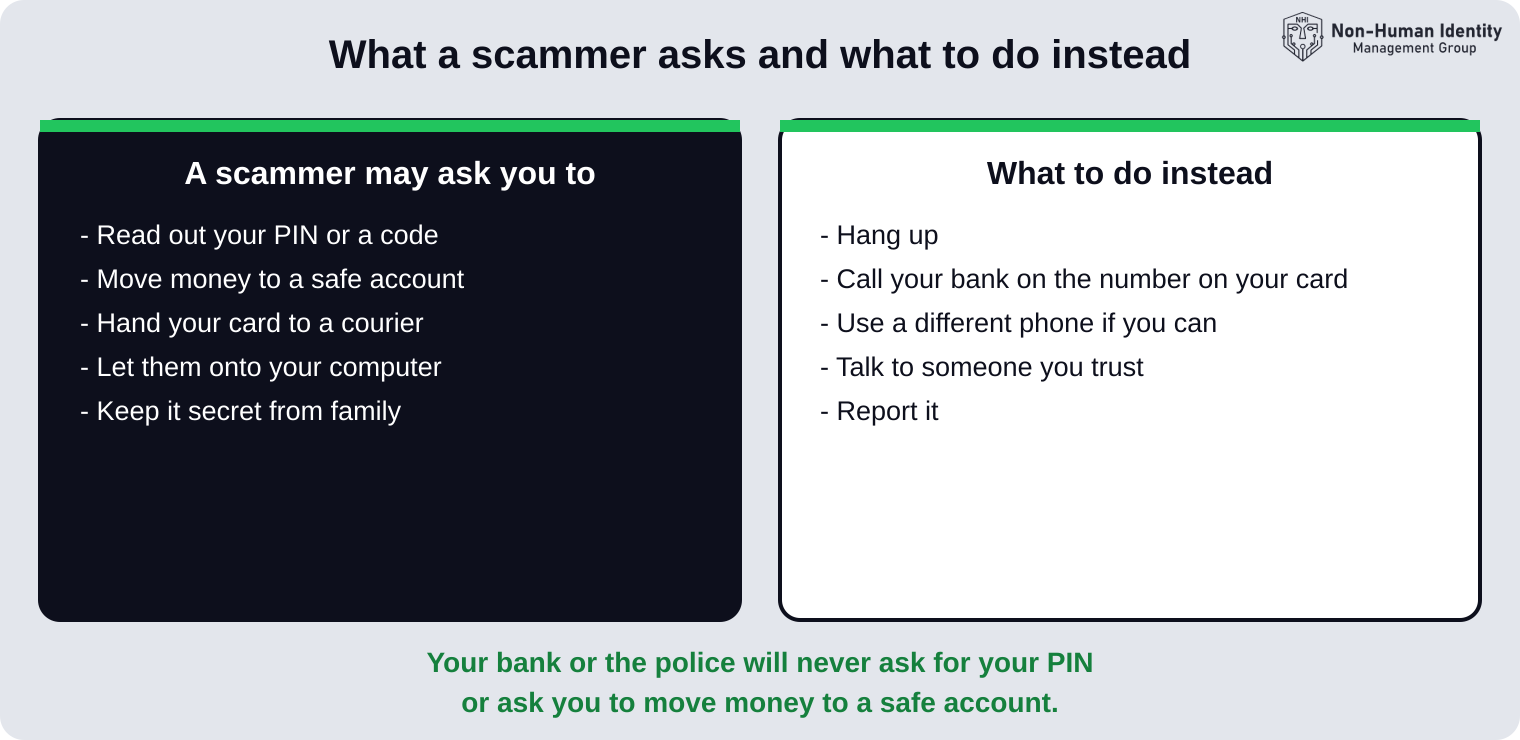
Check this: hang up, then call your bank on the number on your card.
If you help an older relative or friend
What could happen: they are too embarrassed to tell you about a strange call until money has gone.
Check this: agree a simple rule together: "If anyone rushes you about money, call me first."
If you care for or support older people at work
What could happen: someone in your care lets a "computer helper" take over their laptop.
Check this: know the warning signs and where to report them in your organisation.
What does it look like?
Example only. All values are made up.
Caller ID: FakeBank Fraud Team                    (1)
"Hello, this is FakeBank. We have seen a
 suspicious payment of 0000 on your account.      (2)
 Your money is at risk. You must act now.         (3)
 Please read me the code we just sent you.        (4)
 Then move your savings to this safe account:
 EXAMPLE-0000. Do not tell anyone, even staff     (5)
 at your branch."
- The name on the screen can be faked. It does not prove who is calling.
- A scary story about your money to make you worry.
- Pressure to act right now, before you can think.
- A request for a code. In a real message, a code like this is meant for you alone, never for a caller.
- Being told to keep it secret is a strong warning sign.
Why this is risky: every step is designed to rush you. Once you send the money, it can be very hard to get back.
The safer way: say "I will call you back" and hang up. Then call your bank on the number on your card, ideally from a different phone.
How does it work?
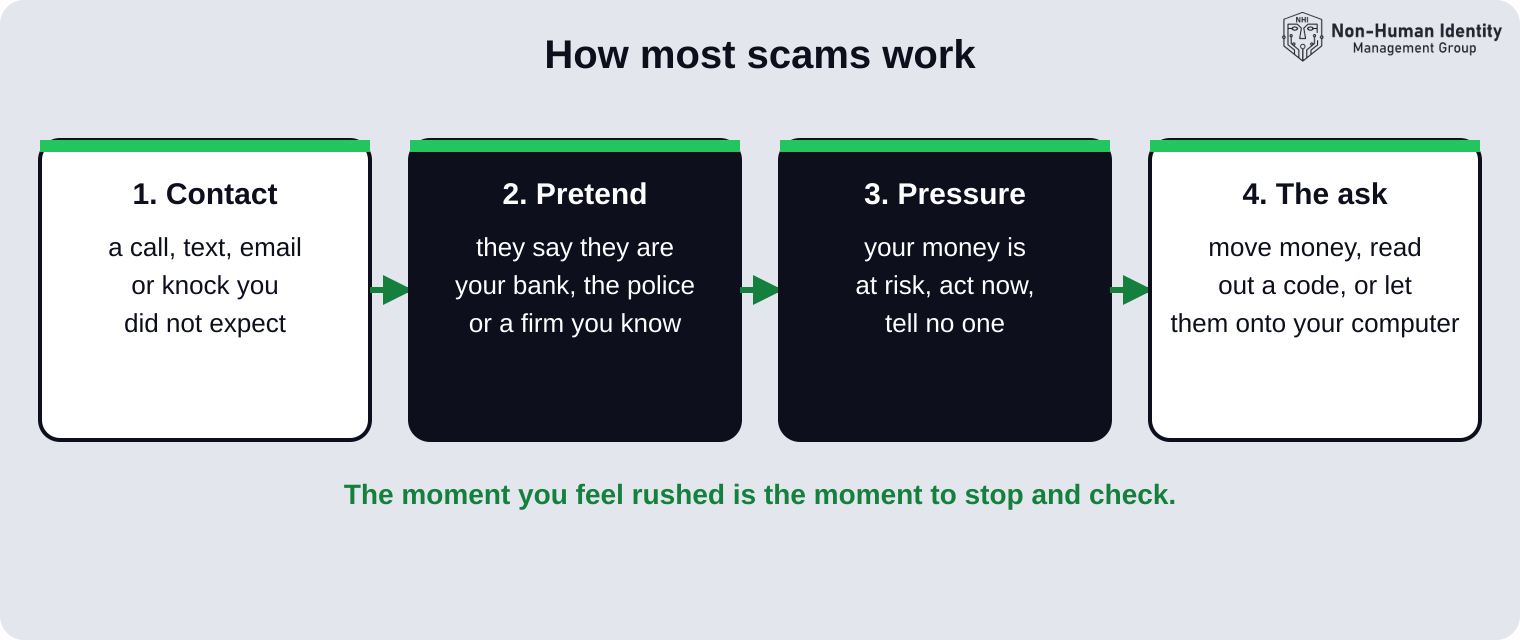
Most scams follow the same steps, whatever story they tell. Knowing the steps helps you spot the trick.
- They make contact. A call, text, email or knock at the door, from someone you did not expect.
- They pretend to be trusted. They say they are your bank, the police, a delivery firm or a family member.
- They create fear or excitement. Your money is at risk, or you have won a prize.
- They rush you. You must act now, and you must not tell anyone.
- They ask for money or details. A payment, your PIN, a code, or control of your computer.
A UK fraud campaign run by the banks sums it up in three words. Stop and think before you part with money or details. Challenge the request: could it be fake? Protect yourself by calling your bank if you think you have been scammed.[3]
The crime prevention charity Crimestoppers lists things your bank or the police will never do. Here are three of them.[4] They will never phone and ask for your PIN or full banking password. They will never ask you to move money to a "safe account". And they will never send someone to collect your cash, PIN or cards.
A worked example
This story is made up to show how it can happen.
Moira Fletcher is 76 and lives in Shrewsbury. She uses an iPad for video calls with her grandchildren and her bank's app for paying bills.
One morning her phone rings. The screen shows her bank's name. A polite man says he works in the fraud team. He says someone is trying to take money from her account.
He sounds worried for her. He says she must move her savings to a new "safe account" today. He asks her to read out a code that has just arrived by text. He also says not to tell the staff at her branch, because one of them might be involved.
Moira feels her heart racing. Then she remembers what her daughter told her: "If anyone rushes you about money, hang up and call me."
She says, "I will call you back," and puts the phone down. She does not read out the code. She calls her daughter from her landline, and her daughter agrees it sounds like a scam.
Moira then calls her bank using the number on the back of her card. The bank confirms they did not call her. Her money is safe. They tell her the code was for a new payment the caller was trying to set up.
That afternoon, Moira reports the call to Report Fraud, the UK fraud reporting service.[5] Her daughter helps her turn on two-step verification for her email.
What made the difference: Moira had a simple plan before the call came, and she used it.
Myths and mistakes
| What people think | What is true |
|---|---|
| If the screen shows my bank's name, it must be my bank. | Caller names and numbers can be faked. Hang up and call the number on your card. |
| Scams only catch people who are careless. | Scammers are skilled at sounding real. Anyone can be caught, so there is no shame in it. Telling someone helps. |
| A real bank might ask me to move money to keep it safe. | Your bank or the police will never ask you to move money to a "safe account".[4] |
| Updates are just annoying and can wait. | Updates often fix security problems. Install them when your device asks.[2] |
| It is rude to hang up on someone. | It is fine to refuse, reject or ignore any request.[3] A real caller will understand. |
What can I do this week?
- Agree a plan with someone you trust: if anyone rushes you about money, you call them first.
- Write your bank's phone number from your card on a piece of paper by the phone.
- Turn on two-step verification for your email. Ask a family member to help if you like.
- Check your phone, tablet and computer are set to install updates.
- Use three random words to make a strong password for your email.[2]
Checklist
- I know my bank will never ask for my PIN or ask me to move money to a "safe account".
- I hang up and call back on a number I trust if a call feels wrong.
- I never let a stranger take control of my computer or phone.
- My email has a strong, separate password.
- Two-step verification is turned on for my email and bank where they offer it.
- My devices install updates.
- I have someone I can call if I am unsure.
- I know how to report a scam: Report Fraud in England, Wales and Northern Ireland, or Police Scotland in Scotland.
Common questions
What should I do first if I think I have been scammed?
Call your bank straight away, using the number on your card. Ask them to stop any payments. Then tell someone you trust and report it. In England, Wales and Northern Ireland use Report Fraud. In Scotland, contact Police Scotland.[5]
How can I tell if an email is a scam?
Look for pressure, threats or prizes, and links asking you to sign in or pay. Email scams can look very real and copy trusted companies.[6] If in doubt, do not click. Go to the company's website or app yourself instead.
Is it safe to bank online?
Yes, for most people, if you take a few steps. Use your bank's official app, a strong password and two-step verification. Never share codes or your PIN. Your bank's app is often safer than clicking links in emails or texts.
Where can I get help and support after a scam?
Your bank and the police are the first stops. Charities can help too. Age UK has scam advice and a free advice line. It notes that a scam often hurts your feelings as well as your money.[6]
Should I use a password manager?
It can help a lot. A password manager is an app that remembers your passwords for you, so each account can have its own. The UK's cyber security agency suggests them as a way to keep passwords strong.[2]
Where next?
Ready for the detail? Read the practitioner guide: Cybersecurity for Seniors Guide. It goes further into a 15-minute device set-up, safe online banking and shopping, and how to help an older relative.
Also useful:
- Phone Scams for Beginners
- Text Message Scams for Beginners
- Remote Access Scams for Beginners
- Password Managers for Beginners
- Multi-Factor Authentication for Beginners
Related NHI Mgmt Group resources: Elder Financial Abuse and Scam Prevention for Banks and Care Providers Guide · Two-Factor Authentication for Everyone Guide
Key terms
- Tricking people into doing something, rather than breaking technology.
- Phishing
- A fake message pretending to be from someone you trust, to get your details or money.
- Vishing
- Phishing done by phone call or voice message.
- Tech support scam
- A scam where someone pretends to fix your computer so they can take control or take money.
- Two-factor authentication
- Signing in with two kinds of proof, such as a password and a code.
- Password manager
- An app that safely stores your passwords so each account can have its own.
Sources and further reading
- Internet Crime Report 2024. Federal Bureau of Investigation, Internet Crime Complaint Center (IC3) (60+ complaints: 147,127; losses: $4.885 billion). https://ic3.gov/AnnualReport/Reports/2024_IC3Report.pdf, accessed 28 Nov 2026.
- Top tips for staying secure online. National Cyber Security Centre (NCSC). https://www.ncsc.gov.uk/collection/top-tips-for-staying-secure-online, accessed 28 Nov 2026.
- Take Five to Stop Fraud. UK Finance. https://www.takefive-stopfraud.org.uk/, accessed 28 Nov 2026.
- Protecting yourself against financial fraud. Crimestoppers. https://crimestoppers-uk.org/keeping-safe/fraud/protecting-yourself-against-financial-fraud, accessed 28 Nov 2026.
- Report Fraud service goes live. Report Fraud (City of London Police), 4 December 2025. https://www.reportfraud.police.uk/news/report-fraud-service-goes-live/, accessed 27 Nov 2026.
- Scams advice: how to spot and avoid scams. Age UK. https://www.ageuk.org.uk/information-advice/money-legal/scams-fraud/, accessed 28 Nov 2026.