OPSEC means spotting small, harmless-looking details about your work that could help an attacker, and keeping them quiet.
This guide is for staff, managers and students who want to understand operations security at work. It is about your organisation, not your personal life online. If your business has staff who post, present or advertise jobs, it already shares details an attacker might use.
In short
- OPSEC, short for operations security, is about everyday details, not secrets in a locked drawer.
- One detail alone is often harmless. Put together, details can show an attacker how and when to strike.
- The method has five steps: decide what matters, who wants it, how it leaks, how bad that would be, then what to change.
- Small habits help most, such as thinking before posting and checking files for hidden details before sending them.
What you will learn
- Explain OPSEC in one sentence.
- Spot details in a post or job advert that help an attacker.
- Check a document for hidden details before you share it.
- Ask your team which details matter most to protect.
- Details that matter (critical information)
- facts about your work that would help someone who wants to harm it.
- Hidden file details (metadata)
- information stored inside a file, such as the author's name, that you do not see on the page.
What is OPSEC?
Think of a jigsaw puzzle scattered across a table. One piece shows a patch of sky and tells you very little. Put enough pieces together, and the whole picture appears.
OPSEC (operations security) works on the same idea. A job advert names the software you use. A staff photo shows a door badge. An out-of-office reply says the finance manager is away until Monday. Each piece is ordinary.
Together, they can tell an attacker which tools to target and what a badge looks like. They also show when a fake payment request is most likely to slip through. OPSEC is the habit of looking at your own work the way an attacker would. You then decide which pieces to keep off the table.
It began as a military practice. Today many businesses and public bodies use it, because so much about them is public.
Where the comparison stops working: a jigsaw has a fixed number of pieces. Your organisation keeps adding new pieces every day, through posts, talks, adverts and files. OPSEC is a habit, not a one-off tidy-up.
Why does it matter?
Attackers often research a target before they act. Public details help them write a convincing fake message or phone call. The UK's National Cyber Security Centre warns that criminals can use what people post to make phishing messages more convincing.[3]
If you post about your job online
What could happen: a cheerful post about a new system tells a scammer exactly which login page to fake.
Check this: before posting, ask "would this help a stranger pretend to be us?"
If you manage a team or a business
What could happen: staff names, roles and holiday dates make a fake invoice from "the boss" easy to time.
Check this: agree which details stay internal, such as travel plans and payment steps.
If you write job adverts or website pages
What could happen: a list of exact product versions shows which known flaws might work against you.
Check this: describe skills in general terms rather than listing your exact systems.
Next: OSINT for Beginners
What does it look like?
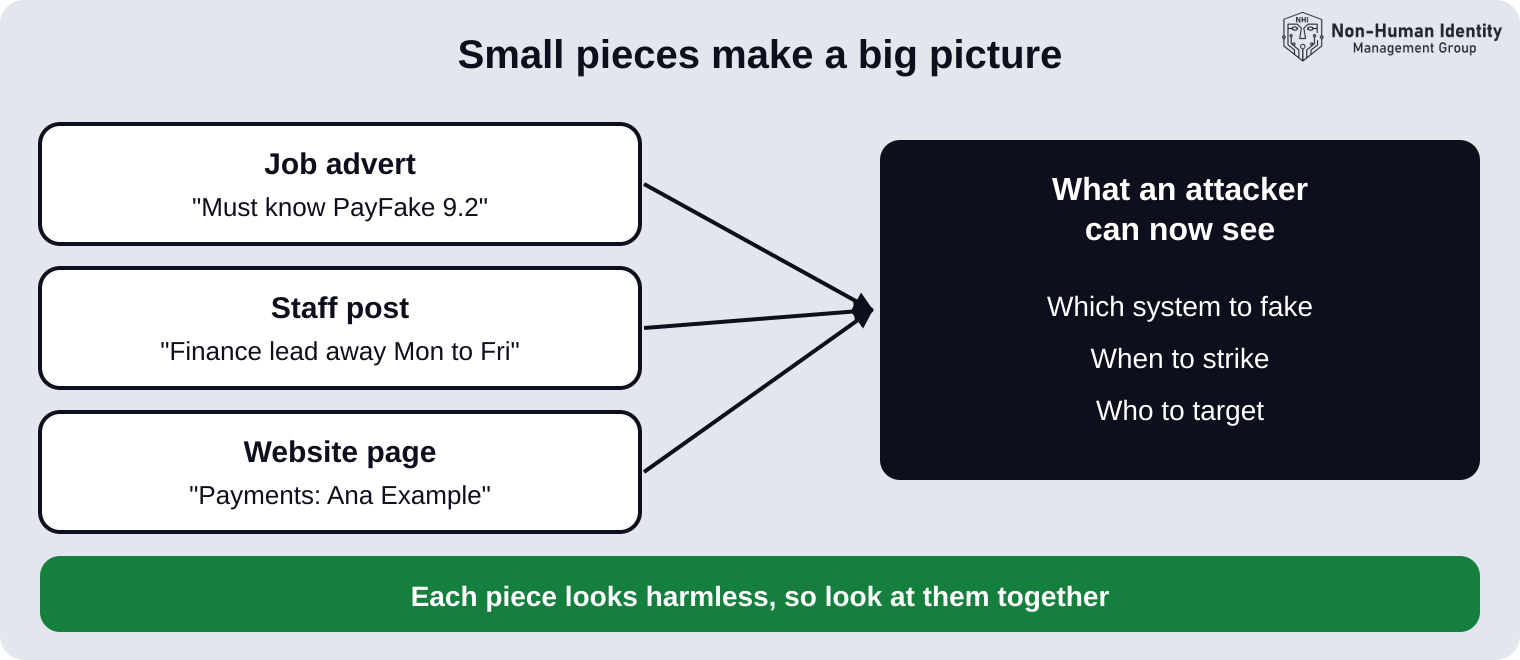
Here is a made-up scenario card. It shows three public items from one small firm, and what an attacker could learn from them together.
Example only. All values are made up.
Job advert:    "Must know PayFake 9.2 for supplier payments"   (1)
Staff post:    "Our finance lead is off to Spain Mon to Fri!"   (2)
Website page:  "Payments team: Ana Example, [email protected]"     (3)
Attacker's picture: on Tuesday, email Ana "from the finance lead"
asking for an urgent supplier payment.                          (4)
- In a real file, this line would contain the exact payment system and its version.
- Tells anyone reading when the person who normally checks payments is away.
- Gives the name and address of who to target.
- No single item is secret. The risk comes from putting them together.
Why this is risky: each item was posted by a different person for a good reason. Nobody looked at them side by side, so nobody saw the picture they made.
The safer way: the advert asks for "experience with payment software". The travel post goes up after the trip. The website lists a shared team address. A rule says any urgent payment request is checked by phone on a known number.
How does it work?
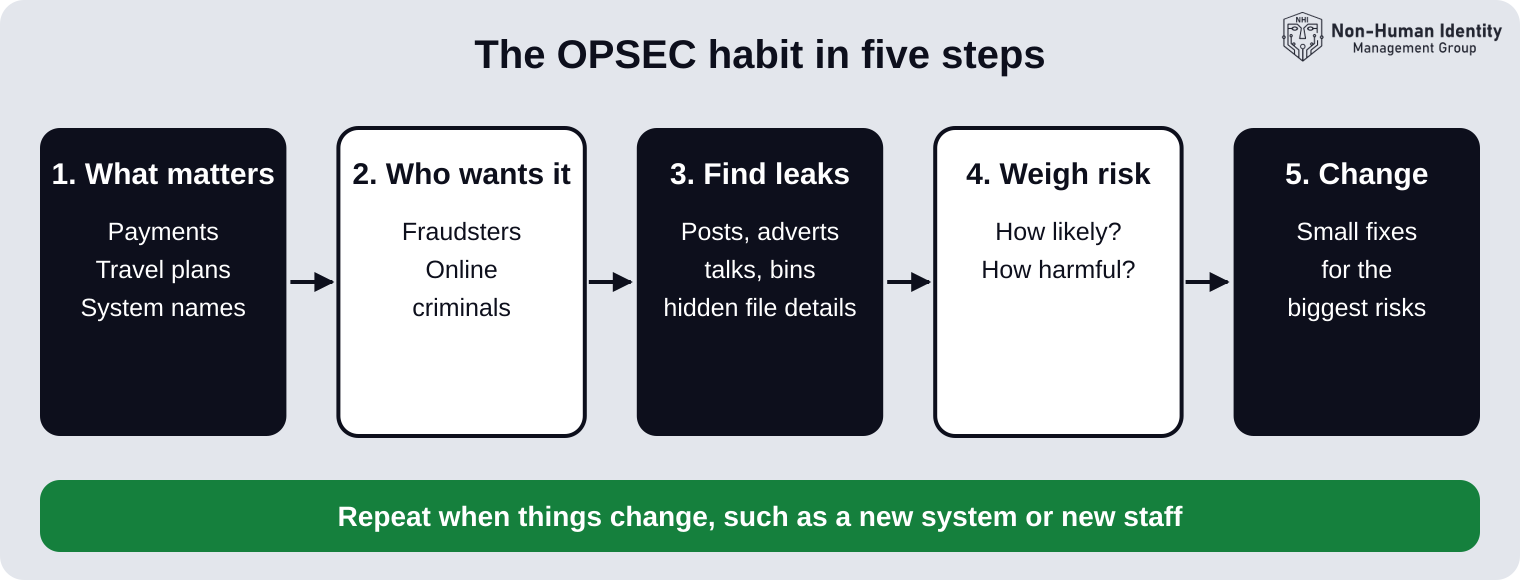
A US government security glossary describes OPSEC as a five-step process.[1] In plain words, the steps are:
- Decide what matters. List the details that would help someone harm your work, such as payment steps, travel plans or system names.
- Think about who wants it. Ask who might want to cause harm, such as fraudsters, rival firms or online criminals.
- Find the leaks. Look at where those details slip out: posts, adverts, talks, rubbish bins and hidden details inside shared files.
- Weigh the risk. Decide how likely each leak is to be used, and how much harm it could do.
- Change what you do. Pick simple fixes for the biggest risks, such as new wording, a check before posting or a payment rule.
Some leaks are hidden from view. Office files can hold comments, tracked changes and the author's name. Microsoft's Document Inspector can find and remove these hidden details before you share a file.[4]
A worked example
Wren Engel is the office manager at Birch Joinery, a fictional firm with twenty staff. Gideon Quist, the owner, asks her to look at the firm "the way a scammer would".
Wren starts with step one. She and Gideon agree the details that matter most: how supplier payments are approved, when Gideon travels and which banking system they use.
Next she spends an hour searching for the firm online. She finds a job advert naming the banking software. She finds a staff post with a photo of the office whiteboard, showing the delivery schedule. The website lists every staff member with a direct email address.
She thinks of the jigsaw. None of these pieces is secret. Together, they show who approves payments, when the owner is away and what the bank login looks like.
Wren weighs the risk. A fake payment request is the most likely attack, and it would do the most harm.
So she makes small changes. The advert now says "experience with business banking". The whiteboard photo comes down, and staff agree to check the background of office photos. The website lists a shared contact address. Gideon sets a new rule: any change to supplier bank details is confirmed by phone, using a number already on file.
Two months later, an email arrives "from a supplier" asking to change bank details. The phone check shows it is fake. The rule did its job.
Myths and mistakes
| What people think | What is true |
|---|---|
| OPSEC is only for the military or spies. | It started there, but any organisation can use the same simple steps. |
| We have no secrets, so we have nothing to protect. | OPSEC is about ordinary details that add up, not only secret files. |
| If it is already public, there is no point removing it. | Taking it down can still help. Fewer people find it, and new posts stop adding to the picture. |
| OPSEC means staff cannot post anything about work. | The aim is to think first. Most posts are fine; a few details are worth leaving out. |
| Deleting comments from a document removes all hidden details. | Files can also hold the author's name and other hidden details. Use a tool that checks for them.[4] |
What can I do this week?
- List three details about your work that would help a scammer.
- Search for your organisation's name and see what a stranger can learn.
- Check the background of any office photo before you post it.
- Run a document check for hidden details before sending a file outside.
- Agree a phone check for any urgent payment or bank detail change.
Checklist
- We have a short list of the details that matter most.
- Staff know which details stay internal, such as travel plans and payment steps.
- Job adverts describe skills without naming exact systems and versions.
- Office photos are checked for screens, whiteboards and badges before posting.
- Files are checked for hidden details before they go outside.
- Payment and bank detail changes are confirmed on a known phone number.
- We look at our public footprint again after big changes, such as a new system.
Common questions
What does OPSEC stand for?
OPSEC stands for operations security. It is a way of finding the everyday details about your work that could help an attacker, then deciding how to protect them. It began in the military, and US government departments and agencies are required to have OPSEC capabilities today.[2]
Is OPSEC the same as protecting my digital footprint?
They are close cousins. Your digital footprint is the trail you leave online as a person. OPSEC looks at your organisation and its work, across posts, adverts, files and talk. See Your Digital Footprint for Beginners for the personal side.
Do small businesses need OPSEC?
Yes, a light version helps. Small firms often post staff names, roles and plans publicly, which makes fake payment requests easier. A short list of details that matter, a check before posting and a phone check for payments cover most of the risk.
Who should be in charge of OPSEC?
Someone should own it, but everyone takes part. In a small firm, the owner or office manager can lead. In larger organisations, the security or risk team often runs it. Staff need short, clear guidance, because most leaks come from everyday posts and files.
Is talking about work at a conference a risk?
Usually not, if you think first. Sharing lessons and ideas is fine. Leave out details such as exact system versions, internal names, network layouts and screenshots of internal tools, because these can help someone plan an attack.
Where next?
Ready for the detail? Read the practitioner guide: Operations Security (OPSEC) for Organisations. It goes further into running each of the five steps, rolling out an OPSEC programme and measuring whether it works.
Also useful:
- Social Engineering for Beginners
- OSINT for Beginners
- Your Digital Footprint for Beginners
- Accidental Data Leaks for Beginners
- Security Awareness for Beginners
Related NHI Mgmt Group resources: Social Engineering Guide · Executive Protection and Digital Footprint Guide · Insider Threat Awareness Training Guide
Key terms
- Operations security (OPSEC)
- A habit of finding everyday details that could help an attacker, and protecting them.
- Critical information
- Facts about your work that would help someone who wants to harm it.
- Metadata
- Hidden information stored inside a file, such as who wrote it and when.
- Tricking people into handing over information, money or access.
- Phishing
- A fake message designed to look real, so you click a link, share details or pay.
- Countermeasure
- A change you make to reduce a risk, such as new wording or a check before posting.
Sources and further reading
- Glossary: operations security (OPSEC). NIST Computer Security Resource Center, citing CNSSI 4009-2022 and NIST SP 800-53 Rev. 5. https://csrc.nist.gov/glossary/term/operations_security, accessed 28 Nov 2026.
- Operations Security. National Counterintelligence and Security Center, Office of the Director of National Intelligence (archived page). https://archive.dni.gov/index.php/ncsc-what-we-do/operations-security, accessed 28 Nov 2026.
- Social media: how to use it safely. National Cyber Security Centre (UK). https://www.ncsc.gov.uk/guidance/social-media-how-to-use-it-safely, accessed 28 Nov 2026.
- Remove hidden data and personal information by inspecting documents, presentations, or workbooks. Microsoft Support. https://support.microsoft.com/en-us/office/remove-hidden-data-and-personal-information-by-inspecting-documents-presentations-or-workbooks-356b7b5d-77af-44fe-a07f-9aa4d085966f, accessed 28 Nov 2026.