Proof of personhood is a way to show a website you are one real person, without saying who you are.
This guide is for anyone who has wondered how websites will tell people from bots as AI improves, and for students and newcomers to online identity. If you run a website with sign-ups, offers or votes, fake accounts made by software can cost you money and trust.
In short
- Proof of personhood shows you are a real, unique person, not who you are.
- It aims to help where puzzles like CAPTCHAs struggle against modern AI.
- Each website sees a different nickname for you, so sites cannot easily link your visits together.
- It is one useful signal, not a full answer: passes can be stolen or sold, and some schemes raise privacy questions.
What you will learn
- Explain the difference between proving you are human and proving who you are.
- Spot why AI agents and bots are pushing websites towards new checks.
- Check what a scheme collects about you before you sign up.
- Ask sensible questions if your website is thinking of using one.
- Human pass (personhood credential)
- a digital pass that says you are one real person, kept on your own device.
- Site-only nickname (pseudonym)
- a made-up name for you that only one website sees.
- Robot (bot)
- a program that visits websites and acts on its own, with no person clicking.
What is proof of personhood?
Think of voting at a polling station. Staff tick you off the list once, so nobody votes twice. Then your ballot paper goes in the box with no name on it.
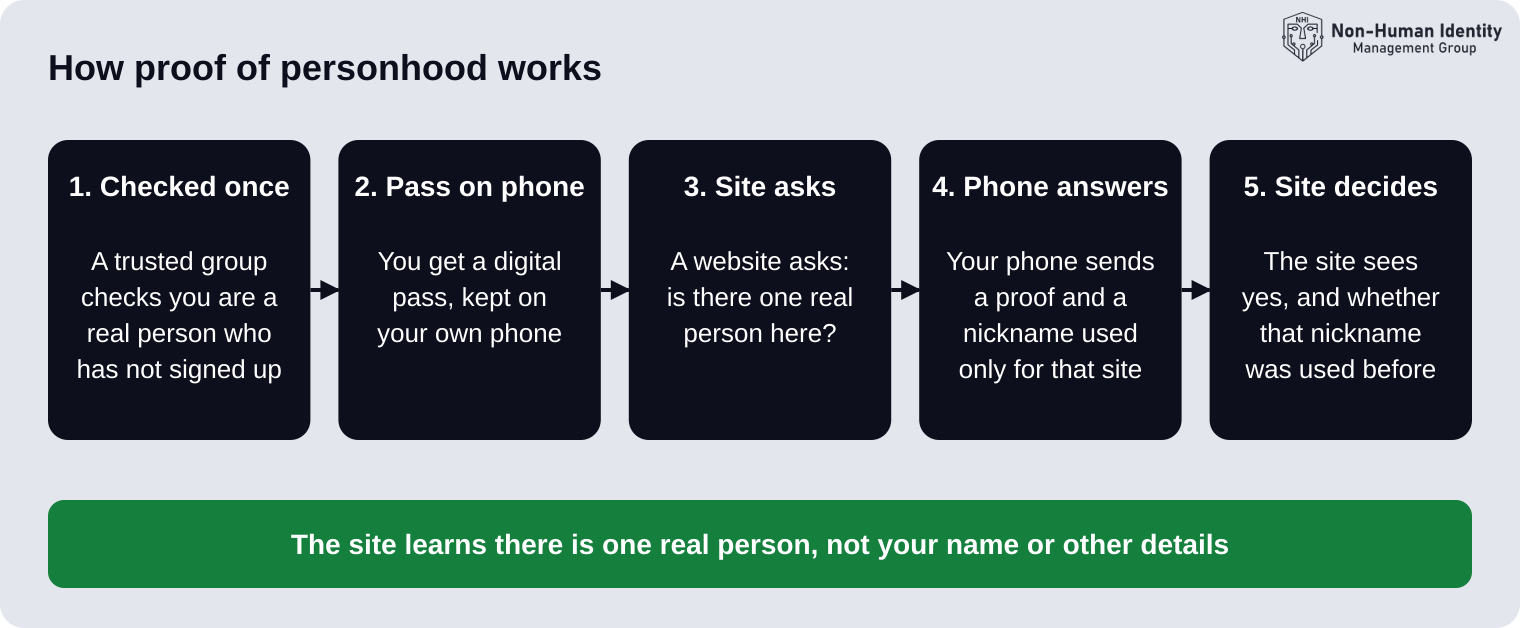
Proof of personhood works the same way online. A trusted group checks once that you are a real person who has not already signed up. Then it gives you a personhood credential, a digital pass kept on your phone.
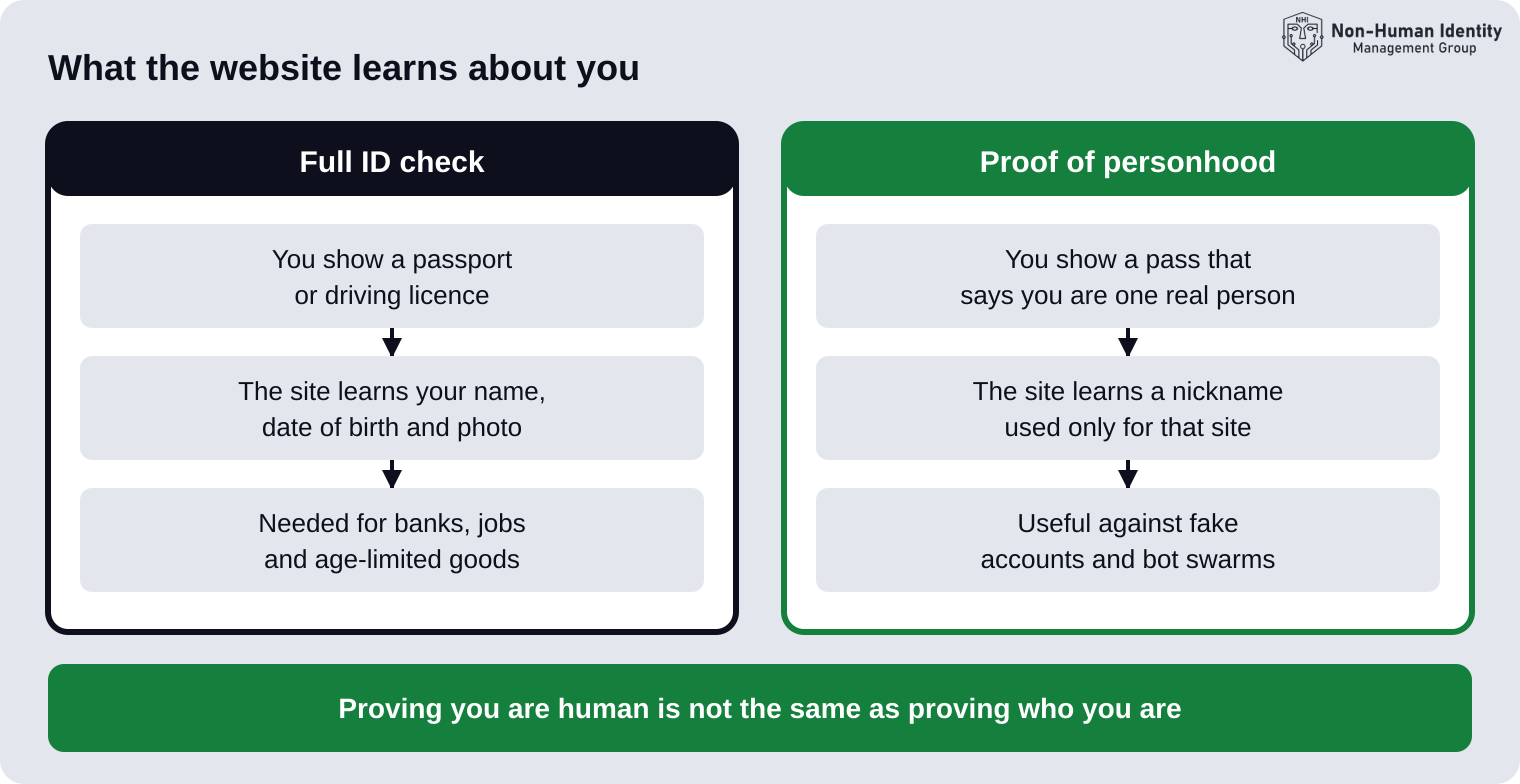
When a website asks, your phone shows the pass. The website learns "this is one real person" and a nickname used only for that site. It does not learn your name.[1][2]
The idea is different from an ID check. A bank needs to know exactly who you are. A forum or a free offer may only need to know you are one person, not a hundred fake accounts.
Where the comparison stops working: a ballot is used once and is gone. A personhood pass is used again and again. If someone steals or buys yours, they can pretend to be a real person on many sites.
Why does it matter?
AI can now write, talk and act online in ways that are hard to tell apart from people. It is also cheap to run at large scale. Researchers argue that puzzles like CAPTCHAs no longer hold back advanced AI well, while full ID checks ask too much of most people.[1]
AI agents add a new twist. An AI agent is a program that acts for a person, such as booking or buying things. Agents are a kind of non-human identity (NHI). An NHI is a digital identity, or the credential behind it, that represents a machine, application, automated process, service or AI agent. Websites may want to know a real person stands behind each agent.
If you use social media or forums
What could happen: crowds of fake accounts make an idea look popular when it is not.
Check this: before joining any scheme, read what data it keeps and how to delete it.
If you run a website with offers or votes
What could happen: one person with a thousand fake accounts claims every free offer.
Check this: count how many sign-ups you think are fake before buying any tool.
If you are building AI agents
What could happen: sites block your agent because they cannot tell it from a bot swarm.
Check this: plan how your agent will show who it is and who it acts for.
What does it look like?
Here is a made-up record of what a website might store after a personhood check. Compare it with what it would hold after a full ID check.
Example only. All values are made up.
# what the site keeps after a personhood check
site: forum.example.com
action: create-account                  (1)
result: one real person = yes           (2)
nickname: EXAMPLE-7f3a-0000-FAKE        (3)
seen before for this action: no         (4)
name / birthday / photo: not shared     (5)
- The site picks what it is guarding, such as making an account.
- The pass says a genuine, unique person is present.
- In a real file, this line would hold a code made just for this site and action.
- If the same nickname comes back, the site knows it is the same person trying again.
- Personal details stay with you.
Why this is risky: the record proves a pass was shown, not who is holding the phone. A stolen or rented pass gives the same "yes".[2]
The safer way: treat the result as one signal among several, such as unusual activity checks, and keep only the nickname and the result.
How does it work?
- A one-time check. A trusted group, called the issuer (the one that hands out passes), checks you are a real person. Researchers say each person should get at most one pass from an issuer.[2]
- The pass. You keep the pass on your own phone, not on the website.
- A website asks. A site asks for proof before an action, such as opening an account or claiming an offer.
- Your phone answers. It sends a maths-based proof, called a zero-knowledge proof (a way to prove something is true without showing the details). It adds a nickname made for that site and action.[3]
- The site decides. It checks the proof, and whether that nickname has done this action before.
Schemes differ in how they make the one-time check. Some use a government ID. One well-known scheme, World ID, can use an eye scan from a device called the Orb. Eye scans raise privacy questions. In December 2024, a German privacy regulator ordered the company behind it to offer a proper way to delete people's data. The company said it would appeal.[5]
A related tool, called Privacy Pass, gives your browser tokens after it passes a check. A site can accept the token without learning who you are.[4] On its own, though, a token proves a check was passed, not that you are a unique person.
A worked example
Zola Marlow runs a small online shop selling concert merchandise. Each month she gives away ten signed posters, one per person.
Last month something felt wrong. All ten winners had new accounts, made within an hour, with similar email addresses. Her developer, Anil Engel, checks the records. He thinks one person used software to make hundreds of accounts.
Zola remembers the polling station. She does not need to know her fans' names. She only needs each fan to enter once.
Anil looks at proof of personhood. He suggests making it optional. Fans who show a human pass get entered in the draw. Others can still shop as normal.
Before switching it on, Zola reads what the scheme keeps. Her shop would store only the site nickname and the yes or no answer. No names, no photos and no eye scans would reach her.
Anil also keeps the shop's other checks running. He knows a pass can be sold, so he watches for one nickname suddenly backing many devices.[2]
Some fans do not want to use the scheme. Zola adds a second way in: they can enter by post. That way nobody is shut out of the draw just because they cannot or will not get a pass.
The next draw has far fewer suspicious entries, in the records Anil can see. Zola keeps both routes open and plans to check again in three months.
Myths and mistakes
| What people think | What is true |
|---|---|
| Proof of personhood tells the website who I am. | It is designed to show you are one real person, using a nickname for each site.[2] |
| It is just a better CAPTCHA. | A CAPTCHA tests one visit. A personhood pass also shows you have not already signed up. |
| A pass proves the person using it is the owner. | Passes can be stolen, lent or sold, so treat the result as one signal.[2] |
| It can replace an ID check for banks or age limits. | Those need to know who you are or how old you are. Use the right check for the job. |
| Every scheme works the same way. | Some use government ID, some use body scans, and some use tokens. Each has different privacy trade-offs. |
What can I do this week?
- Before joining any personhood scheme, read what it collects and how you can delete it.
- Think about whether a site really needs your name, or only needs to know you are a person.
- If you run a website, count how many sign-ups or claims you think are fake.
- If you build AI agents, list which sites they visit and how they show who they act for.
Checklist
- I know the difference between proving I am human and proving who I am.
- I have read what any scheme I use keeps about me.
- I keep my human pass to myself and do not lend or sell it.
- Our site offers personhood checks as an option, not the only way in.
- Our site stores only the nickname and the result.
- Our site still runs its other fake account checks.
- Our site watches for one pass backing many devices or agents.
Common questions
Is proof of personhood the same as a CAPTCHA?
No, it goes further. A CAPTCHA guesses whether one visit comes from a person. Proof of personhood aims to show you are a real person who has not already signed up, using a pass you keep. Researchers say CAPTCHAs struggle against advanced AI, which is one reason for the new idea.[1]
Does the website learn my name?
Not in a well-designed scheme. The website gets a yes and a nickname made just for that site. The research behind the idea says your activity should not be linkable across sites. That should hold even if the sites and the group that gave you the pass work together.[2]
Do I have to scan my eyes?
Not always. The research says a personhood scheme does not have to use body measurements. Some schemes use a government ID instead. World ID can use an eye scan from its Orb device, so check what each scheme asks for before you sign up.[1]
What does this have to do with AI agents?
Websites may want to know a real person stands behind an agent. In March 2026, World launched a test tool called AgentKit. News reports say it lets a person link their agents to their World ID, so sites can see a verified human approves the agent's actions.[6]
Where next?
Ready for the detail? Read the practitioner guide: Personhood Credentials and Proof of Human Guide. It goes further into the main scheme designs compared, how a site can measure abuse before and after, and the risks to check with a scheme operator.
Also useful:
- CAPTCHA for Beginners
- Zero-Knowledge Proofs for Beginners
- Sybil Attacks for Beginners
- Decentralised Identity and Verifiable Credentials for Beginners
- Non-Human Identities for Beginners
Related NHI Mgmt Group resources: CAPTCHA and Bot Challenges Guide · Bot Farms and Fake Engagement Guide · Know Your Agent (KYA) Guide
Key terms
- Proof of personhood
- A way to show you are one real, unique person online without saying who you are.
- Personhood credential
- A digital pass, kept on your device, that says you are one real person.
- Pseudonym
- A made-up name that stands in for you, here one used only by a single website.
- Zero-knowledge proof
- A maths-based way to prove something is true without showing the details behind it.
- CAPTCHA
- A small test a website uses to guess whether a visitor is a person or a program.
- Bot
- A program that visits websites and acts on its own, with no person clicking.
Sources and further reading
- Adler, S., Hitzig, Z., Jain, S. and others. Personhood credentials: Artificial intelligence and the value of privacy-preserving tools to distinguish who is real online (abstract). arXiv:2408.07892, first submitted 15 August 2024, version 4 dated 17 January 2025. https://arxiv.org/abs/2408.07892, accessed 28 Nov 2026.
- Adler, S., Hitzig, Z., Jain, S. and others. Personhood credentials, full text (executive summary: credential limits, unlinkable pseudonymity, credential transfer). arXiv:2408.07892v4. https://arxiv.org/html/2408.07892v4, accessed 28 Nov 2026.
- World ID concepts. World developer documentation. https://docs.world.org/world-id/concepts, accessed 28 Nov 2026.
- RFC 9576: The Privacy Pass Architecture. IETF, June 2024 (Informational). https://www.rfc-editor.org/rfc/rfc9576.html, accessed 28 Nov 2026.
- First results of the Worldcoin investigation: BayLDA strengthens the rights of data subjects. Bavarian State Office for Data Protection Supervision (BayLDA), 19 December 2024. https://lda.bayern.de/media/pm/pm2024_08_en.pdf, accessed 28 Nov 2026.
- Sam Altman-backed startup aims to verify humans behind AI transactions. eWeek (news report), 18 March 2026. https://www.eweek.com/news/world-launches-human-verification-ai-shopping-agents/, accessed 28 Nov 2026.