An AI model licence is the set of rules that says how you may use, change and share a model.
This guide is for students, builders and anyone whose team wants to download a free AI model. You do not need to be a lawyer to be affected: if your app or business runs a downloaded model, its licence sets what you may do with it.
In short
- Being able to download a model does not mean you may use it for anything you like.
- Some models use well-known open licences with few conditions. Others use a licence written by the company that made them.
- Company licences can add rules, such as a credit line, a list of banned uses or a size limit for very large services.
- Find the licence file, check it against your plan and keep a note of what you found.
What you will learn
- Explain what an AI model licence is in one sentence.
- Spot the main kinds of licence and what each one usually asks of you.
- Check where a model's licence lives before your team uses it.
- Ask the right questions before a model goes into a product.
Status: correct as at 28 November 2026, based on the licence texts listed in Sources. Licences change between model versions; check the licence file for the exact version you use.
This guide explains the topic in general terms and is not legal advice.
- Downloadable model (open-weight model)
- an AI model whose main file you can download and run yourself.
- Rules of use (licence)
- the written terms that say who may use something, and how.
- Fact sheet (model card)
- the page published with a model that says what it is for and which licence applies.
What is an AI model licence?
Think of hiring a car. You get the keys and can drive away. But the hire agreement still says who may drive, where you may go and what you must not do with it.
An AI model licence works the same way. Many companies now publish their models so anyone can download them. These are called open-weight models. The "weights" are the large file of numbers that makes the model work.
The licence is a text file that comes with the model. It says whether you may use the model at work, change it, build it into a product or pass it on. It may also ask you to show a credit line or follow a list of banned uses.
Some models use licences that were around long before AI, such as Apache 2.0 or MIT. Others use a licence written by the company that made the model, just for that model family.
Where the comparison stops working: a hire car goes back at the end of the week. A downloaded model stays on your computer, and copies can spread. The licence rules come with every copy, so they still apply to a copy someone else gave you.
Why does it matter?
"Open" can mean very different things. One group that looks after open source rules says open AI should let anyone use, study, change and share it, for any purpose.[6] Many downloadable models come with extra conditions, so it pays to read before you build.
If you are a student or hobbyist
What could happen: a project you started for fun turns into a paid app, and the model's licence does not allow paid use.
Check this: note the licence name the day you download a model, not the day you launch.
If you run a small business
What could happen: a supplier builds your chatbot on a model whose licence asks for a credit line, and nobody adds it.
Check this: ask every supplier which model they use and which licence it comes under.
If you build software at work
What could happen: you fine-tune a model and share the result, without passing on the rules the original licence says must travel with it.
Check this: read what the licence says about changed versions before you share one.
What does it look like?
Here is a made-up check sheet. A small team fills it in before using a model.
Example only. All values are made up.
Model:        example-chat-model-7b-FAKE
Found on:     models.example.invalid/example-chat-FAKE
Licence:      Example Community Licence v1.0     (1)
Paid use?     Yes, with conditions               (2)
Credit line?  "Built with Example" on our site   (3)
Banned uses:  see the attached use policy        (4)
Size limit:   separate deal above 0000 users     (5)
Checked by:   A. Example, 28 Nov 2026
- In a real file, this line would contain the exact licence name and version.
- Some licences allow paid use. Some add conditions. Some ban it.
- Some licences ask you to show a set phrase where people can see it.
- A list of uses the maker does not allow. The licence points to it.
- Very large services may need a separate deal with the maker.
Why this is risky: without a sheet, nobody knows which rules the team agreed to. A newer version may come with a new licence, and no one notices.
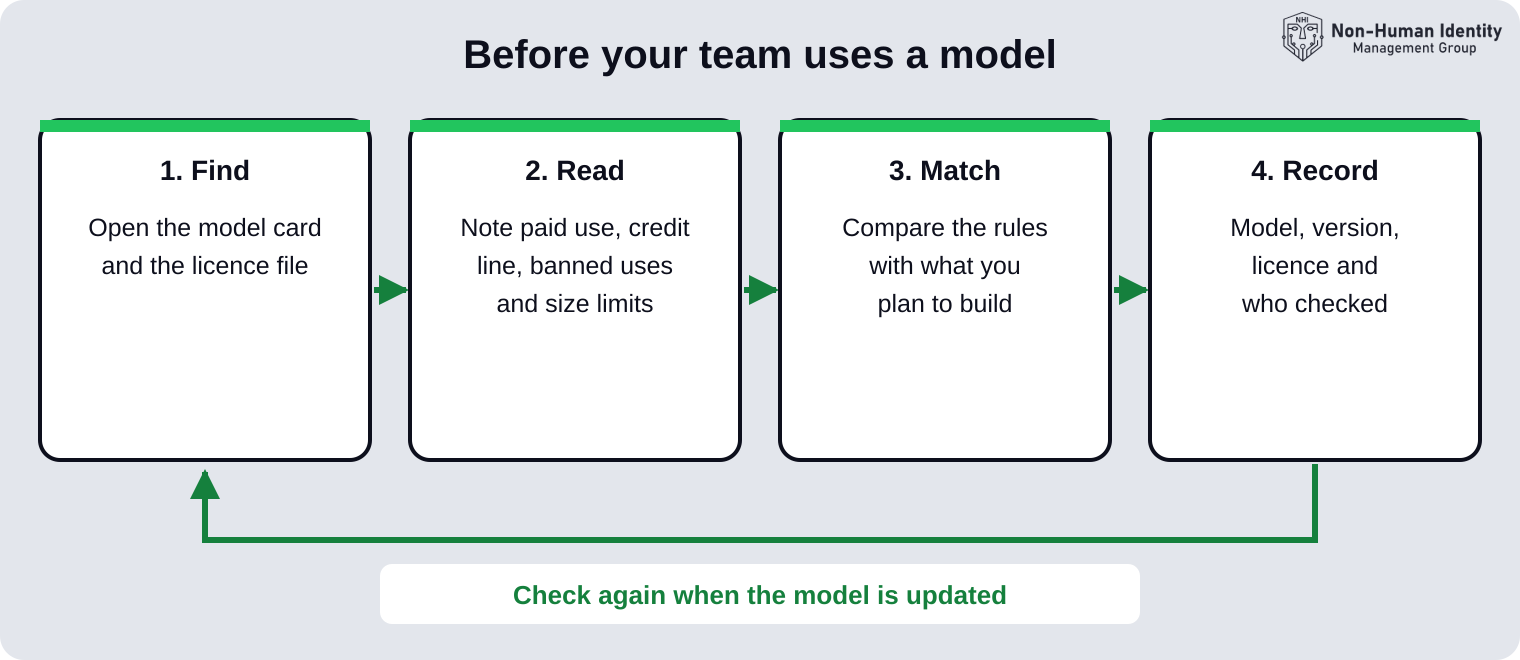
The safer way: fill in one line for each model and version. Keep a copy of the licence file with it. Check again when the model is updated.
How does it work?
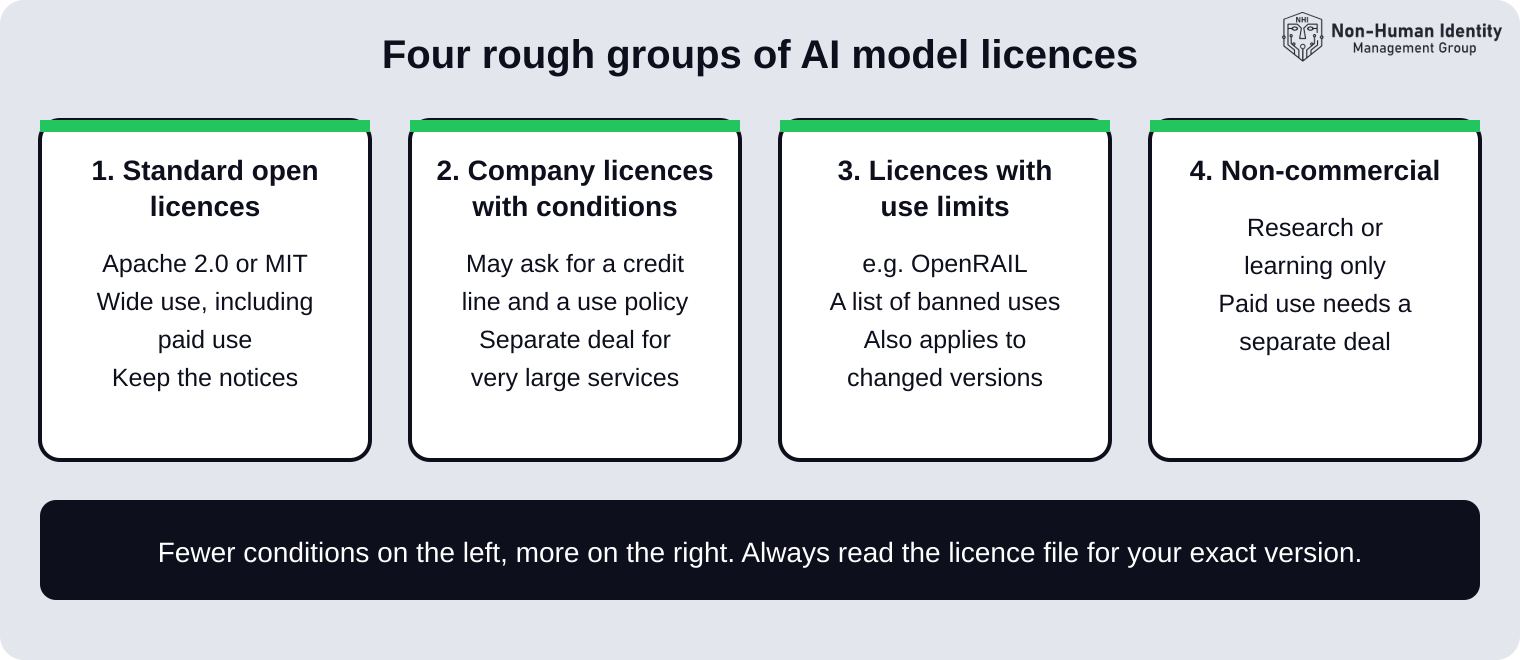
Most model licences fall into one of four rough groups. The group tells you how much reading to do.
- Standard open licences. Licences such as Apache 2.0 and MIT allow wide use, including paid use. They still ask you to keep the copyright and licence notices with copies you share.[1][2] Apache 2.0 also asks you to mark files you changed.[1]
- Company licences with conditions. Some makers write their own licence. For example, Meta's Llama 3.1 licence asks people who share the model or a product built on it to show "Built with Llama". It also says services with more than 700 million monthly users must ask Meta for a separate licence.[4]
- Licences with use limits. Some licences list uses that are not allowed. The OpenRAIL family is one example. Its banned uses also apply to changed versions that other people share.[5]
- Non-commercial licences. These allow research or learning but not paid use without a separate deal. One model licence, for instance, limits use to research and education only.[8] A common general licence, Creative Commons Attribution Non Commercial, also rules out uses mainly aimed at making money.[3]
On model sharing sites such as Hugging Face, the licence is usually named in the model card (the fact sheet page). If a licence is not on the site's standard list, the card may say "other" and point to a licence file in the same folder.[7] That file is what counts, not a summary on a web page.
A worked example
Zola Castell runs a fictional two-person studio that makes booking apps for hair salons. A client asks for a chatbot that answers questions about opening times and prices.
Her developer, Dana Delmar, finds a free model that runs well on a small server. "It is open," Dana says. "We can just use it."
Zola remembers the hire car. Having the keys is not the same as reading the agreement. So she asks Dana to open the model card first.
The card names a company licence, not a standard one. Dana opens the licence file and reads it with Zola. It allows paid use. It asks for a short credit line on any product that uses the model. It also points to a list of banned uses, and the salon chatbot is not on it.
Dana spots one more thing. A smaller model from the same maker uses a different licence. They agree to note the exact model and version, not just the family name.
They add the credit line to the chatbot's "About" page. Zola fills in a one-line check sheet with the model name, version, licence and the date. She keeps a copy of the licence file with the project.
Before the launch, Zola asks a solicitor to look over the sheet, because the app is for a paying client. The solicitor raises nothing new.
Three months later the maker releases a newer version. Before switching, Dana checks the licence again, because the rules can change between versions.
Myths and mistakes
| What people think | What is true |
|---|---|
| If I can download it, I can use it for anything. | Downloading is not permission. The licence sets the rules. |
| "Open-weight" means the same as open source. | Many downloadable models carry extra conditions that open source definitions do not allow.[6] |
| All models from one company share one licence. | Different sizes or versions can use different licences. Check the exact one. |
| The licence only matters for big companies. | Credit lines, banned uses and non-commercial limits can apply to anyone. |
| If I change the model, the old rules no longer apply. | Some licences say their rules travel with changed versions.[5] |
What can I do this week?
- List every downloaded model your team or suppliers use.
- Open each model card and write down the licence name and version.
- Read each licence for paid use, credit lines, banned uses and size limits.
- Save a copy of each licence file with the project.
- Ask for legal advice where the use is paid or the licence is unclear.
Checklist
- Every model in use is listed with its exact name and version.
- The licence for each model has been read from the licence file, not a summary.
- Paid use is allowed for every model in a paid product.
- Any required credit line is shown where the licence asks.
- Planned uses have been checked against any list of banned uses.
- Changed or fine-tuned versions you share carry the rules the licence requires.
- Someone checks the licence again before a model is updated.
- Suppliers tell you which models and licences they use.
Common questions
Can I use an open-weight model in a product I sell?
Often, but not always. Standard licences such as Apache 2.0 and MIT allow paid use if you keep the notices. Company licences may add conditions, and non-commercial licences rule it out without a separate deal. Read the licence file for the exact model and version before you sell anything built on it.
Where do I find a model's licence?
Start with the model card, the page published with the model. It usually names the licence. Then open the licence file stored with the model files, because that is the full text. If the card says "other", the licence file is the only place to find the rules.
What is the difference between open-weight and open source AI?
Open-weight means you can download the model file. Open source AI goes further. One widely used definition says anyone should be free to use, study, change and share it for any purpose. It also asks for details of how the model was built. Many open-weight models meet the first test only.
Do licence rules apply to what the model writes?
Sometimes. Some licences say nothing about outputs, while others mention them. One non-commercial model licence, for example, bans commercial use of the model's output too. Read the licence for any lines about "output" before you rely on generated text in a paid product.
Do I need a lawyer to use a free model?
Not for learning or trying a model at home. For a product, a client project or anything that makes money, it is sensible to get advice on the licence. This guide gives general information only and is not legal advice.
Where next?
Ready for the detail? Read the practitioner guide: Open-Weight Model Licence Tracker. It goes further into the licence for each major model, the revenue and user thresholds in company licences and which checkpoints are non-commercial.
Also useful:
- Open-Weight AI Models for Beginners
- Open Source Licences for Beginners
- Open-Weight vs Closed Models Explained
- Hugging Face for Beginners
Related NHI Mgmt Group resources: Open Source Licence Compliance Guide · Model Supply Chain Guide · AI Training Data Provenance and Copyright Exposure Guide
Key terms
- Open weights
- A model's file of numbers, published so others can download and run the model themselves.
- Model card
- A short page published with a model that says what it is for, how it was tested and which licence applies.
- Licence
- The written terms that say who may use, change and share something, and on what conditions.
- Permissive licence
- A licence, such as Apache 2.0 or MIT, that allows wide use if you keep its notices.
- Acceptable use policy
- A list of uses a model's maker does not allow, often included in the licence by reference.
- Non-commercial
- A condition that rules out use mainly aimed at making money.
- Fine-tuning
- Training an existing model a little more so it suits a task, which creates a changed version.
Sources and further reading
- Apache License, Version 2.0 (sections 2 to 7). The Apache Software Foundation, January 2004. https://www.apache.org/licenses/LICENSE-2.0, accessed 28 Nov 2026.
- The MIT License. Open Source Initiative. https://opensource.org/license/mit, accessed 28 Nov 2026.
- Attribution-NonCommercial 4.0 International (CC BY-NC 4.0). Creative Commons. https://creativecommons.org/licenses/by-nc/4.0/, accessed 28 Nov 2026.
- Llama 3.1 Community License Agreement (sections 1.b and 2), version release date 23 July 2024. Meta. https://dev.meta.ai/llama/llama3_1/license, accessed 28 Nov 2026.
- OpenRAIL: Towards open and responsible AI licensing frameworks. Hugging Face blog, 31 August 2022. https://huggingface.co/blog/open_rail, accessed 28 Nov 2026.
- The Open Source AI Definition 1.0. Open Source Initiative, 28 October 2024. https://opensource.org/ai/open-source-ai-definition, accessed 28 Nov 2026.
- Licenses. Hugging Face Hub documentation. https://huggingface.co/docs/hub/repositories-licenses, accessed 28 Nov 2026.
- EXAONE AI Model License Agreement 1.2 - NC (sections 2 and 3). LG AI Research, licence file for EXAONE-4.5-33B on Hugging Face. https://huggingface.co/LGAI-EXAONE/EXAONE-4.5-33B/blob/main/LICENSE, accessed 28 Nov 2026.