MTTD and MTTR are average times showing how fast a security team notices an attack and deals with it.
This guide is for managers, students and anyone who sees these letters on a security report. You do not need a technical background. If your business pays for a security team or service, these numbers are often how it reports its speed to you.
In short
- MTTD, mean time to detect, is the average time from an attack starting to the team noticing it.
- MTTR usually means mean time to respond or to recover, and teams use it differently, so always ask which.
- Both are averages over many incidents, so one slow case can pull the number up.
- A fast number is only good news if the work behind it was done properly.
What you will learn
- Explain MTTD and MTTR in one sentence each.
- Spot where each clock starts and stops on one incident.
- Check whether a report defines its numbers clearly.
- Ask better questions when someone shows you these metrics.
- Average (mean)
- the total of all the times, divided by how many there are.
- Security problem (incident)
- an event that harms, or could harm, your systems or data.
- Measure of success (metric)
- a number a team tracks to see how well it is doing.
What are MTTD and MTTR?
Think of a leaking pipe at home. First there is the time before anyone notices the damp patch. Then there is the time to turn off the water and fix the pipe.
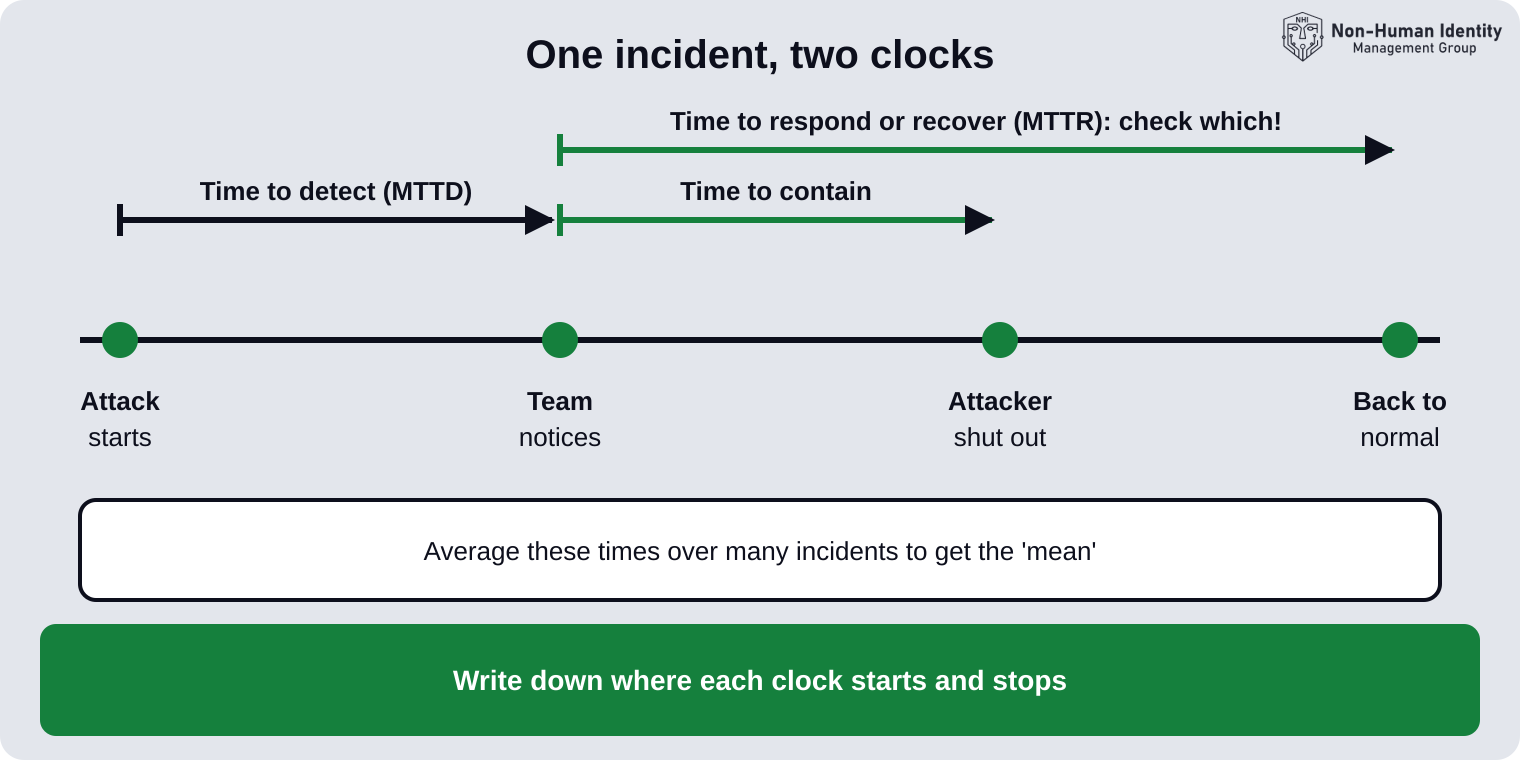
Security teams measure the same two gaps. MTTD stands for mean time to detect. It is the average time between an attack starting and the team noticing it. MTTR usually stands for mean time to respond or mean time to recover. It measures how long the team takes to act once it knows.
Here is the catch. The letters MTTR can stand for four different measures: repair, recovery, respond and resolve.[1] Two teams can both say "four hours" and mean quite different things.
Where the comparison stops working: a damp patch is easy to see in the end. An attacker may try hard to stay hidden, so some attacks are found only much later, or by someone outside the business.
Why does it matter?
An attacker who goes unnoticed has more time to look around and take data. Mandiant's yearly report found that, in its 2024 cases, attackers were inside for a middle value of 11 days before discovery.[2]
If you manage a business
What could happen: a supplier reports a fast MTTR, but its clock stops at "first email sent", not "problem fixed".
Check this: ask where each clock starts and stops, in writing.
If you are a student
What could happen: you learn the letters, but not the timestamps behind them.
Check this: practise working out the times from a made-up incident record.
If you are new to a security team
What could happen: you close alerts quickly to make the numbers look good, and miss a real attack.
Check this: ask how the team checks the quality of closed alerts, not just the speed.
What does it look like?
Here is a made-up incident record, the kind of note a security team keeps for each case.
Example only. All values are made up.
Case:              EXAMPLE-0000
First bad activity: Mon 02:00                    (1)
Alert raised:       Mon 08:00                    (2)
Attacker shut out:  Mon 11:00                    (3)
Service back:       Tue 09:00                    (4)
Time to detect:     6 hours
Time to contain:    3 hours
Time to recover:    25 hours
- When the attack started. Teams often learn this only later, by looking back through records.
- When the team first knew. The detect clock stops here.
- When the attacker lost access. This is the contain clock.
- When things were back to normal. This is the recover clock.
Why this is risky: if a report says only "MTTR: 3 hours", you cannot tell whether that means shut out or fully recovered. Here, that is the difference between 3 hours and 25.
The safer way: record each time as its own field in every case. Work out every metric from those same fields, and publish the definition next to the number.
How does it work?
- Record the times. For each incident, the team notes when the attack began, when it was noticed, when it was stopped and when things were normal again.
- Measure each gap. Time to detect runs from the start to being noticed. Time to contain runs from being noticed to being stopped, and time to recover runs on to normal.
- Average them. The team adds up the gaps for many incidents and divides by the number of incidents. That gives the mean.
- Look at the spread. One very slow case can pull a mean up a lot. Many teams also report the middle value, called the median.
- Pair speed with quality. A team can look fast by closing alerts too early. Good reports check a sample of closed cases, and test whether the team spots practice attacks.[3]
Other time metrics sit alongside these. Mean time to acknowledge (MTTA) is the average time from an alert being raised to someone starting work on it.[1] It shows whether the alert queue is staffed well enough, not whether the work was good.
A worked example
Kofi Mbeki runs a small security team at a fictional insurance firm. Calla Thorne, the finance director, asks him to explain a slide that says "MTTR: 2 hours".
Kofi uses the leaking pipe. "Two hours is how long it takes us to turn off the water," he says. "Fixing the pipe and drying the floor takes longer." His clock stops when the attacker is shut out, not when systems are fully back.
Calla asks for both numbers. Kofi checks his case records. Time to contain is a mean of two hours. Time to recover is a mean of two days. He adds both to the slide, with one line saying where each clock starts and stops.
Next, she asks about MTTD. Kofi explains that it is harder. The start time is often found only later, by looking back through records. His team's mean is three days. One old case, found after five weeks, pulls it up. Without it, most cases were found within a day. He adds the median, so the board sees the usual case as well as the worst.
Last, Calla asks how she knows the team is not just rushing. Kofi explains that each month, a colleague checks a sample of closed alerts. Twice a year, an outside firm runs a practice attack to see if the team spots it.
Calla leaves with a clearer slide, and three questions to ask any future supplier.
Myths and mistakes
| What people think | What is true |
|---|---|
| MTTR always means the same thing. | It can mean repair, recovery, respond or resolve.[1] Always ask which. |
| A lower number is always better. | Speed can come from closing alerts too early. Pair each time metric with a quality check. |
| Two companies' MTTD figures can be compared directly. | Only if both start and stop the clock at the same points. |
| The average tells the whole story. | One very slow case can pull it up. Look at the median and the worst cases too. |
| MTTD only counts attacks we found ourselves. | It should include attacks reported by customers, partners or the police, which can take longer to surface.[2] |
What can I do this week?
- Find the last security report you received and look for MTTD and MTTR.
- Ask the team or supplier where each clock starts and stops.
- Ask whether they report the median as well as the mean.
- Ask how they check the quality of fast-closed alerts.
Checklist
- Each metric has a written definition of when its clock starts and stops.
- The team records each key time as its own field in every case.
- MTTR reports say which meaning they use: respond, contain or recover.
- Reports show the median as well as the mean.
- Results are shown by how serious the incident was.
- Speed metrics are paired with a quality check on closed cases.
- Detection is tested with practice attacks at least once a year.
Common questions
What is a good MTTD?
There is no single target that fits every business. It depends on the kind of attack, your systems and how the team defines the clock. A better aim is a clear definition, a steady trend downwards and regular tests that show the team spots practice attacks.
What is the difference between MTTD and dwell time?
They are close. Dwell time is how long an attacker was inside before being found, for one incident. MTTD is the average of the detect times across many incidents. Some teams start the clock at the first sign in their logs instead, so check the definition.
What does MTTR stand for in security?
Usually mean time to respond or mean time to recover. Some teams use it for repair or resolve as well. Respond often stops at the first real action, while recover stops when service is back to normal. Ask the team to write down which they mean.
Why use the median as well as the mean?
The median is the middle value when all the times are put in order. It is not pulled up by one very slow case, so it shows the usual experience. The mean shows the overall load, including the worst cases. Together they tell a fuller story.
Can a team game these metrics?
Yes. A team can close alerts early, start the clock late or leave hard cases out. That is why the definitions should be written down. Speed should also be paired with quality checks and practice attacks.
Where next?
Ready for the detail? Read the practitioner guide: Security Operations Metrics Guide. It goes further into eight time metrics on one incident timeline, how to calculate them by severity, and how to report them to leadership without encouraging gaming.
Also useful:
- Security Operations Centres for Beginners
- SOC Case Management for Beginners
- Incident Response Metrics and KPIs Guide
- Detection Engineering Metrics and KPIs Guide
Related NHI Mgmt Group resources: SOC Guide · Incident Response Guide · SOC Manager for Beginners
Key terms
- MTTD
- Mean time to detect: the average time from an attack starting to the team noticing it.
- MTTR
- Usually mean time to respond or to recover: the average time to act on, or recover from, an incident after detection.
- Mean time to contain
- The average time from noticing an incident to stopping it from spreading.
- Dwell time
- How long an attacker was inside before being found or removed.
- Median
- The middle value when all the times are put in order.
- KPI
- A key performance indicator: a number used to judge whether work is meeting its goals.
- Incident
- An event that harms, or could harm, the safety of systems or data.
Sources and further reading
- Common incident management metrics. Atlassian incident management guide, Atlassian (one vendor's guidance). https://www.atlassian.com/incident-management/kpis/common-metrics, accessed 28 Nov 2026.
- M-Trends 2025: data, insights and recommendations from the frontlines. Mandiant, Google Cloud, 2025. https://cloud.google.com/blog/topics/threat-intelligence/m-trends-2025, accessed 28 Nov 2026.
- Detection practices. Building a Security Operations Centre, National Cyber Security Centre (UK). https://www.ncsc.gov.uk/collection/building-a-security-operations-centre/detection/detection-practices, accessed 28 Nov 2026.