Wi-Fi and Bluetooth tracking means following a phone or gadget by the wireless signals it sends out.
This guide is for anyone who carries a phone, smartwatch or earbuds and wonders whether shops, stations or venues can follow them. If your business runs public Wi-Fi or visitor counting, the same ideas tell you what your customers will expect.
In short
- Phones and gadgets send out short wireless messages, and some of these carry an address that sensors can pick up.
- Venues can use these signals to count visitors, measure how long they stay and spot repeat visits.
- Modern phones use private addresses that change, which makes linking visits harder, though other clues can still be used.
- You can cut tracking down with a few settings: private addresses on, scanning off, and wireless off when you do not need it.
What you will learn
- Explain how a phone can be noticed without joining a network.
- Spot the settings on your phone that affect tracking.
- Check that private Wi-Fi addresses are switched on.
- Ask a venue what it does with wireless signals it collects.
Status: correct as at 28 November 2026, based on guidance from European data protection authorities and the settings phone makers publish. Rules and settings change; check the official sources.
This guide explains the topic in general terms and is not legal advice.
- Device address (MAC address)
- a code that names a phone or gadget on a wireless network.
- Changing address (private address)
- a made-up address a phone uses instead of its built-in one.
- Network search message (probe request)
- a short message a phone sends to ask which Wi-Fi networks are nearby.
What is Wi-Fi and Bluetooth tracking?
Imagine walking into every shop on the high street. In each one, you call out to ask if your friend is there. Nobody needs to answer for the shopkeeper to hear you. If you use the same voice each time, they can tell you came back.
Phones do something similar. With Wi-Fi on, a phone sends short messages asking which networks are nearby. These are called probe requests. They can be sent even when the phone has not joined any network.[1]
Each message can carry a MAC address, a code that names the device on the network. Earbuds, watches and other Bluetooth gadgets also send out short "I am here" messages with an address.[4]
Small sensors can pick up these messages. If the same address shows up again and again, a computer can link those sightings into a pattern of where the device went.
Where the comparison stops working: you can choose to stay quiet in a shop. A phone may keep sending these messages in the background, and most people never see it happen.
Why does it matter?
Wi-Fi tracking is used in shopping centres, museums, workplaces, transport hubs and large events. It can show how long people stay, the routes they take and how often they return.[1] Some of this is harmless counting. Linked over time, it can also reveal habits.
If you carry a phone every day
What could happen: your visits to a shop, gym or clinic are recorded and linked together without you knowing.
Check this: make sure private Wi-Fi addresses are switched on in your phone's Wi-Fi settings.
If you run a shop or venue with guest Wi-Fi
What could happen: visitor counting collects more than you need and becomes personal data you must protect.
Check this: ask your Wi-Fi supplier what device data is collected, how long it is kept and who sees it.
If you are a student or new to IT
What could happen: you mix up "connected to the network" with "visible to the network" and miss how much a phone gives away.
Check this: learn what a MAC address is and why phones now change it.
What does it look like?
Here is a made-up page from a visitor counting system in a shopping centre. It shows the kind of record a sensor might keep.
Example only. All values are made up.
# visitor counter export, Northgate Mall (example)
device=00:00:EX:AM:PL:E1  sensor=entrance-A  time=09:58   (1)
device=00:00:EX:AM:PL:E1  sensor=pharmacy    time=10:04   (2)
device=00:00:EX:AM:PL:E1  sensor=cafe        time=10:31
device=00:00:EX:AM:PL:E1  visits_this_month=6             (3)
device=FA:KE:00:00:00:07  sensor=entrance-A  time=10:02   (4)
- In a real file, this line would contain a device address picked up at the entrance.
- The same address seen by a second sensor shows where the person walked next.
- Repeat sightings let the system count how often the same device returns.
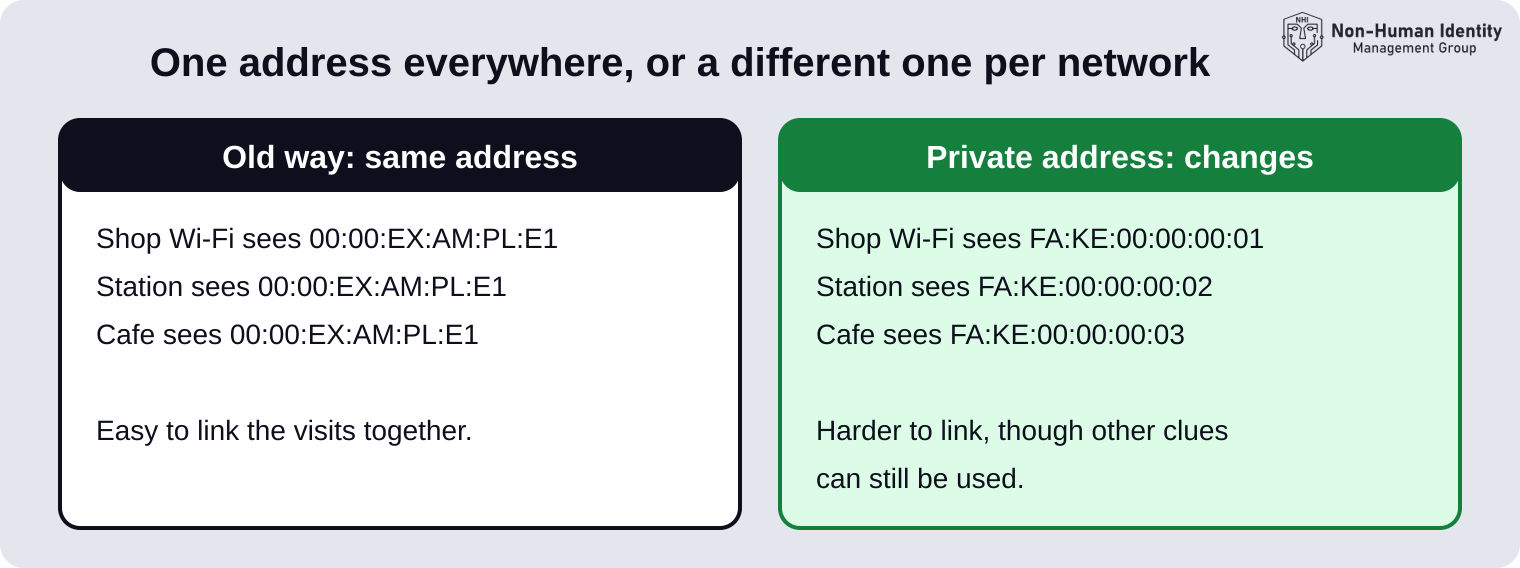
- A phone using a private, changing address shows up as a different device, so it is harder to link.
Why this is risky: a fixed address works like a name tag. Linked over weeks, the records can show someone's routine, such as regular visits to a pharmacy.
The safer way: phones use private addresses that differ for each network. Venues collect only what they need, blur or delete addresses quickly, and tell visitors clearly what they do.[1]
How does it work?
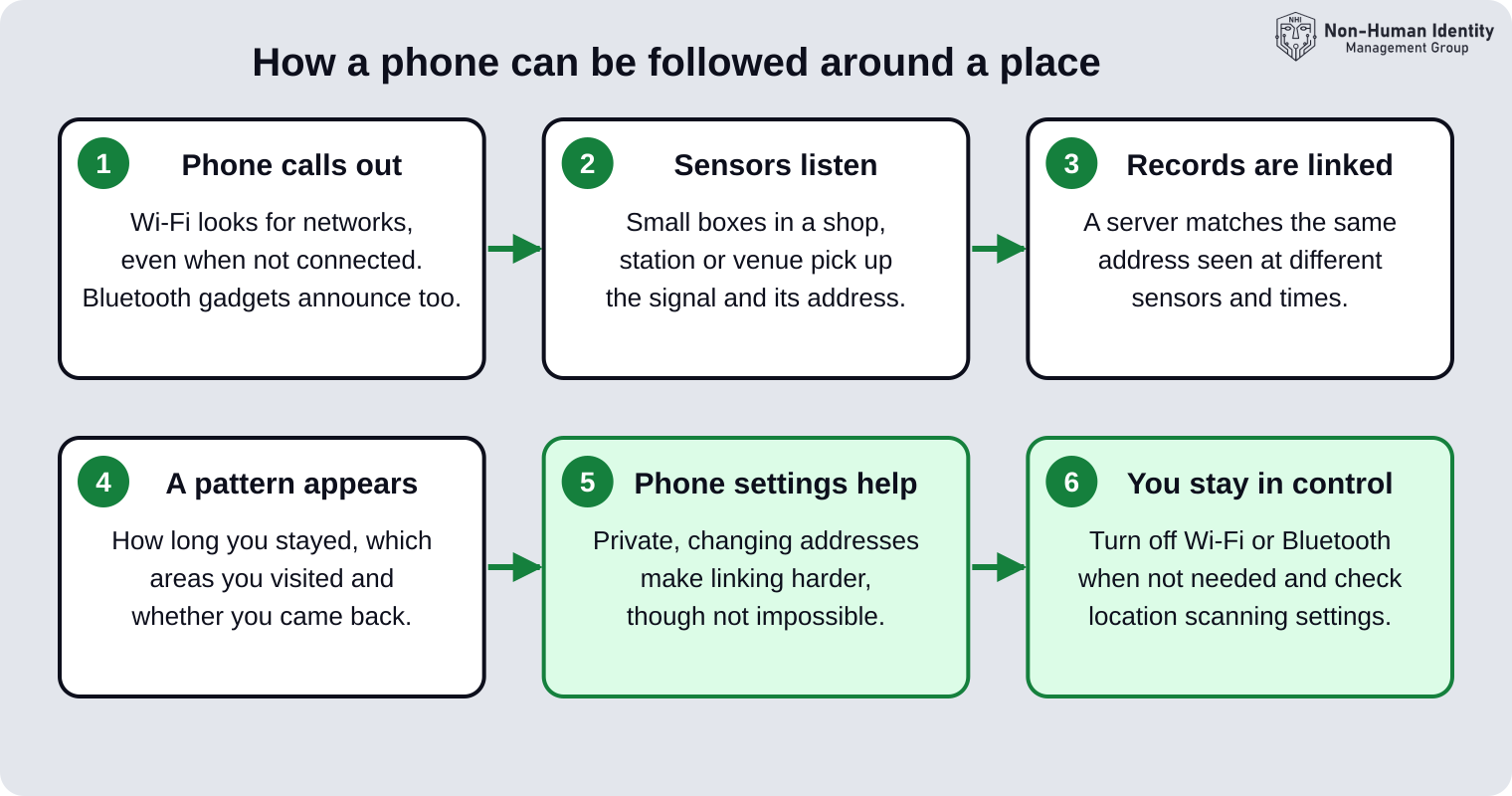
Here is how a phone's signals can turn into a record of where it went.
- The phone calls out. With Wi-Fi on, it sends probe requests to find networks, even if it is not connected to one.[1]
- Sensors listen. Small boxes in a venue pick up the messages and note the address, the time and the signal strength.
- Sightings are linked. A server matches the same address seen at different sensors. With three or more sensors, it can estimate where in a building the device is.[1]
- A pattern appears. The records show how long people stayed, which areas they visited and whether they came back.
- Private addresses get in the way. Phones that use a different, made-up address for each network are harder to link across places.[2][3]
Phone makers have added protections. Apple devices can use a different private Wi-Fi address for each network. On open or weakly protected networks, the address can change about every two weeks.[2] Android 10 and later use a randomised address by default when connecting to Wi-Fi.[3] Many Bluetooth gadgets can use a feature that swaps their address on a timer the maker sets.[4]
These protections help, but they have limits. Data protection regulators note that devices can still be recognised from other details in their messages, from signal strength and with computer analysis. This is a kind of fingerprinting, recognising a device from a mix of small details.[1]
Android phones also have settings that let apps scan for nearby Wi-Fi networks and Bluetooth devices to improve location. You can turn these off under the phone's location settings.[5]
A worked example
Jana Yilmaz works in a bank branch in a busy town centre. She shops at the same shopping centre most lunchtimes, and her phone's Wi-Fi is always on.
One day a sign by the entrance catches her eye. It says the centre counts visitors using Wi-Fi signals from phones. Jana wonders what that means for her.
She thinks of calling out in every shop. Her phone has been calling out every lunchtime, and she never noticed.
That evening she asks her friend Hugo Tanaka, who studies networking at college. Hugo explains that her phone sends messages looking for networks, even when it is not connected. Each message can carry an address that sensors can note.
He shows her the Wi-Fi settings on her phone. Private Wi-Fi address is on for her home network. She had switched it off for the office network months ago, to fix a problem. Hugo suggests she turns it back on and asks IT whether that causes any issue.
Next, they look at her location settings. Wi-Fi scanning and Bluetooth scanning are both on. Jana does not use apps that need precise indoor location, so she turns them off.
Jana also reads the shopping centre's privacy notice on its website. It says device addresses are scrambled and deleted after a set period. She notes the contact details for questions, in case she wants to ask more.
Her phone still works the same way. It is simply harder to link her lunchtime visits into one long story.
Myths and mistakes
| What people think | What is true |
|---|---|
| If I do not join the Wi-Fi, the venue cannot see my phone. | Phones can send probe requests without joining any network, and sensors can pick them up.[1] |
| Private addresses make me invisible. | They make linking harder. Regulators note devices can still be recognised from other details.[1] |
| Turning off Bluetooth in the quick menu stops all scanning. | Check the location settings too. Some phones have separate Wi-Fi and Bluetooth scanning options.[5] |
| Wi-Fi tracking is only about the internet I use. | It is mostly about where your device is, how long it stays and whether it returns. |
| Switching private addresses off is harmless. | It lets networks see your built-in address. Turn it off only for a network that needs it. |
What can I do this week?
- Check that private Wi-Fi addresses are on for each saved network on your phone.
- Turn off Wi-Fi scanning and Bluetooth scanning in location settings if you do not need them.
- Remove old Wi-Fi networks you no longer use from your phone.
- Switch Wi-Fi and Bluetooth off when you are out and not using them.
- If you run guest Wi-Fi, ask your supplier what visitor data it collects.
Checklist
- Private Wi-Fi addresses are switched on for every network that allows it.
- Any network with private addresses turned off has a clear reason.
- Wi-Fi scanning and Bluetooth scanning settings have been reviewed.
- Unused saved networks have been removed.
- Bluetooth gadgets you no longer own have been unpaired.
- Your phone and gadgets have the latest updates installed.
- If you run a venue, visitors are told clearly about any Wi-Fi counting.
Common questions
Can a shop track my phone if I never connect to its Wi-Fi?
Yes, it can notice it. Phones with Wi-Fi on send messages looking for networks, and sensors can pick these up without you connecting. Private, changing addresses make it harder to link visits. Turning Wi-Fi off when you are out reduces what is sent.
What is a private Wi-Fi address?
It is a made-up device address your phone uses instead of its built-in one. Apple and Android phones use one by default for many networks. It can differ for each network, so different places see different addresses and your visits are harder to connect.
Why does a network ask me to turn off my private address?
Usually because the network uses device addresses to manage access or parental controls. Some work and home setups rely on a fixed address. Turn it off only for that one network, and only if you trust it. Leave it on everywhere else.
Is Wi-Fi tracking legal?
It can be, but the rules vary by country. In the EU and UK, device signal data can be personal data when it relates to a person.[1] Venues then need a lawful reason and should tell people. This guide is general information, not legal advice.
What if my phone warns that an unknown tracker is moving with me?
Take the alert seriously. iPhones can warn you when a tracker away from its owner seems to move with you. They can also help you find it. Follow Apple's steps and, if you feel unsafe, contact the police.[6]
Where next?
Ready for the detail? Read the practitioner guide: Wi-Fi Tracking Guide: Probe Requests, MAC Randomisation and Hidden Networks. It goes further into how each phone platform randomises addresses, why hidden networks leak more, and how to run Wi-Fi analytics responsibly.
Also useful:
- Wi-Fi Security for Beginners
- Bluetooth Security for Beginners
- Device Fingerprinting for Beginners
- Cookies and Online Tracking for Beginners
Related NHI Mgmt Group resources: Android Security and Privacy Settings Guide · iPhone and iPad Security for Beginners · Bluetooth, RFID and NFC Security Guide
Key terms
- MAC address
- A code that identifies a device on a network.
- Private Wi-Fi address
- A made-up address a phone uses instead of its built-in one, often different for each network.
- Probe request
- A short message a device sends to ask which Wi-Fi networks are nearby.
- Bluetooth Low Energy
- A low-power kind of Bluetooth used by watches, earbuds and trackers.
- Beacon
- A small device that sends out a regular Bluetooth signal so nearby phones can tell where they are.
- Fingerprinting
- Recognising a device from a mix of small details rather than one fixed name.
- Personal data
- Information that relates to a person who can be identified, directly or indirectly.
Sources and further reading
- Wi-Fi tracking technologies: guidance for data controllers (English translation, version May 2024). Spanish Data Protection Agency (AEPD) with the Catalan, Basque and Andalusian data protection authorities. https://www.aepd.es/guides/wi-fi-tracking-technologies-guidance-for-data-controllers.pdf, accessed 28 Nov 2026.
- Use private Wi-Fi addresses on Apple devices. Apple Support, Apple. https://support.apple.com/en-us/102509, accessed 28 Nov 2026.
- MAC randomization behavior. Android Open Source Project, Google. https://source.android.com/docs/core/connect/wifi-mac-randomization-behavior, accessed 28 Nov 2026.
- Bluetooth technology protecting your privacy. Bluetooth SIG blog. https://www.bluetooth.com/blog/bluetooth-technology-protecting-your-privacy/, accessed 28 Nov 2026.
- Manage your Android device's location settings. Google Account Help, Google. https://support.google.com/accounts/answer/3467281, accessed 28 Nov 2026.
- What to do if you get an alert that an AirTag, set of AirPods, Find My network accessory or compatible Bluetooth location-tracking device is with you. Apple Support, Apple. https://support.apple.com/en-us/119874, accessed 28 Nov 2026.