SOC case management is how a security team records, tracks and closes each possible problem it investigates.
This guide is for students, newcomers to security work and anyone who buys a monitoring service. You do not need a technical background. If a provider watches your systems for you, the case record is often what you see when something goes wrong.
In short
- A case is one record for one possible problem, holding the alerts, notes, evidence and decisions about it.
- Each case has an owner, a priority and a status, so nothing is forgotten and nobody works on it twice.
- A case moves through steps: opened, checked, investigated, dealt with and closed with a short summary.
- Good notes in the case help with handovers, reports, legal questions and learning for next time.
What you will learn
- Explain the difference between an alert, a case and an incident.
- Describe the steps a case goes through from opening to closing.
- Spot what a good case record contains.
- Ask a monitoring provider sensible questions about how they track cases.
- Warning message (alert)
- an automatic message from a security tool saying something might be wrong.
- Investigation file (case)
- one record that gathers everything about a possible problem until it is closed.
- Security team (SOC)
- a security operations centre, the team that watches systems for signs of attack.
What is SOC case management?
Think of a detective's case folder. Each crime gets one folder. Every clue, interview note and decision goes into it, and the folder shows who is in charge. When the case is solved, the folder is closed with a summary, and anyone can pick it up later to see what happened.
A security operations centre (SOC) works the same way. Its tools send many alerts each day. When an alert, or a group of related alerts, needs a closer look, an analyst opens a case. The case is a single record in a case tool, which is software for storing and tracking investigations. Everything about that possible problem goes into it: the alerts, what the analyst checked, what they found, what they did and why.
A case is not always an attack. Many cases end as a false alarm. Only some turn out to be a real security incident that needs a fuller response. US government guidance treats that response as part of how an organisation manages cyber risk.[3]
Where the comparison stops working: a detective usually has days or weeks. A SOC may handle many cases a day, and the most urgent need action quickly, so priorities and time limits matter a lot more.
Why does it matter?
Without a clear record, warnings slip through the cracks, work is repeated and nobody can explain later what was done.
If you want to work in a SOC
What could happen: you investigate well but write thin notes, and the next shift cannot follow your work.
Check this: practise writing what you checked, what you found and why you decided.
If you buy a monitoring service
What could happen: your provider says "all handled" but cannot show what they looked at.
Check this: ask to see an example case report with names removed.
If you manage a team
What could happen: urgent cases wait in a queue behind routine ones because nobody set priorities.
Check this: agree what counts as high, medium and low, and how fast each should be picked up.
Next: Alert Triage Guide
What does it look like?
Here is a made-up case record, shortened. Real case tools look different, but most hold the same kinds of fields.
Example only. All values are made up.
Case:      CASE-0000-EXAMPLE
Title:     Unusual sign-in for user [email protected]
Owner:     Analyst A. Sample                       (1)
Priority:  Medium                                  (2)
Status:    Investigating                           (3)
Alerts:    2 linked (sign-in from new country, new device)
Notes:     09:10 Checked sign-in history. First time from this country.
           09:25 Called user via known number. User is travelling. (4)
Evidence:  sign-in-log-EXAMPLE.csv (added 09:12 by A. Sample)   (5)
Outcome:   (filled in at closure)
- One named owner, so everyone knows who is working on it.
- The priority decides how soon it is looked at.
- The status shows where the case is in its life.
- Time-stamped notes say what was checked and what was learned.
- Each piece of evidence notes who added it and when.
Why this is risky: without these fields, a case is just a chat message that is easy to lose and hard to check later.
The safer way: write notes as you go, so another analyst could pick up the case and carry on.
How does it work?
Teams and tools differ, but most cases follow similar steps. UK government guidance on incident response says all tasks and findings should be tracked, from first discovery through to close down.[1]
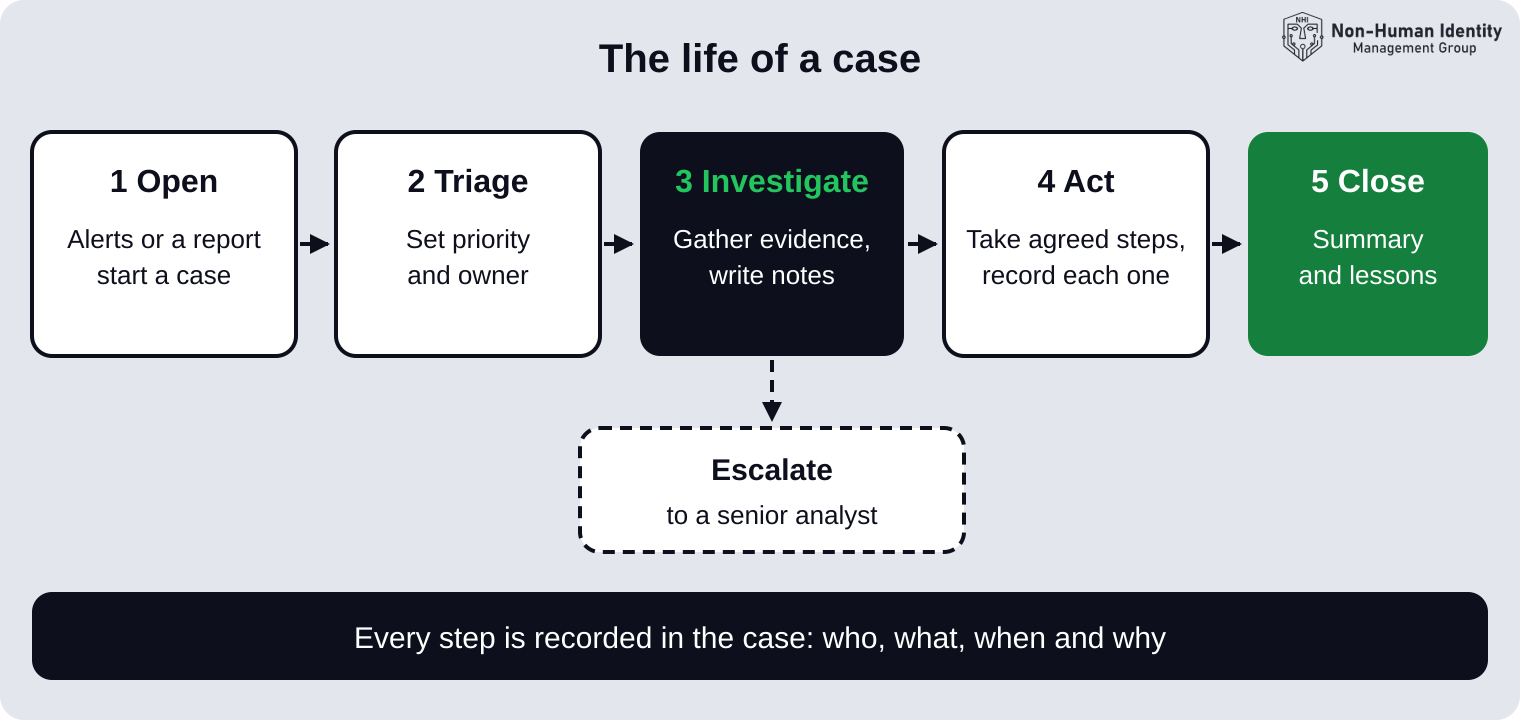
- Open. An alert, or a report from a person, looks worth checking. The analyst opens a case and links the alerts to it.
- Check and sort (triage). The analyst decides how serious and how urgent it is, and sets the priority. The guidance says knowing the type and severity of an incident tells you how urgent your response is.[1]
- Investigate. The analyst gathers evidence, writes notes and works out what happened. If it is beyond their role, they pass the case up to a more senior person. That step is called escalation.
- Act. If it is a real problem, the team takes agreed steps, such as resetting a password or isolating a laptop, and records each one.
- Close and learn. The case closes with a short summary of what happened and why. For bigger cases, the team holds a review to ask what could have gone better.[1]
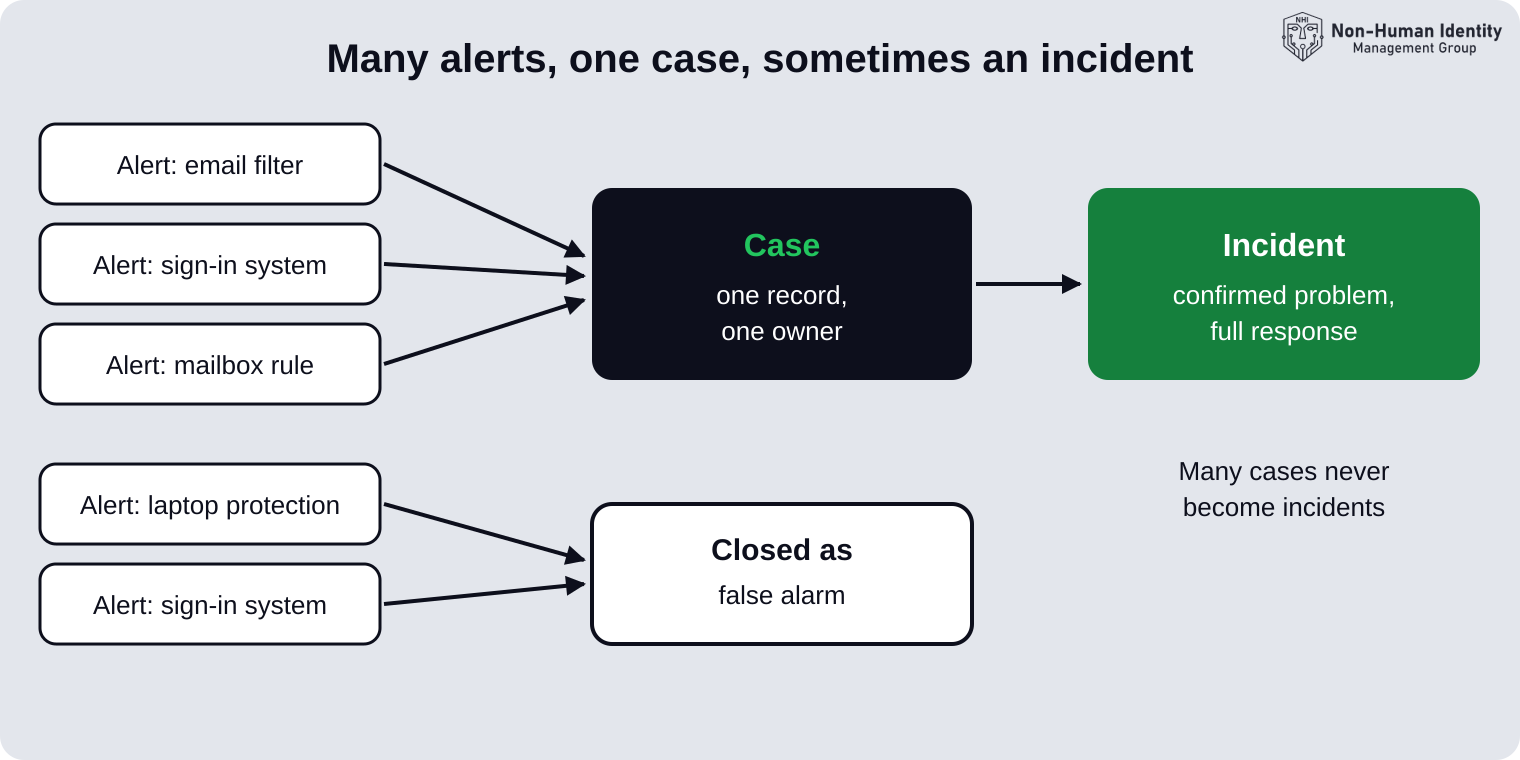
Cases also help with noise. One problem can set off many alerts. Grouping them into one case means the team investigates the problem once, not each alert separately.
Some cases may end up in court or with a regulator. The guidance notes that evidence may then need careful handling, and that recording actions helps later review.[1] The record of who collected, handled and passed on each piece of evidence, and when, is called the chain of custody.[2]
A worked example
Imani Dube is a junior analyst at a fictional monitoring company. One of its customers is Alder Printers, a print shop with 40 staff.
At 2 pm, two alerts arrive for the same Alder Printers user, Juno Kader. One says she signed in from a new country. The other says a new rule was added to her mailbox to forward emails outside the company. Imani opens one case and links both alerts.
She sets the priority to high, because a forwarding rule could send customer emails to a stranger. Her notes record each check. Juno's normal sign-ins are from the UK, and the new one is not. Juno did not create the rule, and she says so when Imani calls her on the number held on file.
This is beyond Imani's role, so she escalates the case to Idris Yilmaz, a senior analyst. Idris confirms the account has been taken over. With Alder Printers' agreement, the team resets Juno's password, signs her out everywhere and removes the rule. Each step goes into the case with the time and who did it.
Before closing, Idris writes a short summary: what happened, what was done and what to watch next. He suggests the print shop turns on a second sign-in check for all staff.
A week later, the owner asks what happened. Imani sends the case summary. It answers the question in one page, because everything was written down as it happened.
Myths and mistakes
| What people think | What is true |
|---|---|
| Every alert is an attack. | Many alerts turn out to be harmless. The case shows how the analyst decided. |
| Case management is just a help desk ticket. | A case holds evidence, a timeline and decisions, and may need careful handling if it goes to court or a regulator.[1] |
| Notes can be written at the end. | Notes written later miss details. Writing as you go helps handovers and later review.[1] |
| Closing a case means the work is done. | A good closure includes a summary and, for bigger cases, lessons for next time.[1] |
| Automation replaces case management. | Automation tools can fill in and update cases, but people still own the decisions recorded in them. |
What can I do this week?
- If you are learning, write up one practice investigation as a case: what you checked, found and decided.
- If you buy monitoring, ask your provider for an example case report with names removed.
- Agree what high, medium and low priority mean for your team.
- Check who can see and change your case records, and that the list is short.
- Pick one closed case and ask: could someone new understand it?
Checklist
- Every case has one named owner.
- Every case has a priority and a status.
- Related alerts are linked to one case, not handled one by one.
- Notes are time-stamped and say what was checked and why.
- Evidence records who added it and when.
- There is a clear rule for when to escalate.
- Cases close with a short summary of what happened and what was done.
- Bigger cases get a review to learn lessons.
Common questions
What is the difference between an alert, a case and an incident?
An alert is an automatic warning from a tool. A case is the record a person opens to investigate one or more alerts. An incident is a confirmed security problem that needs a fuller response. Many alerts never become cases, and many cases close without becoming incidents.
Is a case tool the same as a SIEM?
No. A SIEM collects logs from many systems and raises alerts. A case tool tracks the investigation that follows. Some products do both, and many teams link the two so alerts can flow into cases. See SIEM for Beginners.
Where does SOAR fit in?
SOAR tools run set steps automatically, such as looking up an address or blocking a sender. Many of them can open or update cases as they work. The case stays the main record of what happened and why. See SOAR for Beginners.
Can a small business use case management?
Yes. A small team can start with a simple shared tracker that records owner, priority, status, notes and outcome for each possible problem. What matters most is the habit of writing things down. If you use a monitoring provider, their case records may do this for you.
Why does chain of custody matter?
It shows that evidence was not changed after it was collected. If a case ends up with the police, a court, an insurer or a regulator, they may ask who handled each file and when. A clear record makes the evidence easier to trust.[2]
Where next?
Ready for the detail? Read the practitioner guide: Security Case Management Guide. It goes further into case record fields, evidence handling inside the case, response time targets and choosing and running a case platform.
Also useful:
- Security Operations Centres for Beginners
- Incident Response for Beginners
- Digital Forensics for Beginners
- Alert Fatigue Reduction Guide
Related NHI Mgmt Group resources: Alert Triage Guide · Security Case Management and Incident Response Platforms Buyer's Guide · SOC Analyst for Beginners
Key terms
- Case management
- Recording, assigning, tracking and closing each security investigation in one place.
- Security operations centre (SOC)
- The team that watches an organisation's systems for signs of attack and responds.
- Alert triage
- Checking each alert quickly to decide whether it needs action and how urgent it is.
- Escalation
- Passing an alert or case to a more senior analyst or to the incident response team.
- False positive
- An alert that looks like a problem but turns out to be harmless.
- Incident response
- The planned way an organisation deals with a confirmed security problem.
- Chain of custody
- A record of who collected, handled and passed on each piece of evidence, and when.
Sources and further reading
- Plan: Your cyber incident response processes (Incident Management collection). National Cyber Security Centre (NCSC), version 1.0, reviewed 19 September 2019. https://www.ncsc.gov.uk/collection/incident-management/cyber-incident-response-processes, accessed 28 Nov 2026.
- Chain of custody (glossary entry, from NIST SP 800-72 and SP 800-101 Rev. 1). NIST Computer Security Resource Center. https://csrc.nist.gov/glossary/term/chain_of_custody, accessed 28 Nov 2026.
- SP 800-61 Rev. 3, Incident Response Recommendations and Considerations for Cybersecurity Risk Management: A CSF 2.0 Community Profile. NIST, April 2025. https://csrc.nist.gov/pubs/sp/800/61/r3/final, accessed 28 Nov 2026.