A software update is a free fix from a device maker that repairs faults, including security holes.
This guide is for anyone with a phone, laptop, tablet or smart gadget at home. You do not need to be technical: most updates take a few taps, and the main job is making sure they happen.
In short
- Updates fix security holes that criminals can use, so installing them is one of the simplest ways to stay safer.
- Turn on automatic updates on each device, so you do not have to remember.
- Devices stop getting security updates at some point. Check the end date before you buy, and plan to replace devices that have reached it.
- Real updates come from the device's own settings or app store, not from a pop-up on a website.
What you will learn
- Explain why updates matter for safety, not just new features.
- Check that automatic updates are on for each device at home.
- Spot a device that no longer gets security updates.
- Spot a fake update message.
- Fix (patch)
- a small change from the maker that repairs a fault in software.
- Weak spot (vulnerability)
- a fault in software that a criminal could use to get in.
- End of support
- the date after which a maker stops sending security fixes for a device or program.
What is a software update?
Think of a lock maker who finds a fault in one of its door locks. It sends every owner a free replacement part. Fitting it takes a few minutes, but an unfitted lock stays easier to open.
A software update works the same way. Phones, laptops, apps, browsers and smart gadgets all run software. Makers keep finding faults in it. Some faults are vulnerabilities, weak spots a criminal could use to get in. The maker writes a fix, called a patch, and sends it out as an update.
Some updates add new features too. But the UK government's cyber security agency says security updates help protect your devices and accounts. It calls installing them one of the most important things you can do online.[1]
Where the comparison stops working: a faulty lock is one door. One unpatched phone may hold your email, bank app and photos all at once.
Why does it matter?
Once a fix is published, criminals can study it too. Devices that never install it can stay open to the same trick.
If you look after the family's devices
What could happen: an old tablet that nobody updates becomes the easy way into the home network.
Check this: list every device at home and whether its updates are automatic.
If you are buying a new gadget
What could happen: a cheap smart camera stops getting fixes a year after you buy it.
Check this: look for the maker's stated security update period before you buy.
If you run a small business from home
What could happen: the laptop you use for invoices and banking misses months of security fixes.
Check this: make sure work laptops and the home router update, not just phones.
What does it look like?
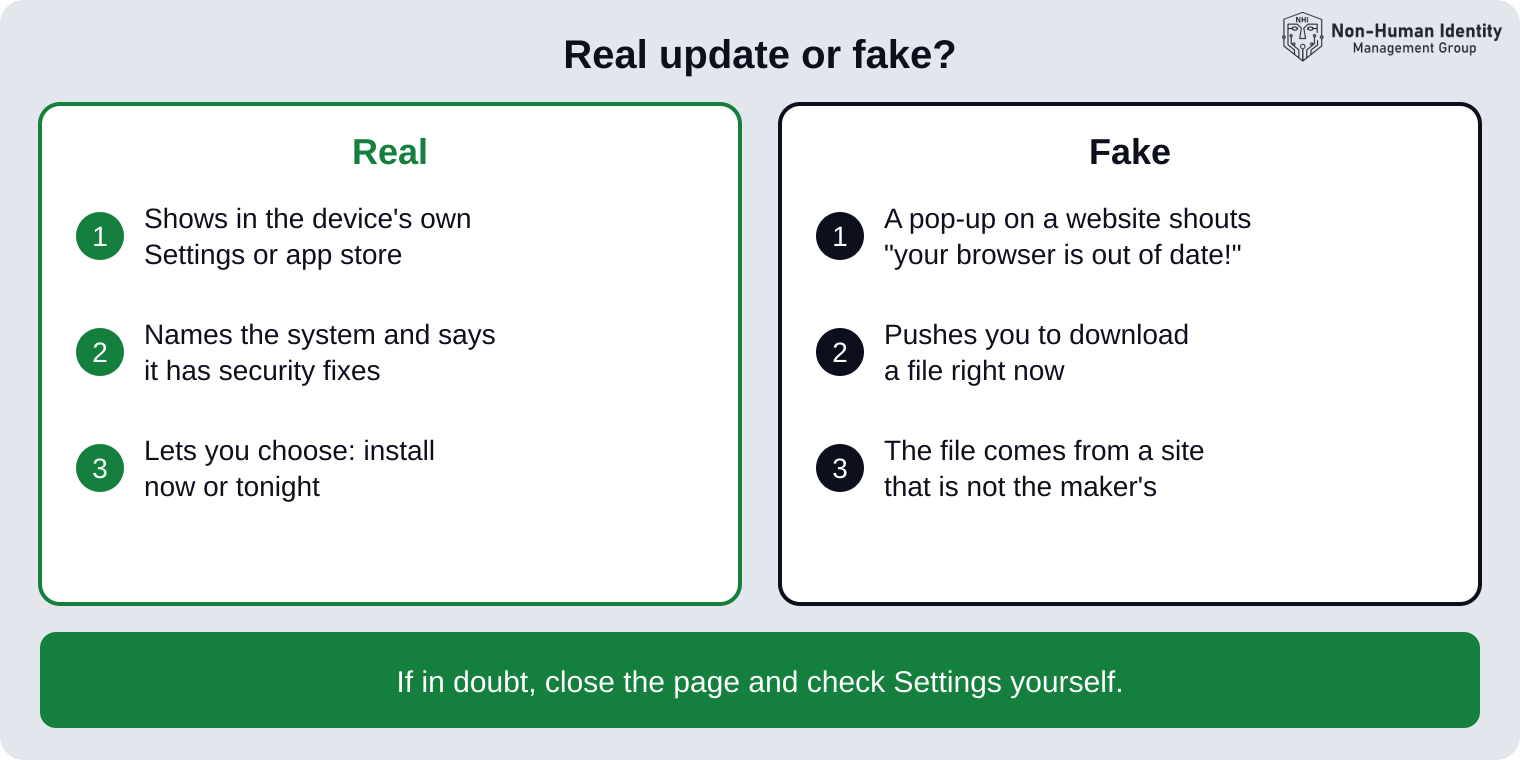
Here are two made-up messages. One is a normal update screen. The other is a fake that appears on a website.
Example only. All values are made up.
Screen A, in the phone's own Settings
  Software Update
  ExampleOS 0.0.1 is available            (1)
  Security fixes and bug fixes            (2)
  [Install tonight]

Pop-up B, on a website
  WARNING! Your browser is out of date!   (3)
  Download UPDATE-FAKE.exe now            (4)
  from get-updates.example.invalid
- The update is shown inside the device's own settings.
- A short note says what the update fixes.
- Scary wording and urgency on a web page.
- A push to download a file from a site that is not the maker's.
Why this is risky: fake update pop-ups are used to trick people into installing harmful software.
The safer way: ignore update offers on web pages. Go to the device's own settings or app store and check there.
How does it work?
In plain words, an update usually travels like this:
- A fault is found. The maker's own staff or an outside researcher finds a weak spot.
- A fix is made. The maker writes and tests a patch.
- The update is sent. Your device learns that an update is ready, through its settings or app store.
- You install it. With automatic updates on, this can happen overnight. For example, Apple says iPhones set to install automatically do so overnight while charging and on Wi-Fi.[2]
- Support ends. After some years, the maker stops sending fixes. The device still works but gets no more security updates.[1]
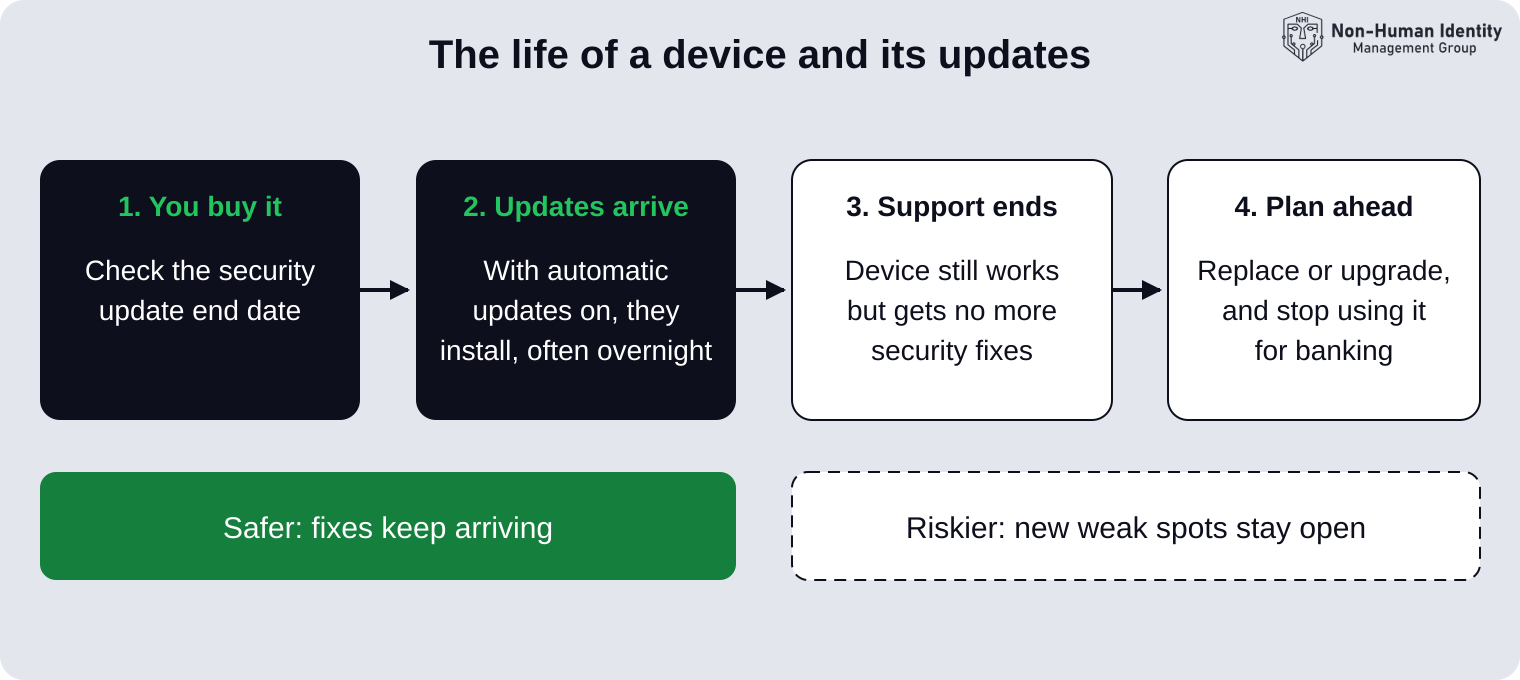
Support end dates vary. For example, Microsoft ended support for Windows 10 on 14 October 2025. Those PCs still run, but no longer get regular security updates unless they are enrolled in Microsoft's Extended Security Updates programme.[3]
In the UK, a law for smart products has applied since 29 April 2024. Makers must publish the minimum period they will provide security updates, with an end date, in words a non-technical buyer can follow.[4]
A worked example
Rania Dube lives with her teenage son and her father. One evening she reads that an old laptop can be a weak spot, so she decides to check every device at home.
She writes a list: two phones, a tablet, two laptops, a smart TV, a doorbell camera and the internet router.
Her own phone already updates automatically. Her father's phone has an update waiting for three weeks. He kept tapping "Later". She plugs it in, connects it to Wi-Fi and installs it. Then she turns on automatic updates, so it can happen overnight.
The old laptop is harder. It runs Windows 10, and its support ended in October 2025.[3] Rania checks whether it can move to Windows 11. It cannot, so she moves the family photos onto the newer laptop and stops using the old one for email and banking.
For the doorbell camera and the router, she opens each maker's app and finds the update setting. The router has an automatic update option, which was switched off. She switches it on.
That weekend, a pop-up on a recipe site says her browser is out of date and offers a download. Rania remembers the lock maker. Real fixes come from the maker, not from a stranger at the door. She closes the page and checks the browser's own settings. It is already up to date.
The whole check takes about an hour. She puts a reminder in her calendar to look again every few months.
Myths and mistakes
| What people think | What is true |
|---|---|
| Updates are just new features I do not need. | Many updates carry security fixes. The NCSC says installing them is one of the most important things you can do.[1] |
| My device still works, so it is fine. | A device past its support date still works but gets no new security fixes.[1] |
| Only computers need updates. | Phones, apps, browsers, routers, TVs and smart gadgets all run software that can need fixing. |
| A pop-up saying "update now" must be genuine. | Fake update messages are a common trick. Check the device's own settings instead. |
| I should wait months in case an update breaks something. | Long waits leave known holes open. If you are worried, back up first, then update.[1] |
What can I do this week?
- List every device at home that connects to the internet, including the router and smart gadgets.
- Turn on automatic updates on each one that offers it, including app updates.
- Install any update that has been waiting, with the device plugged in and on home Wi-Fi.[1]
- Check whether any device has reached its support end date, and plan what to do about it.
- Back up photos and files you care about before big updates.
Checklist
- I have a list of every connected device at home.
- Automatic updates are on for phones, tablets and laptops.
- Apps and browsers update automatically.
- The router and smart gadgets have been checked for updates.
- No device holding email or banking is past its support date.
- I check the security update period before buying a new gadget.
- I install updates only from the device's settings or official app store.
- Important files are backed up.
Common questions
Should I install updates straight away?
Usually, yes. Security updates fix holes that criminals may already know about, so waiting leaves them open. Turning on automatic updates is the easiest way. If you rely on a device for something important, back up first and install when you have a little time.
How do I know when my device stops getting updates?
Check the maker's support pages for your model. Many makers publish dates or support periods. UK law now requires makers of smart products to publish a minimum update period with an end date.[4] Your device's settings may also warn you.
What should I do with a device that no longer gets updates?
Plan to replace or upgrade it. Until then, stop using it for email, banking and shopping. Move important files off it, and keep it away from sensitive tasks. When you retire it, wipe it properly first so your data does not go with it.
Can an update be fake?
Yes. Fake update pop-ups on websites are used to trick people into installing harmful software. Genuine updates for your device appear in its own settings or official app store. If a web page tells you to download an update, close it and check settings yourself.
Why do updates need Wi-Fi and power?
Updates can be large and take a while. The UK's cyber security agency suggests doing them at home on Wi-Fi, with the device plugged in. That way a flat battery or lost signal is less likely to interrupt the install.[1]
Where next?
Ready for the detail? Read the practitioner guide: Patch Management Guide. It goes further into how organisations track, test and roll out updates across many devices, and how they decide what to fix first.
Also useful:
- Patch Management for Beginners
- Home Router Security for Beginners
- Disposing of Old Devices for Beginners
- Windows 10 End of Support for Home Users Guide
- The 3-2-1 Backup Rule for Beginners
Related NHI Mgmt Group resources: SocGholish and Fake Browser Update Malware Guide · End-of-Life Home Routers Guide · Android and Pixel Security Update Support
Key terms
- Software update
- A new version or fix from the maker that changes a program, operating system or device.
- Patch
- A fix that repairs a fault in software, often a security hole.
- Vulnerability
- A weak spot in software or settings that someone could misuse.
- Automatic updates
- A setting that downloads and installs updates without you having to start them.
- End of support
- The date after which a maker stops sending security fixes for a product.
- Firmware
- Built-in software that runs a device such as a router, camera or TV.
Sources and further reading
- Install the latest software and app updates. National Cyber Security Centre (NCSC), UK. https://www.ncsc.gov.uk/collection/top-tips-for-staying-secure-online/install-the-latest-software-and-app-updates, accessed 28 Nov 2026.
- Update your iPhone or iPad. Apple Support, Apple. https://support.apple.com/en-us/118575, accessed 28 Nov 2026.
- Windows 10 support has ended on October 14, 2025. Microsoft Support, Microsoft. https://support.microsoft.com/en-us/windows/windows-10-support-has-ended-on-october-14-2025-2ca8b313-1946-43d3-b55c-2b95b107f281, accessed 28 Nov 2026.
- The UK Product Security and Telecommunications Infrastructure (Product Security) regime. UK Government, GOV.UK. https://www.gov.uk/government/publications/the-uk-product-security-and-telecommunications-infrastructure-product-security-regime, accessed 28 Nov 2026.