Spear phishing is a fake message written for one person, and whaling is spear phishing aimed at senior leaders.
This guide is for anyone who wants to know why some scam emails feel so personal, from students to new staff and their bosses. It matters to every organisation: one convincing email to the right person can move money or open the door to company systems.
In short
- Spear phishing uses real details about you, gathered from websites and social media, to make a fake message believable.
- Whaling is the same idea aimed at senior people, such as directors, who can approve payments or reach valuable data.
- The research step is what makes these emails work, and it is also where you can make the criminal's job harder.
- Check any unusual request through a route you already trust, and report it, however senior the sender seems.
What you will learn
- Explain the difference between ordinary phishing, spear phishing and whaling.
- Spot the personal details that make a targeted email feel real.
- Check a request from a senior person without causing offence.
- Ask what your organisation shares online that a criminal could use.
- Targeted fake message (spear phishing)
- a fake message written for one person or team, using real details about them.
- Fake message to a leader (whaling)
- spear phishing aimed at a senior person, such as a board member.
- Your trail online (digital footprint)
- the details about you that anyone can find on the web.
What is spear phishing?
Picture a con artist who reads your noticeboard before knocking on your door. They know your name, your job and that you are expecting a delivery. So their story fits.
Ordinary phishing is a fake message sent to thousands of people at once. Spear phishing is aimed at one person or a small team. The criminal uses facts about you or your company to make the message more persuasive.[2]
Whaling is spear phishing aimed at a "big phish": a senior person, such as a board member, who can reach money or valuable data.[2] A whaling email may also pretend to come from a leader, to push junior staff into acting fast.[1]
Where the comparison stops working: a con artist at the door can only visit a few houses a day. Online, a criminal can research many people from a desk, and each extra email costs very little.
Why does it matter?
A message that mentions your real boss, client or project is much harder to doubt. Whaling often aims at a second step, such as a payment, a click or more information for a later attack.[1]
If you are new in a job
What could happen: a "director" emails you for an urgent favour. You do not want to say no.
Check this: confirm unusual requests by phone or in person, using contact details you already have.
Next: Phishing for Beginners
If you are a senior leader
What could happen: your public profile gives a criminal enough detail to fool you, or to pretend to be you.
Check this: look at what your online profiles say about your travel, team and suppliers.
If you look after payments
What could happen: a "boss" asks you to make a secret, urgent transfer before a deadline.
Check this: agree that every new payment request is checked with a second person.
What does it look like?
Here is a made-up whaling email sent to a finance manager. The numbers point to the details the criminal found by research.
Example only. All values are made up.
From: Director Name <[email protected]>  (1)
Subject: Quick favour before my flight              (2)

Hi Sam, following our chat at the EXAMPLE summit,  (3)
please pay the attached invoice from our new partner
today. Keep it between us until the deal is public. (4)
I am in meetings, so email only, no calls.          (5)
- In a real message, this line would show a leader's name. The address would be close to the company's, but not the same.
- A travel detail, often from a public post. It explains why the boss is hard to reach.
- An event, partner or project name the target knows, to make the email feel familiar.
- Secrecy, so you do not ask anyone else.
- A block on the one check that would expose the scam: a call.
Why this is risky: every detail fits, so the request feels normal. The NCSC notes that criminals use social media, public partners and company language to make whaling emails believable.[1]
The safer way: call the director on a number you already have, or ask a second person to approve the payment. A real leader should welcome the check.
How does it work?
Targeted phishing follows a pattern. The research step at the start is what sets it apart from mass phishing.
- Pick a target. The criminal chooses a person who can pay, approve or reach something of value.
- Research. They read the company website, social media and news. They note names, roles, partners, events and the way people write.[1]
- Build the story. They choose who to pretend to be, such as a boss, a supplier or a lawyer, and a reason for urgency.
- Send. The email may come from a look-alike address or a real account the criminal has broken into. A follow-up phone call may be used to make it seem more real.[1]
- Ask for the action. A payment, a click, a file opened or more information.
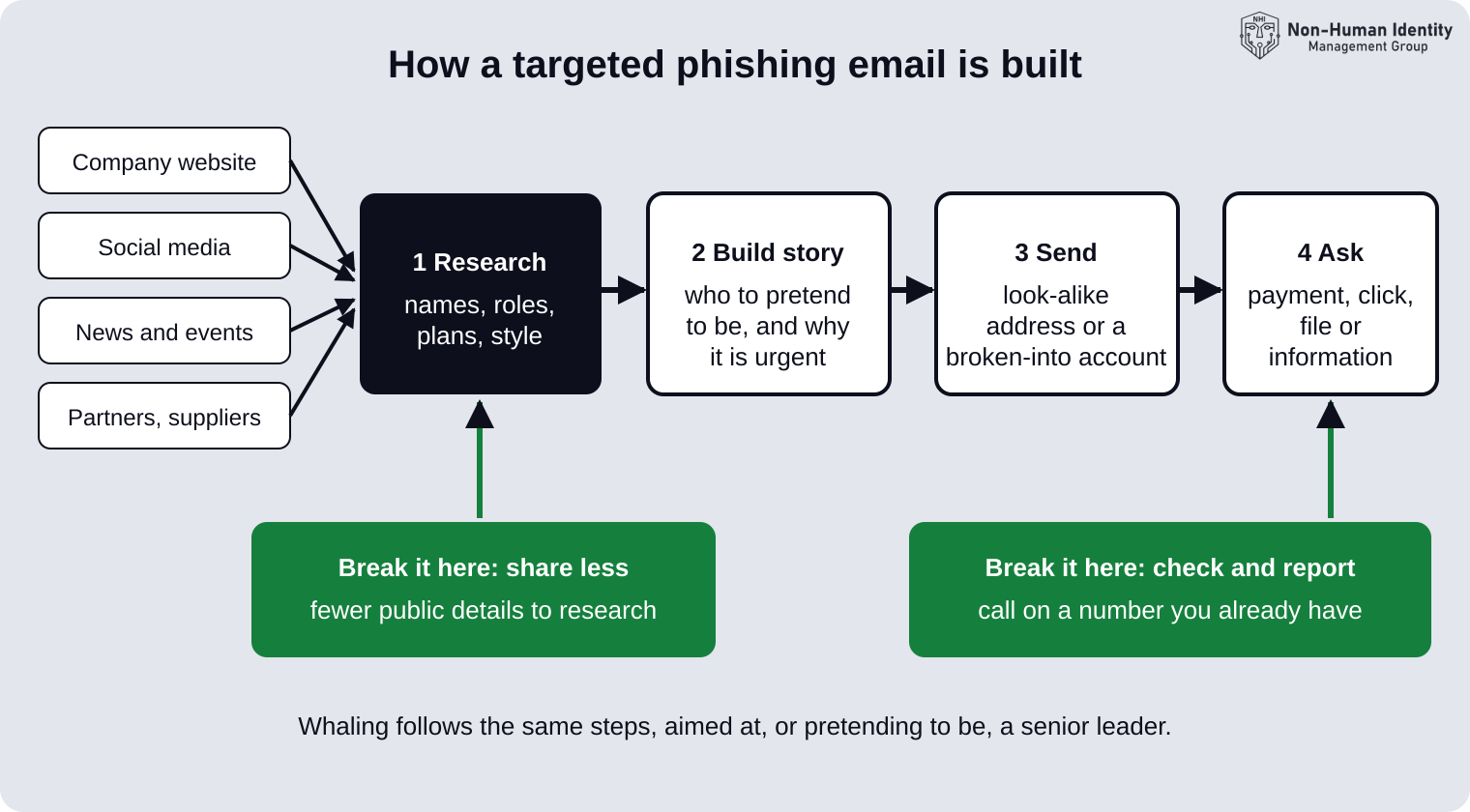
You can break this chain in two places. First, share less in public, so there is less to research. The NCSC suggests thinking about what visitors to your website really need to know.[2] Second, check unusual requests by a route you already trust. Training helps, but the NCSC says it cannot catch every well-made attack, so checks matter too.[1]
A worked example
Uma Quist has just started as an accounts assistant at Brightfold Studios, a fictional design firm with forty staff.
On her third day, an email arrives from the managing director, Nils Varga. It mentions a client pitch Uma heard about in her welcome meeting. It says Nils is flying to a trade show and needs a supplier paid today, quietly, before the client hears.
The details are right. The trade show is real, and Nils had posted online that he was going. Uma feels pressure. She is new, and this is the boss.
Then she remembers the con artist who reads the noticeboard first. Knowing true facts does not prove who is asking.
She looks closer. The address has an extra word in the company name. The email asks her not to call.
Uma rings Nils on the number in the staff list. He answers from the airport. He has sent no such email.
Nils reports it to the firm's IT supplier, who blocks the look-alike address. He also thanks Uma in front of the team for checking.
The next week, Brightfold agrees two changes. Every new payment needs a second approver, whoever asks. And Nils stops posting his travel plans before he goes.
No money is lost. The check took Uma two minutes, and it worked because she used a number she already trusted.
Myths and mistakes
| What people think | What is true |
|---|---|
| If the email knows real details, it must be genuine. | Many details are public. Criminals gather them on purpose to sound real.[1] |
| Only big companies and famous bosses are targeted. | Any person who can pay, approve or reach data can be a target, at any size of firm. |
| Questioning the boss is rude. | A quick check by phone protects the boss too. Agree in advance that checks are welcome. |
| Training will stop all of these emails. | Training helps, but well-made emails still get through, so payment checks are needed too.[1] |
| If I clicked, I should keep quiet. | Report it straight away. A blame-free culture means people report faster.[2] |
What can I do this week?
- Save the phone numbers of your manager and key contacts, so you can check requests.
- Look at your own public profiles and remove travel plans and needless job detail.
- Agree with your team that any urgent, secret payment request gets a call first.
- Find out how to report a suspicious email at work, and try it once.
Checklist
- Unusual requests are checked by phone or in person, using known contact details.
- New payments and changes to bank details need a second approver.
- Leaders know they will be checked, and say they welcome it.
- Staff know how to report a suspicious email, with no blame.
- The company website shares only what visitors need.
- Senior staff review what their public profiles reveal.
- Requests that ask for secrecy or block a call are treated as warning signs.
Common questions
What is the difference between phishing and spear phishing?
Ordinary phishing is sent to many people with the same message, hoping some will fall for it. Spear phishing is written for one person or team, using real details about them. That makes it harder to spot, because it fits what you expect to receive.
What is whaling in cyber security?
Whaling is spear phishing aimed at senior people, such as directors or board members. They are targeted because they can approve payments or reach valuable data. Whaling emails may also pretend to come from a senior person, to pressure junior staff into acting.
Is whaling the same as business email compromise?
They overlap, but they are not the same. Whaling is about who is targeted or copied: senior people. Business email compromise is about the goal: tricking a firm into paying or sharing data by email. A whaling email is often the first step of one.
How do criminals find out so much about me?
Mostly from public sources. Company websites, social media, news stories and event lists can show names, roles, partners and travel plans. The NCSC calls social media accounts a goldmine for this kind of research.[1]
How do I check a request from my boss without offending them?
Make checks normal, not personal. Call them on a number you already have and say you check all payment requests. Better still, ask your team to agree the rule in advance, so nobody takes a check as distrust.
Where next?
Ready for the detail? Read the practitioner guide: Spear Phishing vs Whaling vs BEC. It goes further into how the three attacks differ, the process controls and detection signals for each, and how deepfakes and phone calls are being added.
Also useful:
- Phishing for Beginners
- Business Email Compromise for Beginners
- Your Digital Footprint for Beginners
- Deepfakes and AI Fraud for Beginners
- Executive Protection and Digital Footprint Guide
Related NHI Mgmt Group resources: Phishing Guide · Security Awareness and Human Risk Management Guide · Top 10 Phishing Techniques
Key terms
- Spear phishing
- A fake message written for a specific person or team, using details about them.
- Whaling
- Spear phishing aimed at senior leaders and other high-value people.
- Phishing
- A fake message or website that tricks people into handing over details or taking a risky action.
- Using deception, urgency and authority to get a person to do something risky.
- Business email compromise
- A scam where a criminal poses as a trusted person by email to get a payment or data.
- Digital footprint
- The trail of information about a person or company that can be found online.
- Lookalike domain
- A web or email address made to look like a trusted organisation's address.
Sources and further reading
- Whaling: how it works, and what your organisation can do about it. National Cyber Security Centre (NCSC), 7 October 2016. https://www.ncsc.gov.uk/guidance/whaling-how-it-works-and-what-your-organisation-can-do-about-it, accessed 28 Nov 2026.
- Phishing attacks: defending your organisation. National Cyber Security Centre (NCSC). https://www.ncsc.gov.uk/guidance/phishing, accessed 28 Nov 2026.