Strong Customer Authentication is a rule that makes banks check two kinds of proof before some payments.
This guide is for anyone who pays online or runs a small online shop and wonders why the bank keeps asking for a check. You do not need to know how payments work to be affected: if you pay by card or bank app in the UK or Europe, these rules shape what you see.
In short
- Strong Customer Authentication (SCA) means your bank checks two different kinds of proof, such as your phone plus your face or PIN.
- It applies when you pay online, sign in to your bank online, or do something risky from a distance.
- The approval should be tied to one amount and one shop, so always read both before you approve.
- Small or low-risk payments may skip the check, so a missing check is not by itself a sign of fraud.
What you will learn
- Explain what Strong Customer Authentication is in one sentence.
- Spot the details to check before you approve a payment.
- Explain why some payments skip the extra check.
- Check what a small online shop needs to ask its payment provider.
Status: correct as at 28 November 2026, based on the EU payment services rules, the European Parliament and Council announcements of 27 November 2025 and the UK Financial Conduct Authority's guidance. Laws change; check the official text.
This guide explains the topic in general terms and is not legal advice.
- Two kinds of proof (Strong Customer Authentication)
- a check that asks for two different kinds of proof before a payment or sign-in goes ahead.
- Payment firm (payment service provider)
- a bank, card company or payment app that moves money for you.
- Card check at checkout (3-D Secure)
- the step at an online checkout where your card company may ask you to confirm the payment.
What is Strong Customer Authentication?
Think of a parcel locker that asks for a code and your phone before it opens. One on its own is not enough. Strong Customer Authentication works the same way for your money.
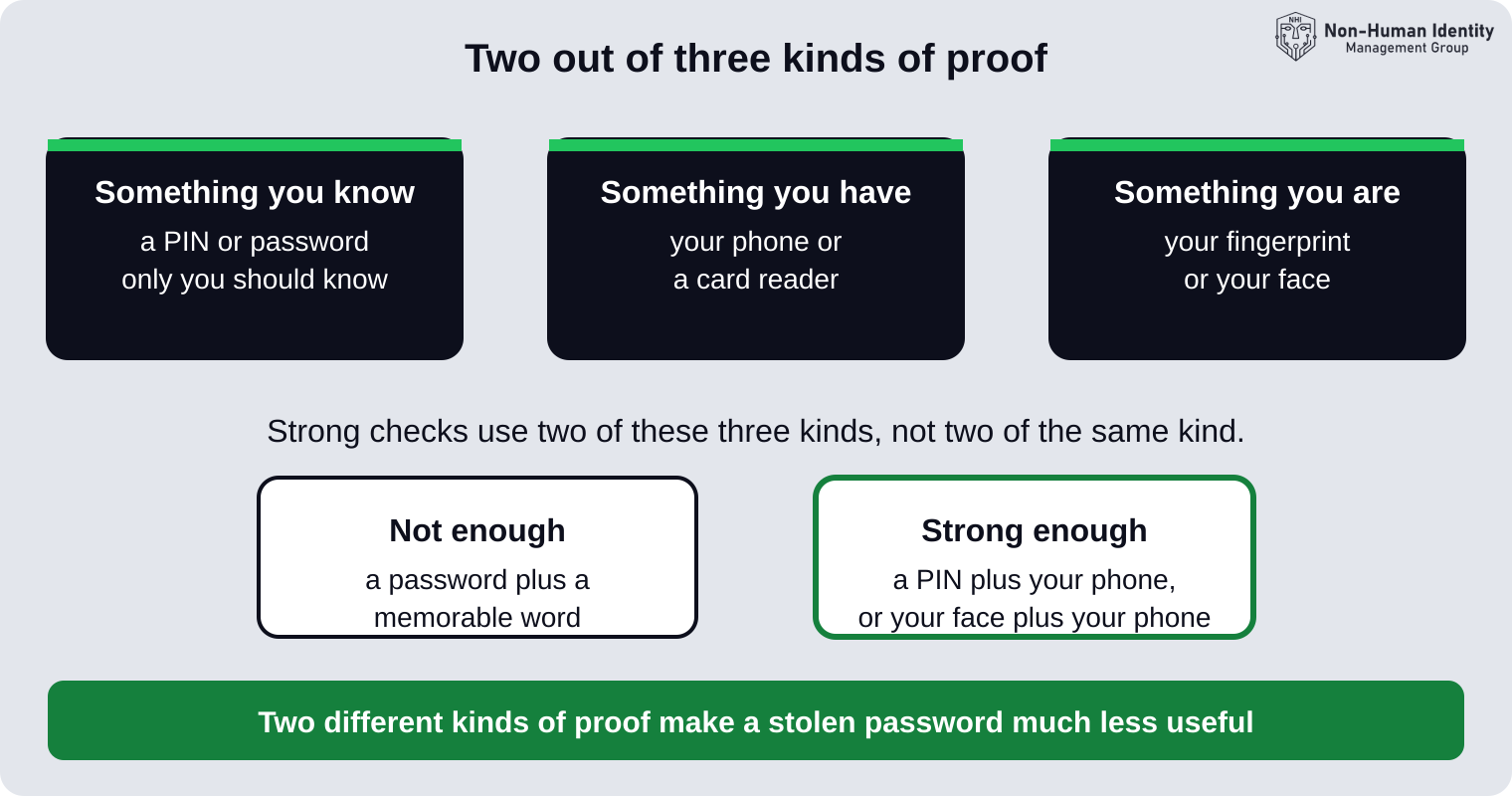
It is a rule for banks and other payment firms in the UK and the European Union. It says they must check two different kinds of proof in certain cases.[1][3] The three kinds are something you know, something you have and something you are.
- Something you know: a PIN or a password.
- Something you have: your phone, or a small card reader from your bank.
- Something you are: your fingerprint or your face. This is called a biometric check.
The two kinds must be separate, so that stealing one does not give away the other.[1] A password plus a memorable word is two things you know. That is only one kind, so it does not count.
The check applies when you pay electronically, look at your account online, or do something remote that could lead to fraud.[3] Adding a new person to pay is one example.
Where the comparison stops working: a parcel locker treats every parcel the same. Your bank does not. It can skip the check for some small or low-risk payments and ask more often for others.
Why does it matter?
A stolen card number or password on its own should not be enough to take your money. The second kind of proof is what makes that harder.
If you shop or bank online
What could happen: a scammer on the phone talks you into approving a payment in your banking app that you did not start.
Check this: read the amount and the shop name on every approval screen before you tap.
If you run a small online shop
What could happen: payments fail at checkout, or you carry more fraud losses, because the card check is not set up well.
Check this: ask your payment provider whether your checkout supports the card check at checkout, called 3-D Secure.
If you help an older relative
What could happen: they cannot pay a bill because they do not have a smartphone for the bank's app.
Check this: ask the bank for a method that does not need a mobile phone. The UK regulator expects banks to offer one.[3]
What does it look like?
Example only. All values are made up.
FakeBank app                              (1)
Confirm your payment
  To:     EXAMPLE Garden Supplies         (2)
  Amount: GBP 64.00                       (3)
  Card:   ending 0000
[ Approve with face or PIN ]              (4)
[ This was not me ]                       (5)
- The request appears inside your own banking app, not in a text message link.
- The name of the shop or person being paid.
- The exact amount. In a real screen, this line would show what you are about to pay.
- Your face, fingerprint or PIN adds the second kind of proof to your phone.
- A way to say no and alert the bank if you did not start this payment.
Why this is risky: people tap Approve out of habit, even when a caller is guiding them or the amount looks wrong.
The safer way: approve only payments you started yourself, and only when the amount and the name match.
How does it work?
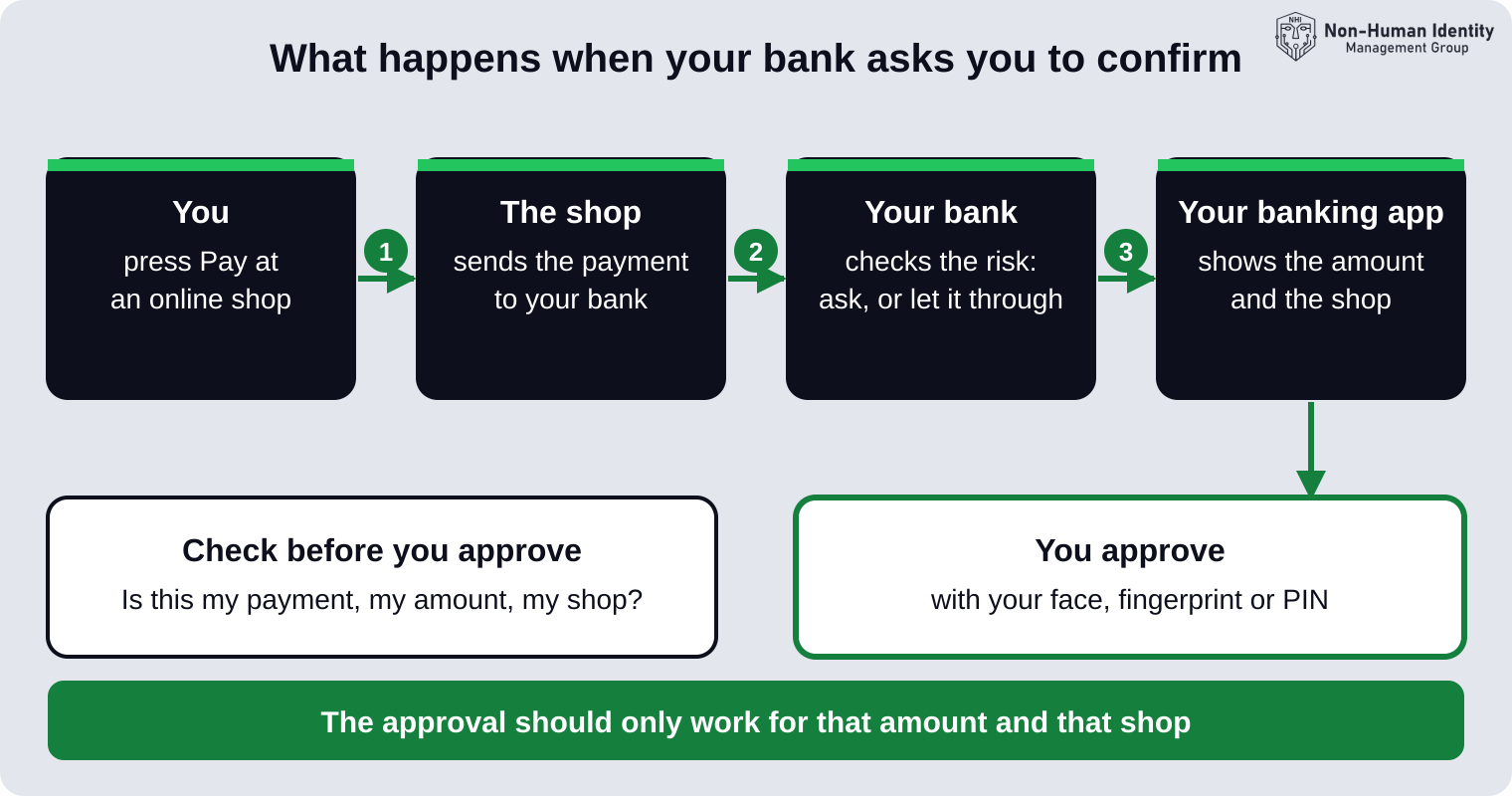
Here is what usually happens when you pay at an online shop.
- You press Pay. The shop sends the payment details to your card company or bank.
- Your bank weighs the risk. It looks at things such as the amount, the shop and your device.
- It asks, or lets it through. For many small or low-risk payments, it may not ask you anything.[2]
- Your app shows the details. If it does ask, your banking app shows the amount and who you are paying.
- You approve. You use your face, fingerprint or PIN on your phone. That is two kinds of proof.
- The approval is locked to that payment. If the amount or the payee changes, the approval code should no longer be accepted.[2] This is called dynamic linking.
Some payments may skip the check. Under the EU rules, these include small online payments of up to 30 euros, until a total or count limit is reached.[2] Small contactless payments in shops can skip it too, up to set limits.[2] Payments the bank judges low risk, and payments to people you have saved as trusted, may also skip it.[2]
At online checkouts, many shops use the card check at checkout, called 3-D Secure. It passes payment and device details to your card company, which then lets the payment through or asks you to confirm.[4]
The EU is updating its payment rules. In November 2025, EU lawmakers agreed a deal that keeps strong checks and adds more protection against impersonation scams. It still needed formal adoption at the time of the announcement.[5][6]
A worked example
This story is made up to show how it can happen.
Lars Jensen sells handmade candles from a small website. Otto Nakamura is one of his regular customers.
One evening Otto orders three candles. When he presses Pay, his banking app pops up. It shows Lars's shop name and the right amount. Otto looks at both, then approves with his face. The payment goes through.
The next week, Otto buys a single tea light for a few pounds. This time his bank does not ask him anything. Otto wonders if something is wrong. It is not. Small, low-risk payments can skip the check, so a missing check is normal.
A month later, Otto gets a call. The caller says he is from Otto's bank and that someone is trying to use his card. He asks Otto to approve the message on his app to block it. The app shows a payment of several hundred pounds to a shop Otto has never heard of.
Otto stops. The amount and the name do not match anything he bought. He taps "This was not me", hangs up, and calls his bank on the number on the back of his card. The bank confirms the call was a scam and blocks the card.
Meanwhile, Lars has a different problem. A few customers say their payments failed at checkout. He asks his payment provider, who switches on a newer version of the card check at checkout. Failed payments drop.
What made the difference: Otto read the amount and the payee before approving. He also treated a caller asking for an approval as a warning sign.
Myths and mistakes
| What people think | What is true |
|---|---|
| If my bank asks me to approve, the payment must be safe. | The check proves it is you approving. It does not prove the payment is a good idea. Scammers often try to talk people into approving. |
| A password and a memorable word count as two checks. | Both are things you know, so they are one kind of proof. The rule needs two different kinds.[1] |
| If my bank did not ask, the payment was not protected. | Banks may skip the check for small or low-risk payments under the rules.[2] Your other protections still apply. |
| I need a smartphone to pay online. | The UK regulator expects banks to offer ways to confirm that do not rely on a mobile phone.[3] Ask your bank what it offers. |
| Strong checks only matter to banks. | Online shops are part of it too. How their checkout handles the card check affects failed payments and fraud. |
What can I do this week?
- Open your banking app and find where it shows payment approvals and the "not me" button.
- Make a habit of reading the amount and the payee before every approval.
- Save your bank's number from the back of your card where you can find it quickly.
- If you help someone without a smartphone, ask their bank which other methods it offers.
- If you run an online shop, ask your payment provider how your checkout handles 3-D Secure.
Checklist
- I know the three kinds of proof: something I know, have and am.
- I read the amount and the payee before I approve a payment.
- I never approve a payment because a caller asked me to.
- I know a missing check on a small payment is normal.
- I know how to call my bank on a number I already trust.
- If I run a shop, my checkout supports the card check at checkout.
Common questions
Why does my bank sometimes ask and sometimes not?
Because the rules allow some payments to skip the check. These include small online payments, small contactless payments, payments to trusted payees and payments the bank judges low risk. Each skip has limits. After a few skipped payments, the bank is likely to ask again.
Is a one-time text code enough for Strong Customer Authentication?
It can count as the "something you have" part, because the code goes to your phone. It still needs a second, different kind of proof, such as a password or PIN. Many banks now use their own app with a face, fingerprint or PIN check instead.
Does Strong Customer Authentication apply in the UK?
Yes. The UK kept these rules after leaving the EU. The Financial Conduct Authority oversees them under UK payment rules, which came into force in September 2019. Some UK details now differ from the EU version, so check your bank's own guidance.
What should I do if I approved a payment by mistake?
Call your bank straight away on the number on your card or in its app. Tell them what happened and when. Banks can sometimes stop a payment that has not finished. Then report it as fraud if a scammer was involved.
Do I need to do anything as a small shop owner?
Mostly, your payment provider does the work. Ask them whether your checkout supports the card check at checkout, called 3-D Secure, and which version it uses. A good setup can mean fewer failed payments and fewer fraud disputes.
Where next?
Ready for the detail? Read the practitioner guide: PSD2/PSD3 Strong Customer Authentication Guide. It goes further into the legal articles, the exemption rules and what the planned EU update changes for payment firms.
Also useful:
- Multi-Factor Authentication for Beginners
- Online Banking Security for Beginners
- Payment Fraud for Beginners
- Verification Code Scams for Beginners
Related NHI Mgmt Group resources: Two-Factor Authentication for Everyone Guide · Passkeys for Everyone Guide · Card Testing Attacks for Beginners
Key terms
- Strong Customer Authentication
- A payment rule that asks for two different kinds of proof before certain payments or sign-ins.
- Multi-factor authentication
- Asking for two or more kinds of proof, such as a PIN and your phone, before letting you in.
- Dynamic linking
- Tying an approval to one amount and one payee, so it should no longer be accepted if either changes.
- Biometric authentication
- Proving it is you with a body feature, such as your fingerprint or face.
- 3-D Secure
- A check at online checkouts that lets your card company confirm it is you before the payment goes through.
- One-time password
- A short code that works once, often sent to your phone, to confirm it is you.
Sources and further reading
- Directive (EU) 2015/2366 on payment services in the internal market (PSD2), 25 November 2015, Article 4(30) definition of strong customer authentication and Article 97. EUR-Lex. https://eur-lex.europa.eu/legal-content/EN/TXT/HTML/?uri=CELEX:32015L2366, accessed 28 Nov 2026.
- Commission Delegated Regulation (EU) 2018/389 of 27 November 2017, regulatory technical standards for strong customer authentication (Article 5 dynamic linking; Article 11 contactless; Article 13 trusted beneficiaries; Article 16 low-value remote transactions; Article 18 transaction risk analysis). EUR-Lex. https://eur-lex.europa.eu/legal-content/EN/TXT/HTML/?uri=CELEX:32018R0389, accessed 28 Nov 2026.
- Strong Customer Authentication. Financial Conduct Authority (FCA), first published 1 September 2019, last updated 15 February 2023. https://www.fca.org.uk/firms/strong-customer-authentication, accessed 28 Nov 2026.
- EMV 3-D Secure. EMVCo. https://www.emvco.com/emv-technologies/3-d-secure/, accessed 28 Nov 2026.
- Payment services: deal for more protection from online fraud and hidden fees (press release). European Parliament, 27 November 2025. https://www.europarl.europa.eu/news/en/press-room/20251121IPR31540/payment-services-deal-more-protection-from-online-fraud-and-hidden-fees, accessed 28 Nov 2026.
- Payment services: Council and Parliament agree to step up the fight against fraud and increase transparency (press release). Council of the EU, 27 November 2025. https://www.consilium.europa.eu/en/press/press-releases/2025/11/27/payment-services-council-and-parliament-agree-to-step-up-the-fight-against-fraud-and-increase-transparency/, accessed 28 Nov 2026.