Online banking security means the simple habits that keep your bank account safe when you use an app or website.
This guide is for anyone who checks a balance, pays a bill or sends money from a phone or computer. You do not need to be good with technology to stay safe: many losses start with a message or a call, not with a broken app.
In short
- Get to your bank only through its official app or a website address you type yourself.
- Protect the account with a strong password and a second check at login, called two-step verification.
- UK banks say they will not ask you to move money to a "safe account" or to share your PIN or online banking password.
- If a call or message feels urgent, stop, hang up and call your bank on the number on your card.
What you will learn
- Explain what keeps a banking app safe in plain words.
- Spot the signs of a fake bank call or message.
- Check the settings that protect your account.
- Know who to call first if something goes wrong.
- Second check at login (two-step verification)
- a code, tap or fingerprint you give after your password, so a stolen password alone is not enough.
- Fake bank contact (impersonation scam)
- a criminal pretending to be your bank, the police or another trusted body to get money or details.
What is online banking security?
Think of your bank branch. You walk in through the front door you know. You would not follow a stranger to a "branch" round the corner because they said your money was at risk.
Online banking works the same way. The app on your phone, or the address you type into a web browser, is your front door. Online banking security is mostly about using only that door and keeping its locks strong.
The locks are your password, your phone's screen lock and two-step verification (a second check after your password, such as a code or a fingerprint). The bank adds its own checks behind the scenes, such as asking you to confirm a new payee.
Where the comparison stops working: a real branch has a fixed address you can see. Online, a fake website or message can look just like your bank. So the habit that matters most is how you get to the door, not how the door looks.
Why does it matter?
Criminals often find it easier to trick a person than to break into a bank's systems. A common trick is to pretend to be the bank and talk you into moving your own money.
In the UK, a set of refund rules has applied since 7 October 2024 to people tricked into sending a bank transfer. Most claims are covered up to £85,000, but people who were "grossly negligent" may not get their money back.[2] Good habits keep you safe and make a claim simpler if you ever need one.
If you bank on your phone
What could happen: a text with a link leads you to a fake login page that copies your details.
Check this: open the banking app yourself instead of tapping links in messages.
If you look after an older relative's money
What could happen: a caller says they are from the bank's fraud team and asks your relative to move their savings.
Check this: agree together that any call about moving money gets a hang-up and a call back on the card's number.
If you run a small business account
What could happen: an email that looks like it is from a supplier asks you to pay a bill into new bank details.
Check this: confirm any change of bank details by phone, using a number you already had.
What does it look like?
Here is a made-up phone call script of the kind scammers use. The callers often sound calm and professional.
Example only. All values are made up.
Caller: "Hello, this is the fraud team at Example Bank."   (1)
Caller: "We've seen a payment of £950 to FAKE-SHOP-0000."  (2)
Caller: "Your account is not safe. We must act now."        (3)
Caller: "I'll text you a code. Read it back to confirm."    (4)
Caller: "Then move your savings to this safe account:
         sort code 00-00-00, account 00000000."           (5)
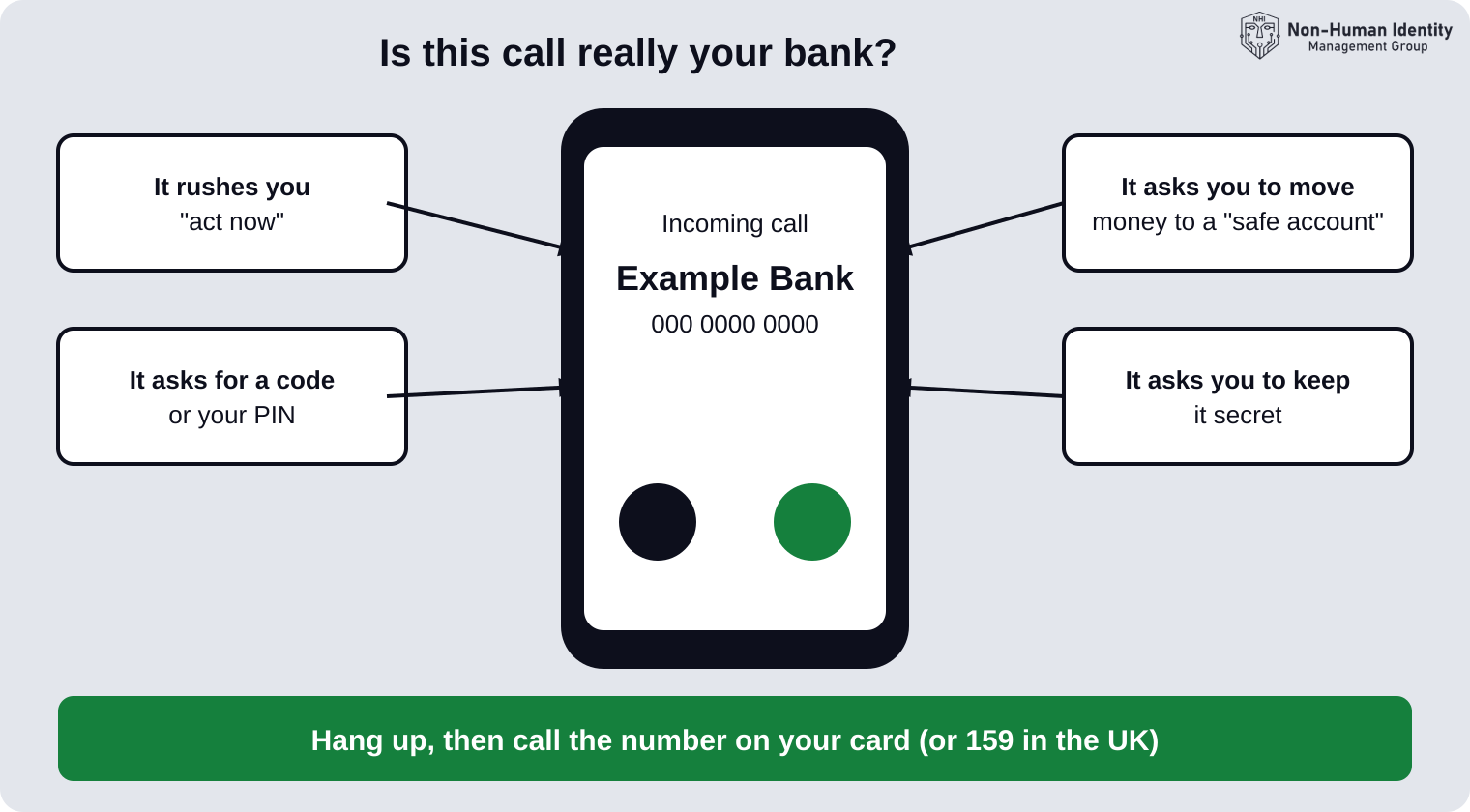
- Your phone screen can show a bank's name or number even when the caller is not the bank. This is called caller ID spoofing.
- A scary payment you do not recognise is used to make you panic.
- Rushing you is a warning sign. The Take Five campaign says only criminals will try to rush or panic you.[1]
- In a real message from your bank, a code like this is for you alone. Reading it out can let someone else log in or approve a payment.
- Banks say they will not ask you to move money to a "safe account".[4]
Why this is risky: every step feels helpful, and the caller seems to know things about you. If you follow along, you send the money yourself, which can make it harder to get back.
The safer way: hang up. Wait a moment, then call your bank on the number printed on your card.[4] In the UK you can also call 159, a short number that connects you to most major banks.[3]
How does it work?
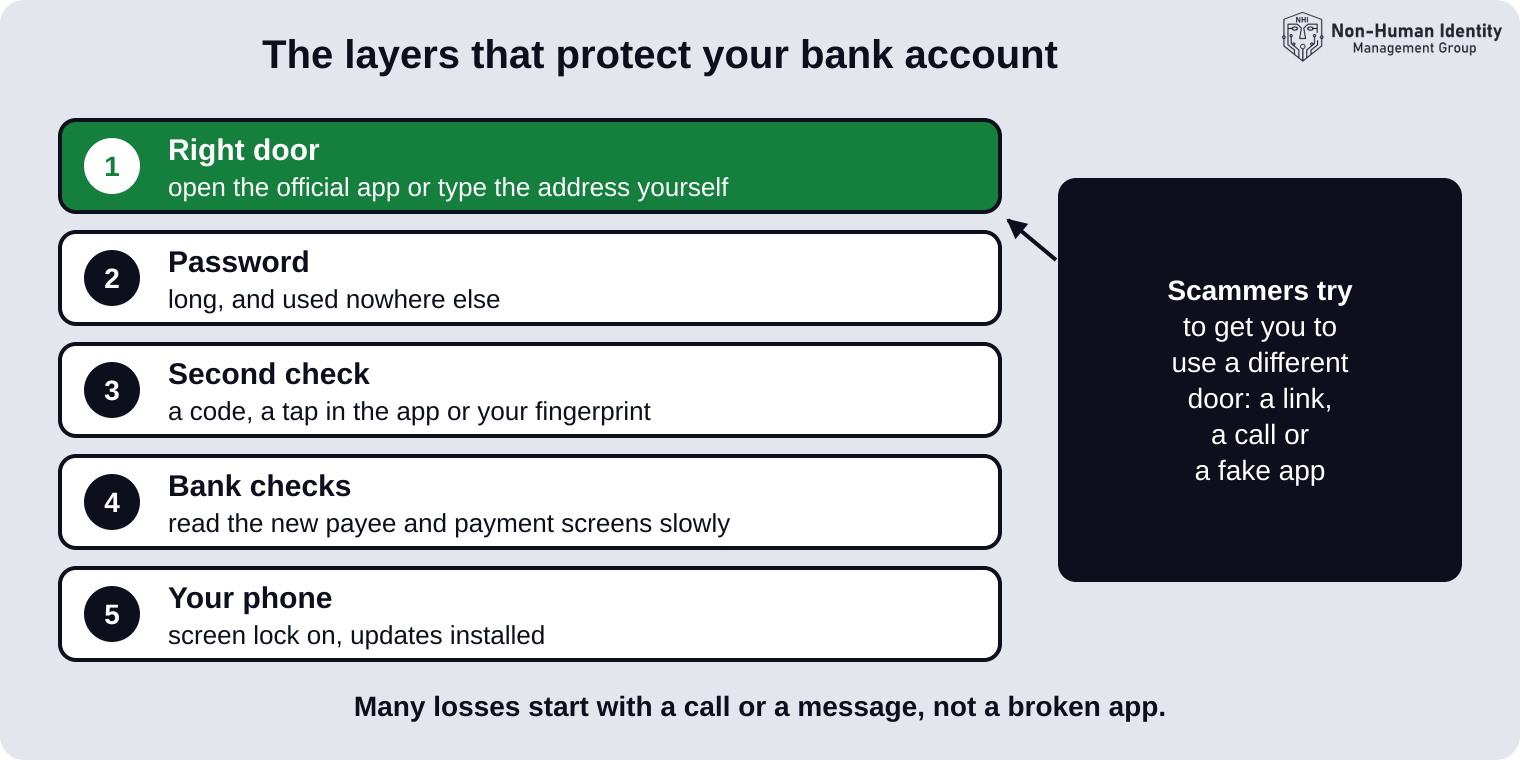
A safe banking session has a few layers. Each one catches something the others might miss.
- The right door. You open the bank's own app, downloaded from the official app store, or type the bank's address yourself.
- The password. You use a long password that you use nowhere else. A password manager (an app that remembers passwords for you) makes this easier.[5]
- The second check. Two-step verification asks for a code, a tap in the app or your fingerprint. It helps keep criminals out even if they know your password.[6]
- The bank's checks. The bank may ask you to confirm a new payee or a large payment. Read these screens slowly: they tell you who the money is going to.
- Your phone. A screen lock and the latest updates protect the device the app lives on.[5]
A worked example
Hana Zeller is a retired teacher who uses her bank's app to pay bills. This story is fictional.
One evening her phone rings, and the screen shows her bank's name. A calm man says he is from the fraud team. He says someone has just tried to spend a large sum on her card.
Hana feels her heart race. He says her account is not safe and he needs to move her savings to a new account straight away. First, he says, she must read out a code the bank is about to text her.
The text arrives. Underneath the code it says the bank will never ask her to share it. Hana stops. She remembers that a real bank would not ask her to move money to a "safe account".
She tells the man she will call back, and hangs up. He rings twice more. She does not answer.
Then she waits a while and calls the number printed on her card, using her landline. The bank's adviser checks her account. There is no strange payment, and nothing has moved.
The adviser thanks her and explains that her phone showed the bank's name because callers can fake it. Hana also reports the call to the police's fraud reporting service.[1]
The next day she turns on fingerprint login in the app and changes her online banking password, just to be sure. She also tells her book club what happened, so they know the signs too.
Myths and mistakes
| What people think | What is true |
|---|---|
| If the screen shows my bank's number, it is my bank. | Callers can fake the name or number on your screen. Hang up and call the number on your card. |
| The bank might need me to move money to keep it safe. | Banks say they will not ask you to move money to a "safe account".[4] |
| Reading out a code is fine if the caller already knows my details. | Criminals often know some details already. A code from your bank is for you alone. |
| Banking apps are risky, so the website is safer. | The official app, kept up to date, is a sound choice. The risk is fake links and fake apps. |
| If I am tricked, the bank always pays me back. | UK refund rules cover many bank transfer scams, with limits and exceptions.[2] Report quickly. |
What can I do this week?
- Delete any banking link you saved from a message and open the official app instead.
- Turn on two-step verification or fingerprint login in your banking app.
- Change your banking password if you use it anywhere else.
- Save your bank's number from your card in your phone contacts, and note 159 if you are in the UK.
- Talk to one family member about the "safe account" trick.
Checklist
- I use only my bank's official app or a website address I type myself.
- My banking password is long and used nowhere else.
- Two-step verification or fingerprint login is turned on.
- My phone has a screen lock and installs updates.
- I never share a PIN, password or one-time code with anyone who contacts me.
- I read the payee name and amount on every payment screen.
- I know to hang up and call the number on my card if a call worries me.
- I know how to report a scam to my bank and the police.
Common questions
Is it safe to use a banking app on public Wi-Fi?
Usually, yes, when you use the bank's official app and keep it up to date. Banking apps protect the connection to the bank. The bigger risks are fake links and people watching your screen. If you are unsure, wait until you are on your mobile data or home connection.
What should I do if I think I have been scammed?
Call your bank straight away, using the number on your card. Then report it to the police. In the UK, the Take Five campaign points to Report Fraud for this.[1] Acting fast gives the bank the best chance to stop or trace the payment.
Will my bank ever call me?
Yes, banks do sometimes call, for example to check an unusual payment. That is why the safe habit is to hang up and call back on the number on your card. A real bank will understand. A scammer will often push you to stay on the line.
Are texts with codes safe for two-step verification?
Text codes are much better than a password alone. Some banks also offer a tap in the app or a fingerprint, which avoids typing codes. Whatever you use, the key rule is the same: never share the code with anyone who contacts you.
How do I know an app is really my bank's?
Download it from the official app store, and check the bank's own website, which often links to its app. Look at the developer name and the number of downloads. If someone sends you a link to install a banking app, do not use it.
Where next?
Ready for the detail? Read the practitioner guide: Online Banking Security Guide. It goes further into how people lose money, your refund rights and where to get help after a scam.
Also useful:
- Authorised Push Payment (APP) Fraud Guide
- Phone Scams for Beginners
- Multi-Factor Authentication for Beginners
- Password Managers for Beginners
- Open Banking for Beginners
Related NHI Mgmt Group resources: Online Scams for Beginners · SIM Swap Fraud for Beginners · Remote Access Scams for Beginners
Key terms
- Two-step verification
- A login that needs two different kinds of proof, such as a password plus a code.
- Password manager
- An app that creates, stores and fills in strong passwords for you.
- One-time code
- A short code that works once, sent or shown to you to confirm a login or payment.
- Bank impersonation scam
- A scam where a criminal pretends to be your bank to get your money or details.
- Caller ID spoofing
- Faking the name or number that shows on your phone when someone calls.
- Smishing
- A scam text message that tries to get you to tap a link or share details.
- When a person is tricked into sending a bank transfer to a criminal.
Sources and further reading
- Take Five to Stop Fraud. UK Finance. https://www.takefive-stopfraud.org.uk/, accessed 28 Nov 2026.
- APP fraud reimbursement protections. Payment Systems Regulator. https://www.psr.org.uk/information-for-consumers/app-fraud-reimbursement-protections/, accessed 28 Nov 2026.
- 159: connecting you to your bank. Stop Scams UK. https://www.stopscamsuk.org.uk/159, accessed 28 Nov 2026.
- How to spot and avoid bank scams. MoneyHelper. https://www.moneyhelper.org.uk/blog/how-to-spot-and-avoid-bank-scams, accessed 28 Nov 2026.
- Top tips for staying secure online. National Cyber Security Centre. https://www.ncsc.gov.uk/collection/top-tips-for-staying-secure-online, accessed 28 Nov 2026.
- Activate 2-step verification (2SV). National Cyber Security Centre. https://www.ncsc.gov.uk/collection/top-tips-for-staying-secure-online/activate-2-step-verification-on-your-email, accessed 28 Nov 2026.