Cyber security jargon is the short words and acronyms security people use for common ideas.
This guide is for anyone starting a job, course or project where security comes up and the acronyms fly past. You do not need a technical background: most of these terms describe simple ideas you already know.
In short
- Most security acronyms stand for a plain idea, like a second check at login or a fake email.
- The same letters can mean different things in different teams, so ask what they mean here.
- Sort new terms into four groups: attacks, defences, teams and rules.
- Keep your own list, and ask when you are stuck. People expect questions in week one.
What you will learn
- Explain ten common security acronyms in plain words.
- Sort a new term into one of four simple groups.
- Spot when the same letters mean two different things.
- Ask about jargon in a meeting without feeling lost.
- Short form (acronym)
- a word made from the first letters of a longer name, like MFA.
- Insider words (jargon)
- words a group uses that outsiders often do not know.
- Weak spot (vulnerability)
- a flaw in software or a process that someone could misuse.
What is cyber security jargon?
Think of a phrasebook for a new country. You do not need the whole language on day one. You need the twenty phrases you will hear most, and a way to look up the rest.
Security jargon works the same way. It is a set of short words that save time for people who use them every day. An acronym (a word built from first letters) like MFA stands for multi-factor authentication. That is just a second check when you log in, like a code sent to your phone.
Most of these words describe one of four things. Some name an attack. Some name a defence. Some name a team or a job. Some name a law or a rulebook. Once you know which group a word is in, it is much easier to follow the talk.
Where the comparison stops working: a phrasebook gives one meaning for each phrase. In security, the same letters can mean different things in different teams, and new terms appear all the time.
Why does it matter?
Jargon can make a simple point sound hard. If you miss what a word means, you may miss a task, a risk or a decision.
Even the experts check their terms. One US government security glossary lists more than 10,000 entries, and it notes that many terms have more than one meaning.[1]
If you are starting a job in IT or security
What could happen: you nod along in a meeting, then miss the job you were given.
Check this: write down each new term and ask about it the same day.
If you manage people, but not the IT
What could happen: you sign off a plan or a bill without knowing what it covers.
Check this: ask your supplier to explain each acronym in one plain sentence.
If you are studying for a security course
What could happen: you learn the letters but not the idea, and exam questions catch you out.
Check this: for each acronym, say what it does, not just what it stands for.
What does it look like?
Here is a made-up note from a first team meeting. It is the kind of thing a new starter might be sent.
Example only. All values are made up.
Team notes, Monday (EXAMPLE)
- SOC saw a spike in phishing this week     (1)
- Roll out MFA to the finance team by Friday (2)
- EDR alert on laptop FAKE-0000, no action   (3)
- Patch the VPN, there may be a zero-day     (4)
- IAM review due before the audit            (5)
- SOC is the security operations centre, the team that watches for trouble. Phishing means fake emails or messages that try to trick people.
- MFA means a second check at login, such as a code from an app.
- EDR is software on each computer that watches for harmful behaviour and raises alerts.
- A VPN is a protected link into the work network. A zero-day is a flaw that attackers use before a fix is out.
- IAM is identity and access management: who can log in, and what each person can reach.
Why this is risky: a new starter who does not know these terms may miss the point. They might not see that the VPN fix is urgent. They might miss the Friday deadline for the finance team.
The safer way: the person who writes the notes spells out each term the first time. Newcomers ask about any word they do not know.
How does it work?
You do not need to learn every term at once. Here is a simple way to deal with a new one.
- Catch it. When you hear a new word, write it down exactly as you heard it.
- Expand it. Find what the letters stand for. A trusted glossary helps here.[1][6]
- Sort it. Decide if it is an attack, a defence, a team or a rule.
- Say it plainly. Write one sentence a friend outside work would understand.
- Check it here. Ask a colleague what the word means in your team, because meanings can differ.
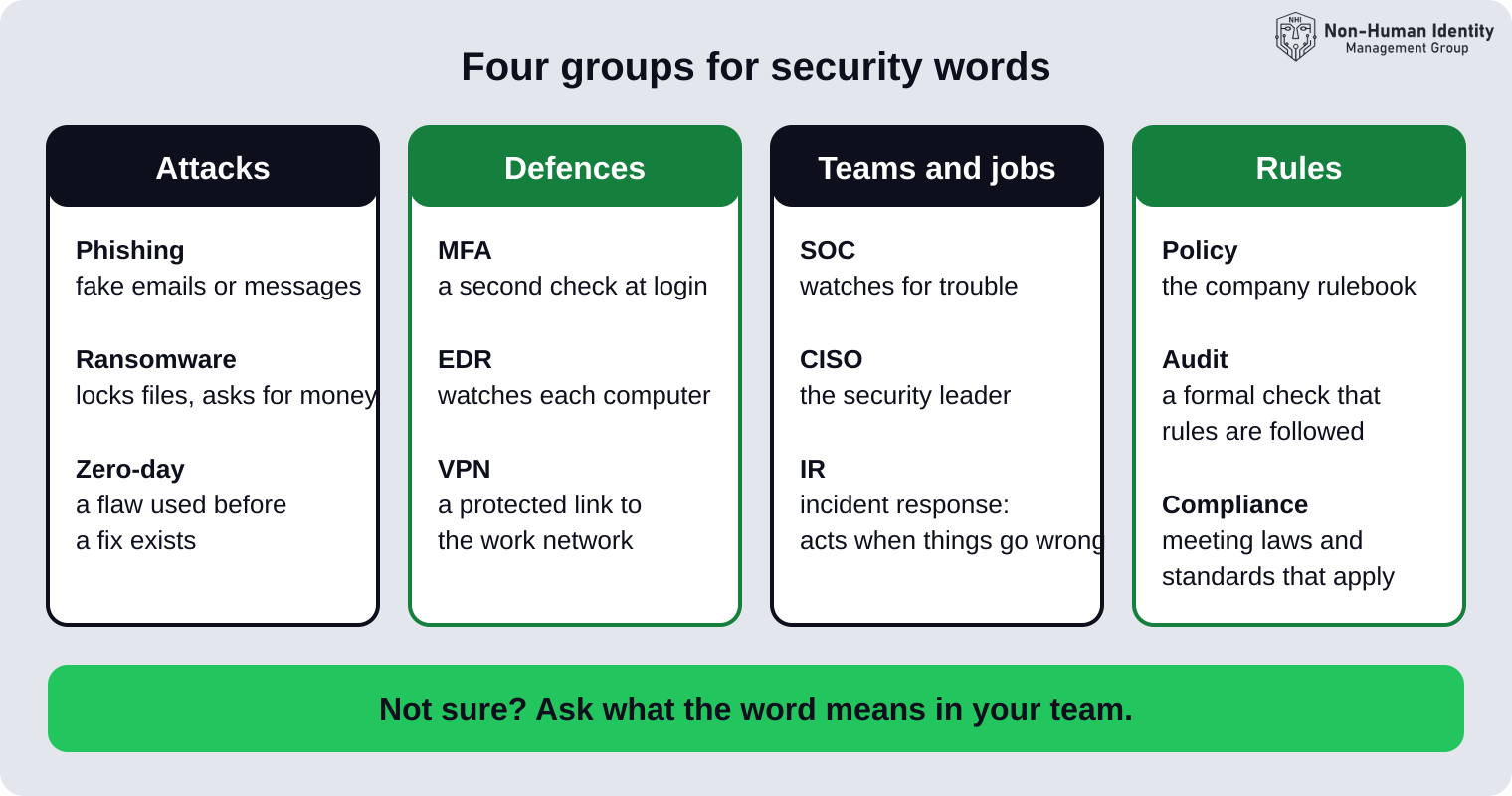
Here are ten terms you are likely to hear in week one, with a plain meaning for each.
- Phishing: fake emails or messages that try to trick you into giving away details or clicking a bad link.[3]
- MFA: logging in with two or more different kinds of proof, like a password plus a phone code.[2]
- Malware: harmful software, such as viruses or spyware.
- Ransomware: malware that locks files and demands money to unlock them.
- Zero-day: an attack that uses a flaw nobody knew about, so no fix is ready yet.[4]
- VPN: a virtual private network, a protected link that carries your traffic over the internet.[5]
- SOC: the security operations centre, a team that watches systems for signs of attack.
- EDR: endpoint detection and response, software that watches laptops and servers for harmful activity.
- IAM: identity and access management, the systems that decide who can log in and what they can reach.
- CISO: the chief information security officer, the person who leads security in a company.
A worked example
Nathan Brooks-Ward starts as an IT support assistant at Dunaj Tech, a fictional software firm. On his first morning, he joins a short team call.
His manager, Oona Virtanen, talks fast. "The SOC flagged some phishing overnight. We need MFA on the remaining accounts. And keep an eye on EDR alerts."
Nathan writes down three acronyms and feels he should already know them. Then he remembers the phrasebook idea: he only needs the words he hears most, and a way to look them up.
After the call, he makes a small table with three columns: the term, what it stands for and what it means in plain words. He looks up each one in a public security glossary.[1] Then he sorts them: phishing is an attack, MFA and EDR are defences, and the SOC is a team.
One word still puzzles him. A chat message mentions "the IR plan". He is not sure IR means the same here as in his old job. So he asks Oona.
"Incident response," she says. "Our plan for what to do when something goes wrong. Good question. Half the team uses it differently."
By Friday, Nathan's list has 25 terms. He shares it with the next new starter. Oona adds it to the team's welcome pack, with a note that anyone can add to it.
Nothing dramatic happened that week, but Nathan followed every task, because he asked early instead of guessing.
Myths and mistakes
| What people think | What is true |
|---|---|
| Everyone else already knows all the terms. | Experienced people look things up too. Glossaries exist because the list keeps growing. |
| Asking what a word means looks bad. | Most teams would rather you ask than guess. A wrong guess costs more time. |
| Knowing what the letters stand for is enough. | You also need to know what the thing does. MFA is not just a name; it is a second check at login. |
| An acronym means the same thing everywhere. | The same letters can mean different things in different teams. Check the meaning where you work. |
| Using lots of jargon makes you sound expert. | Clear, plain words are easier to act on. Spell out a term the first time you use it. |
What can I do this week?
- Start a personal list with three columns: term, what it stands for, plain meaning.
- Bookmark one trusted public glossary for quick look-ups.
- Sort each new term into attacks, defences, teams or rules.
- Ask one colleague what a term means in your team.
- Explain one term to a friend in a single plain sentence.
Checklist
- I keep a list of new terms with a plain meaning for each.
- I can explain phishing, MFA and malware in my own words.
- I know which team in my organisation handles security alerts.
- I check what an acronym means in my team, not just in general.
- I spell out a term the first time I use it in an email or note.
- I ask when I do not understand a word, rather than guess.
- I know where to find a trusted glossary.
Common questions
How many security acronyms do I need to know?
Start with about ten to twenty. Most first weeks use a small set again and again, like phishing, MFA, malware, VPN and SOC. Learn those well, then add new terms as you meet them. Nobody learns the full list at once, and the list keeps changing.
Where can I look up a term I do not know?
Use a trusted public glossary. Government security agencies publish free ones, such as the UK National Cyber Security Centre and the US National Institute of Standards and Technology. For a longer list of acronyms, see our Cyber Security Acronyms Glossary.
Why do the same letters mean different things?
Because there are only so many short letter groups, and many fields use them. IR can mean incident response in security but something else in another team. Always check the meaning with the person who used it, especially in plans, contracts or tickets.
Is jargon a sign that security is too hard for me?
No. Jargon is a shortcut, not a test. Most terms describe simple ideas, like a second check at login or a fake email. Once you know the plain meaning, the conversation becomes much easier to follow. Everyone in the room once had to learn these words too.
Should I use acronyms in my own writing?
Use them sparingly. We suggest spelling out the full term the first time, with the short form after it in brackets. After that, the short form is fine. This helps new starters, managers and anyone reading your note later, without slowing down the experts.
Where next?
Ready for the detail? Read the practitioner guide: Cyber Security Acronyms Glossary. It goes further into hundreds of acronyms, grouped by area, with short definitions for each.
Also useful:
- Cyber Security for Beginners
- Phishing for Beginners
- Multi-Factor Authentication for Beginners
- Security Operations Centre for Beginners
Related NHI Mgmt Group resources: Cybersecurity Careers Guide · Cloud Security Glossary · Zero Trust Glossary
Key terms
- Phishing
- Fake emails or messages that try to trick people into giving away details or clicking a bad link.
- Multi-factor authentication (MFA)
- A login that asks for two or more different kinds of proof, so a stolen password alone is less likely to work.
- Malware
- Harmful software, such as viruses, spyware or ransomware.
- Ransomware
- Malware that locks or steals files and demands payment.
- Zero-day
- A flaw that attackers use before the maker has a fix, or before defenders know about it.
- VPN
- A protected link that carries your traffic across the internet to another network.
- EDR
- Software on laptops and servers that watches for harmful activity and helps teams respond.
- Identity and access management (IAM)
- The rules and tools that decide who can log in and what each person or program can reach.
Sources and further reading
- Glossary. Computer Security Resource Center, National Institute of Standards and Technology (NIST). https://csrc.nist.gov/glossary, accessed 27 Nov 2026.
- Glossary: multi-factor authentication. NIST Computer Security Resource Center (definitions from NIST SP 800-63-4 and CNSSI 4009-2022). https://csrc.nist.gov/glossary/term/multi_factor_authentication, accessed 27 Nov 2026.
- Glossary: phishing. NIST Computer Security Resource Center (definitions from NIST SP 800-12 Rev. 1 and others). https://csrc.nist.gov/glossary/term/phishing, accessed 27 Nov 2026.
- Glossary: zero-day attack. NIST Computer Security Resource Center (definition from CNSSI 4009-2022). https://csrc.nist.gov/glossary/term/zero_day_attack, accessed 27 Nov 2026.
- Glossary: virtual private network. NIST Computer Security Resource Center (definitions from NIST SP 800-113 and others). https://csrc.nist.gov/glossary/term/virtual_private_network, accessed 27 Nov 2026.
- NCSC glossary. National Cyber Security Centre (UK). https://www.ncsc.gov.uk/information/ncsc-glossary, accessed 27 Nov 2026.