A personal access token is a long code that lets a tool log in to an account as you.
This guide is for students, junior developers and anyone who has been told to "just make a token". You do not need to be a developer to be affected: if your team stores code online, tokens like this can open it.
In short
- A personal access token (PAT) is used in place of your password, mostly by scripts and tools.
- It carries your access, so whoever copies a working token may be able to act as you.
- Give each token only the access it needs and an end date.
- If a token leaks, cancel it at the site that made it, then make a new one.
What you will learn
- Explain what a personal access token is in one sentence.
- Spot a token that has been left somewhere unsafe.
- Choose a short end date and narrow access when you make one.
- Cancel a token quickly if it leaks.
- Stand-in password (personal access token)
- a long code you create so a tool can log in as you.
- Allowed actions (scopes or permissions)
- the list of things a token is allowed to do.
- End date (expiry)
- the day a token stops working on its own.
What is a personal access token?
Think of a front door key. It works for whoever holds it, and the door does not check who that is. A personal access token works in a similar way for your online accounts.
Code hosting sites, such as GitHub, GitLab and Azure DevOps, let you make one. You create it in your account settings. Then you give it to a script, an app or a command line tool (a text window where you type instructions). The tool shows the token instead of your password, and the site lets it in as you.
GitHub describes tokens as an alternative to passwords. It warns that they are like passwords and share the same risks.[1] Microsoft calls its version "an alternative password" and says to treat it with the same care.[3]
A token can never do more than its owner can. But it can do less. When you make one, you choose its scopes (the actions it is allowed to take) and its expiry (the date it is set to end).[2][3]
Where the comparison stops working: a key can only be in one place. A token is just text, so it can be copied into many places at once, and nobody notices a copy has gone.
Why does it matter?
People paste tokens into scripts, settings files and chat messages. If a token is still working when someone else finds it, they may be able to use your access.
A leak can stay open for a long time. TechCrunch reported that a GitHub access token belonging to a Home Depot employee was exposed online from early 2024. A researcher said it opened hundreds of private code projects and was only cancelled after the newspaper contacted the company in December 2025.[4] Read our Home Depot token exposure page for the full story.
If you are a student or learning to code
What could happen: you paste a token into a project file and share the project publicly.
Check this: search your projects for long random codes before you share them.
If you are a junior developer
What could happen: a token with full access and no end date sits in an old script for years.
Check this: open your token list and look at the end dates and access of each one.
If you lead a team
What could happen: a shared tool runs on one person's token and breaks, or stays open, when they leave.
Check this: ask which team tools run on a person's token and plan to move them.
What does it look like?
Here is a made-up script. It copies code each night.
Example only. All values are made up.
# nightly-copy.sh, written by K. for the website project
SITE=code.example.invalid
USER=kemal-example
TOKEN=EXAMPLE-TOKEN-0000-FAKE-0000     (1)
# access: everything                    (2)
# expires: never                        (3)
- In a real file, this line would contain a working token, typed straight into the script.
- The token was made with full access, though the script only needs to read one project.
- The token has no end date, so it keeps working until someone cancels it.
Why this is risky: anyone who can read the script can copy the token. It has full access and no end date. So a copy found years later may still open every project the owner can reach.
The safer way: the script gets the token from a secrets store when it runs. A secrets store is a locked place for passwords and keys. The token can read only one project. It ends after a set number of days. Microsoft's advice is to keep the lifetime "as short as practical" and to keep tokens out of code, settings files and logs.[3]
How does it work?
Here is the life of a token, from making it to cancelling it.
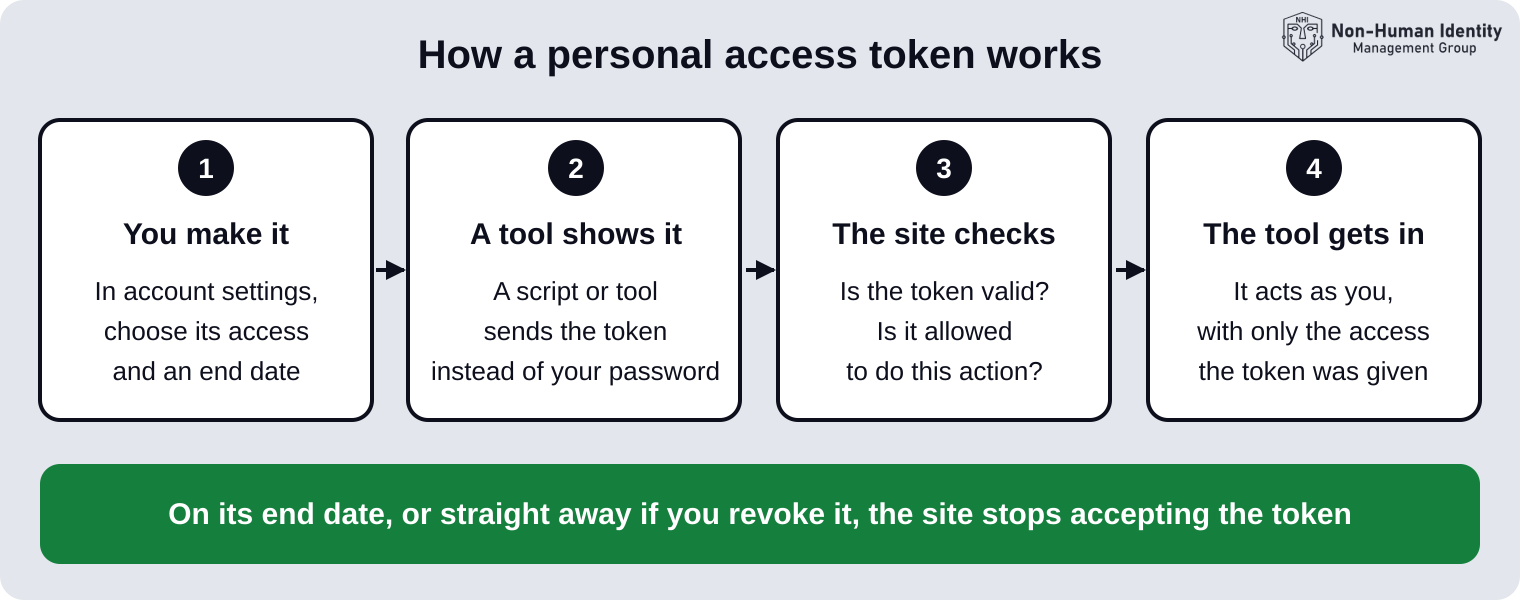
- You make it. In your account settings you name the token, pick its access and pick an end date. The site shows the token once, so you copy it straight away.[3]
- A tool uses it. The tool sends the token in place of your password, for example when it copies code from the site.[1][2]
- The site checks it. If the token is valid and allowed to do the action, the site lets the tool in as you.
- It ends. On its end date the site no longer accepts the token. GitLab says an expired token cannot be switched back on, so you make a new one.[2]
- Or you cancel it. Cancelling is called revoking. GitLab says revoking a token stops it being used straight away.[2]
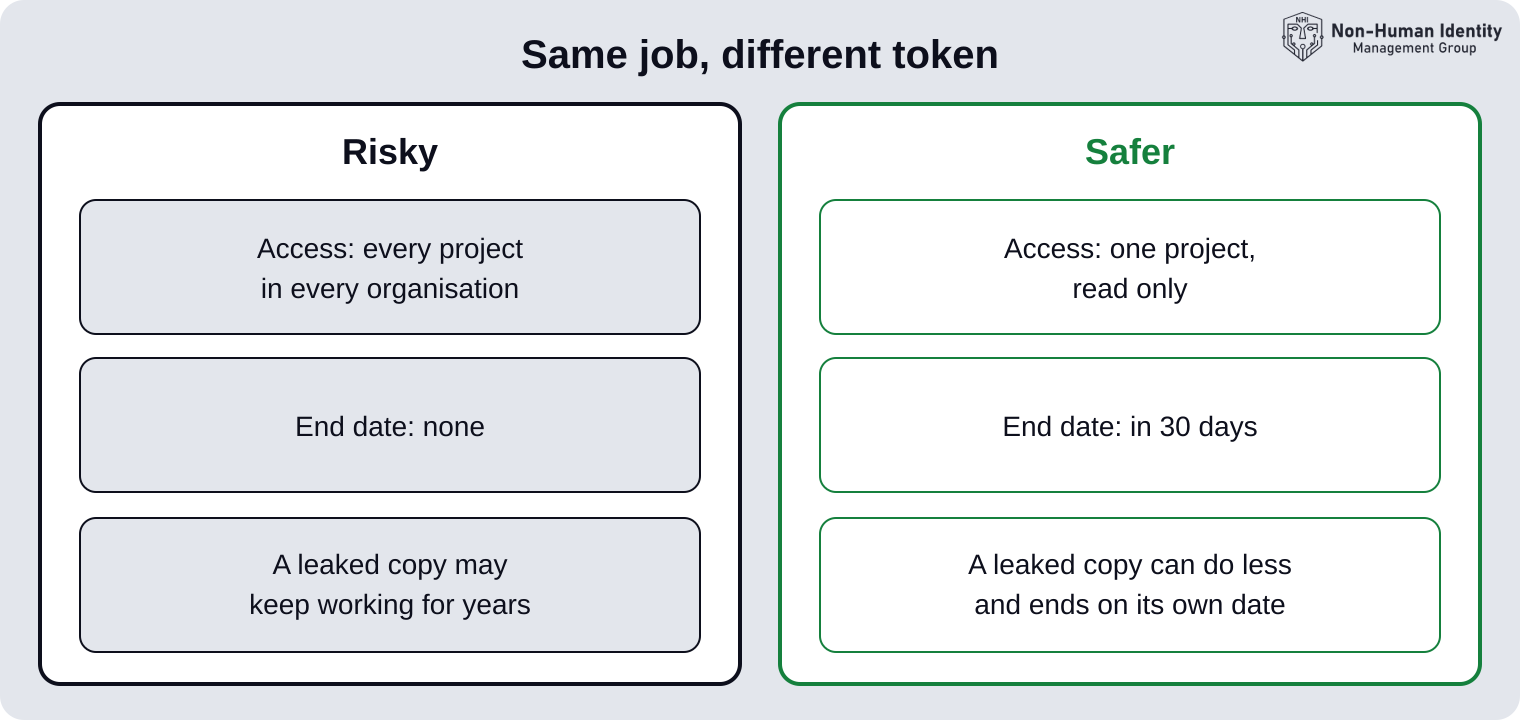
Some sites have two kinds of token. GitHub's older "classic" tokens can reach every project in every organisation you belong to. Its newer "fine-grained" tokens can be limited to chosen projects and chosen permissions, and GitHub recommends them.[1]
For tools that run for a long time, a person's token is often the wrong choice. GitHub suggests a GitHub App for long-lived team tools.[1] Microsoft suggests other sign-in methods, such as managed identities, for apps and automation.[3] These belong to the tool, not to a person, so they keep working when someone leaves.
A worked example
Kemal Vance is in his first month as a junior developer at a small web agency. His lead, Jana Sorensen, asks him to set up a script that copies the website code to a backup server each night.
The script needs to log in to the code site. Kemal makes a personal access token. The settings page offers full access and no end date, so he clicks through quickly. He pastes the token into the script and saves it to the shared project.
Next morning, Jana reviews his work. She spots the long code at the top of the script. "That token is you," she says. "Anyone who reads this file can be you, everywhere you have access."
Kemal remembers the front door key. A key left in the lock helps anyone who walks past. So they fix it in order.
First, Kemal revokes the token in his account settings. Once that is done, the copy in the file should no longer let anyone in. Then he makes a new token. This one can only read the website project, and it ends in 30 days. He sets a reminder to renew it.
The new token goes into the backup server's secure settings, and the script reads it from there. The script file now holds only the setting's name.
Jana checks the site's records for actions by Kemal's account that he did not make. She finds nothing unusual in the records she can see.
Last, Jana adds a task to the team list: move the backup job to an app-based identity that does not depend on one person. She thanks Kemal for fixing it calmly, and he makes "access and end date first" his habit.
Myths and mistakes
| What people think | What is true |
|---|---|
| A token is safer than a password, so it does not need much care. | Sites say tokens carry the same risks as passwords. Treat them the same way.[1] |
| Full access saves time later. | Full access means a leaked copy can do far more. Pick only what the tool needs.[3] |
| No end date is fine for a small script. | Small scripts get forgotten. An end date limits how long a lost copy works.[1] |
| Deleting the line from the file fixes a leak. | Copies may remain in history and backups. Revoke the token at the site that made it. |
| A team tool can run on my token. | It stops, or stays open, when you leave. Use an app or service account made for tools.[1] |
What can I do this week?
- Open the token page in each code site you use and list your tokens.
- Revoke any token you do not recognise or no longer need.
- Give the rest a short end date and only the access they need.
- Move tokens out of scripts and into a secrets store or secure settings.
- Where a site offers it, use its sign-in helper instead of a token for daily work.
Checklist
- Every token has a clear name that says what it is for.
- Every token has an end date.
- Each token has only the access its tool needs.
- No tokens are written into code, settings files, chat or tickets.
- Tokens are kept in a secrets store or the tool's secure settings.
- Team tools use an app or service account, not one person's token.
- Everyone knows to revoke a leaked token first and report it straight away.
Common questions
Is a personal access token the same as a password?
Close, but not quite. Both prove you may get in. A token is made for tools, can be limited to certain actions, can have an end date, and you can have many at once. Because it often lives in files, it can leak more easily than a password you type.
How long should a token last?
As short as is practical for the job. A few days suits a one-off task. For a regular script, we suggest 30 to 90 days with a reminder to renew. GitLab sets 365 days as the default limit, though administrators can change it.[2]
What should I do if I shared a token by mistake?
Revoke it straight away at the site that made it, then tell your lead or security contact. Make a new token with narrow access and an end date. Check the site's records for anything you did not do. See Leaked Secret Response for Beginners.
Do I need a token to use Git every day?
Often not. GitHub suggests its command line tool or Git Credential Manager instead of making a token yourself. Git Credential Manager is a helper that signs you in and stores the login safely.[1] Other sites offer similar helpers or other sign-in methods.
Do code sites look for leaked tokens?
Some do. Microsoft says Azure DevOps scans public GitHub projects for its tokens, tells the owner and, unless turned off, cancels a leaked one.[3] Treat this as a safety net, not a plan. Keeping tokens out of code is still the main defence.
Where next?
Ready for the detail? Read the practitioner guide: GitHub Personal Access Tokens Security Guide. It goes further into organisation token policies, approval for fine-grained tokens and how to trace a leaked token in the audit log.
Also useful:
- How to set expiry policies on personal access tokens
- How to migrate from GitHub classic PATs to fine-grained tokens or GitHub Apps
- API Keys for Beginners
- Secrets Management for Beginners
- Non-Human Identities for Beginners
Related NHI Mgmt Group resources: GitLab Tokens Security Guide · Azure DevOps Security Guide · How to find long-lived personal access tokens across Atlassian
Key terms
- Personal access token (PAT)
- A reusable code that lets a tool log in to an account without a password, with the owner's access or less.
- Fine-grained personal access token
- A GitHub token that can be limited to chosen projects and chosen permissions.
- Classic personal access token
- An older GitHub token type that acts as its creator with broad access.
- Scope
- A named permission that sets what a token is allowed to do.
- Token expiry
- The point when a token stops working and must be replaced.
- Token revocation
- Cancelling a token before its end date, for example after a leak.
- GitHub App
- An integration installed in an organisation that has its own permissions and does not depend on one person.
Sources and further reading
- Managing your personal access tokens. GitHub Docs, GitHub. https://docs.github.com/en/authentication/keeping-your-account-and-data-secure/managing-your-personal-access-tokens, accessed 28 Nov 2026.
- Personal access tokens. GitLab Docs, GitLab. https://docs.gitlab.com/user/profile/personal_access_tokens/, accessed 28 Nov 2026.
- Use personal access tokens. Azure DevOps documentation, Microsoft Learn. https://learn.microsoft.com/en-us/azure/devops/organizations/accounts/use-personal-access-tokens-to-authenticate, accessed 28 Nov 2026.
- Home Depot exposed access to internal systems for a year, says researcher. TechCrunch, 12 December 2025 (news report). https://techcrunch.com/2025/12/12/home-depot-exposed-access-to-internal-systems-for-a-year-says-researcher/, accessed 28 Nov 2026.