A data security analyst finds an organisation's important information and checks it is kept safe from loss and misuse.
This guide is for students, career changers and anyone curious about security work that centres on information rather than networks. You do not need a technical background to follow it. If your business keeps customer details, payment records or staff files, someone needs to know where they are and who can see them.
In short
- A data security analyst finds where important data lives, checks who can reach it and helps fix what is exposed.
- Typical tasks include sorting data by how sensitive it is, reviewing access and checking alerts about data leaving the organisation.
- The job mixes careful checking, some technical skill and a lot of talking to the teams that own the data.
- People come in from IT support, security operations, database work, audit and privacy roles.
What you will learn
- Explain what a data security analyst does in one sentence.
- Spot common ways data ends up exposed.
- Check which of your current skills the job uses.
- Ask good questions about a data security job before you apply.
- Private or valuable information (sensitive data)
- data that would cause harm if the wrong person saw, changed or lost it.
- Sorting by sensitivity (data classification)
- giving each kind of data a label, such as public or confidential, so the right rules apply.
- Who can open what (access)
- the permissions that let a person or a program read, change or delete data.
What is a data security analyst?
Think of a museum's collections officer. They know what every object is, where it is kept, who may handle it and when it is moved. If something goes missing, they notice.
A data security analyst does a similar job for information. They find out where a firm keeps its key data. Then they check that only the right people and programs can reach it. They also check it is kept safe, and deleted when it is no longer needed.
A widely used security checklist sums up this work in five parts. Find the data, sort it and handle it safely. Keep it as long as needed, then get rid of it.[1] The analyst helps the organisation do each of those steps.
Where the comparison stops working: a museum object can be in only one place. Data can be copied in seconds, so the analyst also has to hunt for forgotten copies.
Why does it matter?
When data about people leaks, those people can be harmed. The firm can also face fines and lose trust. In the UK, the law expects firms to guard this data with the right safeguards and to test them often.[2]
If you are a student or career changer
What could happen: you think security means only fighting hackers, and miss a role built on careful checking.
Check this: read three data security analyst job adverts and mark the tasks you already do.
If you run a small business
What could happen: a customer list sits in a shared folder that anyone with the link can open.
Check this: list where your customer and staff data is kept and who can open each place.
If you already work in IT
What could happen: a test copy of a real customer database stays online long after the project ends.
Check this: ask whether test systems use real data, and who deletes it afterwards.
What does it look like?
A lot of the job starts with a finding from a review or a scanning tool. Here is a made-up one.
Example only. All values are made up.
FINDING 0000-EXAMPLE
Location:  Shared drive / Sales / EXAMPLE-export.csv
Contains:  Customer names and home addresses       (1)
Label:     (none)                                   (2)
Access:    Anyone with the link                     (3)
Owner:     Sales team (FAKE NAME)                   (4)
Last used: 00/00/0000                               (5)
- What kind of data the file holds. In a real file, this line would contain a count of the records found.
- No sensitivity label, so no rules were applied to it.
- The access setting. Here, anyone who gets the link can open it.
- The team that should decide what happens to the file.
- When it was last opened. An old date can mean nobody needs it any more.
Why this is risky: a forgotten export with open access can be found and copied without anyone noticing.
The safer way: confirm with the owner, then delete the file or limit access to named people and add the right label.
How does it work?
Every team works a little differently, but the job often follows a loop like this one.
- Find the data. The analyst builds a list of where important data is stored, often with help from scanning tools.
- Sort it. They help label data by how sensitive it is, using the organisation's own scheme.
- Check who can reach it. They review which people and programs have access, and flag access that is too wide.
- Fix with the owner. They agree changes with the team that owns the data. That might mean removing access, deleting old copies or adding encryption (scrambling data so only key holders can read it).
- Watch and report. They check alerts about data leaving the organisation and report the biggest risks to leaders.
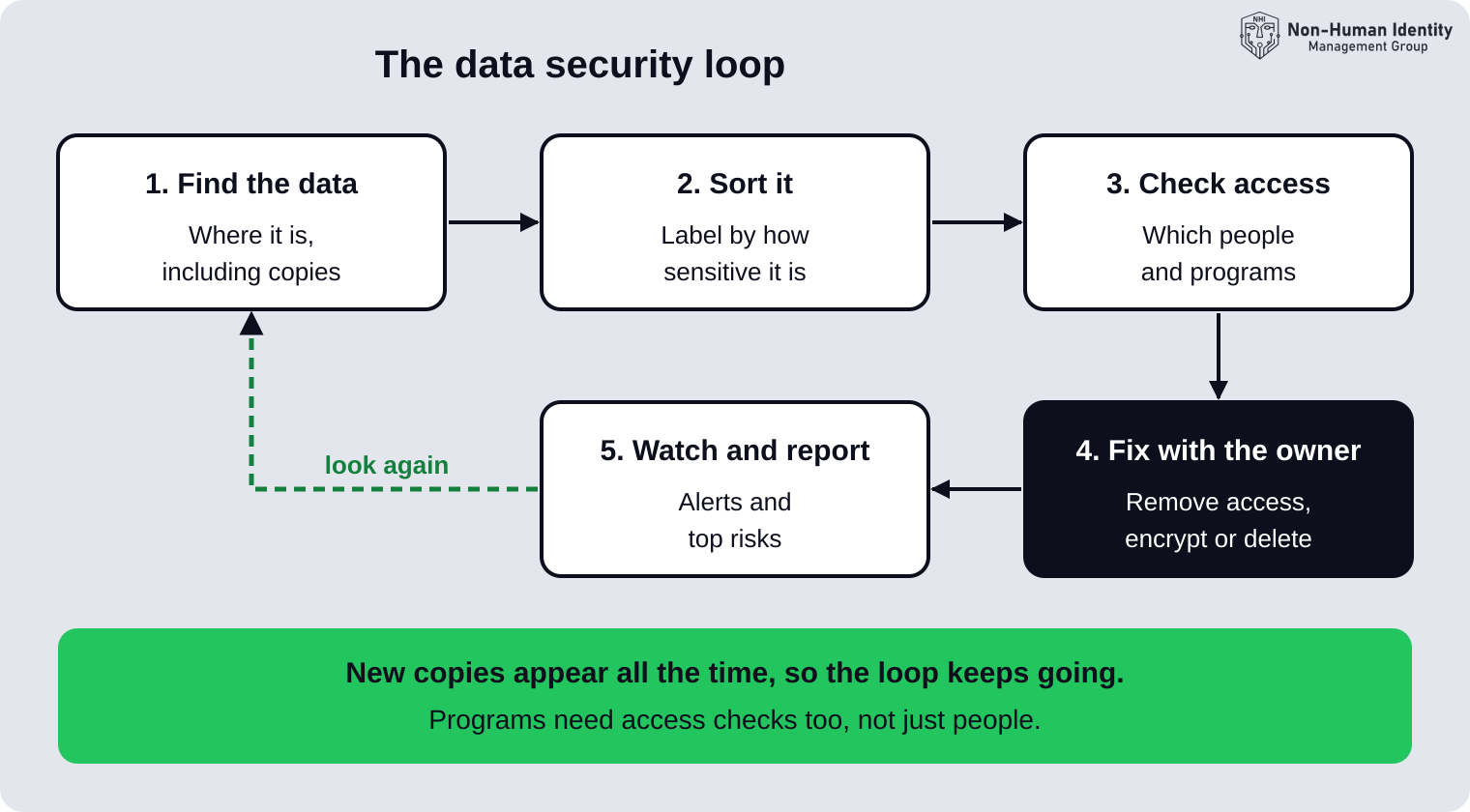
Programs matter as well as people. Reporting tools, backup jobs and AI assistants often read large amounts of data using their own accounts. A good analyst checks those accounts too. Our Non-Human Identities for Beginners guide explains these software accounts.
Skills and tools
- Careful checking. Following details through and keeping good records.
- Basic technical knowledge. How files, databases, cloud storage and permissions work.
- Working with people. Data owners must agree to changes, so tact matters.
- Knowing the rules. A broad sense of data protection law and the organisation's own policies.
- Tools. Spreadsheets, data scanning and labelling tools, tools that flag data leaving the organisation, and access reports from cloud and file systems.
The job sits close to the wider information security analyst role. A US government job guide says these analysts often need a degree. Some get in with training and certificates instead, and many first work in IT.[3]
A worked example
Lina Novak is three months into her first data security analyst job at Cedar Removals, a fictional house moving firm. Before this, she worked on the IT help desk.
On Monday a scanning tool lists twenty files that seem to hold customer addresses. Lina thinks of the museum officer. Which objects are here, and who may handle them?
Most files are in the bookings system, where access is limited. One is not. A sales export from last year sits in a shared folder that anyone with the link can open.
Lina does not delete it straight away. She asks the sales lead whether anyone still needs it. The answer is no: it was used once for a mailing.
Lina deletes the file and records the change. She also asks the IT team to check the sharing records for that folder.
On Wednesday she reviews which accounts can read the bookings database. She finds an account used by an old reporting tool that nobody uses now. With the IT lead's agreement, it is switched off.
On Friday she writes a short note for her manager. It lists the open file, the unused account and one suggestion: exports with customer data should carry a label and an end date.
The next month's scan shows no open-link files with customer addresses, in the places the tool checks.
Myths and mistakes
| What people think | What is true |
|---|---|
| Data security is just encryption. | Encryption is one tool. Finding data, sorting it, limiting access and deleting old copies matter too.[1] |
| If the main system is locked down, the data is safe. | Copies, exports and test systems often hold the same data with weaker protection. |
| Only people need access checks. | Programs and their accounts can read large amounts of data, so they need checks too. |
| Scanning tools find everything. | Tools find what they are set up to look for, in the places they can reach. |
| Keeping all data just in case is the safe choice. | Data you no longer need is still data that can leak. Deleting it on time lowers risk. |
What can I do this week?
- List where your own personal files are stored, such as phone, email and cloud drives, and who can see each one.
- Check the sharing settings on three shared files or folders you use.
- Read three data security analyst job adverts and note the tools they mention.
- Read our Data Security for Beginners guide.
Checklist
- I can explain what a data security analyst does in one sentence.
- I know what sensitive data, classification and access mean.
- I can name three ways data ends up exposed.
- I know that programs need access checks as well as people.
- I have looked at real job adverts for the role.
- I have checked official sources for pay, not just job boards.
- I have one first learning step planned.
Common questions
Do I need a computer science degree?
Not always. Some employers ask for a degree, but others accept training, certificates and time in IT. Many analysts start on a help desk or in a database or audit job. What matters most is that you can check details with care and know how access works.
How is this different from a data protection officer?
A data protection officer gives advice on privacy law and checks that the firm follows it. A data security analyst works closer to the systems, finding data and fixing what is left open. The two often work together. See Data Protection Officer for Beginners.
Is a data security analyst the same as a SOC analyst?
No, though the jobs overlap. A SOC analyst watches for attacks on all systems and deals with alerts. A data security analyst looks at where data is and who can reach it. Both may look at alerts about data that leaves the firm. See SOC Analyst for Beginners.
How much does a data security analyst earn?
Pay varies by country, employer and experience, so we do not give a figure here. Use official sources. In the US, see the government's job outlook page for information security analysts.[3] In the UK, see the National Careers Service.[4]
Where can the job lead?
There are several paths. Analysts often move into data security building work, cloud security, privacy or security leadership. The job shows how a whole firm handles its data, which helps in most senior jobs. See Data Security Engineer Career Guide.
Where next?
Ready for the detail? Read the practitioner guide: Data Security Guide. It goes further into how a data security programme fits together, finding forgotten copies, access by software accounts and the tool types analysts use.
Also useful:
- Data Security for Beginners
- Data Classification for Beginners
- Data Loss Prevention for Beginners
- Data Security Engineer Career Guide
- Privacy Analyst for Beginners
Related NHI Mgmt Group resources: Cybersecurity Careers Guide · Career Change into Cyber Security Guide · Non-Human Identities for Beginners
Key terms
- Sensitive data
- Information that would cause harm if the wrong person saw, changed or lost it.
- Data classification
- Labelling data by how sensitive it is, so the right rules apply.
- Least privilege
- Giving each person or program only the access it needs, and no more.
- Encryption
- Scrambling data so only someone with the right key can read it.
- Data loss prevention
- Tools and rules that spot and block sensitive data leaving where it should stay.
- Personal data
- Information that relates to a person who can be identified.
- Data breach
- When data is lost, seen or taken by someone who should not have it.
Sources and further reading
- CIS Critical Security Controls, Control 3: Data Protection. Center for Internet Security. https://www.cisecurity.org/controls/data-protection, accessed 28 Nov 2026.
- A guide to data security. Information Commissioner's Office (UK). https://ico.org.uk/for-organisations/uk-gdpr-guidance-and-resources/security/a-guide-to-data-security/, accessed 28 Nov 2026.
- Information Security Analysts, Occupational Outlook Handbook. US Bureau of Labor Statistics, last modified 27 August 2026. https://www.bls.gov/ooh/computer-and-information-technology/information-security-analysts.htm, accessed 28 Nov 2026.
- Explore careers. National Careers Service (England). https://nationalcareers.service.gov.uk/explore-careers, accessed 28 Nov 2026.