A machine identity specialist looks after the accounts and keys that software uses to log in.
This guide is for anyone curious about this job, including people already in IT who want a new direction. You do not need to be an expert to follow it. If you run a business, your apps and cloud services already use these accounts, so someone needs to look after them.
In short
- Software logs in to other software all day, using its own accounts, keys and passwords.
- These are called non-human identities, or NHIs, and a business can have a great many of them.
- The specialist finds them, gives each one a human owner, trims its access and retires it when it is no longer needed.
- People often come into the role from identity, cloud or software teams.
What you will learn
- Explain what a non-human identity is in one sentence.
- Describe what a machine identity specialist does in a normal week.
- Spot the skills from your own work that fit the role.
- Pick a first step to learn more.
- Non-human identity (NHI)
- a digital identity, or the credential behind it, that represents a machine, application, automated process, service or AI agent, so it can authenticate, carry out tasks and connect to other systems without a person.
- Software password (secret)
- a password, key or token a program shows to log in to another program.
- Owner
- the named person who answers for a software account and decides if it is still needed.
What is a machine identity specialist?
Think of a staff badge given to a robot or a machine. It lets the machine through doors to do its job, just like a person's badge. A machine identity specialist keeps track of all those robot badges.
In computing, these badges are called non-human identities, or NHIs. One example is the account a backup program uses. Another is a key that lets a shop's website take payments. A third is a certificate that proves a server is genuine.[1]
Nobody hires a robot through HR, so these accounts often have no clear owner. They can pile up, keep more access than they need and stay active long after the project ends.[2] The specialist's job is to bring them under control.
Job titles vary. You may see NHI engineer, machine identity engineer, workload identity engineer or secrets management engineer. The work is broadly the same.
Where the comparison stops working: a robot badge is a single card. A software account may be a key copied into several files and systems, so finding every copy is part of the job.
Why does it matter?
A leaked software key can let a stranger in. Unlike a person, a program usually has no second check at sign-in. Microsoft says attackers are increasingly targeting these accounts.[1]
If you already work in IAM
What could happen: you look after staff accounts well, while software accounts in the same systems go unchecked.
Check this: ask how many software accounts your team knows about, and who owns them.
If you work in cloud or software teams
What could happen: you create keys every week for your apps, and nobody tracks them after launch.
Check this: pick one app and list every key and account it uses.
If you are hiring for a security team
What could happen: software accounts fall between the identity, cloud and security teams, so each assumes another owns them.
Check this: ask which team is responsible for software accounts, in writing.
What does it look like?
A big part of the job is keeping a list, called an inventory, of every software account. Here is a made-up extract.
Example only. All values are made up.
Name            Used by         Owner        Last used    Access
svc-backup      Backup tool     A. Example   Today        Read files
key-payments    Shop website    (none)  (1)  Yesterday    Take payments
svc-report-old  Old report job  B. Example   400 days (2) Admin     (3)
cert-web-0000   Web server      C. Example   Today        Expires in 9 days (4)
- No owner. Nobody can say if this key is still needed or who to call if it leaks.
- Not used for over a year. It is probably safe to retire, after checking with the owner.
- Full control, called admin access, for a simple reporting task. That is far more than it needs.
- A certificate close to its end date. If it runs out, visitors may see warnings or errors.
Why this is risky: unowned, unused or over-powered accounts are a favourite way in for attackers. A key that nobody tracks may not be changed even after it leaks.[2]
The safer way: every row has an owner and only the access it needs. Old accounts are switched off, and certificates renew automatically before they run out.
How does it work?
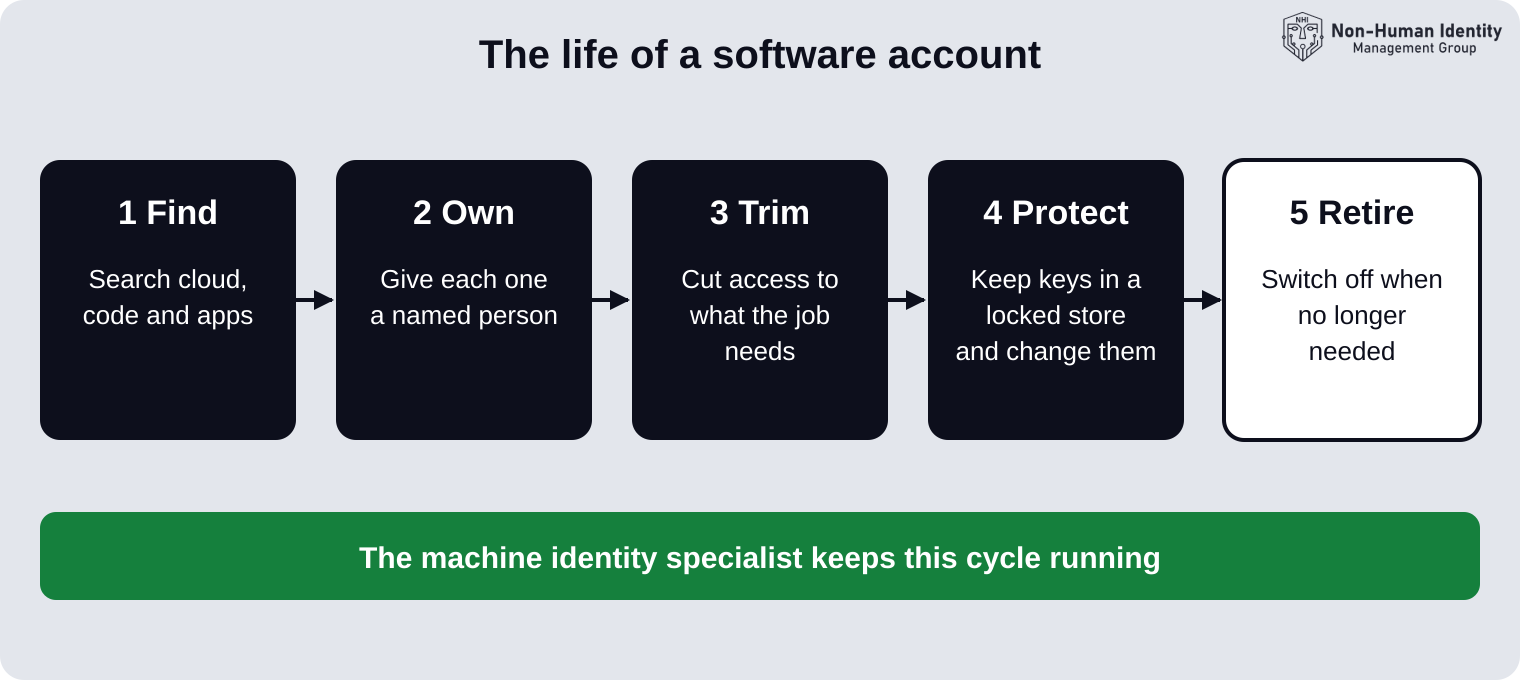
Most of the work follows the life of a software account, from creation to retirement.
- Find them. The specialist searches cloud services, code and apps for accounts, keys and certificates, then builds the inventory.
- Give each one an owner. A named person agrees what the account is for and that it is still needed.
- Trim the access. They cut each account's access down to what its job needs. This idea is called least privilege.
- Protect the secrets. They move keys and passwords into a locked store, called a secrets manager, and change them on a schedule. Where possible they switch to sign-in methods that need no stored password at all.[3]
- Retire them. When a project ends, the account is switched off and its keys are cancelled.
Many specialists use NHI Mgmt Group's seven lifecycle stages as a map of the areas they will work in.[7] The NHI Lifecycle Management Guide covers each one.
- Provisioning and decommissioning: creating accounts through an approved route and retiring them when the job ends.
- Continuous discovery and inventory: keeping one live list of every account, key and AI agent.
- Classification and ownership: giving each account an owner and ranking it by risk.
- Posture management: trimming unused access and removing stale or shared accounts.
- Secretless credentials: moving to short-lived passes and keeping the rest in a locked store.
- Detection and response: spotting odd use and acting quickly on a leak.
- Preventive controls: stopping keys reaching code and giving access only when it is needed.
To judge how far along an organisation is, specialists often use a maturity model. NHI Mgmt Group's NHI and AI governance maturity model has five levels: ad hoc, developing, defined, managed and optimised.[8]
Skills and tools
Few people start with all of these. Most build them up from a nearby job.
- Identity basics. How sign-in works, and the difference between proving who you are and deciding what you may use.
- Cloud know-how. How cloud services give programs their own accounts and access.
- Secrets and certificates. How keys are stored, changed and cancelled, and how certificates are renewed.
- Some scripting. Short programs that search for accounts and automate changes.
- Persuasion. Asking busy teams to change how their apps log in, without breaking anything.
Some newer tools give software short-lived identities automatically. One open standard for this is called SPIFFE.[4] AI agents, which are AI programs that can take actions, are also adding to the role, because they need accounts and access too.
A worked example
Freya Lindgren is a machine identity specialist at Alpenblick Energie, a fictional energy firm. She joined from the cloud team six months ago. Here is one Thursday.
She starts by checking last night's search results. It found 12 new software accounts in the cloud. Ten already have owners. Two do not, so she messages the team that created them and asks who should own each one.
Mid-morning, a scanner flags a key in a shared code project. Freya calls the app's owner. They agree to change the key first, so the copy in the code should no longer give access. Then they check the records for odd use. They find no unusual activity in the records available to them.
After lunch she meets the finance team about an old reporting account with admin access. It has not been used for over a year. The owner agrees to switch it off for two weeks as a test. If nothing breaks, it will be removed.
Later, a project lead asks for a key so a new AI assistant can read customer tickets. Freya suggests an account that can read tickets but not change or delete them. She also sets it to expire at the end of the pilot.
She ends the day updating the inventory. Like keeping a register of every robot badge in the building, it means the next problem is quicker to trace.
Myths and mistakes
| What people think | What is true |
|---|---|
| Software accounts are a small corner of security. | A business can have a great many of them. A well-known industry list sets out ten main risks that are all about them.[2] |
| You need years of security work first. | Many specialists come from identity, cloud or software jobs. Knowing how apps really work is a big advantage. |
| Changing a key once a year is enough. | Keys that last a long time are one of the listed risks, and old keys should be cancelled promptly when they are no longer needed.[2] |
| It is the same as managing admin passwords. | The two overlap, but this role covers every software account, not just powerful ones. Admin access work is its own job, often called PAM. |
| There is one exam that makes you an NHI specialist. | There is no single route yet. People mix an identity certification with cloud skills and hands-on practice. |
What can I do this week?
- Read our beginner guides to non-human identities and service accounts.
- Pick one app you use at work. Ask what software accounts and keys it relies on.
- Read the industry list of the ten main risks for software accounts.[2]
- Try NHI Mgmt Group's free maturity assessment on an organisation you know, to see how the five levels work in practice.
- Look at the outline of the NHI Foundation Level Training course to see which topics the role covers.
- Look at the study notes for an identity exam that is not tied to one product.[5]
Checklist
- I can explain what a non-human identity is in plain words.
- I can name three kinds: an account, a key and a certificate.
- I know why every software account needs a human owner.
- I can describe the life of a software account, from finding it to retiring it.
- I know why keys that never change are a risk.
- I have chosen one guide or study resource to start with.
Common questions
Is a machine identity specialist the same as an NHI engineer?
Mostly, yes. The titles are used for broadly the same work: finding, owning, protecting and retiring software accounts. Some firms say NHI, some say machine identity or workload identity. Read the job description rather than the title to see what a post really covers.
How do people get into this role?
Usually from a nearby job. IAM engineers add software accounts to their work. Cloud and platform engineers bring knowledge of how apps log in. Developers who have handled keys and certificates also move across. The practitioner guide sets out these routes in more detail.
Do I need to know how to code?
Some coding helps a lot, but you do not need to be a developer. You will read settings files, write short scripts and talk to developers about how their apps log in. Many people learn this on the job, one real problem at a time.
How much does this role pay?
Pay varies by country, sector and experience, so we do not quote figures here. Check official sources for your country. In the US, the Bureau of Labor Statistics publishes pay data for the wider information security group of jobs.[6]
How do AI agents change the job?
They add more software accounts to look after. An AI agent can take actions, so it needs its own account with tightly limited access. Specialists are increasingly asked to set these up and keep a record of what each agent did. See AI Agent Identity for Beginners.
Where next?
Ready for the detail? Read the practitioner guide: NHI and Machine Identity Engineer Career Guide. It goes further into the day-to-day tasks, the certifications that help and how the role grows over time.
Also useful:
- Non-Human Identities for Beginners
- Service Accounts for Beginners
- Machine Identities and Certificates for Beginners
- PAM and NHI Engineer Interview Questions
- NHI Foundation Level Training
- AI Security Engineer for Beginners
Related NHI Mgmt Group resources: Non-Human Identity (NHI) Guide · NHI Ownership Guide · NHI Engineer Operating Playbook
Key terms
- Non-human identity (NHI)
- A digital identity, or the credential behind it, that represents a machine, application, automated process, service or AI agent, so it can authenticate, carry out tasks and connect to other systems without a person.
- Machine identity
- Another name for an identity used by a program, device or server rather than a person.
- Service account
- An account a program uses to do its job without a person signing in.
- Secret
- A password, key, token or certificate that software uses to prove who it is.
- Secrets manager
- A tool that stores secrets locked away, controls who can read them and records each use.
- NHI owner
- The named person who answers for a software account and decides if it is still needed.
- Workload identity
- A short-lived identity a cloud program gets automatically, without a stored password.
- Credential rotation
- Replacing a key or password with a new one on a schedule, then cancelling the old one.
Sources and further reading
- What are workload identities? Microsoft Learn, Microsoft. https://learn.microsoft.com/en-us/entra/workload-id/workload-identities-overview, accessed 28 Nov 2026.
- OWASP Non-Human Identities Top 10 (2025). OWASP Foundation, 2025. https://owasp.org/www-project-non-human-identities-top-10/2025/top-10-2025/, accessed 28 Nov 2026.
- Workload identity federation. Microsoft Learn, Microsoft. https://learn.microsoft.com/en-us/entra/workload-id/workload-identity-federation, accessed 28 Nov 2026.
- SPIFFE overview. SPIFFE project. https://spiffe.io/docs/latest/spiffe-about/overview/, accessed 28 Nov 2026.
- CIDPRO, Certified Identity Professional. IDPro. https://idpro.org/cidpro/, accessed 28 Nov 2026.
- Information Security Analysts, Occupational Outlook Handbook. US Bureau of Labor Statistics. https://www.bls.gov/ooh/computer-and-information-technology/information-security-analysts.htm, accessed 28 Nov 2026.
- NHI Lifecycle Management Guide. Lalit Choda, NHI Mgmt Group, updated 27 October 2026. https://nhimg.org/nhi-lifecycle-management-guide, accessed 28 Nov 2026.
- NHI and AI Governance Maturity Model, and NHI and AI Maturity Assessment. NHI Mgmt Group, accessed 28 Nov 2026.