An information systems security officer (ISSO) keeps one computer system's security in good order, day after day.
This guide is for students, career changers and people leaving the armed forces who keep seeing "ISSO" in job adverts. You do not need to be a programmer to understand it. The role is most common in government work and at firms that supply government.
In short
- An ISSO looks after the security of one system, or a small group of systems, on behalf of the person who owns it.
- Much of the job is keeping the system's security plan up to date, tracking problems until they are fixed and checking every change.
- It is a mix of paperwork and technical checks. Good ISSOs read scan results and settings, not just reports.
- People come in from IT support, system administration, audit and military communications roles.
What you will learn
- Explain what an ISSO does in one sentence.
- Spot how an ISSO differs from an auditor and from a system administrator.
- Check which of your skills the job already uses.
- Ask good questions about an ISSO job before you apply.
- The system's security rulebook (system security plan)
- a document that says what a system must protect and which safeguards are in place or planned.
- The fix-it list (plan of action and milestones)
- a tracked list of known weaknesses, who will fix each one and by when.
- Permission to run (authorisation)
- a senior manager's formal decision that a system's remaining risk is acceptable.
What is an information systems security officer?
Think of the safety officer on a ship. The captain owns the ship and decides where it goes. The safety officer makes sure the lifeboats, alarms and drills stay in order on every voyage, not just on inspection day.
An ISSO does a similar job for a computer system. A US government standards body says the ISSO keeps a system's day-to-day security in the right state.[1] The job title also appears as "system security officer".
The ISSO works for the system owner. That is the manager in charge of the system. A senior boss, called the authorising official, decides if the system may run. An outside tester checks the safeguards now and then. The ISSO keeps things in order between those checks.
Where the comparison stops working: a ship's safety kit is easy to see and count. A computer system changes every week. It gets new software, new users and new links. So the ISSO keeps checking that the papers still match the system.
Why does it matter?
A system can pass its formal check and then drift. A setting gets changed, a fix is skipped or an old account is left open. The ISSO is the person who notices that drift and gets it put right.
If you are leaving the armed forces
What could happen: you have run secure communications kit, but job adverts use words you do not recognise.
Check this: write down the systems you looked after, and the checks and paperwork you kept for them.
If you work in IT support or administration
What could happen: you already make the changes an ISSO reviews, but nobody has asked you to judge their security impact.
Check this: next time you change a server, write one line on what it could affect.
If you manage a team that sells to government
What could happen: nobody owns the security plan, so it goes stale and the next review finds gaps.
Check this: name one person for each system who keeps the plan and the fix-it list current.
Next: FedRAMP for Beginners
What does it look like?
A lot of the job is reading requests. The ISSO asks: what could this change break? Here is a made-up request of the kind an ISSO checks.
Example only. All values are made up.
CHANGE REQUEST  REF EXAMPLE-0000
System:     FAKE Case Records System
Change:     open a new link to a supplier's server   (1)
Requested:  system administrator (FAKE NAME)
Security impact review: (blank)                       (2)
Security plan updated:  no                            (3)
Open fix-it items:      2 overdue                     (4)
Approved by: (blank)
- A new link to an outside server. In a real file, this line would contain the supplier and the data that flows.
- Nobody has yet judged what the change could affect.
- The security plan would no longer match the system as it runs.
- Two known weaknesses have passed their fix date.
Why this is risky: if the change goes in unchecked, the system may no longer match what the authorising official agreed to.
The safer way: the ISSO reviews the impact, agrees any extra safeguards, updates the plan and records the decision before the change goes ahead.
How does it work?
In US government work, systems follow a risk management process published by a US standards body.[2] The ISSO's part of it often looks like this.
- Know the system. The ISSO learns what the system does, what data it holds and where its edges are.
- Keep the plan. The ISSO helps write and update the system security plan. That plan gives an overview of the system's security needs and the safeguards in place or planned.[3]
- Check every change. The ISSO works with the system owner on changes and judges their security impact.[3]
- Track problems. Weaknesses found by scans or assessors go on the fix-it list, with an owner and a date. The ISSO chases them until they close.
- Watch and report. The ISSO reviews scan results, audit logs and settings, and reports the system's security state to the owner and the authorising official. This ongoing watching is called continuous monitoring.
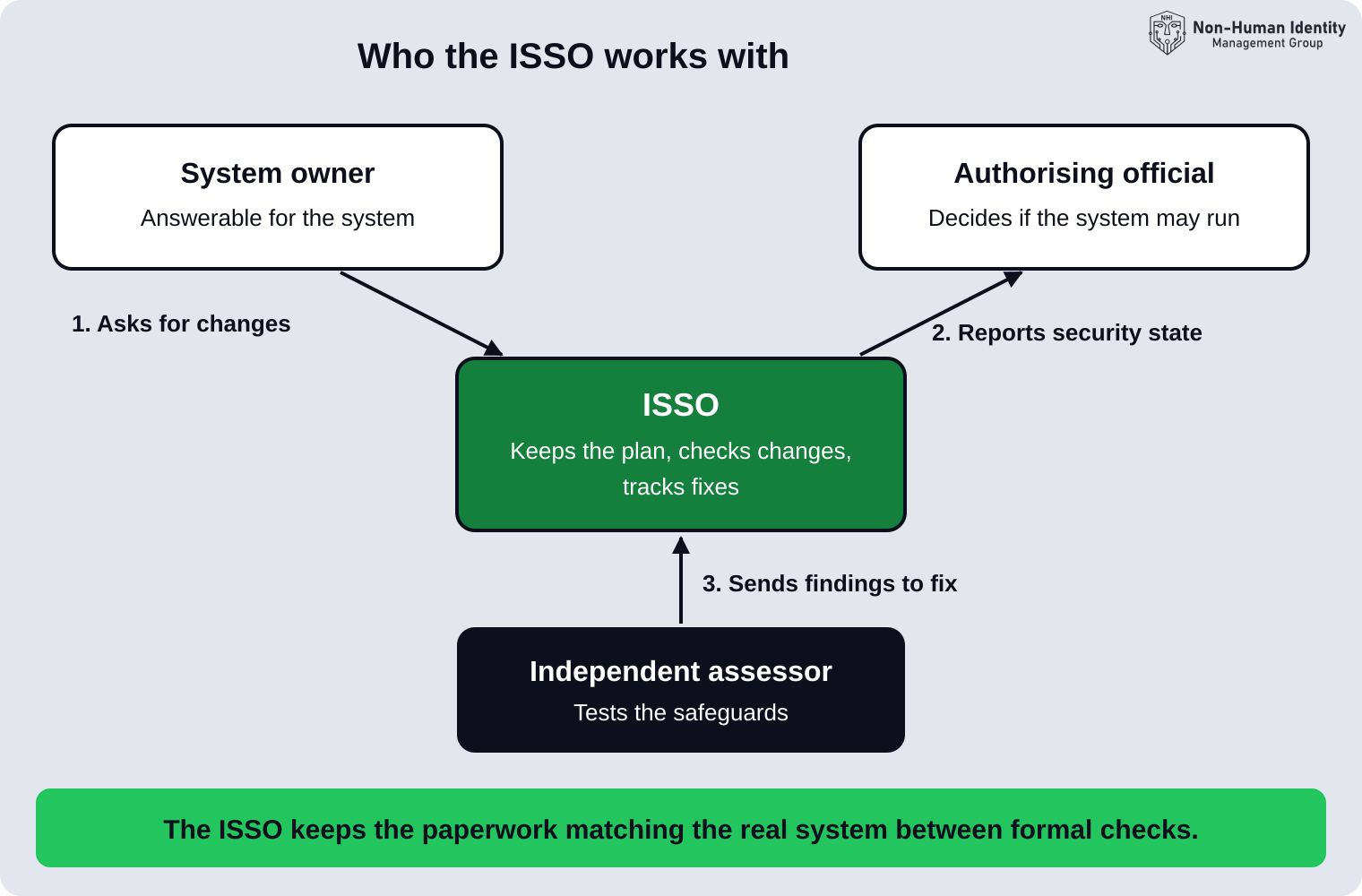
An ISSO is not an auditor. Auditors and assessors come in, test and leave. The ISSO stays with the system all year. An ISSO is also not usually the person who makes the changes. Administrators do that, and the ISSO checks the result.
A new ISSO often looks after one or two smaller systems. With experience, people take on larger systems or lead a team of ISSOs. Many job adverts in US defence work also ask for a security clearance, a government check on whether you can be trusted with protected information.
Skills and tools
You do not need all of these on day one. People pick most of them up in the first year.
- Clear writing. Security plans, change reviews and reports are read by managers and assessors.
- Reading technical evidence. Scan reports, system settings and audit logs.
- Knowing the rulebooks. The government security checklists and processes your systems follow.
- Tracking work. Keeping a fix-it list honest, with owners and dates.
- Working with people. Asking administrators the right questions without slowing them down.
A worked example
This story is made up to show what the job can look like.
Juno Thorne spent eight years running radio and network kit in the armed forces. She is now three months into her first ISSO job with a fictional supplier that runs a records system for a government department.
Monday starts with the weekly scan report. Juno spots two servers missing a security fix. She checks the fix-it list. One item is already there. The other is new, so she adds it with an owner and a date.
On Tuesday, Pia Abara, a system administrator, sends a change request. She wants to open a link to a new backup supplier. Juno thinks of the ship's safety officer. She does not block the change. She asks three questions: what data goes over the link, how it is protected and who can reach it.
Pia answers by Wednesday. The data is encrypted and only the backup server can connect. Juno updates the security plan to show the new link, and the system owner approves the change.
On Thursday, Juno chases the overdue fix. The team is waiting for a quiet time to restart the server. She agrees a date with them and notes the reason on the list.
On Friday, she writes a one-page summary for the system owner: one new link, one new weakness, one overdue item with a plan.
What made the difference: Juno kept the plan matching the real system, so the next formal check held no surprises.
Myths and mistakes
| What people think | What is true |
|---|---|
| An ISSO is just a paperwork job. | The paperwork matters, but it has to match the real system. That means reading scans, settings and logs yourself. |
| An ISSO is the same as an auditor. | Auditors test at a point in time. The ISSO looks after the system all year. |
| Once a system is approved, the job is done. | Systems change. Keeping the security state current after approval is the core of the role.[1] |
| You need a computer science degree. | Many come from IT support, administration, audit or military roles and learn the processes on the job. |
| The ISSO approves the risk. | A senior official makes that decision. The ISSO gives them the facts they need. |
What can I do this week?
- Read three ISSO job adverts and list the tasks they share.
- Read our FedRAMP for Beginners guide to see how government cloud systems get approved.
- Write a one-page summary of a system you have looked after: what it does, who uses it and how it is protected.
- Look at official career sources for your country for pay and entry routes.
Checklist
- I can explain what an ISSO does, with an example.
- I know what a system security plan is.
- I know what a fix-it list (plan of action and milestones) is for.
- I can explain how an ISSO differs from an auditor.
- I know who decides whether a system may run.
- I have looked at real job adverts for the role.
- I have checked official sources for pay, not just job boards.
Common questions
Is the ISSO role only in the United States?
Mostly, as a job title. It comes from US government rules. Other countries have similar jobs with other names, such as security officer. The daily work is much the same: keep the plan current and get problems fixed.
Is this a good job for someone leaving the military?
It can be. Many service leavers have looked after secure kit and followed strict rules. The job uses both. You will still need to learn the civilian rulebooks. Our career change guide shows how to describe your past work to employers.
How is an ISSO different from an ISSM?
An ISSM is a security manager. They usually look after several systems and the ISSOs who run them. The ISSO works closer to one system each day. Many people move from ISSO to ISSM after a few years.
How much does an ISSO earn?
Pay varies by country, sector, clearance and experience, so we do not quote a figure. Use official sources, such as the US labour statistics office or the National Careers Service in England. Then compare several real adverts.[4][5]
Do I need a certification to start?
Not always. But many US government jobs ask for an approved certificate. Check the adverts you like. Our practitioner guide lists the ones most often asked for, and what each one covers.
Where next?
Ready for the detail? Read the practitioner guide: Systems Security Officer Career Guide. It goes further into the risk management steps, the documents an ISSO owns, certifications and how people progress to manager and assessor roles.
Also useful:
- GRC Analyst for Beginners
- Security Auditor for Beginners
- Information Security Manager for Beginners
- FedRAMP Guide
Related NHI Mgmt Group resources: Cybersecurity Careers Guide · Career Change into Cyber Security Guide · FedRAMP vs FISMA
Key terms
- System security plan
- A document that describes a system's security needs and the safeguards in place or planned to meet them.
- Plan of action and milestones
- A tracked list of known security weaknesses, with an owner and a target date for each fix.
- A senior official's formal decision that a system may run because its remaining risk is acceptable.
- Risk management framework
- A step-by-step process for choosing, checking and approving the safeguards on a system.
- Continuous monitoring
- Ongoing checks that a system's safeguards are still working between formal reviews.
Sources and further reading
- Glossary: information system security officer (ISSO). NIST Computer Security Resource Center, definitions drawn from NIST SP 800-37 Rev. 2, NIST SP 800-128 and CNSSI 4009. https://csrc.nist.gov/glossary/term/information_system_security_officer, accessed 28 Nov 2026.
- NIST SP 800-37 Rev. 2, Risk Management Framework for Information Systems and Organizations: A System Life Cycle Approach for Security and Privacy. National Institute of Standards and Technology, December 2018. https://csrc.nist.gov/pubs/sp/800/37/r2/final, accessed 28 Nov 2026.
- NIST SP 800-18 Rev. 1, Guide for Developing Security Plans for Federal Information Systems, section 1.7.5 and executive summary. National Institute of Standards and Technology, February 2006. https://nvlpubs.nist.gov/nistpubs/Legacy/SP/nistspecialpublication800-18r1.pdf, accessed 28 Nov 2026.
- Occupational Outlook Handbook: Information Security Analysts. US Bureau of Labor Statistics. https://www.bls.gov/ooh/computer-and-information-technology/information-security-analysts.htm, accessed 28 Nov 2026.
- Explore careers. National Careers Service (England). https://nationalcareers.service.gov.uk/explore-careers, accessed 28 Nov 2026.