Bring your own key (BYOK) means making the key that locks your cloud data, then giving the cloud a copy.
This guide is for students, newcomers and anyone who has seen "BYOK" on a cloud form and wondered what it means. You do not need to be technical to care: if your business keeps data in the cloud, someone decides who holds the keys to it.
In short
- Cloud data is usually locked with encryption. The question is who makes and holds the key.
- There are three common set-ups: the provider holds the key, you bring your own key, or you hold your own key outside the cloud.
- More control means more work. If you lose a key you made, the data it locks may be lost too.
- Most people do not need BYOK. It suits rules or contracts that ask you to prove where a key came from.
What you will learn
- Explain the difference between provider keys, BYOK and holding your own key.
- Spot the extra jobs that come with making your own key.
- Check who in your team looks after each key.
- Ask a supplier the right questions before you pick BYOK.
- Data lock (encryption)
- scrambling data so only someone with the right key can read it.
- Key safe (key management service)
- a cloud service that stores encryption keys and uses them for you.
- Key-making box (hardware security module)
- a sealed device built to make and guard keys.
What is bring your own key?
Think of renting a storage unit. Normally the storage company fits the lock and holds the key. With BYOK, you have your own lock made and give the company a copy of the key.
Cloud data works the same way. Cloud providers lock stored data with encryption, which scrambles it so only the key can unscramble it. The key lives in a key management service, a cloud service that stores keys and uses them on your behalf.
By default, the provider makes that key. With BYOK, you make the key yourself, often in your own hardware, and then load a copy into the provider's key service. This is called importing the key.[1]
There is a third set-up, often called hold your own key (HYOK). Here the key stays in a system you run outside the cloud. The cloud has to ask your system every time it needs to unlock something.[3][4]
Where the comparison stops working: a storage company could, in theory, cut its own copy of your key. A cloud key service is built so the key is used inside protected hardware, and your rules decide who may ask it to unlock data. You are trusting how the service is built, not just a promise.
Why does it matter?
Whoever controls the key controls whether the data can be read. That gives you more say, and it also gives you more ways to lock yourself out.
If you are a student or new to cloud work
What could happen: you hear "BYOK" in a meeting and assume it is simply safer, without the extra jobs it brings.
Check this: learn the three set-ups and what each one asks of you.
Next: Encryption for Beginners
If you run a small business
What could happen: you pay for a complex key set-up you do not need, or you lose a key and the data with it.
Check this: ask your supplier which set-up you use today and why.
If you work in compliance or risk
What could happen: a contract says you must control your keys, but nobody can show who made them or where they are kept.
Check this: list each key, its owner and where the original copy lives.
What does it look like?
Here is a made-up key record, the kind of summary a team might keep for each key it brought to the cloud.
Example only. All values are made up.
Key name:        customer-files-key-EXAMPLE
Set-up:          Bring your own key            (1)
Made in:         our own key-making box, London office
Original copy:   kept offline in our safe      (2)
Cloud copy ends: 31 Dec 2099 (FAKE date)       (3)
Owner:           FAKE-Name, IT manager         (4)
- The team made this key and loaded a copy into the cloud key service.
- In a real file, this line would contain the place where the team keeps its own copy. Losing it can mean losing access.
- Some services let you set an end date for an imported key, after which the cloud copy can no longer be used.[1]
- Every key needs a named person who looks after it.
Why this is risky: the original copy could be lost. If the cloud copy then ends or is deleted, the locked data may not be readable again.
The safer way: keep the original key in a safe place. Set a reminder before any end date. Agree in writing who may delete or change the key.[1]
How does it work?
Here is how a typical BYOK set-up runs, in plain steps.
- Make the key. Your team makes a key in its own key-making box, called a hardware security module (HSM).
- Wrap it for the trip. The cloud gives you a special locking key. Your box uses it to wrap your key, so it never travels as plain text.[2]
- Import it. You load the wrapped key into the cloud key service, which unwraps it inside its own protected hardware.[2]
- Use it. Cloud services ask the key service to lock and unlock your data. Your access rules decide which services and people may ask.[5]
- Look after it. You keep the original safe, watch any end date and decide when to replace it.[1]
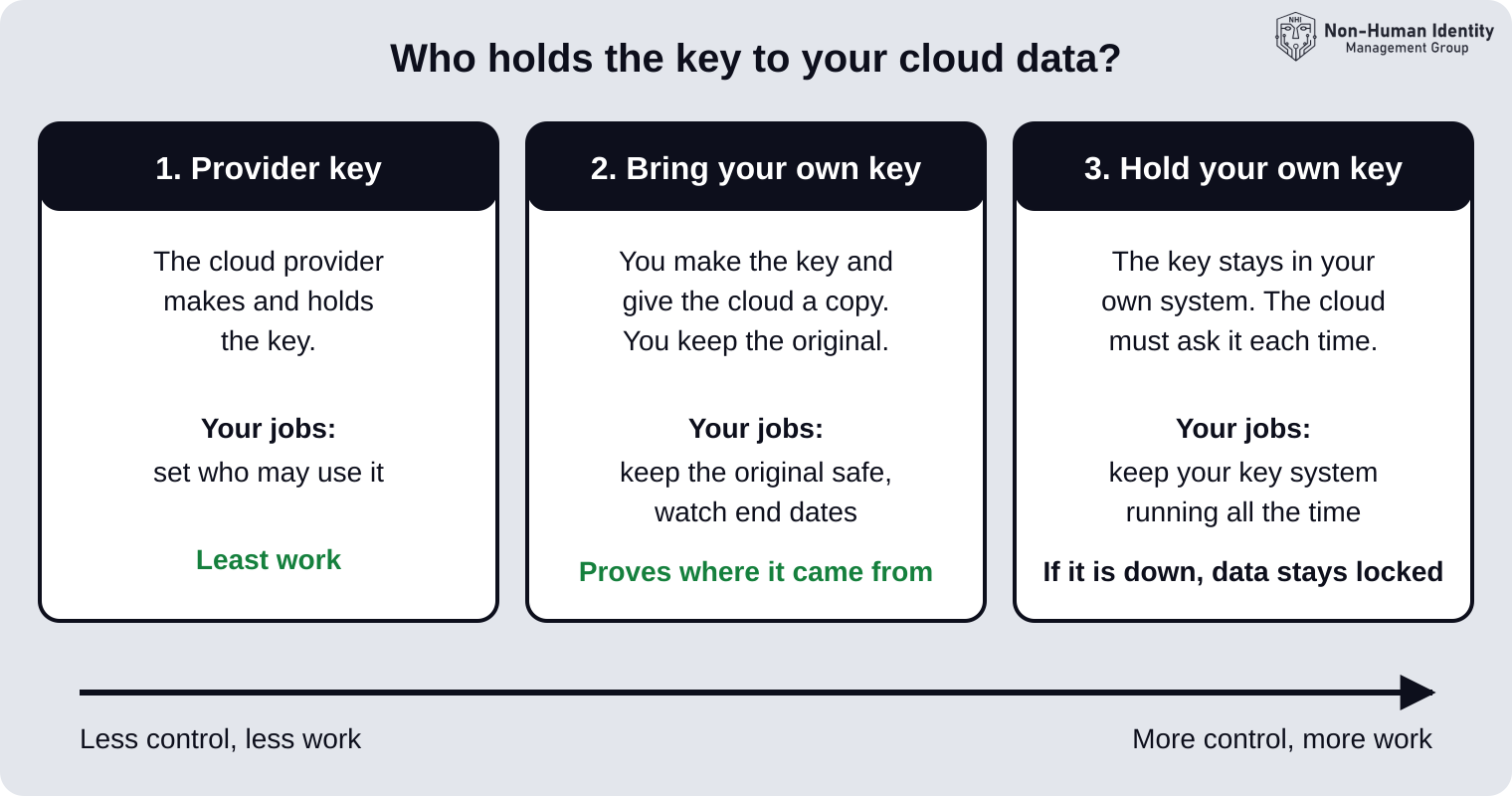
Holding your own key works differently. The key never enters the cloud. Each time data must be unlocked, the cloud sends a request to your system. If your system is down, the cloud cannot unlock that data until you fix it.[3][4] AWS says, for most customers, the extra risk to availability outweighs the security benefit of this set-up.[3]
The keys themselves are used by software, not people. The cloud services and apps that ask for them prove who they are with their own identities, such as roles and service accounts. These are non-human identities (NHIs): digital identities, or the credentials behind them, that let a machine, app or service connect without a person. Who may use a key matters as much as who made it.
A worked example
Bea Brandt is the IT manager at a fictional insurance broker with forty staff. A large new client sends a contract. One line says the broker must control the encryption keys for the client's files.
Bea remembers the storage unit. Does the client want its own lock, or the key kept at home? She asks the client's contact, Reza Kowal, what the line really means.
Reza explains that his auditors want proof that the key was made by the broker, not the provider. They do not need the key kept outside the cloud.
So Bea picks BYOK, not the hold-your-own-key set-up. She knows a home-kept key would mean running her own key system all day, every day, and the broker has no team for that.
Her cloud supplier helps her make a key in a hired key-making box and import it. Bea writes a short key record. It names her as owner and her deputy as backup, and says where the original copy is kept.
She sets a calendar reminder a month before the cloud copy's end date. She also limits who can delete the key to two named people.
Six months later the auditors ask for proof. Bea sends the key record and the import notes. The check passes, and nobody had to guess who held the keys.
Myths and mistakes
| What people think | What is true |
|---|---|
| BYOK means the cloud never has my key. | With BYOK the cloud key service holds a copy and uses it. Keeping the key outside the cloud is a different set-up.[1] |
| Making my own key is always safer. | It gives more control, but adds jobs. A lost or deleted key can make data unreadable.[1][4] |
| Holding the key outside the cloud has no downside. | If your key system is down, the cloud cannot unlock that data until it is back.[3] |
| Once the key is imported, the job is done. | Someone has to keep the original, watch end dates and decide who may use or delete the key. |
| Everyone needs BYOK. | Provider-made keys suit most data. Microsoft, for one, says its strongest customer-held option is not for every organisation.[6] |
What can I do this week?
- Ask your IT team or supplier which key set-up your cloud data uses today.
- Find out whether any contract or rule asks you to control your keys.
- If you already use BYOK, check where the original key copy is kept.
- Write down who may delete or replace each key you made.
Checklist
- We know which key set-up each important cloud service uses.
- We have a reason, written down, for any key we make ourselves.
- Every key we made has a named owner and a backup person.
- The original copy of each imported key is stored safely outside the cloud.
- Reminders are set before any key end date.
- Only a few named people can delete a key.
- If we keep a key outside the cloud, we have a plan for when our key system is down.
Common questions
What is the difference between BYOK and HYOK?
The difference is where the key lives. With BYOK you make the key and give the cloud a copy to use. With HYOK the key stays in your own system, and the cloud must ask it each time. HYOK gives more control, but your system must stay available.
Is BYOK the same as a customer managed key?
Not quite. A customer managed key is a key you control in the cloud key service, with your own rules and settings. The provider may still make the key. BYOK is a customer managed key where you also made the key yourself and imported it.[5]
Can the cloud provider still read my data with BYOK?
The provider's services can use the imported copy when your rules allow it, which is how the cloud reads your data to serve it. BYOK proves where the key came from and lets you remove the cloud copy. It does not keep the key out of the cloud.
What happens if I lose my key?
Your data may be lost if no working copy is left. If the cloud copy still works, your data stays readable. If the cloud copy is deleted or expires and your original is lost, the data it locks may be unrecoverable. Keep a safe original and a written plan.[1]
Do small businesses need BYOK?
Usually not. Provider-made keys protect most data well and need far less care. BYOK is worth it when a law, regulator or contract asks you to prove you made and control the key. If nobody asks, the extra work may not pay off.
Where next?
Ready for the detail? Read the practitioner guide: How to rotate customer-managed KMS keys and decide when to re-encrypt. It goes further into replacing keys in each major cloud, deciding when data must be locked again with a new key, and how to test and roll back.
Also useful:
- BYOK, HYOK and External Key Management Guide
- Cryptographic Key Management for Beginners
- Hardware Security Modules for Beginners
- Data Sovereignty for Beginners
Related NHI Mgmt Group resources: AWS KMS Security Guide · Encryption for Beginners · Non-Human Identities for Beginners
Key terms
- Encryption
- Scrambling data so only someone with the right key can read it.
- Encryption key
- The secret value used to lock and unlock encrypted data.
- Bring Your Own Key
- Making your own encryption key and importing a copy into a cloud key service.
- Hold Your Own Key
- Keeping the key in your own system outside the cloud, which the cloud must ask each time.
- Key Management Service
- A cloud service that stores encryption keys and uses them on your behalf.
- Hardware Security Module
- A sealed device built to make, store and use keys safely.
- Customer Managed Key
- A key in a cloud key service whose rules and settings you control.
- Key material
- The secret value inside a key, the part you make and import with BYOK.
Sources and further reading
- Importing key material for AWS KMS keys. AWS Key Management Service Developer Guide, Amazon Web Services. https://docs.aws.amazon.com/kms/latest/developerguide/importing-keys.html, accessed 28 Nov 2026.
- BYOK specification. Azure Key Vault documentation, Microsoft Learn. https://learn.microsoft.com/en-us/azure/key-vault/keys/byok-specification, accessed 28 Nov 2026.
- External key stores. AWS Key Management Service Developer Guide, Amazon Web Services. https://docs.aws.amazon.com/kms/latest/developerguide/keystore-external.html, accessed 28 Nov 2026.
- Cloud External Key Manager. Cloud KMS documentation, Google Cloud. https://docs.cloud.google.com/kms/docs/ekm, accessed 28 Nov 2026.
- AWS KMS concepts (customer managed keys, AWS managed keys and AWS owned keys). AWS Key Management Service Developer Guide, Amazon Web Services. https://docs.aws.amazon.com/kms/latest/developerguide/concepts.html, accessed 28 Nov 2026.
- Double Key Encryption. Microsoft Purview documentation, Microsoft Learn. https://learn.microsoft.com/en-us/purview/double-key-encryption, accessed 28 Nov 2026.