A security programme is an organisation's ongoing plan for protecting its people, data and systems.
This guide is for founders, managers and anyone asked to "sort out security" without a security team. You do not need to be technical to start: most of the first steps are about owners, priorities and habits, not tools.
In short
- A security programme is not one product or one project. It is a plan, an owner and a regular routine.
- Start by naming who is in charge and listing what you need to protect.
- Pick a simple, recognised starting list of basics instead of inventing your own.
- Check progress every few months and update the plan as the business changes.
What you will learn
- Explain what a security programme is in one sentence.
- Spot the first five steps that matter most.
- Check whether your business has an owner, a list and a plan.
- Ask better questions before you buy security tools.
- Starting list (baseline)
- a short, recognised set of basic protections that most organisations should have.
- Things worth protecting (assets)
- the devices, accounts, data and services your business depends on.
- Written rules (policy)
- a short document that says what people must do to keep things safe.
What is a security programme?
Think of a fitness plan. One gym session does not make you fit. You need a goal, a routine and a way to check progress. A security programme is the same kind of plan for keeping an organisation safe.
In plain terms, a programme answers four questions. Who is in charge? What are we protecting? What basics do we have in place? How do we check it is working?
A widely used US security framework puts "govern" first among its six main areas. It means setting the strategy, expectations and rules, then sharing and checking them.[1] In other words, decide who owns security before you buy anything.
Where the comparison stops working: a fitness plan is about one person. A security programme involves everyone in the business, plus the suppliers and apps you rely on.
Why does it matter?
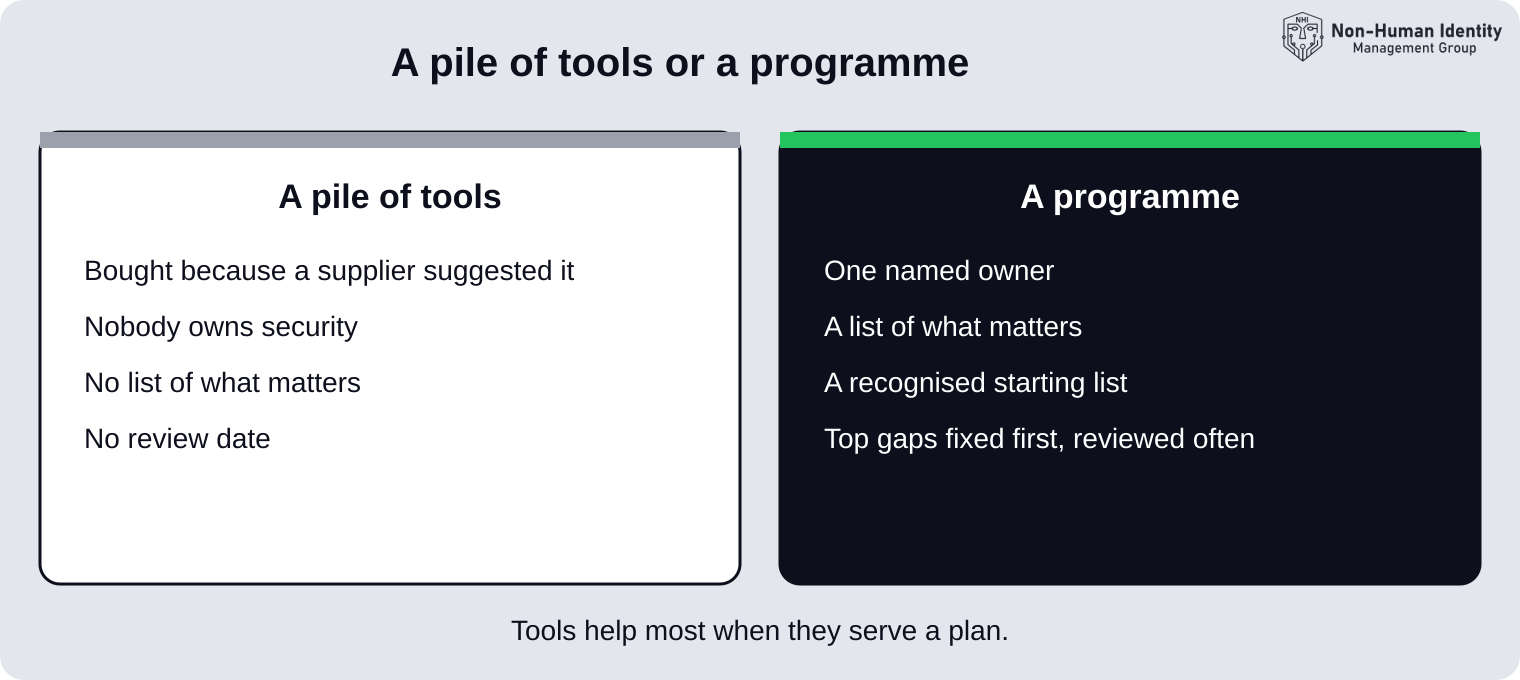
Without a plan, security turns into a pile of tools nobody owns. With a plan, even a small team can cover the basics and know what to do next.
If you are a startup founder
What could happen: a large customer sends a security questionnaire and you cannot answer basic questions.
Check this: name one person who owns security, even part time.
If you are a manager handed "security"
What could happen: you buy a tool because a supplier suggested it, while simple basics are still missing.
Check this: compare what you have against a recognised starting list before buying.
If you run a small business
What could happen: a lost laptop or a stolen password stops work for days, because nobody planned for it.
Check this: know where your backups are and who to call if something goes wrong.
What does it look like?
Here is a one-page programme plan for a small firm. It is a starting point, not a finished plan.
Example only. All values are made up.
SECURITY PLAN   Example Firm Ltd   Version 0.1
Owner: FAKE Person, Operations Lead            (1)
We protect: email, customer list, payments app (2)
Starting list: UK Cyber Essentials basics      (3)
Top 3 this quarter:
  - Two-step sign-in on all email accounts
  - Tested backups of the customer list
  - Remove accounts of people who have left
Next review: 00 Month 0000                     (4)
- One named owner, even if security is only part of their job.
- A short list of what matters most to the business.
- A recognised starting list, so you do not invent your own.
- In a real file, this line would hold a date in the diary, usually every few months.
Why this is risky: a plan with no owner or review date is soon forgotten.
The safer way: keep the plan to one page, give it an owner and put the review in the calendar.
How does it work?
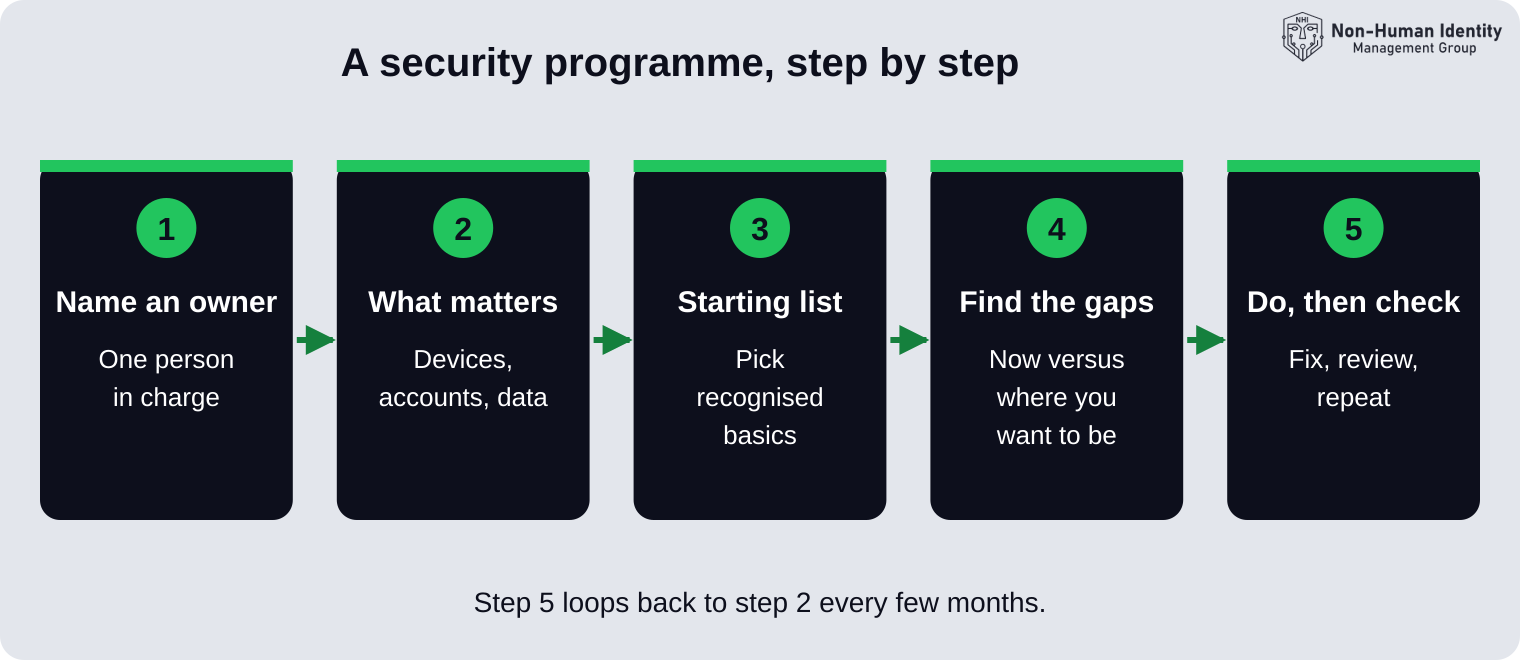
Every programme is different, but most start in the same order.
- Name an owner. One person is in charge of security and reports to the boss. In a larger firm, this may be a chief information security officer, often called a CISO.
- List what matters. Write down your devices, accounts, data and key services. You cannot protect what you do not know you have.
- Pick a starting list. Choose a recognised set of basics. In the UK, Cyber Essentials covers five technical controls, such as firewalls, updates and access control.[2] In the US, a nonprofit called CIS offers 56 basic safeguards for small and mid-sized firms.[3]
- Find the gaps and plan. Compare where you are now with where you want to be. A US framework calls these a current profile and a target profile.[1] Pick the top few gaps to fix first.
- Do, then check. Fix the gaps, write short rules for staff, and plan what to do if something goes wrong. Review the plan every few months.
The same framework groups security work into six areas: govern, identify, protect, detect, respond and recover.[1] You do not need to master them all at once. They are a useful way to check you have not left a whole area out.
A worked example
This story is made up to show how it can happen.
Quinn Kader founded Slate Couriers, a delivery firm with 30 staff and a booking app. A big retail customer asks for proof that Slate takes security seriously before signing a contract.
Quinn has no security team. Her first idea is to buy a security product the customer has heard of. Instead, she asks her operations lead, Bodhi Rinaldi, to own security for half a day a week.
Bodhi starts with a list. He writes down the laptops, the shared email accounts, the booking app and the customer address list. He notices that two former drivers still have booking app accounts.
Next, he picks a starting list. As a UK firm, Slate uses the Cyber Essentials basics. Bodhi compares the list with what they have. The gaps are clear: two-step sign-in is not switched on for email, backups are not tested, and old accounts are not removed.
He writes a one-page plan with those three items and a review date in three months. Quinn signs it off.
Six weeks later, the old accounts are gone, two-step sign-in is on, and a backup has been restored as a test. Quinn shares the plan with the retail customer, along with a timeline for the next steps.
What made the difference: Quinn gave security an owner, and Bodhi fixed the basics before anyone bought a tool.
Myths and mistakes
| What people think | What is true |
|---|---|
| Buying a security product gives you a security programme. | A product is one tool. A programme needs an owner, a list of what matters and a routine. |
| We are too small to need a programme. | Small firms can use short, recognised starting lists made for organisations like theirs.[2][3] |
| Security is the IT person's job alone. | Leaders set the direction and rules. A widely used framework puts that "govern" work first.[1] |
| Once the plan is written, the job is done. | The business, staff and threats change. Review the plan every few months. |
| A starting list covers everything. | Basic lists are a foundation. A US government list of basic goals says it is not complete.[4] |
What can I do this week?
- Name one person who owns security, and tell the team.
- Write a list of your devices, accounts, key data and services.
- Choose one recognised starting list that fits your country and size.
- Pick the three biggest gaps and give each an owner and a date.
- Put a plan review in the calendar for three months from now.
Checklist
- One person owns security and has time set aside for it.
- We have a list of the devices, accounts, data and services that matter.
- We have chosen a recognised starting list of basics.
- Our top gaps each have an owner and a date.
- Staff have short written rules they can follow.
- We know what to do and whom to call if something goes wrong.
- The plan has a review date in the calendar.
Common questions
What is a security programme?
It is an organisation's ongoing plan for protecting its people, data and systems. It names an owner, lists what matters, sets basic protections and checks progress on a routine. It is different from a single project or product, because it carries on as the business changes.
Where should a small business start?
Start with an owner and a list of what matters. Then pick a recognised starting list made for small firms. In the UK, many use Cyber Essentials. In the US, the CIS basic safeguards are a common choice. Fix the biggest gaps first.[2][3]
Do I need to hire a CISO?
Not at first, in most small firms. What you need is one named owner with time set aside. As the business grows, takes on bigger customers or holds more sensitive data, a dedicated security lead or an outside adviser becomes more useful.
Which framework should I use?
Pick one recognised list and stick with it for a while. Cyber Essentials suits many UK firms. The CIS basic safeguards suit many small US firms. Larger firms often use the NIST Cybersecurity Framework to organise the bigger picture.[1]
How often should the plan be reviewed?
Every few months is a sensible rhythm for a small firm, and after any big change. Big changes include a new office, a new app, a security problem or a large new customer. Each review should check progress on the top gaps and pick the next ones.
Where next?
Ready for the detail? Read the practitioner guide: Security Programme Building Guide. It goes further into choosing a baseline, building a roadmap, budgets and team models, and measuring progress.
Also useful:
- NIST Cybersecurity Framework for Beginners
- Cyber Essentials for Beginners
- The CISO Role for Beginners
Related NHI Mgmt Group resources: CISO Guide: First 90 Days · Cyber Risk Management for Beginners
Key terms
- Security programme
- The joined-up set of rules, protections, routines and oversight an organisation uses to stay safe.
- Asset inventory
- A kept-up-to-date list of the systems, accounts and data an organisation needs to protect.
- NIST Cybersecurity Framework
- A flexible US framework that groups security work into areas such as protect, detect and recover.
- Cyber Essentials
- A UK government-backed scheme built around five basic technical controls.
- Information security policy
- The top-level document that says how an organisation protects its information and systems.
- CISO
- The senior leader responsible for an organisation's security strategy and risk.
- Risk assessment
- Working out what could go wrong, how likely it is and how much harm it could cause.
Sources and further reading
- The NIST Cybersecurity Framework (CSF) 2.0, NIST CSWP 29. National Institute of Standards and Technology, 26 February 2024. https://nvlpubs.nist.gov/nistpubs/CSWP/NIST.CSWP.29.pdf, accessed 28 Nov 2026. Small business quick start guides: https://www.nist.gov/cyberframework/quick-start-guides.
- About Cyber Essentials. National Cyber Security Centre (NCSC). https://www.ncsc.gov.uk/cyberessentials/overview, accessed 28 Nov 2026.
- CIS Critical Security Controls Implementation Group 1. Center for Internet Security. https://www.cisecurity.org/controls/implementation-groups/ig1, accessed 28 Nov 2026.
- Cross-Sector Cybersecurity Performance Goals. Cybersecurity and Infrastructure Security Agency (CISA). https://www.cisa.gov/cross-sector-cybersecurity-performance-goals, accessed 28 Nov 2026.